RAM Help!?!?!

Dudders

New member
Local time
10:15 PM
Messages
4
I have 8GB DDR2 667 MHZ RAM and when windows is idling just after a fresh boot it is only using around 23% - 24% of the RAM and I have around 6362MB free of my 8000MB in total. Then after using a few applications or just launching applications it goes up to around 40% usage. And i used to be able to run about two or three applications before the ram started to go into around 5900MB - 5500MB free or it sometimes stays in the 6000MB or 6GB region.

Now I have tried something to help i done the msconfig in search as I am running Win7 and disabled some of the items in start-up and no luck. And now for example I am running just Google Chrome, and I am using 40% of my ram and I have 4900MB free and im only running one application its stupid it used to have around 6300MB when running a few application let alone just one!

So I don't understand I am using almost half of my ram when only running one application and it never used to use up much of my RAM. I used to use low 20% and now running just one application I am using 40% and if I use another application like Spotify for example it goes up to 45% and only have around 4990MB free. I used to be able to run both these applications and have around 6200MB free.

So I don't understand why so much RAM is being used up and it makes my computer run slower when multi tasking, i have also tried to clear registry but also no change in performance or amount of RAM being used. There is still loads being used!

Many thanks in advance!

Cheers! :D :D
 

My Computer

Computer Manufacturer/Model Number
ADVENT QC8003
OS
Windows 7 Ultimate x64
CPU
Intel Core 2 Quad Q8003 @ 2.3GHz
Motherboard
Intel DG45iD
Memory
8GB DDR2 667 MHz
Graphics Card(s)
NVIDIA 9600GT 512MB
Sound Card
Intergrated on Motherboard
Monitor(s) Displays
ADVENT 22" Monitor
Screen Resolution
1680x1050
Hard Drives
WD Green Powe 1TB 5400rpm
PSU
420w PSU
Cooling
Coolmaster CPU cooler
Keyboard
Logitech Keyboard
Mouse
Logitech Mouse
Internet Speed
50MB/s Download - 4MB/s Upload
It will start to use more memory the longer you use Windows. It starts preloading items you normally use, or leaves them in memory when you exit the program.
One advantage of having that much RAM, is so that Windows can use it to its full potential.
Meaning, leaving as much as possible in RAM.

Althought it is possible one of your applications may have a memory leak if its using an abnormal amount of memory by itself.

None-the-less, 30-40% use is not really that strange, and I see that type of use often on my own machine. Especially after its been up and running for a while.
This in and of itself should actually make things faster, not slower.


If Windows is actually starting to run slow with only 40% or so of 8GB in use, there very well may be another issue.


How many processes do you have running and what kind of CPU use are seeing?
 

My Computer

Computer Manufacturer/Model Number
Custom (Self Build)
OS
Windows 7 Home Premium 64bit
CPU
Intel Core i7 2700k
Motherboard
eVGA P67 SLI
Memory
8GB Mushkin Redline Ridgebacks @1866
Graphics Card(s)
EVGA GTX570 SC
Sound Card
XiFi Titanium HD
Monitor(s) Displays
LG W2453V
Screen Resolution
1920x1080
Hard Drives
Intel 320 80GB -- Intel X25-V 40GB --WD Black 1TB x2 -- WD Blue 640GB
PSU
Seasonic x750
Case
Corsair 600T SE White
Cooling
eVGA Superclocked CPU Cooler
Keyboard
Saitek Cyborg
Antivirus
Kaspersky
Browser
IE
Other Info
LG BD/DVD
Re:

My CPU is a quad core Intel Q8200 @ 2.3GHz and no windows runs fast it isn't slow by any means well booting up is but that's due to the 1TB green power 5400RPM drive I have :).

But I was just curious about the RAM usage as i have only noticed this weird increase of usage in the last month and I had my PC for a year and it hasn't done any thing like this before?
 

My Computer

Computer Manufacturer/Model Number
ADVENT QC8003
OS
Windows 7 Ultimate x64
CPU
Intel Core 2 Quad Q8003 @ 2.3GHz
Motherboard
Intel DG45iD
Memory
8GB DDR2 667 MHz
Graphics Card(s)
NVIDIA 9600GT 512MB
Sound Card
Intergrated on Motherboard
Monitor(s) Displays
ADVENT 22" Monitor
Screen Resolution
1680x1050
Hard Drives
WD Green Powe 1TB 5400rpm
PSU
420w PSU
Cooling
Coolmaster CPU cooler
Keyboard
Logitech Keyboard
Mouse
Logitech Mouse
Internet Speed
50MB/s Download - 4MB/s Upload
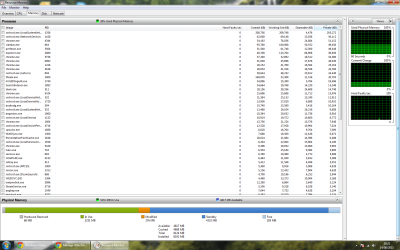
Have a look in Resource Monitor > Memory tab. That will give you clues which processes are using the RAM. If you post a picture with the processes sorted by RAM usage (Commit), we may assist.
 

My Computer

Computer Manufacturer/Model Number
HP, Dell, Gateway, Toshiba - 4 laptops and 2 desktops
OS
Vista, Windows7, Mint Mate, Zorin, Windows 8
CPU
from 1.6GHz Duo to i7
Monitor(s) Displays
2x HP w2207
Hard Drives
5x HDD, 7x SSD, 12x Externals
Keyboard
with trackball - no mices
Mouse
Trackball mice
Internet Speed
DSL 6000
Re:

Here is the Picture of the Resource Monitor.

Hope you can Help...
 

Attachments

  • Resource Monitor.png
    Resource Monitor.png
    85.1 KB · Views: 103

My Computer

Computer Manufacturer/Model Number
ADVENT QC8003
OS
Windows 7 Ultimate x64
CPU
Intel Core 2 Quad Q8003 @ 2.3GHz
Motherboard
Intel DG45iD
Memory
8GB DDR2 667 MHz
Graphics Card(s)
NVIDIA 9600GT 512MB
Sound Card
Intergrated on Motherboard
Monitor(s) Displays
ADVENT 22" Monitor
Screen Resolution
1680x1050
Hard Drives
WD Green Powe 1TB 5400rpm
PSU
420w PSU
Cooling
Coolmaster CPU cooler
Keyboard
Logitech Keyboard
Mouse
Logitech Mouse
Internet Speed
50MB/s Download - 4MB/s Upload
You have an awful lot of networking stuff running. Other than that it looks relatively normal. Is there anything special to your netorking setup?
 

My Computer

Computer Manufacturer/Model Number
HP, Dell, Gateway, Toshiba - 4 laptops and 2 desktops
OS
Vista, Windows7, Mint Mate, Zorin, Windows 8
CPU
from 1.6GHz Duo to i7
Monitor(s) Displays
2x HP w2207
Hard Drives
5x HDD, 7x SSD, 12x Externals
Keyboard
with trackball - no mices
Mouse
Trackball mice
Internet Speed
DSL 6000
No not really I am running off an extension wireless router in my house i have quite allot of gadgets running like GPU monitors and CPU all in one monitors. Could these be eating up RAM but the thing I don't understand is that I have the exact same settings and everything that I had a month ago and there was barely any RAM being used... I just turned it on one day and I noticed that allot of RAM was being used when windows is idling let alone running applications...

Although this is in the wrong part of the forum to ask this question but would anyone know how I can decrease the time of my BIOS start up so make it faster and quicker for the BIOS boot. So when i turn my PC on the splash screen you get which says press F2 for set-up etc.. (this stage of the boot for me takes about 20 seconds) this is very abnormal and every other PC i have been on the Boot prior to "Starting Windows" only takes a few seconds. But on my PC the Boot up prior to the "Starting Windows" takes around 20 seconds its a joke. Does anyone know how I can speed this up to a normal BIOS boot time :)

Thanks
 

My Computer

Computer Manufacturer/Model Number
ADVENT QC8003
OS
Windows 7 Ultimate x64
CPU
Intel Core 2 Quad Q8003 @ 2.3GHz
Motherboard
Intel DG45iD
Memory
8GB DDR2 667 MHz
Graphics Card(s)
NVIDIA 9600GT 512MB
Sound Card
Intergrated on Motherboard
Monitor(s) Displays
ADVENT 22" Monitor
Screen Resolution
1680x1050
Hard Drives
WD Green Powe 1TB 5400rpm
PSU
420w PSU
Cooling
Coolmaster CPU cooler
Keyboard
Logitech Keyboard
Mouse
Logitech Mouse
Internet Speed
50MB/s Download - 4MB/s Upload
Regarding the BIOS I think there is little you can do. The BIOS checks all components and devices of the system and that may take time. If you have a lot of gear hanging on the system, that slows things down. I have the same problem with a couple of systems whilst others are lightening fast. I measured from less than 2sec to 20sec depending on the system. My HP desktop takes longer for the BIOS than booting from the SSD.
 

My Computer

Computer Manufacturer/Model Number
HP, Dell, Gateway, Toshiba - 4 laptops and 2 desktops
OS
Vista, Windows7, Mint Mate, Zorin, Windows 8
CPU
from 1.6GHz Duo to i7
Monitor(s) Displays
2x HP w2207
Hard Drives
5x HDD, 7x SSD, 12x Externals
Keyboard
with trackball - no mices
Mouse
Trackball mice
Internet Speed
DSL 6000
Back
Top