RAM increase issue

rahul2507

New member
Local time
9:24 PM
Messages
2
Hello,

I have been trying to increase the ram, still there is no luck. The Process I followed MSCONFIG>Boot> Advanced Options> Maximum Memory "(Unchecked) displaying 0", number of processors 1

Installed Memory RAM : 8.00 GB (246 MB usable)

Any help would be great

Thanks
Rahul
 

My Computer

Computer type
PC/Desktop
Computer Manufacturer/Model Number
dell
OS
windows 7 32 bit
Memory
8 GB
Welcome to our forum rahul2507.

Windows 7/32 bit will never use 8 gb of ram.
You will need Windows 7/64 to use to use more than 4 gb of ram.

From your specs.

Computer type PC/Desktop
System Manufacturer/Model Number dell
OS windows 7 32 bit
Memory 8 GB
 

My Computer

Computer type
PC/Desktop
Computer Manufacturer/Model Number
Home made Desktop
OS
Windows 10 Pro. 64/ version 1709 Windows 7 Pro/64
CPU
Intel i7-6800K @ 4.3
Motherboard
ASUS X-99 Deluxe II
Memory
Corsair Platinum 16 gig @2400
Graphics Card(s)
EVGA GTX 1070 OC
Monitor(s) Displays
Asus 27" LED LCD/VE278Q
Screen Resolution
1920-1080 or 1280-720 HDMI
Hard Drives
INTEL SSD 730-240 Gb Sata 3.0/
PSU
EVGA Platium 1200W
Case
Phanteks Luxe Tempered Glass 8 fans/ one radiator
Cooling
XSPC/ Water Cooled CPU
Keyboard
Das 4 Professional
Mouse
Logitech M705/MX Anywhere 2-S
Internet Speed
100 mbits
Antivirus
Microsoft Security Essentials/ Malwarebytes Premium 3.0/ SAS
Browser
I.E. 11 default/Firefox/ ISP Time Warner Cable/Spectrum
Other Info
LG BluRay Burner/
Sound system-KLipsch-THX/
Icy Dock ssd Hot Swap bays.
It isn't possible to increase system memory within Windows. You'd have to physically install more RAM modules into your motherboard for this.

As Bear suggested, however, you'll need to backup your system and make a fresh installation of Windows making sure that you install the x64 bit version in order to take advantage of your 8GB of RAM.
 

My Computer

Computer type
PC/Desktop
Computer Manufacturer/Model Number
Custom Built
OS
Windows 10 Pro x64 (UPGRADED - 10/20/2016)
CPU
AMD FX 8350 (OC: 4.48GHz)
Motherboard
ASUS Crosshair V Formula-Z AM3+
Memory
14GB DDR3 Corsair Vengeance
Graphics Card(s)
Asus AMD Radeon R9 280X 3GB
Sound Card
N/A
Monitor(s) Displays
BenQ G2420HD
Screen Resolution
1920x1080
Hard Drives
Internal: 1x 500GB WD Blue SSD | 1TB WD Caviar Black | 3x 500GB WD Caviar Green
External: 500GB Seagate
PSU
Corsair AX1200i
Case
CoolerMaster HAF X
Cooling
Corsair Hydro H90 Water Cooling
Keyboard
Microsoft SideWinder X6 Keyboard
Mouse
Microsoft SideWinder X8 Mouse
Antivirus
MSE / Malwarebytes Anti-Malware
Browser
Mozilla Firefox + Google Chrome
All Windows 32 bits can only handle 3.2G of memory.
Even if you have installed more than 3.2G, under a 32 bits OS it will only see 3.2G.
To be able to use more memory, you need to do a 64 bits clean install.
 

My Computers

System One System Two

  • Computer type
    PC/Desktop
    Computer Manufacturer/Model Number
    custom build
    OS
    Windows 7 HP 64
    CPU
    i5 6600K - 800MHz to 4200MHz
    Motherboard
    GA-Z170-HD3P
    Memory
    4+4G GSkill DDR4 3000
    Graphics Card(s)
    IG - Intel 530
    Monitor(s) Displays
    Samsung 226BW
    Screen Resolution
    1680x1050
    Hard Drives
    (1) -1 SM951 – 128GB M.2 AHCI PCIe SSD drive for Windows 7 and Lubuntu
    (2) -1 WD SATA 3 - 1T for Data
    (3) -1 WD SATA 3 - 1T for backup
    PSU
    Thermaltake 450W TR2 gold
    Keyboard
    Old and good Chicony mechanical keyboard
    Mouse
    Logitech mX performance - 9 buttons (had to disable some)
    Internet Speed
    500Mb/s
    Browser
    Firefox 64
    Other Info
    TinyWall firewall
  • Computer type
    Laptop
    System Manufacturer/Model Number
    Asus Q550LF
    OS
    Windows 7 Pro
    CPU
    i7-4500U 800MHz to 3.0GHz
    Motherboard
    Asus Q550LF
    Memory
    (4+4)G DDR3 1600
    Graphics Card(s)
    IG intel 4400 + NVIDIA GeForce GT 745M
    Sound Card
    Realtek
    Monitor(s) Displays
    LG Display LP156WF4-SPH1
    Screen Resolution
    1920 x 1080
    Hard Drives
    BX500 120G SSD for Windows and programs +
    1T HDD for data
    Internet Speed
    500 Mb/s
    Browser
    Firefox
    Other Info
    TinyWall firewall
It isn't possible to increase system memory within Windows. You'd have to physically install more RAM modules into your motherboard for this.

As Bear suggested, however, you'll need to backup your system and make a fresh installation of Windows making sure that you install the x64 bit version in order to take advantage of your 8GB of RAM.

>> I had already increased the RAM to 8 GB, While installing the fresh windows X64 bit copy it shows the insufficient RAM.
 

My Computer

Computer type
PC/Desktop
Computer Manufacturer/Model Number
dell
OS
windows 7 32 bit
Memory
8 GB
Enter BIOS and look for the memory section. Does it say you have 8G?
How many memory sticks you have?
Did you add memory or did you replaced the existing?
Please edit your profile with ALL your hardware information so we can see it.
 

My Computers

System One System Two

  • Computer type
    PC/Desktop
    Computer Manufacturer/Model Number
    custom build
    OS
    Windows 7 HP 64
    CPU
    i5 6600K - 800MHz to 4200MHz
    Motherboard
    GA-Z170-HD3P
    Memory
    4+4G GSkill DDR4 3000
    Graphics Card(s)
    IG - Intel 530
    Monitor(s) Displays
    Samsung 226BW
    Screen Resolution
    1680x1050
    Hard Drives
    (1) -1 SM951 – 128GB M.2 AHCI PCIe SSD drive for Windows 7 and Lubuntu
    (2) -1 WD SATA 3 - 1T for Data
    (3) -1 WD SATA 3 - 1T for backup
    PSU
    Thermaltake 450W TR2 gold
    Keyboard
    Old and good Chicony mechanical keyboard
    Mouse
    Logitech mX performance - 9 buttons (had to disable some)
    Internet Speed
    500Mb/s
    Browser
    Firefox 64
    Other Info
    TinyWall firewall
  • Computer type
    Laptop
    System Manufacturer/Model Number
    Asus Q550LF
    OS
    Windows 7 Pro
    CPU
    i7-4500U 800MHz to 3.0GHz
    Motherboard
    Asus Q550LF
    Memory
    (4+4)G DDR3 1600
    Graphics Card(s)
    IG intel 4400 + NVIDIA GeForce GT 745M
    Sound Card
    Realtek
    Monitor(s) Displays
    LG Display LP156WF4-SPH1
    Screen Resolution
    1920 x 1080
    Hard Drives
    BX500 120G SSD for Windows and programs +
    1T HDD for data
    Internet Speed
    500 Mb/s
    Browser
    Firefox
    Other Info
    TinyWall firewall
Installed Memory RAM : 8.00 GB (246 MB usable)
246MB usable? Is 246MB what it really says or did you mistype that? Where are you seeing that?

Your MSCONFIG settings are as they should be.

Since you installed 64-bit Windows, you should see all or most of that 8GB. Even with only 32-bit, you should see much more than 246MB.

What is the model number of this Dell?
 

My Computer

Computer Manufacturer/Model Number
BrightWorks Systems B4
OS
Windows 7 Profession 64-bit
CPU
Intel Core i7-860 Quad
Motherboard
Gigabyte P55-UD4P
Memory
Mushkin 4x2Gb PC12800
Graphics Card(s)
Gigabyte GTX260 896Mb
Sound Card
Integrated 7.1 HD Dolby
Monitor(s) Displays
2 Samsung 2220wm-HAS 22"
Screen Resolution
1680 x 1050 | 1680 x 1050
Hard Drives
WD HE 1Tb
PSU
Corsair TX-750W
Case
Ultra M998
Cooling
OEM
Keyboard
MS Wireless Comfort 5000
Mouse
MS Wireless 5000
Internet Speed
Cable and pretty darn fast
I suspect it is 2.46 GB usable. Time to enter the UEFI or BIOS and make sure the sticks are all showing up properly.
 

My Computer

Computer type
PC/Desktop
Computer Manufacturer/Model Number
Antec desktop; Acer Aspire laptops
OS
Windows 7 Professional 64-bit
CPU
Desktop i5; Acers i5 & i7
Memory
desktop 16GB; 1 Acer 8GB & 1 Acer 16GB
Hard Drives
1TB split into 2 equal partitions [OS and data] usable by RJS
Internet Speed
AT&T DSL
Browser
FF, GChrome, msIE
Other Info
Windows 7 Firewall, Emsisoft AM/AV, MSE [scan-only], SpywareBlaster, Ruiware/BillP combine
Could be (and I hope so) but that would still suggest an abnormally large chunk was stolen... err... is being "shared" for integrated graphics.

And in any case, Rahul said it has a 64-bit OS installed so if anything, it should show over 6GB usable.

We need more information.
 

My Computer

Computer Manufacturer/Model Number
BrightWorks Systems B4
OS
Windows 7 Profession 64-bit
CPU
Intel Core i7-860 Quad
Motherboard
Gigabyte P55-UD4P
Memory
Mushkin 4x2Gb PC12800
Graphics Card(s)
Gigabyte GTX260 896Mb
Sound Card
Integrated 7.1 HD Dolby
Monitor(s) Displays
2 Samsung 2220wm-HAS 22"
Screen Resolution
1680 x 1050 | 1680 x 1050
Hard Drives
WD HE 1Tb
PSU
Corsair TX-750W
Case
Ultra M998
Cooling
OEM
Keyboard
MS Wireless Comfort 5000
Mouse
MS Wireless 5000
Internet Speed
Cable and pretty darn fast
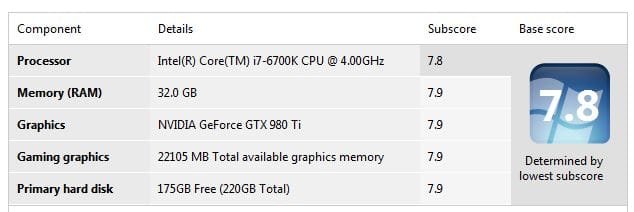
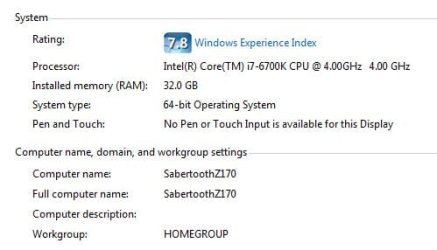
Please post snips of the following 2 areas. One is your computer properties, and the other is the details of your WEI score.

Use the snipping tool to capture each image, save them to your desktop.

Then in your reply make sure you choose Go Advanced, then click the paperclip icon near the top of your reply to upload both pictures.

Examples:
 

Attachments

  • Capture1.JPG
    Capture1.JPG
    25.8 KB · Views: 16
  • Capture.JPG
    Capture.JPG
    25.1 KB · Views: 16

My Computer

Computer type
PC/Desktop
Computer Manufacturer/Model Number
Skylake Special #666
OS
Windows 10 Pro x64
CPU
Intel Core i7 6700K
Motherboard
Asus Sabertooth Z170 Mark 1
Memory
GSkill TridentZ RGB 16GB 3600 16-16-16-36
Graphics Card(s)
EVGA GTX 980 Ti SC x2
Sound Card
Realtek High Definition
Monitor(s) Displays
AOC G2460PG
Screen Resolution
1920 x 1080 144Hz
Hard Drives
Samsung 860 Pro 256GB, Seagate Barracuda 4TB x2
PSU
EVGA 1000 P2, EVGA White Custom Braided Cables
Case
Corsair Vengeance C70 Gunmetal Black
Cooling
Corsair H100i v2, Corsair ML120 x2, Thermal Grizzly Kryonaut
Keyboard
Logitech G910 Orion Spectrum
Mouse
Logitech G700s
Internet Speed
Verizon Fios Quantum Gateway 75/75
Antivirus
Windows Defender, Malwarebytes Free 3.8.3
Browser
Chrome
Other Info
Corsair SP120 x4, LG Blu-ray Drive, Durabrand HT-395 100 Watt Dolby Digital Amp, Corsair H2100 Wireless 7.1 Headset
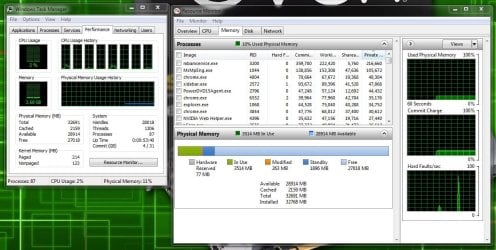
Then please post a snip of the following 2 items, open Task Manager, then click Resource Monitor, then click the memory tab at the top.

Make a snip of both pictures and insert them into your reply by using the paperclip icon at the top of your reply, don`t forget to click Go Advanced.

The option to insert pictures using the Quick Reply option has been removed, you must use the Go Advanced option to insert pictures.
 

Attachments

  • Capture2.JPG
    Capture2.JPG
    135.3 KB · Views: 1

My Computer

Computer type
PC/Desktop
Computer Manufacturer/Model Number
Skylake Special #666
OS
Windows 10 Pro x64
CPU
Intel Core i7 6700K
Motherboard
Asus Sabertooth Z170 Mark 1
Memory
GSkill TridentZ RGB 16GB 3600 16-16-16-36
Graphics Card(s)
EVGA GTX 980 Ti SC x2
Sound Card
Realtek High Definition
Monitor(s) Displays
AOC G2460PG
Screen Resolution
1920 x 1080 144Hz
Hard Drives
Samsung 860 Pro 256GB, Seagate Barracuda 4TB x2
PSU
EVGA 1000 P2, EVGA White Custom Braided Cables
Case
Corsair Vengeance C70 Gunmetal Black
Cooling
Corsair H100i v2, Corsair ML120 x2, Thermal Grizzly Kryonaut
Keyboard
Logitech G910 Orion Spectrum
Mouse
Logitech G700s
Internet Speed
Verizon Fios Quantum Gateway 75/75
Antivirus
Windows Defender, Malwarebytes Free 3.8.3
Browser
Chrome
Other Info
Corsair SP120 x4, LG Blu-ray Drive, Durabrand HT-395 100 Watt Dolby Digital Amp, Corsair H2100 Wireless 7.1 Headset
Back
Top