RAM Issue

JoshuaMitchell

New member
Member
Local time
6:11 PM
Messages
33
Hi,

Iam new here so, but my question is,

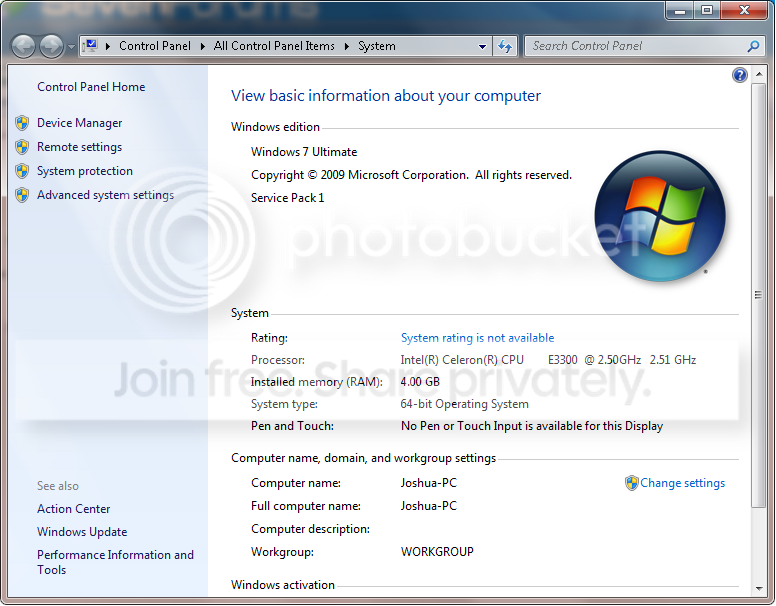
I was doing some research on the internet of missing ram and i checked my PC and i saw i had 4GB installed DDR2 and 3.19 is usable
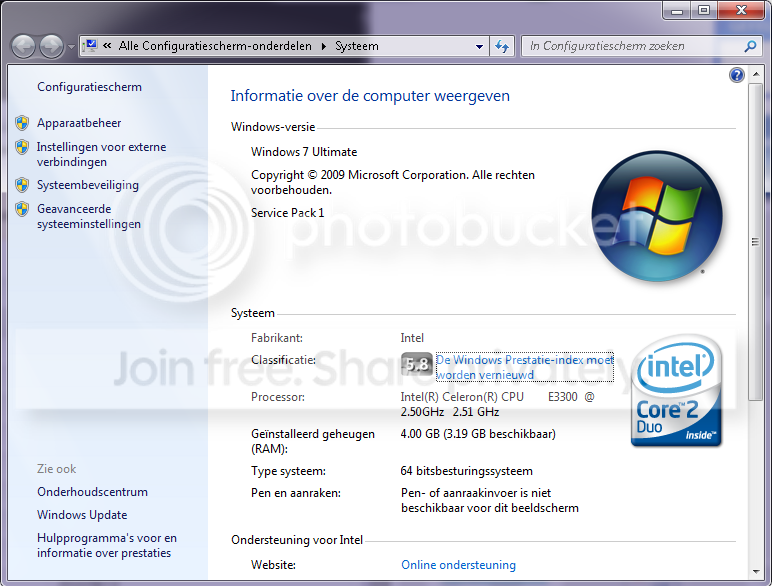
screen2.png


Iam sorry my operator system is Dutch but u can see i have 3.19 usable.

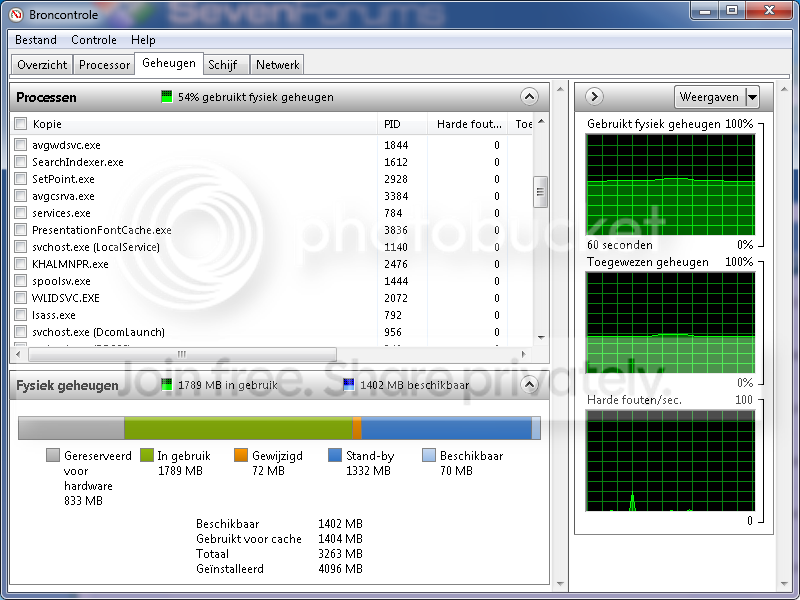
the next screen u can see is the information of my system etc.

screen3.png


Okay i did update my motherboard the original was V1.20 and updated it on V2.10
After update i got the error of pressing F1 or something like that
I did continue of the default settings and alright the computer boots up and after a while my computer won't boot up... its hanging in the bootlogo and my system doesn't start up.

So i manualy shutdown my computer and restart it again and pressing 'DEL' i see at my bios the version P2.10

so i tought my bios was updated and ITS NOT. still the 3.19GB usable.

I have a ATI Radeon HD 5570 1GB videocard and my motherboard is a Asrock G31M-S,

P.S finaly i did search on youtube to solve the problem and found how to but still doesn't work for me,

I need to go to Windows+R > ''msconfig'' > Boot > advanced options and the ''maximum memory'' was unclicked so i clicked it and the ''4096'' appeared i clicked OK and a message poped out and says ''I dont know anymore what was in the diag'' so i restart my PC and still no success.

I hope someone can help me out iam getting sick of it i want to solve it but i can't.... and i dont want to buy a new computer :P

BTW iam sorry for my bad language i come from The Neterlands :)

Friendly Kinds Joshua Mitchell
 

My Computer

OS
Windows 7 Ultimate x64 Build 7601
CPU
Intel Celeron E3300 Duo Core
Motherboard
Asrock G31M-S
Memory
4GB DDR2
Graphics Card(s)
ATI Radeon HD 5570 1GB DDR5
Sound Card
Realtek HD (On board)
Monitor(s) Displays
IIyama 22'' Full HD
Screen Resolution
1920 x 1080
Hard Drives
3TB 5400RPM (3x Samsung 1TB)
Case
Siemens Fuji Case
Cooling
Stock
Keyboard
Thrust
Mouse
Logitech G300
Internet Speed
Fiberglass Download speed: 65.4MB/s Upload Speed: 68.1MB/s
Other Info
LOL why is DDR3 memory cheaper then DDR2 :/
That is normal. Generally 3.0 to 3.5GB useable is what you will see out of 4GB. The rest is used by the OS and system devices.
 

My Computer

Computer type
PC/Desktop
Computer Manufacturer/Model Number
My Own Build
OS
Windows 10 64 bit
CPU
Intel i7 6700K
Motherboard
ASUS ROG Maximus VIII Hero
Memory
16GB Corsair Dominator
Graphics Card(s)
Intel CPU Graphics
Sound Card
RealTek
Monitor(s) Displays
27" Dell S2719dgf
Screen Resolution
2560X1440
Hard Drives
1 TB Samsung 850 EVO SSD for Win 10 Pro
500GB Samsung 850 EVO SSD for Win 10 Insider
2 TB drive for backup
PSU
EVGA Supernova 750G2
Case
BeQuiet Silent Base 600
Cooling
Deepcool Captain 120EX
Keyboard
Microsoft Wireless 2000
Mouse
Microsoft wireless
Internet Speed
100 MB/sec (Cable)
Antivirus
Microsoft Defender and Malwarebytes
Browser
Edge/Firefox
Other Info
Cakewalk (Sonar) by BandLab and Studio One 4.1 Pro recording studio software. MOTU 896Mk3 Hybrid recording interface, Frontier Tranzport wireless control unit, Behringer X-Touch Control Surface.
Five USB connected optical drives for CD Audio production using Nero BurningROM
That is normal. Generally 3.0 to 3.5GB useable is what you will see out of 4GB. The rest is used by the OS and system devices.


So i can't fix the 3.19GB RAM?

I see allot of movies on the internet that it can but i don't want to crash my pc or something like that :O
 

My Computer

OS
Windows 7 Ultimate x64 Build 7601
CPU
Intel Celeron E3300 Duo Core
Motherboard
Asrock G31M-S
Memory
4GB DDR2
Graphics Card(s)
ATI Radeon HD 5570 1GB DDR5
Sound Card
Realtek HD (On board)
Monitor(s) Displays
IIyama 22'' Full HD
Screen Resolution
1920 x 1080
Hard Drives
3TB 5400RPM (3x Samsung 1TB)
Case
Siemens Fuji Case
Cooling
Stock
Keyboard
Thrust
Mouse
Logitech G300
Internet Speed
Fiberglass Download speed: 65.4MB/s Upload Speed: 68.1MB/s
Other Info
LOL why is DDR3 memory cheaper then DDR2 :/
I have 4GB of RAM installed, and only about 3.49GB is usable, some of the RAM as said before is used by the operating system and for hardware addressing with the hardware devices.

It's completely normal.

Hope this helps,

Harry
 

My Computer

Computer type
Laptop
I once had that problem, and being the person I am, I did a bit of research and there is a way to fix it (for me).
Unplug your PC from the powerpoint and hold down the "on" button for 10 seconds.
Then open the case, and refit all RAM sticks (take them out, clean the slots and put the RAM back).
Reboot and voila, all 6GB of RAM back!
:)
But if it doesn't work, don't worry. Your system also needs part of the RAM to function, and this is perfectly normal
 

My Computer

Computer Manufacturer/Model Number
Dell - Vostro 430
OS
Windows 7 Professional x64 SP1
CPU
Intel Core i7 860 @2.80GHz
Motherboard
Dell 054KM3
Memory
6144MB DDR3-SDRAM (3 x 2048 DDR3)
Graphics Card(s)
nVidia GeForce 310
Sound Card
Realtek High Definition Audio ALC662
Monitor(s) Displays
Dell Computer DELL E2311H
Screen Resolution
1920 x 1080
Hard Drives
Seagate Barracuda ST3750528AS (750 GB)
PSU
J515T 350W
Case
14.58inH x 6.69inW x 17.43inD
Cooling
Fan from the Box heehee
Keyboard
Rapoo Wireless Keyboard
Mouse
Rapoo Wireless Mouse
Internet Speed
1 byte every 2.6 hours
Other Info
Dreaming of building a new PC :D

Cant wait :)
I have 4GB of RAM installed, and only about 3.49GB is usable, some of the RAM as said before is used by the operating system and for hardware addressing with the hardware devices.

It's completely normal.

Hope this helps,

Harry


Hmm okay it seems normal for me to it's only a bit poor that you can see that 3.19 is usable and if i press run and run the Resource Monitor i see the memory what isn't usable.

So okay thanks for the help and maybe i need to buy a better pc then :D and say goodbye to my old one :P

Thanks,
Friendly Kinds.

EDIT:

screen4.png
 

My Computer

OS
Windows 7 Ultimate x64 Build 7601
CPU
Intel Celeron E3300 Duo Core
Motherboard
Asrock G31M-S
Memory
4GB DDR2
Graphics Card(s)
ATI Radeon HD 5570 1GB DDR5
Sound Card
Realtek HD (On board)
Monitor(s) Displays
IIyama 22'' Full HD
Screen Resolution
1920 x 1080
Hard Drives
3TB 5400RPM (3x Samsung 1TB)
Case
Siemens Fuji Case
Cooling
Stock
Keyboard
Thrust
Mouse
Logitech G300
Internet Speed
Fiberglass Download speed: 65.4MB/s Upload Speed: 68.1MB/s
Other Info
LOL why is DDR3 memory cheaper then DDR2 :/
Glad to help (: you could always just purchase more RAM and install a 64-bit operating system, instead of purchasing a new computer.
 

My Computer

Computer type
Laptop
Glad to help (: you could always just purchase more RAM and install a 64-bit operating system, instead of purchasing a new computer.


iam running on 64x ;)

And my motherboard doesn't support more RAM so i need to buy a better motherboard :)

EDIT: the max ram is 4GB.
 

My Computer

OS
Windows 7 Ultimate x64 Build 7601
CPU
Intel Celeron E3300 Duo Core
Motherboard
Asrock G31M-S
Memory
4GB DDR2
Graphics Card(s)
ATI Radeon HD 5570 1GB DDR5
Sound Card
Realtek HD (On board)
Monitor(s) Displays
IIyama 22'' Full HD
Screen Resolution
1920 x 1080
Hard Drives
3TB 5400RPM (3x Samsung 1TB)
Case
Siemens Fuji Case
Cooling
Stock
Keyboard
Thrust
Mouse
Logitech G300
Internet Speed
Fiberglass Download speed: 65.4MB/s Upload Speed: 68.1MB/s
Other Info
LOL why is DDR3 memory cheaper then DDR2 :/
Glad to help (: you could always just purchase more RAM and install a 64-bit operating system, instead of purchasing a new computer.


iam running on 64x ;)

And my motherboard doesn't support more RAM so i need to buy a better motherboard :)

EDIT: the max ram is 4GB.

Oh okay (: then buying a new computer would be easier than replacing the motherboard and finding hardware which is compatible etc.
 

My Computer

Computer type
Laptop
Glad to help (: you could always just purchase more RAM and install a 64-bit operating system, instead of purchasing a new computer.


iam running on 64x ;)

And my motherboard doesn't support more RAM so i need to buy a better motherboard :)

EDIT: the max ram is 4GB.

Oh okay (: then buying a new computer would be easier than replacing the motherboard and finding hardware which is compatible etc.


Yeah i know but i only need better memory ( DDR3 ) better motherboard and a new CPU, i dont need a new power supply cause its a 400W so i only need memory and a motherboard my videocard will fit on the motherboard i want to buy so maybe with all the components is arround 300 a 400€.

Still thanks for the support :D
 

My Computer

OS
Windows 7 Ultimate x64 Build 7601
CPU
Intel Celeron E3300 Duo Core
Motherboard
Asrock G31M-S
Memory
4GB DDR2
Graphics Card(s)
ATI Radeon HD 5570 1GB DDR5
Sound Card
Realtek HD (On board)
Monitor(s) Displays
IIyama 22'' Full HD
Screen Resolution
1920 x 1080
Hard Drives
3TB 5400RPM (3x Samsung 1TB)
Case
Siemens Fuji Case
Cooling
Stock
Keyboard
Thrust
Mouse
Logitech G300
Internet Speed
Fiberglass Download speed: 65.4MB/s Upload Speed: 68.1MB/s
Other Info
LOL why is DDR3 memory cheaper then DDR2 :/
No problem, hope you like your new computer (:


I've solved the problem.

My biggest issue was the windows 7 disk because my coputer s operating on a 64x bit version but my IO is 86x LAWL!!!!!!!!!!!!!! so i've got to reinstall the windows 7 and choose the 64x bit version so i run at FULL 64 bit :D YEAH! No new computer and hello €€€ :D


Txs for all the support!!
 

My Computer

OS
Windows 7 Ultimate x64 Build 7601
CPU
Intel Celeron E3300 Duo Core
Motherboard
Asrock G31M-S
Memory
4GB DDR2
Graphics Card(s)
ATI Radeon HD 5570 1GB DDR5
Sound Card
Realtek HD (On board)
Monitor(s) Displays
IIyama 22'' Full HD
Screen Resolution
1920 x 1080
Hard Drives
3TB 5400RPM (3x Samsung 1TB)
Case
Siemens Fuji Case
Cooling
Stock
Keyboard
Thrust
Mouse
Logitech G300
Internet Speed
Fiberglass Download speed: 65.4MB/s Upload Speed: 68.1MB/s
Other Info
LOL why is DDR3 memory cheaper then DDR2 :/
You have the 64 bit installed. Look at Systeem.

Windows 64 bit combines both 64bit and 32bit operating systems into one.(64 and x86)

Windows 32 bit is x86 only.
 

My Computer

Computer Manufacturer/Model Number
Hopalong/ Godzilla
OS
Windows7 Pro 64bit SP-1; Windows XP Pro 32bit
CPU
Intel Core i7-870 Lynnfield 2.93GHz LGA 1156 95W Quad-Core
Motherboard
ASUS P7P55D-E PRO
Memory
8GB@1400MHz Crucial Ballistix DDR3-1600 4x2GB
Graphics Card(s)
ASUS ENGTX460 DirectCU/2DI/1GD5 1GB 256-bit GDDR5
Sound Card
VIA Onboard
Monitor(s) Displays
Asus VS248H-P 24"; Samsung SyncMaster 941BW 19"ws
Screen Resolution
1920x1080; 1440x900
Hard Drives
Samsung 830 120GB SSD
Intel 320 120GB SSD
Western Digital Caviar Black WD7501AALS 750GB 7200 RPM SATA 3.0Gb/s
Western Digital Caviar Black WD6401AALS 640GB 7200 RPM SATA 3.0Gb/s
PSU
COOLER MASTER Silent Pro RS850-AMBAJ3-US 850W Modular
Case
COOLER MASTER HAF 932 RC-932-KKN5-GP Black
Cooling
Scythe "Mugen-2 Rev.B" (2 ScytheKaze-Jyuni PWM fans)
Keyboard
Logitech K-320
Mouse
Kensington
Antivirus
Avast Inernet Suite
Browser
IE 9 ; Chrome
That is normal. Generally 3.0 to 3.5GB useable is what you will see out of 4GB. The rest is used by the OS and system devices.
I wouldn't call that normal behavior at all. With a typical system with 4 GB installed, and an x64 OS, all 4 GB would be usable. Yes, some is reserved for hardware usage, but very minimal. The rest could be used for onboard graphics, as well, but it is far from normal behavior to see that little bit available on an x64 system. My ultrabook for example, has 4 GB installed, uses onboard graphics, and still says 4 GB is available.

I will suggest that the OP may be seeing more dramatic results due to 4 GB being the limit for the board, but I would still expect to see the usable memory to be much higher than it is. Check the BIOS for an option to enable memory mapping. If not, your motherboard may not be new enough to offer better x64 support.
 

My Computer

OS
Windows 7 Ultimate x64 SP1
CPU
Intel Core i7-2600
Motherboard
Gigabyte GA-P67A-UD3P-B3
Memory
12 GB Patriot Extreme DDR3-1333
Graphics Card(s)
Nvidia GTX 470
Monitor(s) Displays
Dell UltraSharp 2209WA
Hard Drives
OCZ Agility3 240 GB, WD5001AALS, WD7501AALS
PSU
OCZ ModStream 700W
Case
CoolerMaster HAF 912 Advanced
Cooling
CoolerMaster Hyper 212 Plus
Deacon

You are right the 4GB should be available.
AsRock mother board specification page> ASRock > G31M-S
It is compatible with 64bit and so is the CPU.

They are using a GPU card so video RAM reserve is unnecessary.

Joshua stated he has it resolved so if not hopefully he will post again.
 

My Computer

Computer Manufacturer/Model Number
Hopalong/ Godzilla
OS
Windows7 Pro 64bit SP-1; Windows XP Pro 32bit
CPU
Intel Core i7-870 Lynnfield 2.93GHz LGA 1156 95W Quad-Core
Motherboard
ASUS P7P55D-E PRO
Memory
8GB@1400MHz Crucial Ballistix DDR3-1600 4x2GB
Graphics Card(s)
ASUS ENGTX460 DirectCU/2DI/1GD5 1GB 256-bit GDDR5
Sound Card
VIA Onboard
Monitor(s) Displays
Asus VS248H-P 24"; Samsung SyncMaster 941BW 19"ws
Screen Resolution
1920x1080; 1440x900
Hard Drives
Samsung 830 120GB SSD
Intel 320 120GB SSD
Western Digital Caviar Black WD7501AALS 750GB 7200 RPM SATA 3.0Gb/s
Western Digital Caviar Black WD6401AALS 640GB 7200 RPM SATA 3.0Gb/s
PSU
COOLER MASTER Silent Pro RS850-AMBAJ3-US 850W Modular
Case
COOLER MASTER HAF 932 RC-932-KKN5-GP Black
Cooling
Scythe "Mugen-2 Rev.B" (2 ScytheKaze-Jyuni PWM fans)
Keyboard
Logitech K-320
Mouse
Kensington
Antivirus
Avast Inernet Suite
Browser
IE 9 ; Chrome
Deacon

You are right the 4GB should be available.
AsRock mother board specification page> ASRock > G31M-S
It is compatible with 64bit and so is the CPU.

They are using a GPU card so video RAM reserve is unnecessary.

Joshua stated he has it resolved so if not hopefully he will post again.


Yes i did it i tried to reinstall my windows 7 again because my system was a kind of runed :$ so and i did tried to setup the memory mapping in my bios and tried to reupdate my bios again and check this out :D

screen1.png


Lots of thanks!!!!!

Friendly kinds.
 

My Computer

OS
Windows 7 Ultimate x64 Build 7601
CPU
Intel Celeron E3300 Duo Core
Motherboard
Asrock G31M-S
Memory
4GB DDR2
Graphics Card(s)
ATI Radeon HD 5570 1GB DDR5
Sound Card
Realtek HD (On board)
Monitor(s) Displays
IIyama 22'' Full HD
Screen Resolution
1920 x 1080
Hard Drives
3TB 5400RPM (3x Samsung 1TB)
Case
Siemens Fuji Case
Cooling
Stock
Keyboard
Thrust
Mouse
Logitech G300
Internet Speed
Fiberglass Download speed: 65.4MB/s Upload Speed: 68.1MB/s
Other Info
LOL why is DDR3 memory cheaper then DDR2 :/
That looks much better!
 

My Computer

OS
Windows 7 Ultimate x64 SP1
CPU
Intel Core i7-2600
Motherboard
Gigabyte GA-P67A-UD3P-B3
Memory
12 GB Patriot Extreme DDR3-1333
Graphics Card(s)
Nvidia GTX 470
Monitor(s) Displays
Dell UltraSharp 2209WA
Hard Drives
OCZ Agility3 240 GB, WD5001AALS, WD7501AALS
PSU
OCZ ModStream 700W
Case
CoolerMaster HAF 912 Advanced
Cooling
CoolerMaster Hyper 212 Plus

My Computer

OS
Windows 7 Ultimate x64 Build 7601
CPU
Intel Celeron E3300 Duo Core
Motherboard
Asrock G31M-S
Memory
4GB DDR2
Graphics Card(s)
ATI Radeon HD 5570 1GB DDR5
Sound Card
Realtek HD (On board)
Monitor(s) Displays
IIyama 22'' Full HD
Screen Resolution
1920 x 1080
Hard Drives
3TB 5400RPM (3x Samsung 1TB)
Case
Siemens Fuji Case
Cooling
Stock
Keyboard
Thrust
Mouse
Logitech G300
Internet Speed
Fiberglass Download speed: 65.4MB/s Upload Speed: 68.1MB/s
Other Info
LOL why is DDR3 memory cheaper then DDR2 :/
Glad you have it fixed.
 

My Computer

Computer Manufacturer/Model Number
Hopalong/ Godzilla
OS
Windows7 Pro 64bit SP-1; Windows XP Pro 32bit
CPU
Intel Core i7-870 Lynnfield 2.93GHz LGA 1156 95W Quad-Core
Motherboard
ASUS P7P55D-E PRO
Memory
8GB@1400MHz Crucial Ballistix DDR3-1600 4x2GB
Graphics Card(s)
ASUS ENGTX460 DirectCU/2DI/1GD5 1GB 256-bit GDDR5
Sound Card
VIA Onboard
Monitor(s) Displays
Asus VS248H-P 24"; Samsung SyncMaster 941BW 19"ws
Screen Resolution
1920x1080; 1440x900
Hard Drives
Samsung 830 120GB SSD
Intel 320 120GB SSD
Western Digital Caviar Black WD7501AALS 750GB 7200 RPM SATA 3.0Gb/s
Western Digital Caviar Black WD6401AALS 640GB 7200 RPM SATA 3.0Gb/s
PSU
COOLER MASTER Silent Pro RS850-AMBAJ3-US 850W Modular
Case
COOLER MASTER HAF 932 RC-932-KKN5-GP Black
Cooling
Scythe "Mugen-2 Rev.B" (2 ScytheKaze-Jyuni PWM fans)
Keyboard
Logitech K-320
Mouse
Kensington
Antivirus
Avast Inernet Suite
Browser
IE 9 ; Chrome
Back
Top