Hi guys,
I have never come across an issue like this, began installing some memory (2 x 1GB Kingston sticks) into a new Shuttle PC I have, new 2TB also. The board has 2 slots. DIMM1 & DIMM2.
OS is Windows 7 64bit - When I install both sticks, OS shows 1GB installed.
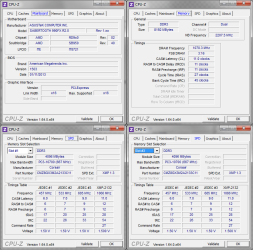
When I install 1 stick into DIMM1 slot, OS shows 8GB (1GB usable) as below:

Performed memory tests with Windows, no issues found.
Anyone had a similar issue? I'm beaten. . .
I have never come across an issue like this, began installing some memory (2 x 1GB Kingston sticks) into a new Shuttle PC I have, new 2TB also. The board has 2 slots. DIMM1 & DIMM2.
OS is Windows 7 64bit - When I install both sticks, OS shows 1GB installed.
When I install 1 stick into DIMM1 slot, OS shows 8GB (1GB usable) as below:
Performed memory tests with Windows, no issues found.
Anyone had a similar issue? I'm beaten. . .
My Computer
- Computer Manufacturer/Model Number
- Compaq 6735s
- OS
- Windows 7
- Memory
- 4GB