Ram Issue

MW630

New member
Local time
4:11 PM
Messages
3
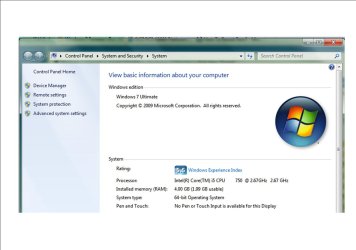
I have seen a lot of posts on this topic but have yet to get a solid answer. I am hoping someone will be able to help me out. I just built a new workstation - main components: Intel Core i5-750 cpu, Asus P7P55D-Pro mobo, and 4Gb OCZ PC3-10666 Platinum Ram. I am running Windows 7 Ultimate 64bit and when I view the installed components I have 4GB installed but only 1.99GB usable ram. I have run memory tests with no errors, reseated the ram multiple times, reseated the CPU and cooler, flashed bios, updated mobo drivers, checked memory mapping, and checked to make sure there is not a maximum amount of ram defined by the system. Any ideas as to what is wrong??

Thanks,
Mike
 

Attachments

  • memory.jpg
    memory.jpg
    80.7 KB · Views: 50

My Computer

OS
Windows 7 Ultimate 64bit
CPU
Intel Core i5-750
Motherboard
Asus P7P55D Pro
Memory
4 Gig OCZ PC3-10666 Platinum
very odd problem i'll look into this and get back with you
 

My Computer

Computer Manufacturer/Model Number
Custom
OS
Windows 7 Ultimate Signature Edition
CPU
Intel Core i7 Extreme 3.33GHz
Motherboard
EVGA X-58 SLI Classified
Memory
12GB DDR3
Graphics Card(s)
2x EVGA 285 2GB in SLI
Sound Card
Creative Labs X-Fi ExtremeGamer
Monitor(s) Displays
30" Viewsonic
Hard Drives
2x1TB Western Digital 7200RPM in RAID 0/1TB WD My Book External HDD
PSU
Thermaltake 1000w supporting quad SLI
Case
Thermaltake Armor Full Tower
Cooling
Thermaltake V1 CPU+DIY Liquid cooling
I just looked at mine and it only shows the installed memory (8GB)??? I have an Intel DP35DP M/B and Win 7 64 bit Professional.
 

My Computer

Computer type
PC/Desktop
Computer Manufacturer/Model Number
My Own Build
OS
Windows 10 64 bit
CPU
Intel i7 6700K
Motherboard
ASUS ROG Maximus VIII Hero
Memory
16GB Corsair Dominator
Graphics Card(s)
Intel CPU Graphics
Sound Card
RealTek
Monitor(s) Displays
27" Dell S2719dgf
Screen Resolution
2560X1440
Hard Drives
1 TB Samsung 850 EVO SSD for Win 10 Pro
500GB Samsung 850 EVO SSD for Win 10 Insider
2 TB drive for backup
PSU
EVGA Supernova 750G2
Case
BeQuiet Silent Base 600
Cooling
Deepcool Captain 120EX
Keyboard
Microsoft Wireless 2000
Mouse
Microsoft wireless
Internet Speed
100 MB/sec (Cable)
Antivirus
Microsoft Defender and Malwarebytes
Browser
Edge/Firefox
Other Info
Cakewalk (Sonar) by BandLab and Studio One 4.1 Pro recording studio software. MOTU 896Mk3 Hybrid recording interface, Frontier Tranzport wireless control unit, Behringer X-Touch Control Surface.
Five USB connected optical drives for CD Audio production using Nero BurningROM
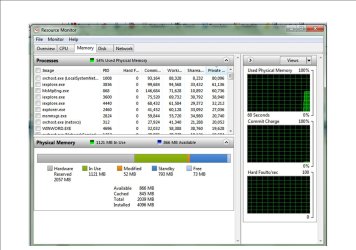
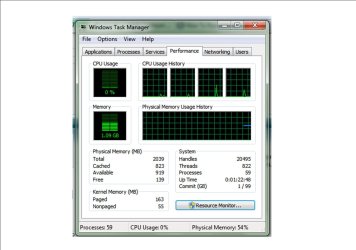
What do you see in the performance tab of task manager as total (first number)? Or in Reource Monitor under the Memory tab. Those are the numbers that count.
 

My Computer

Computer Manufacturer/Model Number
HP, Dell, Gateway, Toshiba - 4 laptops and 2 desktops
OS
Vista, Windows7, Mint Mate, Zorin, Windows 8
CPU
from 1.6GHz Duo to i7
Monitor(s) Displays
2x HP w2207
Hard Drives
5x HDD, 7x SSD, 12x Externals
Keyboard
with trackball - no mices
Mouse
Trackball mice
Internet Speed
DSL 6000
WHS: Here is what I am seeing under the task manager and resource monitor.
 

Attachments

  • Resource Monitor.jpg
    Resource Monitor.jpg
    141.7 KB · Views: 34
  • Task Manager.jpg
    Task Manager.jpg
    101.5 KB · Views: 44

My Computer

OS
Windows 7 Ultimate 64bit
CPU
Intel Core i5-750
Motherboard
Asus P7P55D Pro
Memory
4 Gig OCZ PC3-10666 Platinum
Not good. Maybe you want to talk to OCZ.
 

My Computer

Computer Manufacturer/Model Number
HP, Dell, Gateway, Toshiba - 4 laptops and 2 desktops
OS
Vista, Windows7, Mint Mate, Zorin, Windows 8
CPU
from 1.6GHz Duo to i7
Monitor(s) Displays
2x HP w2207
Hard Drives
5x HDD, 7x SSD, 12x Externals
Keyboard
with trackball - no mices
Mouse
Trackball mice
Internet Speed
DSL 6000
you should definatly contact the manufacturer.
 

My Computer

Computer Manufacturer/Model Number
Custom
OS
Windows 7 Ultimate Signature Edition
CPU
Intel Core i7 Extreme 3.33GHz
Motherboard
EVGA X-58 SLI Classified
Memory
12GB DDR3
Graphics Card(s)
2x EVGA 285 2GB in SLI
Sound Card
Creative Labs X-Fi ExtremeGamer
Monitor(s) Displays
30" Viewsonic
Hard Drives
2x1TB Western Digital 7200RPM in RAID 0/1TB WD My Book External HDD
PSU
Thermaltake 1000w supporting quad SLI
Case
Thermaltake Armor Full Tower
Cooling
Thermaltake V1 CPU+DIY Liquid cooling
try swapping slots, and double/tripple check the RAM is seated properly.

Some things that can cause this:

Ram not seated properly, even though it appears to be. Seat them in the "nonclip" side first, then secure the other end may help seat better.

Memory re-mapping option

Double check RAM voltage and timings are set to man. Spec

Make sure the CPU is seated correctly and no bent pins. the Core i series have a ingrated memory controller. bent pins, or pins not making proper contact could cause such an issue.

Make sure the Heatsink is seated properly, and not to loose or too tight.

If all this is OK, or deosnt work, you can also try slightly increasing VTT voltage, as this seems to help some with simlar issues.
 

My Computer

Computer Manufacturer/Model Number
Custom (Self Build)
OS
Windows 7 Home Premium 64bit
CPU
Intel Core i7 2700k
Motherboard
eVGA P67 SLI
Memory
8GB Mushkin Redline Ridgebacks @1866
Graphics Card(s)
EVGA GTX570 SC
Sound Card
XiFi Titanium HD
Monitor(s) Displays
LG W2453V
Screen Resolution
1920x1080
Hard Drives
Intel 320 80GB -- Intel X25-V 40GB --WD Black 1TB x2 -- WD Blue 640GB
PSU
Seasonic x750
Case
Corsair 600T SE White
Cooling
eVGA Superclocked CPU Cooler
Keyboard
Saitek Cyborg
Antivirus
Kaspersky
Browser
IE
Other Info
LG BD/DVD
Thanks for the suggestions. I tried reseating the RAM only using 1 at a time and both functioned properly. This is the first rig I have used OCZ in and I am regretting it. I am going to exchange it and go back to using Corsair. Hopefully that will resolve the issue.
 

My Computer

OS
Windows 7 Ultimate 64bit
CPU
Intel Core i5-750
Motherboard
Asus P7P55D Pro
Memory
4 Gig OCZ PC3-10666 Platinum
Back
Top