RAM Optimization

7user78

New member
Member
Local time
4:41 AM
Messages
42
Hello there,
Here I am again, seeking some good advices :P

I just made a RAM upgrade from 6 to 8 GB and it feels like almost nothing happened. A few details OS Win 7 x64, Intel Core 2 Duo E6750 2.66GB, HDD 1TB (not SSD, true can be the main cause), 4 X Corsair 2GB DDR2, 800MHz, PC2-6400, 5-5-5-18 on Intel DP35DP mainboard.

Having said that, I have a few questions.
Is there any RAM tweak that I can do in order to improve the speed of the above described machine ?

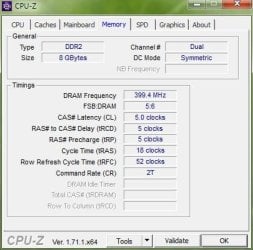
SDRAM Frequency section from BIOS for exemple, is set on Auto. The other options are 333/266/200/133Mhz. Unfortunately I can't understand how these values are related to memory module specs and CPU's FSB .A few "how to" details will be much appreciated .

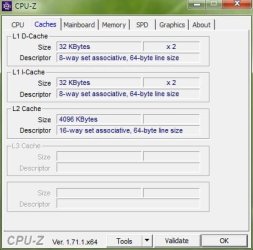
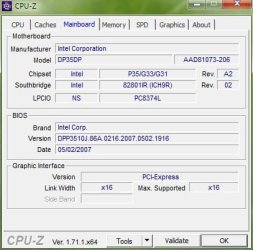
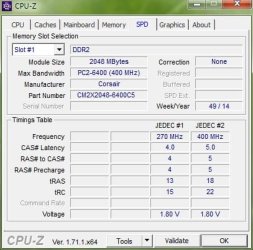
Please find attached print screens exported from CPU-z, to have a full view.
If you need more details, don't hesitate .
Thank you,
 

Attachments
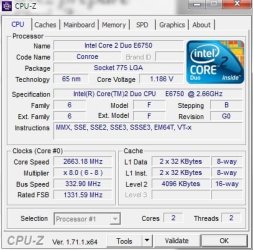
  • CPU.jpg
    CPU.jpg
    37.6 KB · Views: 52
  • Caches.jpg
    Caches.jpg
    26.4 KB · Views: 51
  • Mainboard.jpg
    Mainboard.jpg
    29.4 KB · Views: 51
  • Memory.jpg
    Memory.jpg
    27.3 KB · Views: 51
  • SPD.jpg
    SPD.jpg
    30.9 KB · Views: 51

My Computer

OS
win7 x64
Im not hardware expert but you may be using ram that isn't technically supported by your board. Furthermore, buying another stick of ram and adding it to other ram might not work right. Ram is best bought in pairs or sets. Check the link below for supported ram. Another link I'll add has a suggestion in regards to using the CM2x2048 ram with your board.

Intel® Desktop Board DP35DP — System Memory

https://communities.intel.com/message/174038
 

My Computer

Computer type
PC/Desktop
Computer Manufacturer/Model Number
Custom
OS
Dual Boot: Windows 8.1 & Server 2012r2 VMs: Kali Linux, Backbox, Matriux, Windows 8.1
CPU
A10 7700 Kavari SteamRoller
Motherboard
ASUS A88XM-PLUS (FM2+ )
Memory
8GB DDR3 SDRAM PC3-8500
Graphics Card(s)
1024MB ATI AMD Radeon R7 Graphics
Sound Card
Realtek High Definition Audio
Monitor(s) Displays
Samsung
Hard Drives
SSD Crucial 120gb
WD VelociRaptor 1tb
PSU
Rosewill Gaming 650w
Case
Rosewill Galaxy 2
Internet Speed
55/12
Antivirus
Malwarebytes, MSE, SAS
Browser
FireFox, Chrome
Thank you for your reply,
True, in my case there are 2 Corsair XMS2 pairs with the same technical specs. One pair bought initially a few years ago and another pair a few days ago. They are not listed on the Intel page (that's also true) but until now - Thanks God! - the system was stable with 1 or 2 pairs of RAM installed.

Also I've read and fulfilled at that time, the Intel System memory features (18V, DDR2 800 SIMMs with SPD timings of only 5-5-5).

Reading the Intel forum post, makes me think that I'm so lucky :) because as I said, there are no BSOD screens just I have the feeling that I can obtain a better speed in this configuration. If someone know what's the deal with that Bios Frequency speed, will be just great .
 

My Computer

OS
win7 x64
Your performance would only increase if you were hitting a wall on RAM usage. I doubt you have been bumping into that wall. So no, you are not going to see an improvement in performance for day to day activities.
 

My Computer

Computer type
PC/Desktop
Computer Manufacturer/Model Number
Alienware Aurora ALX R4
OS
Windows 10 Pro (x64)
CPU
Intel Core i7-3930K (3.2GHz - 4.5GHz)
Motherboard
Alienware Aurora-R4 x79
Memory
4x Samsung 4GB PC3-12800 DDR3 (16GB 1600MHz)
Graphics Card(s)
Nvidia Geforce GTX 690
Sound Card
SteelSeries Siberia Elite
Monitor(s) Displays
Dell UltraSharp U3011
Screen Resolution
2560x1600
Hard Drives
Samsung 850 Pro 256 GB, Seagate 1TB Desktop Hybrid HDD, 2x Western Digital 4TB Green HDD
PSU
875W Some Dell PSU <.<
Case
Alienware Aurora ALX
Cooling
Custom Liquid Cooling (EK CPU & GPU blocks) dual EK 480RAD
Keyboard
Logitech G710+ Mechanical
Mouse
Logitech G700s
Internet Speed
Verizon Fios (50 mbps average)
Other Info
Server: Intel NUC D54250WYK: i5-4250U, 16GB, 256 GB mSATA, Windows Server 2012 R2
For RAM you also need to upgrade symmetrically. Did you have 6 GB with 2GB and 4GB? thsi is odd...
i think you have duel channel board, so you always want to go up in pairs (this would be different for the expensive triple and quad channel boards)

the amount of RAM is OK for you. what is slowing you down is the HDD. Nowadays electronics progress enables everyone of us to drive a Porsche. but for some reason we equip that Porsche with Oxcart wheels called HDD. Get an SSD and you will notice a difference. In addition follow above advice on memory.
 

My Computer

Computer Manufacturer/Model Number
homemade
OS
W7 Pro 64
CPU
Intel i3 3220 @ 3.3 GHz
Motherboard
ASRock H77M
Memory
2x8GB DDR 3 1600 Kingston
Graphics Card(s)
onboard
Sound Card
onboard
Monitor(s) Displays
two 21" LCD
Hard Drives
128 GB Samsung 830
PSU
OCZ400MXSP
Cooling
Stock
Internet Speed
DSL
Thank you guys for your feed-back.
I had 2x2GB + 2x1GB in dual channel (6GB) for a few years now. I've made this upgrade 4 x 2GB with 2 pairs as I described above a few days ago.

Regarding the SSD storage devices , I'm not so confortable with that limited numbers of write/read cycles; That's why a HDD represent my best option for the moment, of course with the price I have to pay (slower speed).
 

My Computer

OS
win7 x64
With todays SSD's you don't need to worry about write and read. They will do just as many as a hard drive or more.
The only problem I have found with a quality SSD is once you have one you will want more.
 

My Computer

Computer type
PC/Desktop
Computer Manufacturer/Model Number
Home made Desktop
OS
Windows 10 Pro. 64/ version 1709 Windows 7 Pro/64
CPU
Intel i7-6800K @ 4.3
Motherboard
ASUS X-99 Deluxe II
Memory
Corsair Platinum 16 gig @2400
Graphics Card(s)
EVGA GTX 1070 OC
Monitor(s) Displays
Asus 27" LED LCD/VE278Q
Screen Resolution
1920-1080 or 1280-720 HDMI
Hard Drives
INTEL SSD 730-240 Gb Sata 3.0/
PSU
EVGA Platium 1200W
Case
Phanteks Luxe Tempered Glass 8 fans/ one radiator
Cooling
XSPC/ Water Cooled CPU
Keyboard
Das 4 Professional
Mouse
Logitech M705/MX Anywhere 2-S
Internet Speed
100 mbits
Antivirus
Microsoft Security Essentials/ Malwarebytes Premium 3.0/ SAS
Browser
I.E. 11 default/Firefox/ ISP Time Warner Cable/Spectrum
Other Info
LG BluRay Burner/
Sound system-KLipsch-THX/
Icy Dock ssd Hot Swap bays.
Regarding the SSD storage devices , I'm not so confortable with that limited numbers of write/read cycles; That's why a HDD represent my best option for the moment, of course with the price I have to pay (slower speed).

if you use it heavily you may get 10 years of life, if you use it less, even more. byt the time the SSD wears out your display will have faded away, your battery is dead, and your Mobo is blown up and you don't want the 10 year old laptop anymore anyway.

The average HDD in heavy use may live 8 years on average. SSD may live 10 years, why are we concerned about SSD life but not HDD life?

Consumers are funny that way. With incandescent light you get 1000 hours of life out of a light bulb and no one is concerned. With residential LED bulbs you get 30,000 hours and everyone is worried about that "short" life expectancy.
 

My Computer

Computer Manufacturer/Model Number
homemade
OS
W7 Pro 64
CPU
Intel i3 3220 @ 3.3 GHz
Motherboard
ASRock H77M
Memory
2x8GB DDR 3 1600 Kingston
Graphics Card(s)
onboard
Sound Card
onboard
Monitor(s) Displays
two 21" LCD
Hard Drives
128 GB Samsung 830
PSU
OCZ400MXSP
Cooling
Stock
Internet Speed
DSL
Offtopic
how about SSHD drives, they could be an option ?
 

My Computer

OS
win7 x64
Yes SSHD drives is a options. That is what we are posting (options).

You will just have to do a little research and choose which option you want.

I have never use a SSHD so I have very little knowledge of them.

I have 6 SSD's and not one has given me any problems.
 

My Computer

Computer type
PC/Desktop
Computer Manufacturer/Model Number
Home made Desktop
OS
Windows 10 Pro. 64/ version 1709 Windows 7 Pro/64
CPU
Intel i7-6800K @ 4.3
Motherboard
ASUS X-99 Deluxe II
Memory
Corsair Platinum 16 gig @2400
Graphics Card(s)
EVGA GTX 1070 OC
Monitor(s) Displays
Asus 27" LED LCD/VE278Q
Screen Resolution
1920-1080 or 1280-720 HDMI
Hard Drives
INTEL SSD 730-240 Gb Sata 3.0/
PSU
EVGA Platium 1200W
Case
Phanteks Luxe Tempered Glass 8 fans/ one radiator
Cooling
XSPC/ Water Cooled CPU
Keyboard
Das 4 Professional
Mouse
Logitech M705/MX Anywhere 2-S
Internet Speed
100 mbits
Antivirus
Microsoft Security Essentials/ Malwarebytes Premium 3.0/ SAS
Browser
I.E. 11 default/Firefox/ ISP Time Warner Cable/Spectrum
Other Info
LG BluRay Burner/
Sound system-KLipsch-THX/
Icy Dock ssd Hot Swap bays.
Back
Top