Solved RAM problems

sean5302

New member
Local time
4:29 AM
Messages
16
I have 2 computers, both Dell Optiplex 780 DT models.
I wanted to upgrade the RAM as there was only 2GB of DDR3 in each.
I bought sticks of Corsair XMS3 from ebay, mostly second-hand (used).
All but 1 stick was OK. That faulty stick gave Blue Screen of Death after 10 minutes or so.
I returned it to Corsair, hoping to avail of their lifetime warranty.

They have now sent me a new stick.
This stick, when installed singly or with the other sticks, gives a new fault.
Both pcs refuse to POST.
The fan starts without touching the power button, but the monitor stays black.

I seem to remember needing to reset the cmos battery, but haven't done that, thinking "what's the difference between the existing sticks and the new one"?

Each stick is 4GB, making 16GB in total. I've tried the new stick in each of the 4 dimm slots and get the same problem.

I suspect the new stick, but I'd expect it to have been tested before dispatch from the factory.
Could airport x-ray machines have damaged it?
No external signs of damage and it was very well packed.

Any help very welcome, please.
 

My Computer

Computer type
PC/Desktop
Computer Manufacturer/Model Number
dell 780
OS
Windows 7 Ultimate x64
CPU
e7500
Motherboard
Intel Q45 / Q43 Southbridge 82801JB
Memory
PC3 8500F Kingston 2GB
Graphics Card(s)
Intel Q45 / Q43
Hard Drives
500GB
Antivirus
AVG Business Edn
Browser
Google Chrome
Sean first mistake mate was going through Ebay mate I know it is expensiveto buy but because is pivotal in running the machine it is best get new gear.

If you buy RAM we usually advise that you buy it in one stick or in sticksthat come as apart of a matched batch. ie the sticks come in the same package. So say you are installing 8GB RAM then 1, 2, or 4 sticks in the one retail pack. It is generally speaking to mix match brands or the same brand form different sources.


Having said that your machines are not new and it may be hat one or more of the RAM slots on the motherboards are bad too. I take it you have been using memtest for testing the RAM??

The CMOS battery mate you need to either take it out leave for a few minutes then replace or insert a new one - very cheap and a no brainer.

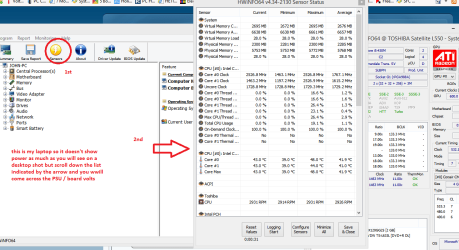
You can check the volts to on the machines with HW Info you can check the voltages on the rails and CMOS battery. HWiNFO, HWiNFO32/64 - Download < get the right bit version
se pic for readout - it is mine unfortunately a laptop so slightly different to a desktop. But you should get the gist of it. You are looking for a readout called Vbatt


Using HW Info

DownloadHW Info and pick the right bit version - HWiNFO, HWiNFO32/64 - Download -(copy and paste this site into the search bar) If you do not need the runninginformation in the smaller right hand panel close it. In the left hand windowclick on the + for the individual device groupings and they will open out tothe various components.

Goon opening out further until you get to the device itself. click on it and itwill highlight. In the right hand window there will be a very detaileddescription of that device as in brand, speeds model number etc etc These arevery detailed and are just what is needed for searching for drivers etc.

Seemy pic for an example - in this I have opened out my memory and thenhighlighted one of the sticks and you can see the detail.
 

Attachments

  • HWINFO-POWER.PNG
    HWINFO-POWER.PNG
    50.5 KB · Views: 1

My Computer

Computer type
PC/Desktop
Computer Manufacturer/Model Number
Own build (new) Desk1 / Asus ROG Win 7 / Desk2 1st build
OS
Desk1 7 Home Prem / Desk2 10 Pro / Main lap Asus ROG 10 Pro 2 laptop Toshiba 7 Pro Asus P2520 7 & 10
CPU
Desk1 i5 3750K / Laptop i7 GTX 860M / Desk2 i5 2500
Motherboard
Desk1 Asus P877-V / Desk2 Gigabyte H67 UD3H / Laptop ?
Memory
Desk1 8GB (1866) / Desk2 16GB (1333) / Laptop 8Gb DDR3
Graphics Card(s)
Desk 1& 2NVidia GTX 650 & Laptops on board Intel
Sound Card
Desk 1 & 2 -XONAR DG Realtek High Def audio Laptop
Monitor(s) Displays
Desk 1 Benq HD 2450 / Desk2 Philips 24" / Laptop 17.5"
Screen Resolution
1920x1080 D1 & D2 & Laptop 1
Hard Drives
Desk1 Samsung 120GB 830 SSD
Asus ROG 256GB 850 Pro SSD
Desk2 Samsung 840 256 SSD
Toshiba 120GB EVO
PSU
Desk 1 Corsair HX 1050/ Laptop ? / Desk 2 Corsair HX 650
Case
Desk 1 Cooler HAF XM ? Toshiba laptop / Desk2 Coolermaster
Cooling
Fans on all Desk1 -2 Desk2 - all Coolermasters 5 Laptop ?
Keyboard
Desk 1 MS Sidewinder X6 Desk 2 MS Sidewinder X 4
Mouse
Desk 1&2 - Gigabyte MS 900 gamer - laptop - Logitec wireless
Internet Speed
ADSL2+
Other Info
One other Desktop (tester) and spare Toshba laptop both with SSD's
Running Kaspersky 2016 ISS on all machines config'd identically
Logitec audio stereo systems on each machine (x3)
Canon MG5250MFC
Router/modem TP-Link running WPA2SK
Thanks, I'll try that.
I know ebay is dicey but 16GB of XMS3 DDR3 RAM costs £130 on Amazon and I needed to upgrade 2 PCs.
£260 is a lot to spend.

What bothers me is that I've tried the new stick on each of the 2 PCs and in each of the DIMM slots.
I get the same result in all cases.
It seems to point to the new stick being faulty.
By the way, every stick is identical. They are all Corsair XMS3 DDR3 4GB apiece. The only difference is the "Version number" whatever that is.
 

My Computer

Computer type
PC/Desktop
Computer Manufacturer/Model Number
dell 780
OS
Windows 7 Ultimate x64
CPU
e7500
Motherboard
Intel Q45 / Q43 Southbridge 82801JB
Memory
PC3 8500F Kingston 2GB
Graphics Card(s)
Intel Q45 / Q43
Hard Drives
500GB
Antivirus
AVG Business Edn
Browser
Google Chrome
Sean just out of interest do you have to have 16GB in each machine. I think generally speaking unless you are going to be doing some super RAM hungry programs in say high end graphics work / intensive gaming mate then 8GB would be plenty.

Having said that I have just had a quick look at the UK sites and yes it is expensive. It is abit like out here we pay far more than our US cousins:(
 

My Computer

Computer type
PC/Desktop
Computer Manufacturer/Model Number
Own build (new) Desk1 / Asus ROG Win 7 / Desk2 1st build
OS
Desk1 7 Home Prem / Desk2 10 Pro / Main lap Asus ROG 10 Pro 2 laptop Toshiba 7 Pro Asus P2520 7 & 10
CPU
Desk1 i5 3750K / Laptop i7 GTX 860M / Desk2 i5 2500
Motherboard
Desk1 Asus P877-V / Desk2 Gigabyte H67 UD3H / Laptop ?
Memory
Desk1 8GB (1866) / Desk2 16GB (1333) / Laptop 8Gb DDR3
Graphics Card(s)
Desk 1& 2NVidia GTX 650 & Laptops on board Intel
Sound Card
Desk 1 & 2 -XONAR DG Realtek High Def audio Laptop
Monitor(s) Displays
Desk 1 Benq HD 2450 / Desk2 Philips 24" / Laptop 17.5"
Screen Resolution
1920x1080 D1 & D2 & Laptop 1
Hard Drives
Desk1 Samsung 120GB 830 SSD
Asus ROG 256GB 850 Pro SSD
Desk2 Samsung 840 256 SSD
Toshiba 120GB EVO
PSU
Desk 1 Corsair HX 1050/ Laptop ? / Desk 2 Corsair HX 650
Case
Desk 1 Cooler HAF XM ? Toshiba laptop / Desk2 Coolermaster
Cooling
Fans on all Desk1 -2 Desk2 - all Coolermasters 5 Laptop ?
Keyboard
Desk 1 MS Sidewinder X6 Desk 2 MS Sidewinder X 4
Mouse
Desk 1&2 - Gigabyte MS 900 gamer - laptop - Logitec wireless
Internet Speed
ADSL2+
Other Info
One other Desktop (tester) and spare Toshba laptop both with SSD's
Running Kaspersky 2016 ISS on all machines config'd identically
Logitec audio stereo systems on each machine (x3)
Canon MG5250MFC
Router/modem TP-Link running WPA2SK
I suppose I was a bit greedy.
I use my PCs quite a bit and download lots of bittorrent stuff.
If you have several files downloading at once it seems to use lots of memory resource.
Probably I didn't actually need 16GB each, but that is what I bought.

I'm just surprised that a brand new stick, sent all the way from Taiwan, would appear faulty on receipt.
 

My Computer

Computer type
PC/Desktop
Computer Manufacturer/Model Number
dell 780
OS
Windows 7 Ultimate x64
CPU
e7500
Motherboard
Intel Q45 / Q43 Southbridge 82801JB
Memory
PC3 8500F Kingston 2GB
Graphics Card(s)
Intel Q45 / Q43
Hard Drives
500GB
Antivirus
AVG Business Edn
Browser
Google Chrome
No it wasn't being greedy mate I did the exact same thing when I did my two larger builds and then found 8GB stacks for really just about anything - so you are not alone in reckoning more is better.
Both my Ivy Bridge and Sandy Bridge both have been cut back to 8GB and although I don't do a lot in the way of graphics I reckon I can do most of what I want.

Yes it is annoying to get stuff that is no good but as I mentioned before stuff from Ebay if that is where it came from is very hit and miss on what you get because a lot of that stuff is probably stripped from old machines and sold as slightly used or whatever.
 

My Computer

Computer type
PC/Desktop
Computer Manufacturer/Model Number
Own build (new) Desk1 / Asus ROG Win 7 / Desk2 1st build
OS
Desk1 7 Home Prem / Desk2 10 Pro / Main lap Asus ROG 10 Pro 2 laptop Toshiba 7 Pro Asus P2520 7 & 10
CPU
Desk1 i5 3750K / Laptop i7 GTX 860M / Desk2 i5 2500
Motherboard
Desk1 Asus P877-V / Desk2 Gigabyte H67 UD3H / Laptop ?
Memory
Desk1 8GB (1866) / Desk2 16GB (1333) / Laptop 8Gb DDR3
Graphics Card(s)
Desk 1& 2NVidia GTX 650 & Laptops on board Intel
Sound Card
Desk 1 & 2 -XONAR DG Realtek High Def audio Laptop
Monitor(s) Displays
Desk 1 Benq HD 2450 / Desk2 Philips 24" / Laptop 17.5"
Screen Resolution
1920x1080 D1 & D2 & Laptop 1
Hard Drives
Desk1 Samsung 120GB 830 SSD
Asus ROG 256GB 850 Pro SSD
Desk2 Samsung 840 256 SSD
Toshiba 120GB EVO
PSU
Desk 1 Corsair HX 1050/ Laptop ? / Desk 2 Corsair HX 650
Case
Desk 1 Cooler HAF XM ? Toshiba laptop / Desk2 Coolermaster
Cooling
Fans on all Desk1 -2 Desk2 - all Coolermasters 5 Laptop ?
Keyboard
Desk 1 MS Sidewinder X6 Desk 2 MS Sidewinder X 4
Mouse
Desk 1&2 - Gigabyte MS 900 gamer - laptop - Logitec wireless
Internet Speed
ADSL2+
Other Info
One other Desktop (tester) and spare Toshba laptop both with SSD's
Running Kaspersky 2016 ISS on all machines config'd identically
Logitec audio stereo systems on each machine (x3)
Canon MG5250MFC
Router/modem TP-Link running WPA2SK
Thank you.
The problem now is with a brand new stick, sent via UPS direct from Taiwan.
I was extremely impressed with their tracking data. It showed every step from Taiwan, to AbuDhabi, to India, to Germany, to Netherlands and over to the UK.
I was less than impressed with the stick when it arrived but it might just be the system cmos battery which is now 4 years old in both PCs.

Once the PC is switched on, is the system voltage maintained from the power supply?
I thought the cmos just maintained settings when the PC was off.
 

My Computer

Computer type
PC/Desktop
Computer Manufacturer/Model Number
dell 780
OS
Windows 7 Ultimate x64
CPU
e7500
Motherboard
Intel Q45 / Q43 Southbridge 82801JB
Memory
PC3 8500F Kingston 2GB
Graphics Card(s)
Intel Q45 / Q43
Hard Drives
500GB
Antivirus
AVG Business Edn
Browser
Google Chrome
The answer seems a bit closer.
I emailed the technical team at Corsair in USA.
This is their reply:
Based on Intel's specification for their Q45 chipset, the memory controller can read up to 2Gb IC modules:

2Gb IC, single rank (8 IC chips total on module) = 2GB module
2Gb IC, dual rank (16 IC chips on module) = 4GB module
4Gb IC, single rank (8 IC) = 4GB module

As you can see, there are two ways to create a memory module - a dual rank, lower density IC or a single rank, high density IC. If the CMX4GX3M1A1333C9 does not work on your system, it is more than likely that it is based on the 4Gb IC technology which the Q45 chipset cannot use. I mentioned "likely" because the IC chip market is very dynamic and as such, our modules are manufactured based on the availability of these chips.

The problem is that they don't distinguish between 4GB modules that are low density or high density.
How daft is that?

I changed the cmos battery and drained residual current before putting the new CR2032 battery in. No good.
I think I have my answer now and will update this post when Corsair decide what they can do.
 

My Computer

Computer type
PC/Desktop
Computer Manufacturer/Model Number
dell 780
OS
Windows 7 Ultimate x64
CPU
e7500
Motherboard
Intel Q45 / Q43 Southbridge 82801JB
Memory
PC3 8500F Kingston 2GB
Graphics Card(s)
Intel Q45 / Q43
Hard Drives
500GB
Antivirus
AVG Business Edn
Browser
Google Chrome
Sean I don't quite understand what you mean by the system voltage being maintained from the power supply because that is the only place it can come from. It is maintained by the Power_Good signal see this Power good signal - Wikipedia, the free encyclopedia
It is the signal at pin 8 (grey cable) on the 24 pin socket and that has to be between 2.4v and 6v for the machine to start powering up otherwise it will not boot and if it goes outside of those limits it will shut down because it is sensing the machine is not getting the correct voltages.

If I can find the Tomshardware link I will send it to you. So the CMOS battery is only for maintaining the time and ate and BIOS details of course.

Yes it is annoying and you should ask them to be a bit more specific on the densities.

PS http://www.tomshardware.com/reviews/power-supply-specifications-atx-reference,3061.html
a very good reference and go to page 2 for the Power_Good info
John
 

My Computer

Computer type
PC/Desktop
Computer Manufacturer/Model Number
Own build (new) Desk1 / Asus ROG Win 7 / Desk2 1st build
OS
Desk1 7 Home Prem / Desk2 10 Pro / Main lap Asus ROG 10 Pro 2 laptop Toshiba 7 Pro Asus P2520 7 & 10
CPU
Desk1 i5 3750K / Laptop i7 GTX 860M / Desk2 i5 2500
Motherboard
Desk1 Asus P877-V / Desk2 Gigabyte H67 UD3H / Laptop ?
Memory
Desk1 8GB (1866) / Desk2 16GB (1333) / Laptop 8Gb DDR3
Graphics Card(s)
Desk 1& 2NVidia GTX 650 & Laptops on board Intel
Sound Card
Desk 1 & 2 -XONAR DG Realtek High Def audio Laptop
Monitor(s) Displays
Desk 1 Benq HD 2450 / Desk2 Philips 24" / Laptop 17.5"
Screen Resolution
1920x1080 D1 & D2 & Laptop 1
Hard Drives
Desk1 Samsung 120GB 830 SSD
Asus ROG 256GB 850 Pro SSD
Desk2 Samsung 840 256 SSD
Toshiba 120GB EVO
PSU
Desk 1 Corsair HX 1050/ Laptop ? / Desk 2 Corsair HX 650
Case
Desk 1 Cooler HAF XM ? Toshiba laptop / Desk2 Coolermaster
Cooling
Fans on all Desk1 -2 Desk2 - all Coolermasters 5 Laptop ?
Keyboard
Desk 1 MS Sidewinder X6 Desk 2 MS Sidewinder X 4
Mouse
Desk 1&2 - Gigabyte MS 900 gamer - laptop - Logitec wireless
Internet Speed
ADSL2+
Other Info
One other Desktop (tester) and spare Toshba laptop both with SSD's
Running Kaspersky 2016 ISS on all machines config'd identically
Logitec audio stereo systems on each machine (x3)
Canon MG5250MFC
Router/modem TP-Link running WPA2SK
Thank you. Very helpful.
Corsair seem embarrassed as this is a known problem.
They use exactly the same item number (SKU) whether their modules contain high density or low density chips.
The former is OK for 10% of PCs and the latter for 100% of PCs.
I think that's significant.
They don't.
 

My Computer

Computer type
PC/Desktop
Computer Manufacturer/Model Number
dell 780
OS
Windows 7 Ultimate x64
CPU
e7500
Motherboard
Intel Q45 / Q43 Southbridge 82801JB
Memory
PC3 8500F Kingston 2GB
Graphics Card(s)
Intel Q45 / Q43
Hard Drives
500GB
Antivirus
AVG Business Edn
Browser
Google Chrome
I now have the solution to my problem and will never buy Corsair Ram again.
Just to walk you through the story, if anyone is interested:

1. A 4GB stick went faulty and was returned to Corsair's Netherlands facility.
2. Netherlands received it and ordered despatch of a new 4GB stick from Taiwan. That stick turned out to be high-density, single rank.
3. I returned that to NL and had to also give them a perfectly good stick of dual-rank ram as they claimed the dual-rank was now only available as an 8GB pair.
4. They sent 2 sticks of single rank ram
5. I queried and they said it was a "picking error"
6. I had to return them to NL.
7. They sent another 2 sticks of single-rank. I queried and they said it was a "production error"
8. I returned it to NL
9. They finally sent the correct 8GB of dual rank dimms.
 

My Computer

Computer type
PC/Desktop
Computer Manufacturer/Model Number
dell 780
OS
Windows 7 Ultimate x64
CPU
e7500
Motherboard
Intel Q45 / Q43 Southbridge 82801JB
Memory
PC3 8500F Kingston 2GB
Graphics Card(s)
Intel Q45 / Q43
Hard Drives
500GB
Antivirus
AVG Business Edn
Browser
Google Chrome
Hum seems you did get the run around shame really as I have had nothing but good stuff from Corsair.
 

My Computer

Computer type
PC/Desktop
Computer Manufacturer/Model Number
Own build (new) Desk1 / Asus ROG Win 7 / Desk2 1st build
OS
Desk1 7 Home Prem / Desk2 10 Pro / Main lap Asus ROG 10 Pro 2 laptop Toshiba 7 Pro Asus P2520 7 & 10
CPU
Desk1 i5 3750K / Laptop i7 GTX 860M / Desk2 i5 2500
Motherboard
Desk1 Asus P877-V / Desk2 Gigabyte H67 UD3H / Laptop ?
Memory
Desk1 8GB (1866) / Desk2 16GB (1333) / Laptop 8Gb DDR3
Graphics Card(s)
Desk 1& 2NVidia GTX 650 & Laptops on board Intel
Sound Card
Desk 1 & 2 -XONAR DG Realtek High Def audio Laptop
Monitor(s) Displays
Desk 1 Benq HD 2450 / Desk2 Philips 24" / Laptop 17.5"
Screen Resolution
1920x1080 D1 & D2 & Laptop 1
Hard Drives
Desk1 Samsung 120GB 830 SSD
Asus ROG 256GB 850 Pro SSD
Desk2 Samsung 840 256 SSD
Toshiba 120GB EVO
PSU
Desk 1 Corsair HX 1050/ Laptop ? / Desk 2 Corsair HX 650
Case
Desk 1 Cooler HAF XM ? Toshiba laptop / Desk2 Coolermaster
Cooling
Fans on all Desk1 -2 Desk2 - all Coolermasters 5 Laptop ?
Keyboard
Desk 1 MS Sidewinder X6 Desk 2 MS Sidewinder X 4
Mouse
Desk 1&2 - Gigabyte MS 900 gamer - laptop - Logitec wireless
Internet Speed
ADSL2+
Other Info
One other Desktop (tester) and spare Toshba laptop both with SSD's
Running Kaspersky 2016 ISS on all machines config'd identically
Logitec audio stereo systems on each machine (x3)
Canon MG5250MFC
Router/modem TP-Link running WPA2SK
In fairness, it only cost me £12 to send the first stick back to Netherlands. Every other collection and delivery was done by UPS and paid for by Corsair. I suppose they have a massive transport contract.

In summary then. I reckon Corsair has very poor QC procedures but very good customer service back-up.
Next time I'll use Kingston or Crucial.
It took 6 weeks to resolve with Corsair and I really don't want to go through this again.
 

My Computer

Computer type
PC/Desktop
Computer Manufacturer/Model Number
dell 780
OS
Windows 7 Ultimate x64
CPU
e7500
Motherboard
Intel Q45 / Q43 Southbridge 82801JB
Memory
PC3 8500F Kingston 2GB
Graphics Card(s)
Intel Q45 / Q43
Hard Drives
500GB
Antivirus
AVG Business Edn
Browser
Google Chrome
Sean I think maybe you should consider G Skill too mate I use it almost exclusively now for my builds and the advice from Tradesman here Welcome to the G.SKILL TECH FORUM is second to none especially for specific boards - that isn't to say members here do not have the knowledge more that this bloke is specific.
The other upside is that I find G Skill tends to be a little cheaper than the other brands.
 

My Computer

Computer type
PC/Desktop
Computer Manufacturer/Model Number
Own build (new) Desk1 / Asus ROG Win 7 / Desk2 1st build
OS
Desk1 7 Home Prem / Desk2 10 Pro / Main lap Asus ROG 10 Pro 2 laptop Toshiba 7 Pro Asus P2520 7 & 10
CPU
Desk1 i5 3750K / Laptop i7 GTX 860M / Desk2 i5 2500
Motherboard
Desk1 Asus P877-V / Desk2 Gigabyte H67 UD3H / Laptop ?
Memory
Desk1 8GB (1866) / Desk2 16GB (1333) / Laptop 8Gb DDR3
Graphics Card(s)
Desk 1& 2NVidia GTX 650 & Laptops on board Intel
Sound Card
Desk 1 & 2 -XONAR DG Realtek High Def audio Laptop
Monitor(s) Displays
Desk 1 Benq HD 2450 / Desk2 Philips 24" / Laptop 17.5"
Screen Resolution
1920x1080 D1 & D2 & Laptop 1
Hard Drives
Desk1 Samsung 120GB 830 SSD
Asus ROG 256GB 850 Pro SSD
Desk2 Samsung 840 256 SSD
Toshiba 120GB EVO
PSU
Desk 1 Corsair HX 1050/ Laptop ? / Desk 2 Corsair HX 650
Case
Desk 1 Cooler HAF XM ? Toshiba laptop / Desk2 Coolermaster
Cooling
Fans on all Desk1 -2 Desk2 - all Coolermasters 5 Laptop ?
Keyboard
Desk 1 MS Sidewinder X6 Desk 2 MS Sidewinder X 4
Mouse
Desk 1&2 - Gigabyte MS 900 gamer - laptop - Logitec wireless
Internet Speed
ADSL2+
Other Info
One other Desktop (tester) and spare Toshba laptop both with SSD's
Running Kaspersky 2016 ISS on all machines config'd identically
Logitec audio stereo systems on each machine (x3)
Canon MG5250MFC
Router/modem TP-Link running WPA2SK
ram issues

dell OptiPlex 780 dt , my dell uses dual ranked ram as opposed to single rank , I had the same issues when I tried to use the singke rank , no boot , no screen , machine fan would start , audio codes emitted , plus light flashing codes , memory codes !
 

My Computer

Computer type
PC/Desktop
Computer Manufacturer/Model Number
dell
OS
win 7
CPU
itel duocore
Motherboard
????
Memory
ddr3 dual rank
Graphics Card(s)
on board
Hard Drives
sata 250
Antivirus
axg
Browser
ie
single rank is faster and more exspensive , its faster because it makes one loop , where dual rank makes two loops
 

My Computer

Computer type
PC/Desktop
Computer Manufacturer/Model Number
dell
OS
win 7
CPU
itel duocore
Motherboard
????
Memory
ddr3 dual rank
Graphics Card(s)
on board
Hard Drives
sata 250
Antivirus
axg
Browser
ie
Back
Top