RAM Timings

manolz

New member
Member
VIP
Local time
11:53 AM
Messages
119
Hi, I've got 2 1600MHZ Patriot Sticks, The latest 4GB 2x2gb pc3-12800 1600mhz sticks I installed are running at a slower timing as my other 2 sticks at the minute. Do these need to be overclocked?

http://img84.imageshack.us/img84/5486/ramw.jpg

or underclocked rather?, (So they all can run at 1333, or 1600mhz even)
any experiance
thanks
 

My Computer

OS
Windows 7 x64
CPU
AMD i5 2500k
Motherboard
ASRock z68 Extreme3 Gen7
Memory
16GB DDR3 1600 Corsair Vengeance
Graphics Card(s)
6950 2GB Sapphire
Sound Card
USB Tascam MK II
Monitor(s) Displays
Samsung 27" S27A950 + LG 23" W2353V
Screen Resolution
1920x1080
Hard Drives
Crucial 128MB M4
WD2002FAEX
500GB Seagate 7200.11
PSU
Seasonic X850
Case
FT03
Cooling
N/A
Sorry, you can't OC specific RAM slots. All the RAM wil default to the lowest "speed" of the RAM installed. Unless you install two more 1600MHz sticks, it will all run at 1066MHz. Also you could remove the two 1066MHz modules and get your 1600MHz at stock speed.
 

My Computer

Computer type
PC/Desktop
Computer Manufacturer/Model Number
Home Built Desktop By DataTech
OS
Windows 7 Ultimate X64 SP1
CPU
Intel i5-2550K, Differing ~4.4-4.8GHz No built in GPU
Motherboard
ASUS P8Z68-V PRO/GEN3
Memory
16GB G.Skill Sniper 1866MHz @ 2133MHz 2x8GB
Graphics Card(s)
ASUS GTX650TIB-DC2OC-2GD5, (650TI Boost)
Sound Card
Onboard Realtek 5-1
Monitor(s) Displays
Samsung P2570HD
Screen Resolution
1920x1080
Hard Drives
Samsung 840 Pro 256GB SSD for OS, 500GB Seagate Constellation (Enterprise drive) for Data
PSU
Corsair HX650W
Case
Inwin Dragon Rider
Cooling
Hyper 212 EVO w/two Noctua fans, push-pull, @1300 RPM
Keyboard
E-Z Eyes, bright yellow keys with large characters
Mouse
steelseries SENSEI Laser Pro Gaming
Internet Speed
48-51Mbs Mbs down, 11 Mbs up Xfinity Cable
Antivirus
Norton Internet Security 2013
Browser
IE 10, Opera, Pale Moon if needed
Other Info
4 case fans, LG BluRay-RE, ASUS DVD-RW, Mr. Fusion power supply, 1.21 gigawatts.
are there 2 ram slots on my motherboard capped to 1066mhz??
my motherboard is gigabyte 890gpa-ud3h, both sticks have labelled on the Ram package PC-12800 1600mhz.

are only 2 sticks on my board allowed to run at 1600mhz? not really sure why this is, looks like I can't use 2 of my sticks at the minute
 

My Computer

OS
Windows 7 x64
CPU
AMD i5 2500k
Motherboard
ASRock z68 Extreme3 Gen7
Memory
16GB DDR3 1600 Corsair Vengeance
Graphics Card(s)
6950 2GB Sapphire
Sound Card
USB Tascam MK II
Monitor(s) Displays
Samsung 27" S27A950 + LG 23" W2353V
Screen Resolution
1920x1080
Hard Drives
Crucial 128MB M4
WD2002FAEX
500GB Seagate 7200.11
PSU
Seasonic X850
Case
FT03
Cooling
N/A
Looking at your image, it suggests that you don't have a matched set and they are 2 different types of ram with different latency's etc. as a result as has been previously suggested at best you would only get the lower speed.
your Bios should give you the overall set speed or use something like CPUZ which will again give a total set speed.
 

My Computer

Computer Manufacturer/Model Number
home built PC. Laptop studio1557
OS
windows 7 64 bit and dual boot Pinguyos
CPU
PC, intel i7 920 2.7ghz, laptop i7 720
Motherboard
PC, Asus P6t .laptop probably rubbish from dell
Memory
PC 6GB, laptop 2GB, me 2 seconds after 6 pints
Graphics Card(s)
PC Asus eah5870,laptop, ati hd 4580
Monitor(s) Displays
Sharp 42" HD TV using HDMI + HDMI to onkyo surround amp
Screen Resolution
1920x1080
Hard Drives
1x ssd OCZ 60GB, 2x250GB raid0, 2x1TB (storage),2TB
PSU
OCZ 700w
Case
antec 902
Cooling
antec khuler h20 920
Keyboard
logitek wave
Mouse
x8 sidewinder
Internet Speed
dog slow
are there 2 ram slots on my motherboard capped to 1066mhz??
my motherboard is gigabyte 890gpa-ud3h, both sticks have labeled on the Ram package PC-12800 1600mhz.

are only 2 sticks on my board allowed to run at 1600mhz? not really sure why this is, looks like I can't use 2 of my sticks at the minute
It is a limitation of all motherboards. RAM will run at the speed of the slowest you have installed, regardless of the speed of any other RAM sticks or what slots you have them in. You will get the 1600MHz only if you:
1. remove the 1066MHz RAM
2. Replace the 1066MHZ with 1600MHz.
the BIOS will treat any RAM you have installed with the 1066MHz as 1066MHz, no matter what the label reads.
 

My Computer

Computer type
PC/Desktop
Computer Manufacturer/Model Number
Home Built Desktop By DataTech
OS
Windows 7 Ultimate X64 SP1
CPU
Intel i5-2550K, Differing ~4.4-4.8GHz No built in GPU
Motherboard
ASUS P8Z68-V PRO/GEN3
Memory
16GB G.Skill Sniper 1866MHz @ 2133MHz 2x8GB
Graphics Card(s)
ASUS GTX650TIB-DC2OC-2GD5, (650TI Boost)
Sound Card
Onboard Realtek 5-1
Monitor(s) Displays
Samsung P2570HD
Screen Resolution
1920x1080
Hard Drives
Samsung 840 Pro 256GB SSD for OS, 500GB Seagate Constellation (Enterprise drive) for Data
PSU
Corsair HX650W
Case
Inwin Dragon Rider
Cooling
Hyper 212 EVO w/two Noctua fans, push-pull, @1300 RPM
Keyboard
E-Z Eyes, bright yellow keys with large characters
Mouse
steelseries SENSEI Laser Pro Gaming
Internet Speed
48-51Mbs Mbs down, 11 Mbs up Xfinity Cable
Antivirus
Norton Internet Security 2013
Browser
IE 10, Opera, Pale Moon if needed
Other Info
4 case fans, LG BluRay-RE, ASUS DVD-RW, Mr. Fusion power supply, 1.21 gigawatts.
sektor5.jpg


this is the new sektor5 ram i bought of PCCG a couple days ago
this is the speed its running at, my old patriot memory was running at 1600mhz previously,

it has designed for Intel, and ive been told intel ram isn't fussy with AMD. any assistance?
anything in BIOS i can do to OC the timings to where they should be, or should I return this memory (most likely sell it on OC boards) and buy the patriot memory I'm using atm
thanks
 

My Computer

OS
Windows 7 x64
CPU
AMD i5 2500k
Motherboard
ASRock z68 Extreme3 Gen7
Memory
16GB DDR3 1600 Corsair Vengeance
Graphics Card(s)
6950 2GB Sapphire
Sound Card
USB Tascam MK II
Monitor(s) Displays
Samsung 27" S27A950 + LG 23" W2353V
Screen Resolution
1920x1080
Hard Drives
Crucial 128MB M4
WD2002FAEX
500GB Seagate 7200.11
PSU
Seasonic X850
Case
FT03
Cooling
N/A
the name of my ram states Patriot 1600, it should be running at 1600mhz this is absurd. I'll have to return these sticks if no one has an advancement. Ill be buying the same sticks I previously had in my system (waiting for reply)
 

My Computer

OS
Windows 7 x64
CPU
AMD i5 2500k
Motherboard
ASRock z68 Extreme3 Gen7
Memory
16GB DDR3 1600 Corsair Vengeance
Graphics Card(s)
6950 2GB Sapphire
Sound Card
USB Tascam MK II
Monitor(s) Displays
Samsung 27" S27A950 + LG 23" W2353V
Screen Resolution
1920x1080
Hard Drives
Crucial 128MB M4
WD2002FAEX
500GB Seagate 7200.11
PSU
Seasonic X850
Case
FT03
Cooling
N/A
ramsj.jpg


this is the speed my rams running at now
is this Slow compared to where it should be?
shouldnt my mhz be at 1600mhz? (I believe this RAM i have running is also intended for Intel chipsets)
Can anyone recommend me RAM that runs at 1600mhz SOLID for AMD chips compatatible with my GB 890gpa-ud3h
motherboard.
appreciate it thanks
 

My Computer

OS
Windows 7 x64
CPU
AMD i5 2500k
Motherboard
ASRock z68 Extreme3 Gen7
Memory
16GB DDR3 1600 Corsair Vengeance
Graphics Card(s)
6950 2GB Sapphire
Sound Card
USB Tascam MK II
Monitor(s) Displays
Samsung 27" S27A950 + LG 23" W2353V
Screen Resolution
1920x1080
Hard Drives
Crucial 128MB M4
WD2002FAEX
500GB Seagate 7200.11
PSU
Seasonic X850
Case
FT03
Cooling
N/A
the name of my ram states Patriot 1600, it should be running at 1600mhz this is absurd. I'll have to return these sticks if no one has an advancement. Ill be buying the same sticks I previously had in my system (waiting for reply)
Just because they are rated to run up to 1600 Mhz, doesn't mean they will. If you have slower memory in your computer, then your 1600 Mhz sticks will be running down at that speed. This is the way it is and always has been. It is not a defect, nor is it something to be worried/angered/care about. There is nothing absurd about it.
 

My Computer

OS
Windows 7 Ultimate x64 SP1
CPU
Intel Core i7-2600
Motherboard
Gigabyte GA-P67A-UD3P-B3
Memory
12 GB Patriot Extreme DDR3-1333
Graphics Card(s)
Nvidia GTX 470
Monitor(s) Displays
Dell UltraSharp 2209WA
Hard Drives
OCZ Agility3 240 GB, WD5001AALS, WD7501AALS
PSU
OCZ ModStream 700W
Case
CoolerMaster HAF 912 Advanced
Cooling
CoolerMaster Hyper 212 Plus
Do this, Remove the 1066MHz sticks and see what you get. Put them in a drawer. Buy 2 more 1600MHz indentical to what you now have, put them in.
In BIOS set CPU NB FREQ to X11
CPU FREQ 200
Mem clock/Manual, X8
 

My Computer

Computer type
PC/Desktop
Computer Manufacturer/Model Number
Home Built Desktop By DataTech
OS
Windows 7 Ultimate X64 SP1
CPU
Intel i5-2550K, Differing ~4.4-4.8GHz No built in GPU
Motherboard
ASUS P8Z68-V PRO/GEN3
Memory
16GB G.Skill Sniper 1866MHz @ 2133MHz 2x8GB
Graphics Card(s)
ASUS GTX650TIB-DC2OC-2GD5, (650TI Boost)
Sound Card
Onboard Realtek 5-1
Monitor(s) Displays
Samsung P2570HD
Screen Resolution
1920x1080
Hard Drives
Samsung 840 Pro 256GB SSD for OS, 500GB Seagate Constellation (Enterprise drive) for Data
PSU
Corsair HX650W
Case
Inwin Dragon Rider
Cooling
Hyper 212 EVO w/two Noctua fans, push-pull, @1300 RPM
Keyboard
E-Z Eyes, bright yellow keys with large characters
Mouse
steelseries SENSEI Laser Pro Gaming
Internet Speed
48-51Mbs Mbs down, 11 Mbs up Xfinity Cable
Antivirus
Norton Internet Security 2013
Browser
IE 10, Opera, Pale Moon if needed
Other Info
4 case fans, LG BluRay-RE, ASUS DVD-RW, Mr. Fusion power supply, 1.21 gigawatts.
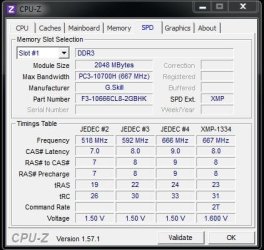
When you buy ram, it often does not run at the stated speed out of the box.
For safety and stability reasons, motherboards are built to down clock the ram, if necessary.
Your ram will run at 1600 MHz, but you have to change the timings in the BIOS.

If you look at your CPU-Z, it will give you the timings that your RAM will run at.
Notice the timings, frequency and the voltage that it recommends.

In my example, when I bought my RAM, it was advertised as 8-8-8-21, DDR3 1333, 1.5V.
Every motherboard I've tried it in, runs it at 9-9-9-24, with is great, because if it ran at the advertised 8-8-8-21, it would run at 592 MHz or double the data rate, 1184.

Capture.JPG
 

My Computer

Computer type
PC/Desktop
Computer Manufacturer/Model Number
Custom Build
OS
Windows 7 Home Premium 64 bit
CPU
Intel Core i7-4790
Motherboard
GA-Z87X-D3H
Memory
G.SKILL 8GB (2 x 4GB) DDR3 F3-10666CL9D-8GBNT
Graphics Card(s)
AMD Radeon R7 250
Sound Card
Realtek ALC892
Monitor(s) Displays
Samsung UN32EH5000, Dell 1703FPT
Screen Resolution
1920 x 1080, 1280 x 1024
Hard Drives
WD5003AZEX
WD10EZEX
Samsung HD103SJ
Samsung 128 GB 840 PRO
PSU
SeaSonic M12II SS-500GM
Case
Fractal Design Define R4
Cooling
Zalman CNPS9900ALED
Keyboard
Logitech K800
Mouse
Logitech M705
Internet Speed
16 Mbps
Antivirus
Avast
Browser
Firefox
Other Info
Bose Companion 2 Multimedia Speakers
ramcpu.jpg

20110830093840.jpg

20110830094003.jpg


The CPU NB Freq only goes up to 10
my CPU Freq is set at 200
I went along to the DRAM freq and increased it to x8.00 to run at 1600mhz, my CPUZ shows the ram speed it's running at.
Correct me if I'm wrong but my RAM still isn't running at 1600 (It's running at 800mhz I believe?)
Thanks, I'd like it to run at at least 1333mhz.
Also, You were saying how the RAM is running at 1066mhz and to remove those sticks, The RAM i've purchased is 1600mhz (PSD32G 16002 1600mhz CL9), whys is running so slow?
Do I have to discard all my sticks and buy new ones to run into the same problem again?, Can I OC?
thanks
 

My Computer

OS
Windows 7 x64
CPU
AMD i5 2500k
Motherboard
ASRock z68 Extreme3 Gen7
Memory
16GB DDR3 1600 Corsair Vengeance
Graphics Card(s)
6950 2GB Sapphire
Sound Card
USB Tascam MK II
Monitor(s) Displays
Samsung 27" S27A950 + LG 23" W2353V
Screen Resolution
1920x1080
Hard Drives
Crucial 128MB M4
WD2002FAEX
500GB Seagate 7200.11
PSU
Seasonic X850
Case
FT03
Cooling
N/A
my max bandwidth is PC3-8500F (533mhz)
whys this?
 

My Computer

OS
Windows 7 x64
CPU
AMD i5 2500k
Motherboard
ASRock z68 Extreme3 Gen7
Memory
16GB DDR3 1600 Corsair Vengeance
Graphics Card(s)
6950 2GB Sapphire
Sound Card
USB Tascam MK II
Monitor(s) Displays
Samsung 27" S27A950 + LG 23" W2353V
Screen Resolution
1920x1080
Hard Drives
Crucial 128MB M4
WD2002FAEX
500GB Seagate 7200.11
PSU
Seasonic X850
Case
FT03
Cooling
N/A
evereste.png


any comments?
 

My Computer

OS
Windows 7 x64
CPU
AMD i5 2500k
Motherboard
ASRock z68 Extreme3 Gen7
Memory
16GB DDR3 1600 Corsair Vengeance
Graphics Card(s)
6950 2GB Sapphire
Sound Card
USB Tascam MK II
Monitor(s) Displays
Samsung 27" S27A950 + LG 23" W2353V
Screen Resolution
1920x1080
Hard Drives
Crucial 128MB M4
WD2002FAEX
500GB Seagate 7200.11
PSU
Seasonic X850
Case
FT03
Cooling
N/A
If I can get some advice ASAP would be appreciated, I need to know whether I need new RAM that will run at the timings listed (AMD RAM) or If these sticks I have currently can be made to run at 1333 / 1600mhz speeds (their both 1600 mhz sticks)
thanks.
 

My Computer

OS
Windows 7 x64
CPU
AMD i5 2500k
Motherboard
ASRock z68 Extreme3 Gen7
Memory
16GB DDR3 1600 Corsair Vengeance
Graphics Card(s)
6950 2GB Sapphire
Sound Card
USB Tascam MK II
Monitor(s) Displays
Samsung 27" S27A950 + LG 23" W2353V
Screen Resolution
1920x1080
Hard Drives
Crucial 128MB M4
WD2002FAEX
500GB Seagate 7200.11
PSU
Seasonic X850
Case
FT03
Cooling
N/A
everestl.png
 

My Computer

OS
Windows 7 x64
CPU
AMD i5 2500k
Motherboard
ASRock z68 Extreme3 Gen7
Memory
16GB DDR3 1600 Corsair Vengeance
Graphics Card(s)
6950 2GB Sapphire
Sound Card
USB Tascam MK II
Monitor(s) Displays
Samsung 27" S27A950 + LG 23" W2353V
Screen Resolution
1920x1080
Hard Drives
Crucial 128MB M4
WD2002FAEX
500GB Seagate 7200.11
PSU
Seasonic X850
Case
FT03
Cooling
N/A
Ok

here are my RAM timings for my OLD ram, Patriot PSD32G
psd32g.png


here is my everest benchmark
everestbm.png


my questions at the moment are.

is this ram i'm running now currently running at 1600mhz Properly?
If so, Should I buy another 2 of the same identical sticks i'm running now for my upgrade?

The above screenshots in my previous posts are results from the sektor5 sticks, (they're not running at full capacity)
any advice with what to do would be great

if these sticks (psd32g) aren't running at their full speed i'll happily buy new sticks (8gb,amd)
seems i'm running into too many complications, these sektor5 sticks aren't putting out 1600mhz, and i'm unsure as to whether these patriot sticks are putting out 1600mhz either so i'm happy to buy compatible sticks that will do the job without bottleneck
feedback is appreciated, if i could get some direction sometime today it would be great so i can get to work with ram for my pc
ty
 

My Computer

OS
Windows 7 x64
CPU
AMD i5 2500k
Motherboard
ASRock z68 Extreme3 Gen7
Memory
16GB DDR3 1600 Corsair Vengeance
Graphics Card(s)
6950 2GB Sapphire
Sound Card
USB Tascam MK II
Monitor(s) Displays
Samsung 27" S27A950 + LG 23" W2353V
Screen Resolution
1920x1080
Hard Drives
Crucial 128MB M4
WD2002FAEX
500GB Seagate 7200.11
PSU
Seasonic X850
Case
FT03
Cooling
N/A
Manolz, you have a AMD motherboard. Your memory controller is in your CPU. The memory controller sets the speed of the ram. An AMD system will set your frequency at either 1066 or 1333 automatically. The only way to make it run faster than that is to overclock your system which can damage the memory controller and other components in your system. When you look at CPUz the memory tab shows what your ram is running at now. You have DDR ram which means double data rate. So, if the memory tab in CPUz says your ram is running at 533, that means it is at 1066 (DDR 533 X 2 = 1066) You said yourself that your max frequency is 533. Max means that is the fastest it will run unless you overclock your ram which I am not going to tell you how to do. The problem is not your ram, it is your memory controller. On the side of the sticks of ram are the timings and voltage. Read those and set your voltage at what the sticks say. I think your ram voltage (Dram voltage in your bios) should be 1.65 but look and see. Your motherboard has set the voltage at 1.5V. I believe, if you change your dram voltage to 1.65 and set your timings at 9-9-9-24 that will be as fast as your system will run it without overclocking. As has been explained to you by several people here, just because your ram is rated at a certain speed does not mean your motherboard will run it at that speed, what it means is that the ram is capable of those speeds not that your system will run it that fast.
 

My Computers

System One System Two

  • Computer type
    PC/Desktop
    Computer Manufacturer/Model Number
    ALWAYS UNDER CONSTRUCTION
    OS
    Windows 11 Pro
    CPU
    Ryzen 9 5900X
    Motherboard
    Asus X570 Crosshair Viii Hero
    Memory
    32GB G Skill DDR4-3600
    Graphics Card(s)
    EVGA RTX 3080 FTW 3 Ultra
    Sound Card
    On Board/Sennheiser PC37X Headset
    Monitor(s) Displays
    3 X Asus 27"
    Screen Resolution
    2560x1440
    Hard Drives
    2 X 1 TB NVME drives
    PSU
    EVGA 850
    Case
    Phanteks Eclipse P400A
    Cooling
    EVGA 280 AIO
    Keyboard
    Logitech G510s/ Logitech G13
    Mouse
    Logitech G502
    Internet Speed
    24/1
    Antivirus
    ESET/MBAM Pro/SAS Pro
    Browser
    Chrome/ Firefox/ Edge
  • Computer type
    Laptop
    System Manufacturer/Model Number
    Dell 16 Plus
    OS
    Windows 11 Pro
    CPU
    Intel Ultra 9 288V
    Memory
    32 GB LPDDR5X 8533
    Monitor(s) Displays
    16" Mini-LED HDR600 Touch 90 Hz
    Screen Resolution
    2560X1600
    Hard Drives
    1 TB NVME
Ok thanks for the reply, I'll follow these steps and report back.
thanks
manolz
 

My Computer

OS
Windows 7 x64
CPU
AMD i5 2500k
Motherboard
ASRock z68 Extreme3 Gen7
Memory
16GB DDR3 1600 Corsair Vengeance
Graphics Card(s)
6950 2GB Sapphire
Sound Card
USB Tascam MK II
Monitor(s) Displays
Samsung 27" S27A950 + LG 23" W2353V
Screen Resolution
1920x1080
Hard Drives
Crucial 128MB M4
WD2002FAEX
500GB Seagate 7200.11
PSU
Seasonic X850
Case
FT03
Cooling
N/A
Ok

here are my RAM timings for my OLD ram, Patriot PSD32G
psd32g.png


here is my everest benchmark
everestbm.png


my questions at the moment are.

is this ram i'm running now currently running at 1600mhz Properly?
If so, Should I buy another 2 of the same identical sticks i'm running now for my upgrade?

The above screenshots in my previous posts are results from the sektor5 sticks, (they're not running at full capacity)
any advice with what to do would be great

if these sticks (psd32g) aren't running at their full speed i'll happily buy new sticks (8gb,amd)
seems i'm running into too many complications, these sektor5 sticks aren't putting out 1600mhz, and i'm unsure as to whether these patriot sticks are putting out 1600mhz either so i'm happy to buy compatible sticks that will do the job without bottleneck
feedback is appreciated, if i could get some direction sometime today it would be great so i can get to work with ram for my pc
ty

According to the screenshot of CPUz your ram is running at 1600. remember it is double data rate so multiply the frequency X 2.
 

My Computers

System One System Two

  • Computer type
    PC/Desktop
    Computer Manufacturer/Model Number
    ALWAYS UNDER CONSTRUCTION
    OS
    Windows 11 Pro
    CPU
    Ryzen 9 5900X
    Motherboard
    Asus X570 Crosshair Viii Hero
    Memory
    32GB G Skill DDR4-3600
    Graphics Card(s)
    EVGA RTX 3080 FTW 3 Ultra
    Sound Card
    On Board/Sennheiser PC37X Headset
    Monitor(s) Displays
    3 X Asus 27"
    Screen Resolution
    2560x1440
    Hard Drives
    2 X 1 TB NVME drives
    PSU
    EVGA 850
    Case
    Phanteks Eclipse P400A
    Cooling
    EVGA 280 AIO
    Keyboard
    Logitech G510s/ Logitech G13
    Mouse
    Logitech G502
    Internet Speed
    24/1
    Antivirus
    ESET/MBAM Pro/SAS Pro
    Browser
    Chrome/ Firefox/ Edge
  • Computer type
    Laptop
    System Manufacturer/Model Number
    Dell 16 Plus
    OS
    Windows 11 Pro
    CPU
    Intel Ultra 9 288V
    Memory
    32 GB LPDDR5X 8533
    Monitor(s) Displays
    16" Mini-LED HDR600 Touch 90 Hz
    Screen Resolution
    2560X1600
    Hard Drives
    1 TB NVME
Back
Top