
RAM upgrade

jaypels

New member
Power User
Local time
6:18 PM
Messages
162
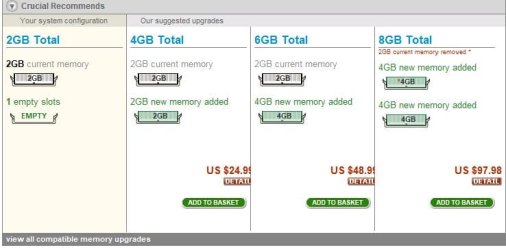
good day! i recently read this thread http://www.sevenforums.com/hardware-devices/142569-maximum-memory-per-slot.html which pparks recommended the crucial site for memory upgrade.. i visited that site and entered my laptop model (acer 4745g) and found their RAMs cheap.. i am planning to upgrade a few weeks from now (still waiting for my payday) and since i already have 2gb installed, i do not want to throw away my installed ram.. i am planning to choose option 3 (2gb installed + 4gb upgrade) and they have two choices for RAM (see attached picture)..

i also checked speccy (see attached snip) and found i have three more slots available while the crucial site only said i have two slots.. i however would tend to believe i only have two slots available since most laptops only have two and why would my laptop model be the only exception? ;) if what speccy said was true, then i would plan to purchase another 2gb (2gb installed + 4gb upgrade + 2gb upgrade) so i would fully utilize my machine..

my question would be what RAM would i buy and is it good or can you recommend from another brand? i am from the philippines by the way so i would take shipping costs into consideration.. i may have further questions but we'll start with these ones..
 

Attachments
  • Capture3.JPG
    Capture3.JPG
    37.1 KB · Views: 29
  • Capture4.JPG
    Capture4.JPG
    40.4 KB · Views: 37
  • Capture2.JPG
    Capture2.JPG
    45.6 KB · Views: 38

My Computer

Computer Manufacturer/Model Number
Desktop is a DIY and laptop is an Acer Aspire 4745
OS
7 all the way!
CPU
core 2 duo (desktop) i5 (laptop)
Motherboard
asus for desktop
Memory
2gb for both machines
Graphics Card(s)
nvidia 512mb GS for desktop; hd 5470 for laptop
Monitor(s) Displays
19" AOC 913fw
Of course you realize that if you have 32 bit Windows 7, additional ram would not serve any purpose.
 

My Computer

Computer type
PC/Desktop
Computer Manufacturer/Model Number
Dell XPS 420
OS
Windows 10, Home Clean Install
CPU
Intel Core2 processsor Q8200(2.33Ghz 1333FSB) Quad Core Tech
Motherboard
Dell
Memory
6 gb
Graphics Card(s)
ATI Radeon 256MB HD3650
Sound Card
Intergrated 7.1 Channel Audio
Monitor(s) Displays
Dell SP2009W 20"
Hard Drives
640 GB Serial ATA Hard drive
Cooling
Fan
Keyboard
Dell USB Keyboard
Mouse
Dell Premium Optical USB
Internet Speed
DSL 2.85
i know.. i would change to 64bit when i get the rams.. i would have asked questions when we get to that part :)
 

My Computer

Computer Manufacturer/Model Number
Desktop is a DIY and laptop is an Acer Aspire 4745
OS
7 all the way!
CPU
core 2 duo (desktop) i5 (laptop)
Motherboard
asus for desktop
Memory
2gb for both machines
Graphics Card(s)
nvidia 512mb GS for desktop; hd 5470 for laptop
Monitor(s) Displays
19" AOC 913fw
Speccy is probably wrong about the number of slots---but I would open the case and confirm before I ordered anything. You are going to have to open the case to install RAM, so you may as well get familiar with the procedure.

Crucial is an excellent brand. Corsair is another good one, as is Kingston.

But make sure that the RAM you buy has the same specifications as the RAM choices shown by the Crucial configurator--even if you don't buy Crucial. That appears to be 1.5 volt DDR 3 PC-3 10600, unbuffered, non-ECC. It has to be laptop RAM. Not sure, but I think that may be 204 pin rather than the 240 pin used in desktops.

I don't know what you do with your laptop, but there is a pretty good chance you would never notice the difference between 4 gigs and 6 gigs of RAM. So, you might save the $25 for some other purpose and just buy 2 more gigs.
 

My Computer

Computer type
PC/Desktop
Computer Manufacturer/Model Number
Ignatz Special; 4 speed manual gearbox; factory air conditioning; one of one
OS
Windows 7 Home Premium SP1, 64-bit
CPU
Intel Skylake i5-6600K, not overclocked
Motherboard
AsRock Z170M Extreme 4, micro ATX
Memory
8 GB HyperX DDR4-2666 (2 x 4 GB)
Graphics Card(s)
none; graphics are integrated on CPU
Sound Card
onboard: Realtek ALC1150; external: USB Behringer UF0-202
Monitor(s) Displays
Dell S2340M 23 inch IPS
Screen Resolution
1600 x 900
Hard Drives
System: Crucial MX100 series SSD, 128 GB;
Data: Samsung Spinpoint 103SJ, 1 TB;
Backup: WD Caviar Green WD30EZRX-00D8PB0, 3 TB
PSU
Rosewill SilentNight 500 watt fanless, semi-modular
Case
Antec Solo II
Cooling
Noctua NH-U12S; Noctua F12 intake, Noctua S12A exhaust
Keyboard
Microsoft 200 6JH-00001 USB
Mouse
Dell or Microsoft optical wired; USB
Antivirus
Microsoft Security Essentials and Malwarebytes Premium
Browser
Pale Moon
Other Info
All fans PWM; speeds at idle: CPU circa 500 rpm; intake circa 600 rpm; exhaust circa 600 rpm; CPU temps 27 idle and 47 C load in a warm room (27 C/81 F) when running Intel Extreme Tuning Utility stress test.
I use this laptop for moderate Photoshop and CorelDraw usage and from time to time, capture and edit videos. I just came back from an Acer service center and they said the laptop only has two slots. I cannot open the laptop as of now because it is still on warranty so if i would buy the RAM, I would let them install it. I tried searching for shops that are selling computer parts and accessories here and found that they only sell 2gb and 1gb RAM because the demand is not high (if there is any) for higher RAM that is why I resulted to online shops.

I might as well go with Crucial (their website is easy to understand as compared to Kingston and Corsair's). Based on the snips I provided above, which of those two 4gb should I choose? I believe that brand would not matter as long as RAM timing and speed are the same. Am I correct with that? I would also talk to their customer representative first before purchasing to make sure both RAMs are compatible.
 

My Computer

Computer Manufacturer/Model Number
Desktop is a DIY and laptop is an Acer Aspire 4745
OS
7 all the way!
CPU
core 2 duo (desktop) i5 (laptop)
Motherboard
asus for desktop
Memory
2gb for both machines
Graphics Card(s)
nvidia 512mb GS for desktop; hd 5470 for laptop
Monitor(s) Displays
19" AOC 913fw
It appears your existing RAM is DDR3-1066 (2 x 532.2), so I would buy CT1315536, which is also DDR3-1066. If you bought CT1315539, I suspect it would run at DDR3-1066 anyway. But either would work fine if you can rely on the Crucial configurator and you entered the right model number for your laptop.

If Acer service is going to install it, they certainly should be able to confirm which RAM is compatible.
 

My Computer

Computer type
PC/Desktop
Computer Manufacturer/Model Number
Ignatz Special; 4 speed manual gearbox; factory air conditioning; one of one
OS
Windows 7 Home Premium SP1, 64-bit
CPU
Intel Skylake i5-6600K, not overclocked
Motherboard
AsRock Z170M Extreme 4, micro ATX
Memory
8 GB HyperX DDR4-2666 (2 x 4 GB)
Graphics Card(s)
none; graphics are integrated on CPU
Sound Card
onboard: Realtek ALC1150; external: USB Behringer UF0-202
Monitor(s) Displays
Dell S2340M 23 inch IPS
Screen Resolution
1600 x 900
Hard Drives
System: Crucial MX100 series SSD, 128 GB;
Data: Samsung Spinpoint 103SJ, 1 TB;
Backup: WD Caviar Green WD30EZRX-00D8PB0, 3 TB
PSU
Rosewill SilentNight 500 watt fanless, semi-modular
Case
Antec Solo II
Cooling
Noctua NH-U12S; Noctua F12 intake, Noctua S12A exhaust
Keyboard
Microsoft 200 6JH-00001 USB
Mouse
Dell or Microsoft optical wired; USB
Antivirus
Microsoft Security Essentials and Malwarebytes Premium
Browser
Pale Moon
Other Info
All fans PWM; speeds at idle: CPU circa 500 rpm; intake circa 600 rpm; exhaust circa 600 rpm; CPU temps 27 idle and 47 C load in a warm room (27 C/81 F) when running Intel Extreme Tuning Utility stress test.
Thank for the recommendation. How about the dual channel stuff? Since this laptop supports dual channel, I would like both RAMs to be compatible in order to benefit from dual channel.
 

My Computer

Computer Manufacturer/Model Number
Desktop is a DIY and laptop is an Acer Aspire 4745
OS
7 all the way!
CPU
core 2 duo (desktop) i5 (laptop)
Motherboard
asus for desktop
Memory
2gb for both machines
Graphics Card(s)
nvidia 512mb GS for desktop; hd 5470 for laptop
Monitor(s) Displays
19" AOC 913fw

My Computer

Computer type
PC/Desktop
Computer Manufacturer/Model Number
Home Built
OS
Windows 8.1 Pro w/Media Center 64bit, Windows 7 HP 64bit
CPU
Phenom II X6 1100T
Motherboard
ASUS M5A99X EVO
Memory
Crucial Balistic 8gb DDR3-1866 CL9
Graphics Card(s)
MSI R6850 Cyclone IGD5 PE
Sound Card
On Board
Monitor(s) Displays
ASUS VE258Q 25" LED with DVI-HDMI-DisplayPort
Screen Resolution
1920 x 1080
Hard Drives
Two WD Cavier Black 2TB Sata III, WD My Book Essential 2TB USB 3.0
PSU
Seasonic X650 80 Plus GOLD Modular
Case
Corsair 400R
Cooling
Antec Kuhler H2O 620, Two 120mm and four 140mm
Keyboard
Logitech K120
Mouse
Logitech Marble Mouse USB, Logitech Precision Game Pad
Internet Speed
15MB
Antivirus
Norton IS 2013, Malwarebytes Pro Beta 2
Browser
IE-11, FF-27
Other Info
APC UPS ES 750, Netgear WNR3500L Gigabit & Wireless N Router with SamKnows Test Program, Motorola SB6120 Gigabit Cable Modem. Brother HL-2170W Laser Printer, Epson V300 Scanner
Dual channel is a function of the motherboard. If you populate 2 slots, they should run in dual channel. Speccy says you are in single channel now because you have only a single stick.

But you are contemplating 1 2 gig stick and 1 4 gig stick---different sizes.

That might make a difference and might force you into single channel.

I'm not sure. I would confirm this with Acer. You need to know if dual channel would still be supported if you had 2 gigs in 1 slot and 4 gigs in another.

If it would force you into single channel, then you have to decide which is better:

2 gigs in each slot, dual channel

2 gigs in 1 slot and 4 gigs in the other, single channel.

To the extent you would actually use the 5th and 6th gig of RAM, the latter choice is preferable.

To the extent you wouldn't use the 5th and 6th gig of RAM, the former would be the better choice because of dual channel, but I'm not at all sure how much of a real-world difference it would make.

Talk to Acer about the 4 gig/6 gig single/dual distinction.

Confirm to your own satisfaction how much you would actually use the 5th and 6th gig.

Make your decision accordingly.
 

My Computer

Computer type
PC/Desktop
Computer Manufacturer/Model Number
Ignatz Special; 4 speed manual gearbox; factory air conditioning; one of one
OS
Windows 7 Home Premium SP1, 64-bit
CPU
Intel Skylake i5-6600K, not overclocked
Motherboard
AsRock Z170M Extreme 4, micro ATX
Memory
8 GB HyperX DDR4-2666 (2 x 4 GB)
Graphics Card(s)
none; graphics are integrated on CPU
Sound Card
onboard: Realtek ALC1150; external: USB Behringer UF0-202
Monitor(s) Displays
Dell S2340M 23 inch IPS
Screen Resolution
1600 x 900
Hard Drives
System: Crucial MX100 series SSD, 128 GB;
Data: Samsung Spinpoint 103SJ, 1 TB;
Backup: WD Caviar Green WD30EZRX-00D8PB0, 3 TB
PSU
Rosewill SilentNight 500 watt fanless, semi-modular
Case
Antec Solo II
Cooling
Noctua NH-U12S; Noctua F12 intake, Noctua S12A exhaust
Keyboard
Microsoft 200 6JH-00001 USB
Mouse
Dell or Microsoft optical wired; USB
Antivirus
Microsoft Security Essentials and Malwarebytes Premium
Browser
Pale Moon
Other Info
All fans PWM; speeds at idle: CPU circa 500 rpm; intake circa 600 rpm; exhaust circa 600 rpm; CPU temps 27 idle and 47 C load in a warm room (27 C/81 F) when running Intel Extreme Tuning Utility stress test.
For the following questions, let us assume that 2 x 2gb RAM would support dual channel while 1 x 2gb and 1 x 4gb would not support dual channel.

Is there really a significant difference in speed between a single and dual channeled RAM? If the difference is not noticeable, I think I would go for the 1 2gb and 1 4gb. But if the 2 x 2gb RAMs would be dual channeled and would have performance gain similar or almost similar to the first mentioned configuration, I would then buy the 2gb RAM instead. I would not mention getting 2 4gb sticks because as of now, I would not want to waste my existing RAM and second, it would be overkill for my usage right now.
 

My Computer

Computer Manufacturer/Model Number
Desktop is a DIY and laptop is an Acer Aspire 4745
OS
7 all the way!
CPU
core 2 duo (desktop) i5 (laptop)
Motherboard
asus for desktop
Memory
2gb for both machines
Graphics Card(s)
nvidia 512mb GS for desktop; hd 5470 for laptop
Monitor(s) Displays
19" AOC 913fw
You can Google for details and get some benchmarks and some so-called percentage differences in speed of single channel versus dual channel, but that won't give you a lot of insight into the real world.

If I thought I was breaking the 4 GB RAM barrier frequently (many times per hour in a task I did frequently, particularly if I was being paid for what I was producing), I would probably go for 6 GB even if single channel.

If I only occasionally broke the 4 GB RAM barrier, I'd probably go with 4 GB. If you are under 4 GB 90% or more of the time, I'd go with dual channel. It's clearly a trade-off.

It's up to you to decide how often you will be needing the 5th and 6th GB and I don't know how you could determine that without a direct test or finding a Google link to a direct test of near identical hardware and a near identical usage pattern.

I use Photoshop myself and rarely even get to 3 GB, but your personal requirements might be different.

In reality---you might never be able to tell the difference, regardless of which choice you make.

The rule of thumb is that more RAM is better than faster RAM, but more RAM is of course completely wasted if it is never used.

I certainly wouldn't agonize over it. Do you have a good use for the possible saved $25--like maybe apply it to a solid state hard drive?
 

My Computer

Computer type
PC/Desktop
Computer Manufacturer/Model Number
Ignatz Special; 4 speed manual gearbox; factory air conditioning; one of one
OS
Windows 7 Home Premium SP1, 64-bit
CPU
Intel Skylake i5-6600K, not overclocked
Motherboard
AsRock Z170M Extreme 4, micro ATX
Memory
8 GB HyperX DDR4-2666 (2 x 4 GB)
Graphics Card(s)
none; graphics are integrated on CPU
Sound Card
onboard: Realtek ALC1150; external: USB Behringer UF0-202
Monitor(s) Displays
Dell S2340M 23 inch IPS
Screen Resolution
1600 x 900
Hard Drives
System: Crucial MX100 series SSD, 128 GB;
Data: Samsung Spinpoint 103SJ, 1 TB;
Backup: WD Caviar Green WD30EZRX-00D8PB0, 3 TB
PSU
Rosewill SilentNight 500 watt fanless, semi-modular
Case
Antec Solo II
Cooling
Noctua NH-U12S; Noctua F12 intake, Noctua S12A exhaust
Keyboard
Microsoft 200 6JH-00001 USB
Mouse
Dell or Microsoft optical wired; USB
Antivirus
Microsoft Security Essentials and Malwarebytes Premium
Browser
Pale Moon
Other Info
All fans PWM; speeds at idle: CPU circa 500 rpm; intake circa 600 rpm; exhaust circa 600 rpm; CPU temps 27 idle and 47 C load in a warm room (27 C/81 F) when running Intel Extreme Tuning Utility stress test.
Thanks for the input! We have some internet connection problem at home so I could not reply immediately. The reason why I would need the extra RAM is when I print the images I made in Photoshop and added some vector shapes in CorelDraw, it would easily reach 2gb. I don't know what it is called exactly but when I look at the print spooling data or something, that's the amount of data it is processing. My computer would not respond for quite a while until I finish printing so that is why I need the extra RAM.

Regarding the SSD, this is a laptop so I would not have an extra space where to put it. And I do not like the idea of always bringing an external disk to place my data. I only use them for backups.

But I think 4gb is enough. I just would like to have an extra just in case I would need them in the future. Thank you so much for the input! +1 for staying and for the informative replies.
 

My Computer

Computer Manufacturer/Model Number
Desktop is a DIY and laptop is an Acer Aspire 4745
OS
7 all the way!
CPU
core 2 duo (desktop) i5 (laptop)
Motherboard
asus for desktop
Memory
2gb for both machines
Graphics Card(s)
nvidia 512mb GS for desktop; hd 5470 for laptop
Monitor(s) Displays
19" AOC 913fw
I recently read this post http://www.sevenforums.com/hardware-devices/142743-mixing-ram.html concerning RAM matching. I think I'll be following this thread for a while and I might consider buying 2 2gbs or 2 4gbs if they seriously recommend not mixing RAMs.

after taking into account the RAM matching issue and did some further digging, I found this site http://www.villman.com/Product-Detail/Kingston_KVR1333D3S9_4G which sells in the Philippines. I need your opinion. Is this good? I'm hesitant about the ValueRam label. Buying from Crucial would still be cheaper but they still have not given me a reply about my shipping concern (which I think would be definitely costly due to the fact it will be shipped internationally).
 
Last edited:

My Computer

Computer Manufacturer/Model Number
Desktop is a DIY and laptop is an Acer Aspire 4745
OS
7 all the way!
CPU
core 2 duo (desktop) i5 (laptop)
Motherboard
asus for desktop
Memory
2gb for both machines
Graphics Card(s)
nvidia 512mb GS for desktop; hd 5470 for laptop
Monitor(s) Displays
19" AOC 913fw
My opinion is your link is to Value Ram. Value Ram is usually Ram that has been binned as just meeting the speed and timing requirement to sell as that.

I would recommend always to go with a Branded Ram form a major manufacturer and in match sets tested together to run at the speeds they are advertised as.
Fabe
 

My Computer

Computer Manufacturer/Model Number
Self Built
OS
Windows 7 ultimate 64 bit / XP Home sp3
CPU
intel Core 2 Duo E8400 3.0ghz
Motherboard
Asus P5ND bios 1401
Memory
8 gigs 1066 OCZ Fata1ty
Graphics Card(s)
EVGA GTX 580 Call of Duty Black Ops Edition
Sound Card
Creative Soundblaster Audigy 2zs
Monitor(s) Displays
Asus 24in LCD's 2MS X2
Screen Resolution
1920x1080p @60Hz
Hard Drives
WD Caviar 500 Black/ WD Caviar 200 Blue
PSU
OCZ 700W GameXtreme
Case
NZXT Apollo
Cooling
Corsair H50 CPU/120mm x3 /60mm x2 /Corsair Dominator Ram
Keyboard
Logitech Bluetooth Wireless MX5000
Mouse
Logitech Bluetooth Wireless MX1000
Internet Speed
Download 19.83 Upload 0.97
Other Info
Logitech Z2300 Speakers/ Bose Noise Cancelling Headphones/Avermedia PCI-e Hybrid TV Bravo/Epson NX415 all in one/ 4 Port Powered USB Hub/ LG 10x Bluray Burner /TSST Corp DVDRW External
The ValueRam series is from Kingston. I think that is their "economy" category which supplies on par or sub par speeds which is why they sell it at lower costs. I'm not sure so that is why I am asking for opinions because maybe someone has an experience on this one,
 

My Computer

Computer Manufacturer/Model Number
Desktop is a DIY and laptop is an Acer Aspire 4745
OS
7 all the way!
CPU
core 2 duo (desktop) i5 (laptop)
Motherboard
asus for desktop
Memory
2gb for both machines
Graphics Card(s)
nvidia 512mb GS for desktop; hd 5470 for laptop
Monitor(s) Displays
19" AOC 913fw
Generally Value Ram does it's job, but if your looking for stability, longer life and better overall preformance why not spend a few extra bucks and get some quality Ram?

To me buying value Ram would be like going to the grocery store and instead of buying Green Giant corn I buy the store brand. I't's basically the same only not up to the Giants standards so they can it pack it and stick the store label on it.
But that's just how I feel about it.
Fabe
 

My Computer

Computer Manufacturer/Model Number
Self Built
OS
Windows 7 ultimate 64 bit / XP Home sp3
CPU
intel Core 2 Duo E8400 3.0ghz
Motherboard
Asus P5ND bios 1401
Memory
8 gigs 1066 OCZ Fata1ty
Graphics Card(s)
EVGA GTX 580 Call of Duty Black Ops Edition
Sound Card
Creative Soundblaster Audigy 2zs
Monitor(s) Displays
Asus 24in LCD's 2MS X2
Screen Resolution
1920x1080p @60Hz
Hard Drives
WD Caviar 500 Black/ WD Caviar 200 Blue
PSU
OCZ 700W GameXtreme
Case
NZXT Apollo
Cooling
Corsair H50 CPU/120mm x3 /60mm x2 /Corsair Dominator Ram
Keyboard
Logitech Bluetooth Wireless MX5000
Mouse
Logitech Bluetooth Wireless MX1000
Internet Speed
Download 19.83 Upload 0.97
Other Info
Logitech Z2300 Speakers/ Bose Noise Cancelling Headphones/Avermedia PCI-e Hybrid TV Bravo/Epson NX415 all in one/ 4 Port Powered USB Hub/ LG 10x Bluray Burner /TSST Corp DVDRW External
That's exactly what I feel so I was immediately hesitant. I'm still looking for local suppliers and still waiting for Crucial's reply though.
 

My Computer

Computer Manufacturer/Model Number
Desktop is a DIY and laptop is an Acer Aspire 4745
OS
7 all the way!
CPU
core 2 duo (desktop) i5 (laptop)
Motherboard
asus for desktop
Memory
2gb for both machines
Graphics Card(s)
nvidia 512mb GS for desktop; hd 5470 for laptop
Monitor(s) Displays
19" AOC 913fw
Back
Top