
Ram usage not making sense and windows explorer not responding lots
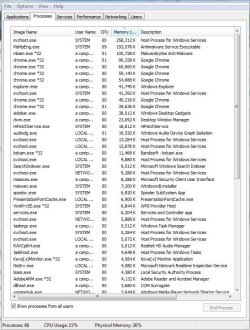
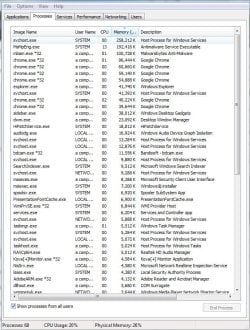
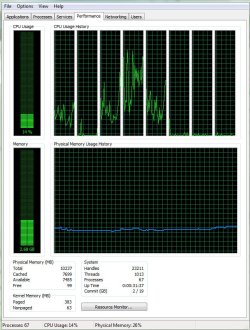
Today I seem to be using a large amount of ram and my computer seems to be a lot more sluggish than usual
I know the system takes up a portion of the ram but this is just way to much. All the processes together is only round 700-1000mb, also explorer stopped responding twice in a row which has never happenend to me on this computer.
I have made sure i turned off all virtual machines as well
Do I have a virus or something?
I am running full scan on both Microsoft security essentials and malwarebytes

Today I seem to be using a large amount of ram and my computer seems to be a lot more sluggish than usual
I know the system takes up a portion of the ram but this is just way to much. All the processes together is only round 700-1000mb, also explorer stopped responding twice in a row which has never happenend to me on this computer.
I have made sure i turned off all virtual machines as well
Do I have a virus or something?
I am running full scan on both Microsoft security essentials and malwarebytes
Attachments
My Computer
- Computer type
- PC/Desktop
- Computer Manufacturer/Model Number
- First custom build
- OS
- windows 7 home premium 64 bit
- CPU
- AMD FX-8150
- Motherboard
- GA-78LMT-S2P 760g REV3.1
- Memory
- 8gb g.skill 1333mhz
- Graphics Card(s)
- Sapphire Radeon HD7770 Ghz edition
- Sound Card
- Onboard
- Screen Resolution
- 1600x900
- Hard Drives
- 320gb 7200RPM HDD
500gb external hybrid drive
- PSU
- 460w
- Case
- Cooler Master Centurion 590
- Cooling
- Cooler Master Hyper 212 Evo
- Keyboard
- ROCCAT ISKU
- Mouse
- ROCCAT Kova +
- Internet Speed
- Terrible everywhere, everyday
- Antivirus
- MSE
- Browser
- Chrome