Solved RAM usage too high

Hawky222

New member
Local time
10:24 PM
Messages
13
Hello, I've been having this problems for about 3 months now. First with Windows Vista ( I thought upgrading might solve the problem )

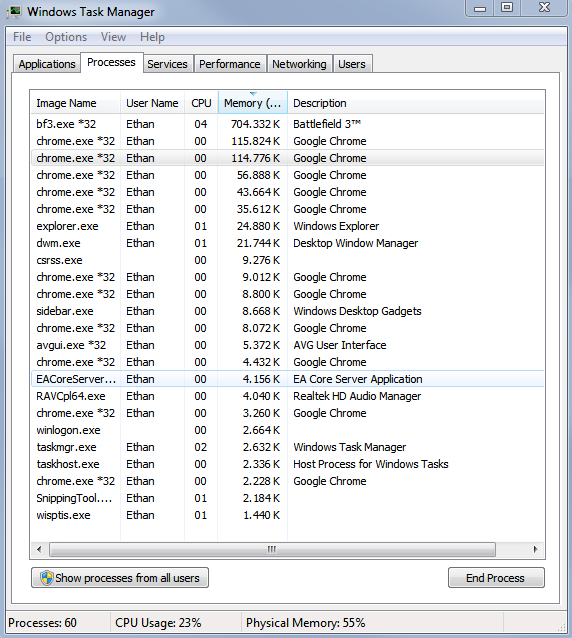
I don't know if there is something wrong with my PC because it seems to use a lot of RAM, On start up I get 40% usage.
But the real problem is that I just bought a new PSU and GPU to play BF3, and I can't even play for 1 match without the PC freezing and forcing me to unplug the power cable.

I have tried using memtest86+ and Windows memory diagnostic, but there's no problems.

PC Start up:
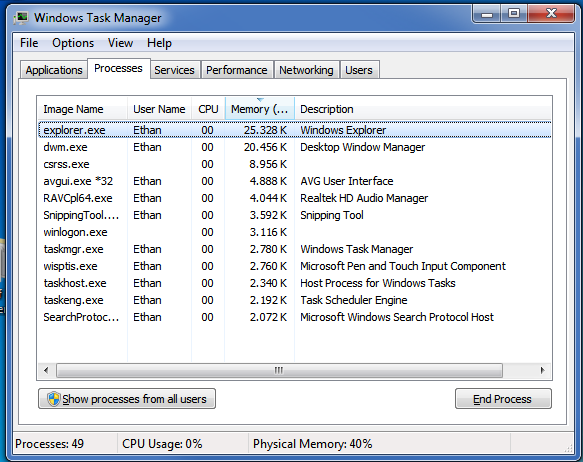
DJyLX.png


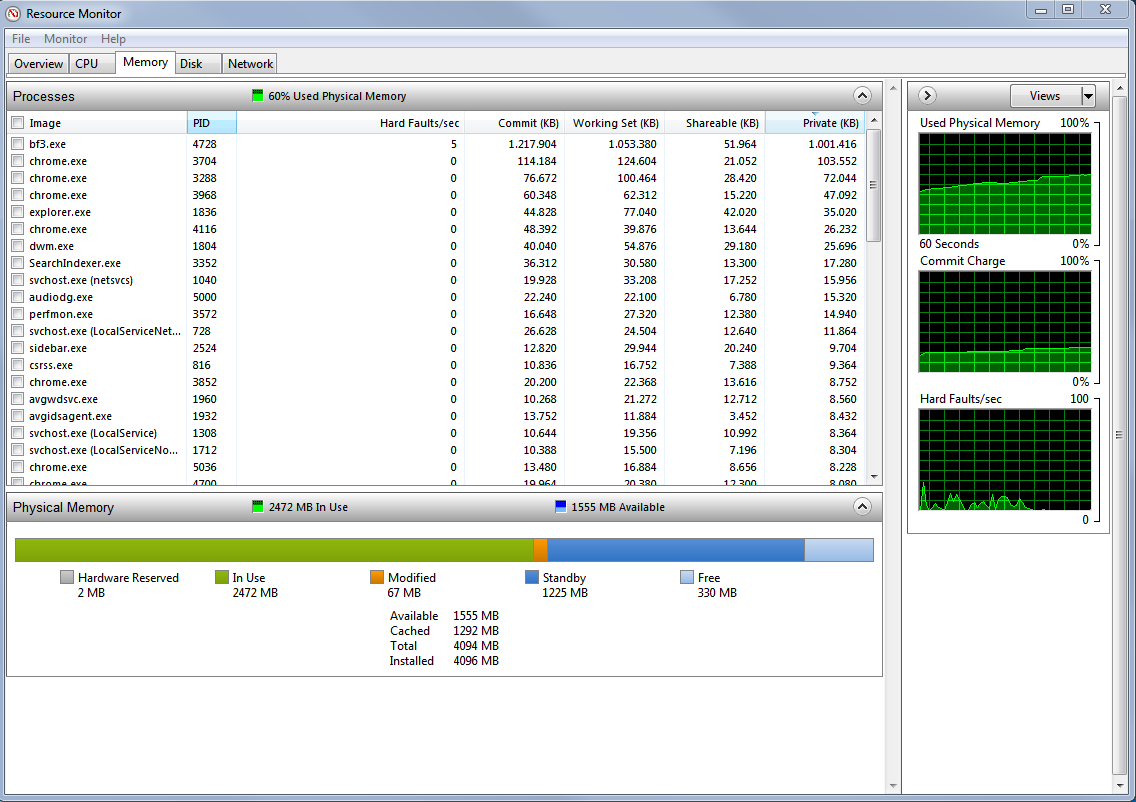
Playing for 5 minutes. ( Goes up to 80% then freezes.)
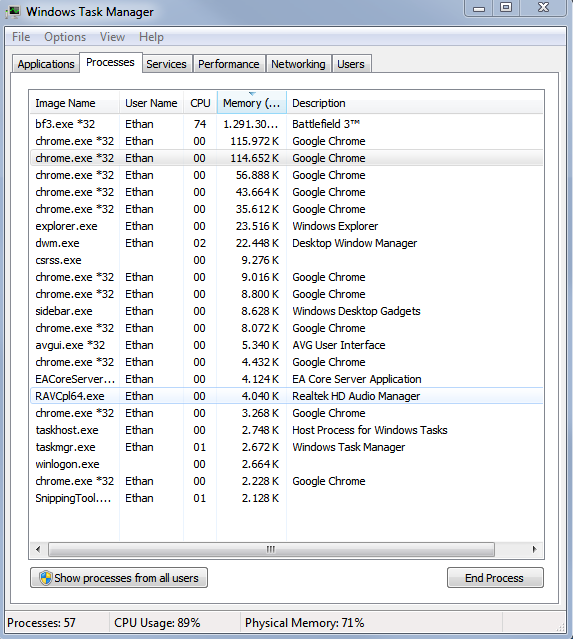
MhBAM.png


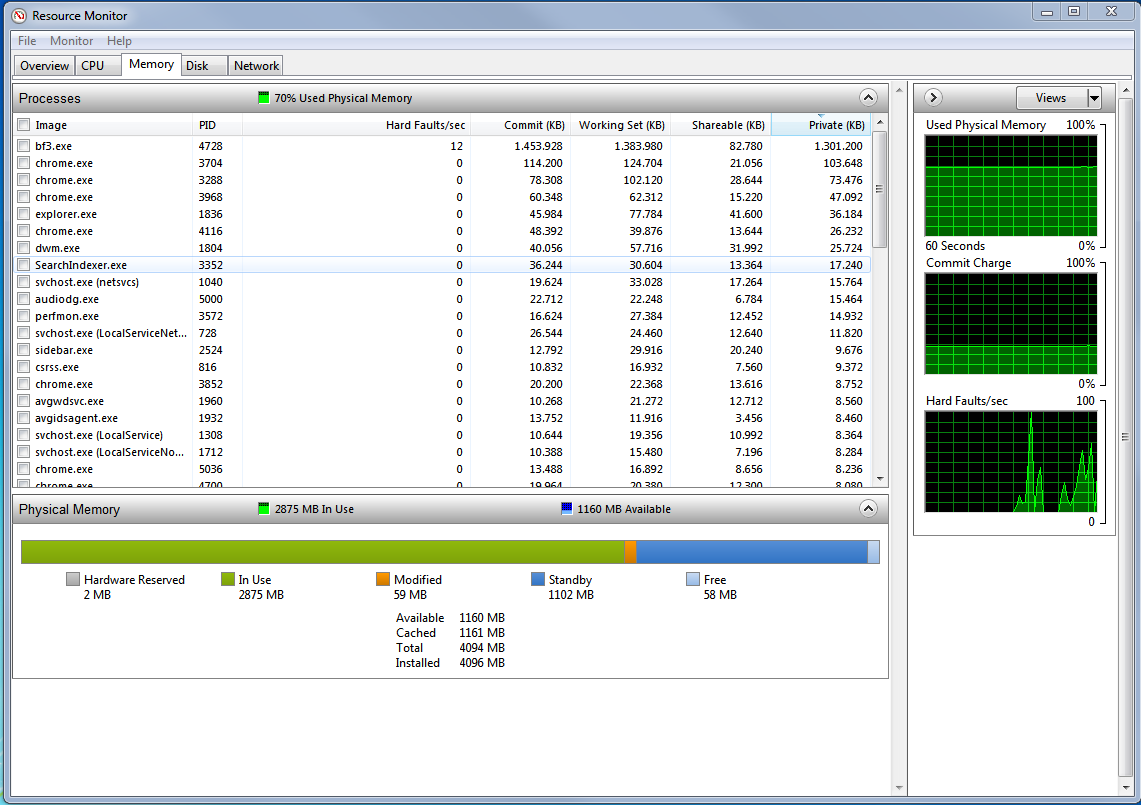
On load-screen.
G1k9j.png

_


I really hope someone can help because frankly I've had enough of this bulls***.
PC Specs:
CPU - Intel Core 2 Quad Q6600
GPU - HD 7750
RAM - 4GB DDR2
PSU - B-move 600w
OS - Windows 7 Ultimate x64
 

My Computer

OS
Windows 7 Ultimate 64bit
CPU
Intel i5 3570k
Memory
8GB DDR3 1600Mhz
Graphics Card(s)
Sapphire HD 7750
It is hard to tell from the pics. Looks like this bf3.exe from Battlefied is growing.

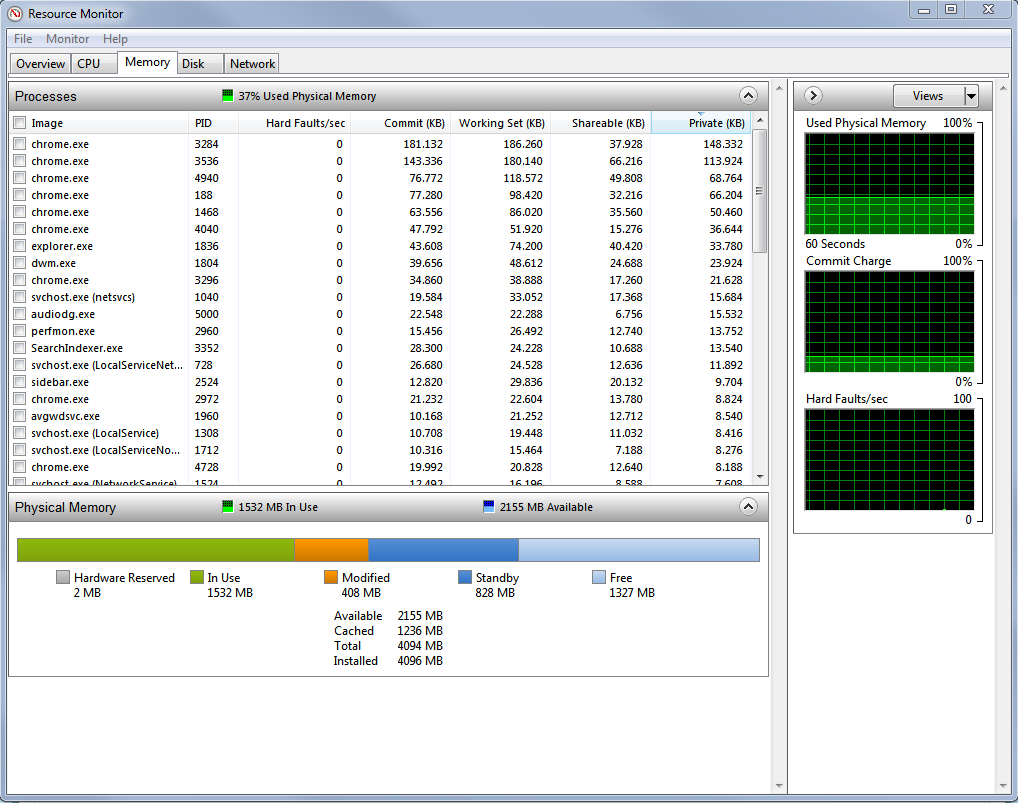
Can you post pictures of Resource Monitor > Memory tab (the colored bar) at various stages. That will be more telling.
 

My Computer

Computer Manufacturer/Model Number
HP, Dell, Gateway, Toshiba - 4 laptops and 2 desktops
OS
Vista, Windows7, Mint Mate, Zorin, Windows 8
CPU
from 1.6GHz Duo to i7
Monitor(s) Displays
2x HP w2207
Hard Drives
5x HDD, 7x SSD, 12x Externals
Keyboard
with trackball - no mices
Mouse
Trackball mice
Internet Speed
DSL 6000
Hi,
Looks like you are running out of ram and the game you are playing is loading into ram for faster game play and no drive swapping. If you have ram windows will use it all up in intensive operations. Do you have the page file disabled or set too small? This will cause this behaviour.
Tony
 

My Computer

Computer type
PC/Desktop
Computer Manufacturer/Model Number
Bluethunder II
OS
Windows 7 x64 Ultimate and numerous virtual machines
CPU
AMD FX-8350 Vishera 32nm Technology @ 4.2 GHz default
Motherboard
ASUSTeK COMPUTER INC. SABERTOOTH 990FX R2.0 (Socket 942)
Memory
G Skill 32.0GB Dual-Channel DDR3 @ 1204MHz (11-13-13-31)
Graphics Card(s)
EVGA GeForce GTX 960 4GB Super SC ACX 2.0+ with Back Plate
Sound Card
Creative X-Fi Titanium HD Audiophile PCIe
Monitor(s) Displays
LG L227WTG x 3
Screen Resolution
1680 x 1050 16:10
Hard Drives
238GB Samsung850 PRO SATA Disk Device (SSD)
1863GB Seagate ST2000DM 001-1CH164 (SATA)
1397GB Seagate ST1500DL 003-9VT16L(SATA)
466GB Western Digital WDC WD50 03AZEX-00K1GA0 (SATA) x 2
932GB Seagate ST310005 28AS SATA Disk Device (SATA)
PSU
Enermax Revolution87+ 1000 Watts Gold Certified Power Supply
Case
Rocketfish Full Tower
Cooling
Cooler Master Hyper 212 EVO Push Pull 120mm Fans
Keyboard
Logitech K740
Mouse
Logitech G100S Laser LED + Logitech Gamepad F310
Internet Speed
500 mbs down and 30mbs up
Antivirus
Malwarebytes Pro & Avast and MSE on certain Virtual Machines
Browser
Firefox (Main) Chrome, Internet Explorer (Back Up)
Other Info
Logitech X 230 2.1 Stereo System and 5.1 Yamaha RX V2090
B&W DM6 Monitor Speakers + Center and Surround Speakers
Using Mouse Without Borders (Google it)
It is hard to tell from the pics. Looks like this bf3.exe from Battlefied is growing.

Can you post pictures of Resource Monitor > Memory tab (the colored bar) at various stages. That will be more telling.

In-game and idling ?
 

My Computer

OS
Windows 7 Ultimate 64bit
CPU
Intel i5 3570k
Memory
8GB DDR3 1600Mhz
Graphics Card(s)
Sapphire HD 7750
Hi,
Looks like you are running out of ram and the game you are playing is loading into ram for faster game play and no drive swapping. If you have ram windows will use it all up in intensive operations. Do you have the page file disabled or set too small? This will cause this behaviour.
Tony

I have Virtual Memory set to 10000MB.
 

My Computer

OS
Windows 7 Ultimate 64bit
CPU
Intel i5 3570k
Memory
8GB DDR3 1600Mhz
Graphics Card(s)
Sapphire HD 7750
It is hard to tell from the pics. Looks like this bf3.exe from Battlefied is growing.

Can you post pictures of Resource Monitor > Memory tab (the colored bar) at various stages. That will be more telling.

In-game and idling ?
That would be good.
 

My Computer

Computer Manufacturer/Model Number
HP, Dell, Gateway, Toshiba - 4 laptops and 2 desktops
OS
Vista, Windows7, Mint Mate, Zorin, Windows 8
CPU
from 1.6GHz Duo to i7
Monitor(s) Displays
2x HP w2207
Hard Drives
5x HDD, 7x SSD, 12x Externals
Keyboard
with trackball - no mices
Mouse
Trackball mice
Internet Speed
DSL 6000
Try letting windows manage the page file. I suspect with that game it is not enough. I have 16gb of ram and windows gives me a 16gb page file. I used to tinker with these settings but it turns out Windows 7 really does know what it is doing.
 

My Computer

Computer type
PC/Desktop
Computer Manufacturer/Model Number
Bluethunder II
OS
Windows 7 x64 Ultimate and numerous virtual machines
CPU
AMD FX-8350 Vishera 32nm Technology @ 4.2 GHz default
Motherboard
ASUSTeK COMPUTER INC. SABERTOOTH 990FX R2.0 (Socket 942)
Memory
G Skill 32.0GB Dual-Channel DDR3 @ 1204MHz (11-13-13-31)
Graphics Card(s)
EVGA GeForce GTX 960 4GB Super SC ACX 2.0+ with Back Plate
Sound Card
Creative X-Fi Titanium HD Audiophile PCIe
Monitor(s) Displays
LG L227WTG x 3
Screen Resolution
1680 x 1050 16:10
Hard Drives
238GB Samsung850 PRO SATA Disk Device (SSD)
1863GB Seagate ST2000DM 001-1CH164 (SATA)
1397GB Seagate ST1500DL 003-9VT16L(SATA)
466GB Western Digital WDC WD50 03AZEX-00K1GA0 (SATA) x 2
932GB Seagate ST310005 28AS SATA Disk Device (SATA)
PSU
Enermax Revolution87+ 1000 Watts Gold Certified Power Supply
Case
Rocketfish Full Tower
Cooling
Cooler Master Hyper 212 EVO Push Pull 120mm Fans
Keyboard
Logitech K740
Mouse
Logitech G100S Laser LED + Logitech Gamepad F310
Internet Speed
500 mbs down and 30mbs up
Antivirus
Malwarebytes Pro & Avast and MSE on certain Virtual Machines
Browser
Firefox (Main) Chrome, Internet Explorer (Back Up)
Other Info
Logitech X 230 2.1 Stereo System and 5.1 Yamaha RX V2090
B&W DM6 Monitor Speakers + Center and Surround Speakers
Using Mouse Without Borders (Google it)

My Computer

OS
Windows 7 Ultimate 64bit
CPU
Intel i5 3570k
Memory
8GB DDR3 1600Mhz
Graphics Card(s)
Sapphire HD 7750
Yes, you only have 50 odd mb left. You are out of memory actual and virtual. Games can and do need every single oz of memory. To play that game you need to let windows manage your swap file or set it to 32gb.
 

My Computer

Computer type
PC/Desktop
Computer Manufacturer/Model Number
Bluethunder II
OS
Windows 7 x64 Ultimate and numerous virtual machines
CPU
AMD FX-8350 Vishera 32nm Technology @ 4.2 GHz default
Motherboard
ASUSTeK COMPUTER INC. SABERTOOTH 990FX R2.0 (Socket 942)
Memory
G Skill 32.0GB Dual-Channel DDR3 @ 1204MHz (11-13-13-31)
Graphics Card(s)
EVGA GeForce GTX 960 4GB Super SC ACX 2.0+ with Back Plate
Sound Card
Creative X-Fi Titanium HD Audiophile PCIe
Monitor(s) Displays
LG L227WTG x 3
Screen Resolution
1680 x 1050 16:10
Hard Drives
238GB Samsung850 PRO SATA Disk Device (SSD)
1863GB Seagate ST2000DM 001-1CH164 (SATA)
1397GB Seagate ST1500DL 003-9VT16L(SATA)
466GB Western Digital WDC WD50 03AZEX-00K1GA0 (SATA) x 2
932GB Seagate ST310005 28AS SATA Disk Device (SATA)
PSU
Enermax Revolution87+ 1000 Watts Gold Certified Power Supply
Case
Rocketfish Full Tower
Cooling
Cooler Master Hyper 212 EVO Push Pull 120mm Fans
Keyboard
Logitech K740
Mouse
Logitech G100S Laser LED + Logitech Gamepad F310
Internet Speed
500 mbs down and 30mbs up
Antivirus
Malwarebytes Pro & Avast and MSE on certain Virtual Machines
Browser
Firefox (Main) Chrome, Internet Explorer (Back Up)
Other Info
Logitech X 230 2.1 Stereo System and 5.1 Yamaha RX V2090
B&W DM6 Monitor Speakers + Center and Surround Speakers
Using Mouse Without Borders (Google it)
I was just wondering what the modified colour is.
 

My Computer

OS
Windows 7 Ultimate 64bit
CPU
Intel i5 3570k
Memory
8GB DDR3 1600Mhz
Graphics Card(s)
Sapphire HD 7750
I was just wondering what the modified colour is.
That will be memory that has been used by windows and the data will be written back to the hard drive at some point. Even though the chart shows standby ram of 1 gb that ram will be full of data which can and is written back to the hard drive swap file.
This game like a lot of others needs a big swap file either a massive fixed one or let windows manage it. You could make things a little better by adding another 4gb of ram but ddr2 ram is not cheap.:)
 

My Computer

Computer type
PC/Desktop
Computer Manufacturer/Model Number
Bluethunder II
OS
Windows 7 x64 Ultimate and numerous virtual machines
CPU
AMD FX-8350 Vishera 32nm Technology @ 4.2 GHz default
Motherboard
ASUSTeK COMPUTER INC. SABERTOOTH 990FX R2.0 (Socket 942)
Memory
G Skill 32.0GB Dual-Channel DDR3 @ 1204MHz (11-13-13-31)
Graphics Card(s)
EVGA GeForce GTX 960 4GB Super SC ACX 2.0+ with Back Plate
Sound Card
Creative X-Fi Titanium HD Audiophile PCIe
Monitor(s) Displays
LG L227WTG x 3
Screen Resolution
1680 x 1050 16:10
Hard Drives
238GB Samsung850 PRO SATA Disk Device (SSD)
1863GB Seagate ST2000DM 001-1CH164 (SATA)
1397GB Seagate ST1500DL 003-9VT16L(SATA)
466GB Western Digital WDC WD50 03AZEX-00K1GA0 (SATA) x 2
932GB Seagate ST310005 28AS SATA Disk Device (SATA)
PSU
Enermax Revolution87+ 1000 Watts Gold Certified Power Supply
Case
Rocketfish Full Tower
Cooling
Cooler Master Hyper 212 EVO Push Pull 120mm Fans
Keyboard
Logitech K740
Mouse
Logitech G100S Laser LED + Logitech Gamepad F310
Internet Speed
500 mbs down and 30mbs up
Antivirus
Malwarebytes Pro & Avast and MSE on certain Virtual Machines
Browser
Firefox (Main) Chrome, Internet Explorer (Back Up)
Other Info
Logitech X 230 2.1 Stereo System and 5.1 Yamaha RX V2090
B&W DM6 Monitor Speakers + Center and Surround Speakers
Using Mouse Without Borders (Google it)
This is not too bad. Indianatone is not quite right - the 'Standby' section (dark blue) is also available RAM. That part contains only cached processes with low priority. Thus you have over 1GB of available RAM after 10 minutes.

I fail to see why the system would crash under those circumstances. There must be another problem. If you forced a blue screen with the accompanying memory dump, you could post the dump here and some of the experts here may find the real cause of the crash. Post it as a new BSOD problem. Then it gets to the right people.
 

My Computer

Computer Manufacturer/Model Number
HP, Dell, Gateway, Toshiba - 4 laptops and 2 desktops
OS
Vista, Windows7, Mint Mate, Zorin, Windows 8
CPU
from 1.6GHz Duo to i7
Monitor(s) Displays
2x HP w2207
Hard Drives
5x HDD, 7x SSD, 12x Externals
Keyboard
with trackball - no mices
Mouse
Trackball mice
Internet Speed
DSL 6000
This is not too bad. Indianatone is not quite right - the 'Standby' section (dark blue) is also available RAM. That part contains only cached processes with low priority. Thus you have over 1GB of available RAM after 10 minutes.

I fail to see why the system would crash under those circumstances. There must be another problem. If you forced a blue screen with the accompanying memory dump, you could post the dump here and some of the experts here may find the real cause of the crash. Post it as a new BSOD problem. Then it gets to the right people.

And how do i force a BSOD? The PC only freezes :confused:
 

My Computer

OS
Windows 7 Ultimate 64bit
CPU
Intel i5 3570k
Memory
8GB DDR3 1600Mhz
Graphics Card(s)
Sapphire HD 7750
This is not too bad. Indianatone is not quite right - the 'Standby' section (dark blue) is also available RAM. That part contains only cached processes with low priority. Thus you have over 1GB of available RAM after 10 minutes.

I fail to see why the system would crash under those circumstances. There must be another problem. If you forced a blue screen with the accompanying memory dump, you could post the dump here and some of the experts here may find the real cause of the crash. Post it as a new BSOD problem. Then it gets to the right people.

And how do i force a BSOD? The PC only freezes :confused:

There is only a fixed 10Gb page file so there is nowhere left to write anything to hence the issue. Have you tried letting windows manage your page file before you get in to troubleshooting deeper? :)
 

My Computer

Computer type
PC/Desktop
Computer Manufacturer/Model Number
Bluethunder II
OS
Windows 7 x64 Ultimate and numerous virtual machines
CPU
AMD FX-8350 Vishera 32nm Technology @ 4.2 GHz default
Motherboard
ASUSTeK COMPUTER INC. SABERTOOTH 990FX R2.0 (Socket 942)
Memory
G Skill 32.0GB Dual-Channel DDR3 @ 1204MHz (11-13-13-31)
Graphics Card(s)
EVGA GeForce GTX 960 4GB Super SC ACX 2.0+ with Back Plate
Sound Card
Creative X-Fi Titanium HD Audiophile PCIe
Monitor(s) Displays
LG L227WTG x 3
Screen Resolution
1680 x 1050 16:10
Hard Drives
238GB Samsung850 PRO SATA Disk Device (SSD)
1863GB Seagate ST2000DM 001-1CH164 (SATA)
1397GB Seagate ST1500DL 003-9VT16L(SATA)
466GB Western Digital WDC WD50 03AZEX-00K1GA0 (SATA) x 2
932GB Seagate ST310005 28AS SATA Disk Device (SATA)
PSU
Enermax Revolution87+ 1000 Watts Gold Certified Power Supply
Case
Rocketfish Full Tower
Cooling
Cooler Master Hyper 212 EVO Push Pull 120mm Fans
Keyboard
Logitech K740
Mouse
Logitech G100S Laser LED + Logitech Gamepad F310
Internet Speed
500 mbs down and 30mbs up
Antivirus
Malwarebytes Pro & Avast and MSE on certain Virtual Machines
Browser
Firefox (Main) Chrome, Internet Explorer (Back Up)
Other Info
Logitech X 230 2.1 Stereo System and 5.1 Yamaha RX V2090
B&W DM6 Monitor Speakers + Center and Surround Speakers
Using Mouse Without Borders (Google it)

My Computer

Computer Manufacturer/Model Number
HP, Dell, Gateway, Toshiba - 4 laptops and 2 desktops
OS
Vista, Windows7, Mint Mate, Zorin, Windows 8
CPU
from 1.6GHz Duo to i7
Monitor(s) Displays
2x HP w2207
Hard Drives
5x HDD, 7x SSD, 12x Externals
Keyboard
with trackball - no mices
Mouse
Trackball mice
Internet Speed
DSL 6000
This is not too bad. Indianatone is not quite right - the 'Standby' section (dark blue) is also available RAM. That part contains only cached processes with low priority. Thus you have over 1GB of available RAM after 10 minutes.

I fail to see why the system would crash under those circumstances. There must be another problem. If you forced a blue screen with the accompanying memory dump, you could post the dump here and some of the experts here may find the real cause of the crash. Post it as a new BSOD problem. Then it gets to the right people.

And how do i force a BSOD? The PC only freezes :confused:

There is only a fixed 10Gb page file so there is nowhere left to write anything to hence the issue. Have you tried letting windows manage your page file before you get in to troubleshooting deeper? :)
Did you see that he still has more than 1GB of available real RAM. So at the 10 minute mark, there has not been a single byte written to the pagefile.
 

My Computer

Computer Manufacturer/Model Number
HP, Dell, Gateway, Toshiba - 4 laptops and 2 desktops
OS
Vista, Windows7, Mint Mate, Zorin, Windows 8
CPU
from 1.6GHz Duo to i7
Monitor(s) Displays
2x HP w2207
Hard Drives
5x HDD, 7x SSD, 12x Externals
Keyboard
with trackball - no mices
Mouse
Trackball mice
Internet Speed
DSL 6000
This is not too bad. Indianatone is not quite right - the 'Standby' section (dark blue) is also available RAM. That part contains only cached processes with low priority. Thus you have over 1GB of available RAM after 10 minutes.

I fail to see why the system would crash under those circumstances. There must be another problem. If you forced a blue screen with the accompanying memory dump, you could post the dump here and some of the experts here may find the real cause of the crash. Post it as a new BSOD problem. Then it gets to the right people.

And how do i force a BSOD? The PC only freezes :confused:

There is only a fixed 10Gb page file so there is nowhere left to write anything to hence the issue. Have you tried letting windows manage your page file before you get in to troubleshooting deeper? :)

I changed it to 32GB like you said before.
 

My Computer

OS
Windows 7 Ultimate 64bit
CPU
Intel i5 3570k
Memory
8GB DDR3 1600Mhz
Graphics Card(s)
Sapphire HD 7750
And how do i force a BSOD? The PC only freezes :confused:

There is only a fixed 10Gb page file so there is nowhere left to write anything to hence the issue. Have you tried letting windows manage your page file before you get in to troubleshooting deeper? :)
Did you see that he still has more than 1GB of available real RAM. So at the 10 minute mark, there has not been a single byte written to the pagefile.

Yes Sir I did but at that time his problem of freezing is yet to occur, I suspect it happens when windows tries to write back to the hard drive and can't.:)
 

My Computer

Computer type
PC/Desktop
Computer Manufacturer/Model Number
Bluethunder II
OS
Windows 7 x64 Ultimate and numerous virtual machines
CPU
AMD FX-8350 Vishera 32nm Technology @ 4.2 GHz default
Motherboard
ASUSTeK COMPUTER INC. SABERTOOTH 990FX R2.0 (Socket 942)
Memory
G Skill 32.0GB Dual-Channel DDR3 @ 1204MHz (11-13-13-31)
Graphics Card(s)
EVGA GeForce GTX 960 4GB Super SC ACX 2.0+ with Back Plate
Sound Card
Creative X-Fi Titanium HD Audiophile PCIe
Monitor(s) Displays
LG L227WTG x 3
Screen Resolution
1680 x 1050 16:10
Hard Drives
238GB Samsung850 PRO SATA Disk Device (SSD)
1863GB Seagate ST2000DM 001-1CH164 (SATA)
1397GB Seagate ST1500DL 003-9VT16L(SATA)
466GB Western Digital WDC WD50 03AZEX-00K1GA0 (SATA) x 2
932GB Seagate ST310005 28AS SATA Disk Device (SATA)
PSU
Enermax Revolution87+ 1000 Watts Gold Certified Power Supply
Case
Rocketfish Full Tower
Cooling
Cooler Master Hyper 212 EVO Push Pull 120mm Fans
Keyboard
Logitech K740
Mouse
Logitech G100S Laser LED + Logitech Gamepad F310
Internet Speed
500 mbs down and 30mbs up
Antivirus
Malwarebytes Pro & Avast and MSE on certain Virtual Machines
Browser
Firefox (Main) Chrome, Internet Explorer (Back Up)
Other Info
Logitech X 230 2.1 Stereo System and 5.1 Yamaha RX V2090
B&W DM6 Monitor Speakers + Center and Surround Speakers
Using Mouse Without Borders (Google it)
So this happened before you upgraded to Windows 7? You bough a new PSU and Graphics card and this problem started or was it already present? Have you checked the temps of your machine? Is the CPU overheating?
CPUID - System & hardware benchmark, monitoring, reporting download and post the results please.
 

My Computer

Computer type
PC/Desktop
Computer Manufacturer/Model Number
Bluethunder II
OS
Windows 7 x64 Ultimate and numerous virtual machines
CPU
AMD FX-8350 Vishera 32nm Technology @ 4.2 GHz default
Motherboard
ASUSTeK COMPUTER INC. SABERTOOTH 990FX R2.0 (Socket 942)
Memory
G Skill 32.0GB Dual-Channel DDR3 @ 1204MHz (11-13-13-31)
Graphics Card(s)
EVGA GeForce GTX 960 4GB Super SC ACX 2.0+ with Back Plate
Sound Card
Creative X-Fi Titanium HD Audiophile PCIe
Monitor(s) Displays
LG L227WTG x 3
Screen Resolution
1680 x 1050 16:10
Hard Drives
238GB Samsung850 PRO SATA Disk Device (SSD)
1863GB Seagate ST2000DM 001-1CH164 (SATA)
1397GB Seagate ST1500DL 003-9VT16L(SATA)
466GB Western Digital WDC WD50 03AZEX-00K1GA0 (SATA) x 2
932GB Seagate ST310005 28AS SATA Disk Device (SATA)
PSU
Enermax Revolution87+ 1000 Watts Gold Certified Power Supply
Case
Rocketfish Full Tower
Cooling
Cooler Master Hyper 212 EVO Push Pull 120mm Fans
Keyboard
Logitech K740
Mouse
Logitech G100S Laser LED + Logitech Gamepad F310
Internet Speed
500 mbs down and 30mbs up
Antivirus
Malwarebytes Pro & Avast and MSE on certain Virtual Machines
Browser
Firefox (Main) Chrome, Internet Explorer (Back Up)
Other Info
Logitech X 230 2.1 Stereo System and 5.1 Yamaha RX V2090
B&W DM6 Monitor Speakers + Center and Surround Speakers
Using Mouse Without Borders (Google it)
Back
Top