RAM

Pinky

New member
Local time
7:54 AM
Messages
36
Hi

I have a acer aspire AX1800-E9102-E9102, windows 7, 2GB DDR2 memory, 320GB HDD, Intel pentium, dvd super multi drive and 7100 integrated NVDIA GeForce. I want to upgrade my RAM to about 2-4GB but don't know if that is possible as it is slow help me please

Thank you
 

My Computer

Computer type
PC/Desktop
Computer Manufacturer/Model Number
Acer
OS
Windows 7 premium 64bit
CPU
Intel penguin processor E2210 dual core
Memory
2GB
Graphics Card(s)
NVIDIA GEForce 7100 intergraded
Hard Drives
320GB HDD
DVD Super multi drive
Antivirus
Norton
Browser
Google Chrome
I think that uses DDR2 RAM and can take at least 4 GB total. Not positive.

You have a weak processor, so I wouldn't be so sure that adding more RAM would solve whatever slowness you feel.

Do you have any reason at all to believe that you are using all of your current 2 GB of RAM?

You can go to Crucial.com and use their "System Scanner" tool, which should tell you how much RAM you can have total and which RAM modules are compatible with your PC.

Whether it makes sense to buy more RAM is another question entirely.
 

My Computer

Computer type
PC/Desktop
Computer Manufacturer/Model Number
Ignatz Special; 4 speed manual gearbox; factory air conditioning; one of one
OS
Windows 7 Home Premium SP1, 64-bit
CPU
Intel Skylake i5-6600K, not overclocked
Motherboard
AsRock Z170M Extreme 4, micro ATX
Memory
8 GB HyperX DDR4-2666 (2 x 4 GB)
Graphics Card(s)
none; graphics are integrated on CPU
Sound Card
onboard: Realtek ALC1150; external: USB Behringer UF0-202
Monitor(s) Displays
Dell S2340M 23 inch IPS
Screen Resolution
1600 x 900
Hard Drives
System: Crucial MX100 series SSD, 128 GB;
Data: Samsung Spinpoint 103SJ, 1 TB;
Backup: WD Caviar Green WD30EZRX-00D8PB0, 3 TB
PSU
Rosewill SilentNight 500 watt fanless, semi-modular
Case
Antec Solo II
Cooling
Noctua NH-U12S; Noctua F12 intake, Noctua S12A exhaust
Keyboard
Microsoft 200 6JH-00001 USB
Mouse
Dell or Microsoft optical wired; USB
Antivirus
Microsoft Security Essentials and Malwarebytes Premium
Browser
Pale Moon
Other Info
All fans PWM; speeds at idle: CPU circa 500 rpm; intake circa 600 rpm; exhaust circa 600 rpm; CPU temps 27 idle and 47 C load in a warm room (27 C/81 F) when running Intel Extreme Tuning Utility stress test.
I check some specs and maybe you acer can support only 2GB ram DDR2 800MHz.
Go to system information and post again the system model.
 

My Computer

Computer type
Laptop
Computer Manufacturer/Model Number
Dell,HP
OS
Win 7 x64 Ultimate
Pentium(R) Dual-Core CPU E5400@ 2.70GHz
Memory 2.00 GB (1.75 GB usable)
64-Bit operating System
Service pack 1

After doing a scan of my computer it says memory or DRAM- DDR PC2-6400
Maximum memory 4096MB
Slots:2 (2 banks of 1)
Not to exceed manufacturer supported memory

Not sure what this means

Need help
 

My Computer

Computer type
PC/Desktop
Computer Manufacturer/Model Number
Acer
OS
Windows 7 premium 64bit
CPU
Intel penguin processor E2210 dual core
Memory
2GB
Graphics Card(s)
NVIDIA GEForce 7100 intergraded
Hard Drives
320GB HDD
DVD Super multi drive
Antivirus
Norton
Browser
Google Chrome
Usually Notebooks have only 2 slots/sockets for RAM modules and the Maximum supported is divided between the 2. According to the specs you got you could put identical 2GB modules in both slots, recommended for best performance, or maybe 2GB in one and 1GB in the other. I usually stay with the same brand for both modules if at all possible, most likely not to have compatibility issues.

Not to exceed manufacturer supported memory
That means the manufacturer of the Notebook, motherboard or Vendor/Brand can limit things as they desire. Plus the version of the Operating System, 32-bit or 64-bit, supports memory differently.
 

My Computer

Computer type
PC/Desktop
Computer Manufacturer/Model Number
Customs, Dell, Gateway, HP, Toshiba, Acer, ASUS
OS
Windows 7 Ultimate 64-bit, Windows 8.1 64-bit, Mac OS X 10.10, Linux Mint 17, Windows 10 Pro TP
Keyboard
Microsoft
Mouse
Microsoft

My Computer

Computer Manufacturer/Model Number
HP, Dell, Gateway, Toshiba - 4 laptops and 2 desktops
OS
Vista, Windows7, Mint Mate, Zorin, Windows 8
CPU
from 1.6GHz Duo to i7
Monitor(s) Displays
2x HP w2207
Hard Drives
5x HDD, 7x SSD, 12x Externals
Keyboard
with trackball - no mices
Mouse
Trackball mice
Internet Speed
DSL 6000
I have a slow computer and don't know what to do here. CPU pentium dual core E5400@ 2.70GHZ help please
 

My Computer

Computer type
PC/Desktop
Computer Manufacturer/Model Number
Acer
OS
Windows 7 premium 64bit
CPU
Intel penguin processor E2210 dual core
Memory
2GB
Graphics Card(s)
NVIDIA GEForce 7100 intergraded
Hard Drives
320GB HDD
DVD Super multi drive
Antivirus
Norton
Browser
Google Chrome
That appears to be a different computer from what is in your System Specs so which version of Windows 7 is it running? If it's a 32-bit version you are limited to 4GB, may display only about 3.5GB. If its a 64-bit version you may be limited by what the motherboard is or 16GB. Also a limit is whether it's Home Premium, Professional or Ultimate.
 

My Computer

Computer type
PC/Desktop
Computer Manufacturer/Model Number
Customs, Dell, Gateway, HP, Toshiba, Acer, ASUS
OS
Windows 7 Ultimate 64-bit, Windows 8.1 64-bit, Mac OS X 10.10, Linux Mint 17, Windows 10 Pro TP
Keyboard
Microsoft
Mouse
Microsoft
It's windows 7 premium 64 but 2GB of ram
 

My Computer

Computer type
PC/Desktop
Computer Manufacturer/Model Number
Acer
OS
Windows 7 premium 64bit
CPU
Intel penguin processor E2210 dual core
Memory
2GB
Graphics Card(s)
NVIDIA GEForce 7100 intergraded
Hard Drives
320GB HDD
DVD Super multi drive
Antivirus
Norton
Browser
Google Chrome
But still nothing known about the computer itself. Because it's running a 64-bit version of Windows you 'probably' could upgrade to 4GB, maybe more, which generally will help performance. 2GB is the minimum requirement for 64-bit Windows [1GB for 32-bit].
 

My Computer

Computer type
PC/Desktop
Computer Manufacturer/Model Number
Customs, Dell, Gateway, HP, Toshiba, Acer, ASUS
OS
Windows 7 Ultimate 64-bit, Windows 8.1 64-bit, Mac OS X 10.10, Linux Mint 17, Windows 10 Pro TP
Keyboard
Microsoft
Mouse
Microsoft
So if I added another 2GB of ram would make a difference. I took my computer into my computer tech guy and he checked it out and told me it doesn't need more r just to reinstall windows n I will be good. I did that and its still slow I have cleaned my cookies defragement disk clean up n not sure what else to do.
 

My Computer

Computer type
PC/Desktop
Computer Manufacturer/Model Number
Acer
OS
Windows 7 premium 64bit
CPU
Intel penguin processor E2210 dual core
Memory
2GB
Graphics Card(s)
NVIDIA GEForce 7100 intergraded
Hard Drives
320GB HDD
DVD Super multi drive
Antivirus
Norton
Browser
Google Chrome
she could also try to replace the RAM, no need for an upgrade, it is possible that shes using a defective RAM
 

My Computer

Computer type
PC/Desktop
Computer Manufacturer/Model Number
HP
OS
Windows 7 Pro 32bit
CPU
Dual Core
Antivirus
Trend Micro
You can try and replace you're RAM or Video Card, i have been into hardware troubleshooting for 3 years, and that two things is the main reasons of computer lagging.
 

My Computer

Computer type
PC/Desktop
Computer Manufacturer/Model Number
HP
OS
Windows 7 Pro 32bit
CPU
Dual Core
Antivirus
Trend Micro
Hi I still haven't found the solution to my pc running slow pls help me
 

My Computer

Computer type
PC/Desktop
Computer Manufacturer/Model Number
Acer
OS
Windows 7 premium 64bit
CPU
Intel penguin processor E2210 dual core
Memory
2GB
Graphics Card(s)
NVIDIA GEForce 7100 intergraded
Hard Drives
320GB HDD
DVD Super multi drive
Antivirus
Norton
Browser
Google Chrome
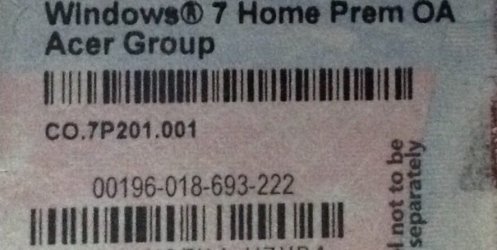
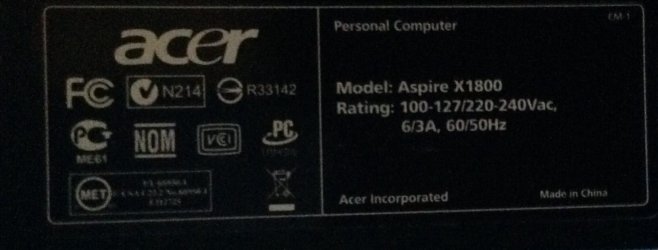
I have added a few pics here maybe it will help someone to understand me more n hopefully help me pls
 

Attachments

  • image.jpg
    image.jpg
    46.5 KB · Views: 1

My Computer

Computer type
PC/Desktop
Computer Manufacturer/Model Number
Acer
OS
Windows 7 premium 64bit
CPU
Intel penguin processor E2210 dual core
Memory
2GB
Graphics Card(s)
NVIDIA GEForce 7100 intergraded
Hard Drives
320GB HDD
DVD Super multi drive
Antivirus
Norton
Browser
Google Chrome
I have to send one picture at a time
 

Attachments

  • image.jpg
    image.jpg
    73.5 KB · Views: 0

My Computer

Computer type
PC/Desktop
Computer Manufacturer/Model Number
Acer
OS
Windows 7 premium 64bit
CPU
Intel penguin processor E2210 dual core
Memory
2GB
Graphics Card(s)
NVIDIA GEForce 7100 intergraded
Hard Drives
320GB HDD
DVD Super multi drive
Antivirus
Norton
Browser
Google Chrome
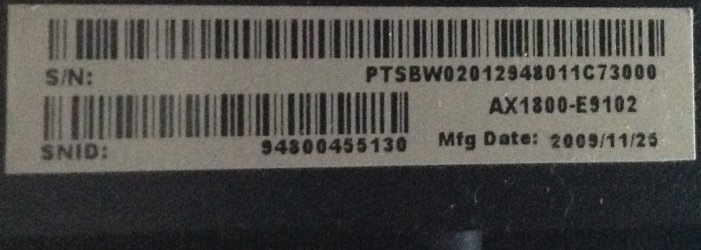
I have to send one picture at a time Picture #3
 

Attachments

  • image.jpg
    image.jpg
    90.9 KB · Views: 0

My Computer

Computer type
PC/Desktop
Computer Manufacturer/Model Number
Acer
OS
Windows 7 premium 64bit
CPU
Intel penguin processor E2210 dual core
Memory
2GB
Graphics Card(s)
NVIDIA GEForce 7100 intergraded
Hard Drives
320GB HDD
DVD Super multi drive
Antivirus
Norton
Browser
Google Chrome
Finally the last one
 

Attachments

  • image.jpg
    image.jpg
    82.1 KB · Views: 0

My Computer

Computer type
PC/Desktop
Computer Manufacturer/Model Number
Acer
OS
Windows 7 premium 64bit
CPU
Intel penguin processor E2210 dual core
Memory
2GB
Graphics Card(s)
NVIDIA GEForce 7100 intergraded
Hard Drives
320GB HDD
DVD Super multi drive
Antivirus
Norton
Browser
Google Chrome
Back
Top