Ram

ritesh

Guest
Local time
4:07 PM
Messages
72
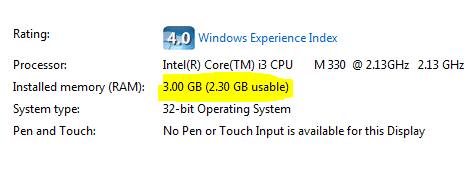
I have 3.00GB installed in my computer and I only get 2.30GB.

Why??

   Note
This is my new computer and I don't want to modify anything


Please help.

Ritesh
Capture.PNG
Capture.PNG
Capture.PNG
Capture.PNG
 

Attachments

  • Capture.PNG
    Capture.PNG
    4.3 KB · Views: 10

My Computer

Computer Manufacturer/Model Number
Acer Aspire 4740
OS
Windows 7
CPU
Intel i3 Core
Motherboard
Intel
Memory
3.00Gb
Graphics Card(s)
Intel Graphics Media Accelerator HD
Sound Card
Realtel HD Audio
Monitor(s) Displays
Laptop display
Screen Resolution
1280x800
Hard Drives
350GB
Cooling
Fans
Keyboard
Build in keyboard (laptop)
Mouse
touch pad mouse
Internet Speed
512 Kbps = 64 KBPS
I have 3.00GB installed in my computer and I only get 2.30GB.

Why??

   Note
This is my new computer and I don't want to modify anything


Please help.

Ritesh
Capture.PNG
Capture.PNG
Capture.PNG
Capture.PNG

Probably your video card and maybe page file.
 

My Computer

Computer Manufacturer/Model Number
HP Pavillion dv-7 1005 Tx
OS
Win 8 Release candidate 8400
CPU
[email protected]
Memory
4 gigs
Graphics Card(s)
Nvidia 9600M
Sound Card
HD built-in
Monitor(s) Displays
17" Wxga
Screen Resolution
1440x900
Cooling
none
Internet Speed
45Mb down 5Mb up
HDD cache, CPU cache, Video card, etc got the rest .
 

My Computer

Computer type
PC/Desktop
Computer Manufacturer/Model Number
Self Assembled
OS
Microsoft Windows 10 Pro Insider Preview 64-bit
CPU
Intel(R) Core(TM) i3-4130 CPU @ 3.40GHz
Motherboard
Gigabyte Technology Co., Ltd. B85M-D3H
Memory
Corsair Vengence 4GB x2 (8.00GB Dual-Channel DDR3 @ 798MHz)
Graphics Card(s)
2047MB GeForce GTS 450 (ZOTAC International)
Sound Card
Onboard (Realtek High Definition Audio)
Monitor(s) Displays
LG Flatron E2040T
Screen Resolution
1600x900
Hard Drives
Western Digital 1 TB
Seagate 500 GB
PSU
Corsair VS550
Case
Cooler Master K380
Cooling
Cooler Master Seidon 120V Plus
Keyboard
Logitech MK260r
Mouse
Logitech MK260r
Internet Speed
PMPL Broadband
Antivirus
Windows Defender + MBAM
Browser
Firefox
Other Info
Dell Studio 15" Laptop

My Computer

Computer Manufacturer/Model Number
Acer Aspire 4740
OS
Windows 7
CPU
Intel i3 Core
Motherboard
Intel
Memory
3.00Gb
Graphics Card(s)
Intel Graphics Media Accelerator HD
Sound Card
Realtel HD Audio
Monitor(s) Displays
Laptop display
Screen Resolution
1280x800
Hard Drives
350GB
Cooling
Fans
Keyboard
Build in keyboard (laptop)
Mouse
touch pad mouse
Internet Speed
512 Kbps = 64 KBPS

My Computer

Computer type
PC/Desktop
Computer Manufacturer/Model Number
Self Assembled
OS
Microsoft Windows 10 Pro Insider Preview 64-bit
CPU
Intel(R) Core(TM) i3-4130 CPU @ 3.40GHz
Motherboard
Gigabyte Technology Co., Ltd. B85M-D3H
Memory
Corsair Vengence 4GB x2 (8.00GB Dual-Channel DDR3 @ 798MHz)
Graphics Card(s)
2047MB GeForce GTS 450 (ZOTAC International)
Sound Card
Onboard (Realtek High Definition Audio)
Monitor(s) Displays
LG Flatron E2040T
Screen Resolution
1600x900
Hard Drives
Western Digital 1 TB
Seagate 500 GB
PSU
Corsair VS550
Case
Cooler Master K380
Cooling
Cooler Master Seidon 120V Plus
Keyboard
Logitech MK260r
Mouse
Logitech MK260r
Internet Speed
PMPL Broadband
Antivirus
Windows Defender + MBAM
Browser
Firefox
Other Info
Dell Studio 15" Laptop
Try using 64-bit Win 7. Your 32-bit key will work for 64-bit as long as they are not installed at the same time. If it still shows the same thing in 64-bit then it is probably your video card's shared memory. 64-bit reserves less RAM for hardware than 32-bit.
 

My Computer

Computer Manufacturer/Model Number
Asus K60IJ
OS
Windows 7 Ultimate x64
CPU
Intel Pentium Dual Core T4200
Motherboard
HP Laptop
Memory
4gb PC-6400
Graphics Card(s)
Integrated Intel GMA 4500
Sound Card
onboard(laptop)
Monitor(s) Displays
16"
Screen Resolution
1300 X 766 with true 720p HD support
Hard Drives
320GB 5400RPM
Mouse
Microsoft 3000 laptop mouse
Internet Speed
15mbit+ down and 768kbit up
Other Info
1TB external Western Digital Essentials HDD
Go to Resource Monitor > Memory tab and look at the color bar. That will tell you how much is system reserved (the leftmost grey area). Once we know that, we can explore for what it is used.
 

My Computer

Computer Manufacturer/Model Number
HP, Dell, Gateway, Toshiba - 4 laptops and 2 desktops
OS
Vista, Windows7, Mint Mate, Zorin, Windows 8
CPU
from 1.6GHz Duo to i7
Monitor(s) Displays
2x HP w2207
Hard Drives
5x HDD, 7x SSD, 12x Externals
Keyboard
with trackball - no mices
Mouse
Trackball mice
Internet Speed
DSL 6000
Try using 64-bit Win 7. Your 32-bit key will work for 64-bit as long as they are not installed at the same time. If it still shows the same thing in 64-bit then it is probably your video card's shared memory. 64-bit reserves less RAM for hardware than 32-bit.
Good point :D Upgrading to 64 bit os should reduce unusable ram quantity, provided the GPU is not sharing memory.
 

My Computer

Computer type
PC/Desktop
Computer Manufacturer/Model Number
Self Assembled
OS
Microsoft Windows 10 Pro Insider Preview 64-bit
CPU
Intel(R) Core(TM) i3-4130 CPU @ 3.40GHz
Motherboard
Gigabyte Technology Co., Ltd. B85M-D3H
Memory
Corsair Vengence 4GB x2 (8.00GB Dual-Channel DDR3 @ 798MHz)
Graphics Card(s)
2047MB GeForce GTS 450 (ZOTAC International)
Sound Card
Onboard (Realtek High Definition Audio)
Monitor(s) Displays
LG Flatron E2040T
Screen Resolution
1600x900
Hard Drives
Western Digital 1 TB
Seagate 500 GB
PSU
Corsair VS550
Case
Cooler Master K380
Cooling
Cooler Master Seidon 120V Plus
Keyboard
Logitech MK260r
Mouse
Logitech MK260r
Internet Speed
PMPL Broadband
Antivirus
Windows Defender + MBAM
Browser
Firefox
Other Info
Dell Studio 15" Laptop
Try using 64-bit Win 7. Your 32-bit key will work for 64-bit as long as they are not installed at the same time. If it still shows the same thing in 64-bit then it is probably your video card's shared memory. 64-bit reserves less RAM for hardware than 32-bit.
I do not think 64bit will help. Since he has only 3GBs, there should not be an address space problem. He has something (e.g. graphics) using real memory.
 

My Computer

Computer Manufacturer/Model Number
HP, Dell, Gateway, Toshiba - 4 laptops and 2 desktops
OS
Vista, Windows7, Mint Mate, Zorin, Windows 8
CPU
from 1.6GHz Duo to i7
Monitor(s) Displays
2x HP w2207
Hard Drives
5x HDD, 7x SSD, 12x Externals
Keyboard
with trackball - no mices
Mouse
Trackball mice
Internet Speed
DSL 6000
I do not think 64bit will help. Since he has only 3GBs, there should not be an address space problem. He has something (e.g. graphics) using real memory.
Agreed. It's most likely his video card and such sharing system memory.
 

My Computer

Computer Manufacturer/Model Number
Self-Built in July 2009
OS
Windows 7 Ultimate x64
CPU
Intel Q9550 2.83Ghz OC'd to 3.40Ghz
Motherboard
Gigabyte GA-EP45-UD3R rev. 1.1, F12 BIOS
Memory
8GB G.Skill PI DDR2-800, 4-4-4-12 timings
Graphics Card(s)
EVGA 1280MB Nvidia GeForce GTX570
Sound Card
Realtek ALC899A 8 channel onboard audio
Monitor(s) Displays
23" Acer x233H
Screen Resolution
1920x1080
Hard Drives
Intel X25-M 80GB Gen 2 SSD
Western Digital 1TB Caviar Black, 32MB cache. WD1001FALS
PSU
Corsair 620HX modular
Case
Antec P182
Cooling
stock
Keyboard
ABS M1 Mechanical
Mouse
Logitech G9 Laser Mouse
Internet Speed
15/2 cable modem
Other Info
Windows and Linux enthusiast. Logitech G35 Headset.
So is a dedicated GPU may be the solution ?
 

My Computer

Computer type
PC/Desktop
Computer Manufacturer/Model Number
Self Assembled
OS
Microsoft Windows 10 Pro Insider Preview 64-bit
CPU
Intel(R) Core(TM) i3-4130 CPU @ 3.40GHz
Motherboard
Gigabyte Technology Co., Ltd. B85M-D3H
Memory
Corsair Vengence 4GB x2 (8.00GB Dual-Channel DDR3 @ 798MHz)
Graphics Card(s)
2047MB GeForce GTS 450 (ZOTAC International)
Sound Card
Onboard (Realtek High Definition Audio)
Monitor(s) Displays
LG Flatron E2040T
Screen Resolution
1600x900
Hard Drives
Western Digital 1 TB
Seagate 500 GB
PSU
Corsair VS550
Case
Cooler Master K380
Cooling
Cooler Master Seidon 120V Plus
Keyboard
Logitech MK260r
Mouse
Logitech MK260r
Internet Speed
PMPL Broadband
Antivirus
Windows Defender + MBAM
Browser
Firefox
Other Info
Dell Studio 15" Laptop
So is a dedicated GPU may be the solution ?
That is a possibility since he has 1Gb of address space to play with.
 

My Computer

Computer Manufacturer/Model Number
HP, Dell, Gateway, Toshiba - 4 laptops and 2 desktops
OS
Vista, Windows7, Mint Mate, Zorin, Windows 8
CPU
from 1.6GHz Duo to i7
Monitor(s) Displays
2x HP w2207
Hard Drives
5x HDD, 7x SSD, 12x Externals
Keyboard
with trackball - no mices
Mouse
Trackball mice
Internet Speed
DSL 6000
Go to Resource Monitor > Memory tab and look at the color bar. That will tell you how much is system reserved (the leftmost grey area). Once we know that, we can explore for what it is used.

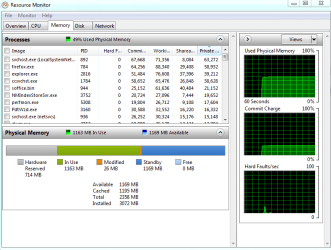
Here, I took a snap shot.
 

Attachments

  • Capture.PNG
    Capture.PNG
    24.3 KB · Views: 16

My Computer

Computer Manufacturer/Model Number
Acer Aspire 4740
OS
Windows 7
CPU
Intel i3 Core
Motherboard
Intel
Memory
3.00Gb
Graphics Card(s)
Intel Graphics Media Accelerator HD
Sound Card
Realtel HD Audio
Monitor(s) Displays
Laptop display
Screen Resolution
1280x800
Hard Drives
350GB
Cooling
Fans
Keyboard
Build in keyboard (laptop)
Mouse
touch pad mouse
Internet Speed
512 Kbps = 64 KBPS
There you have it. 714MBs are hardware reserved. What is your graphics facility. If you don't know, type msinfo32 into the start/search and hit Enter. Then go to Components > Display. That should tell you.
 

My Computer

Computer Manufacturer/Model Number
HP, Dell, Gateway, Toshiba - 4 laptops and 2 desktops
OS
Vista, Windows7, Mint Mate, Zorin, Windows 8
CPU
from 1.6GHz Duo to i7
Monitor(s) Displays
2x HP w2207
Hard Drives
5x HDD, 7x SSD, 12x Externals
Keyboard
with trackball - no mices
Mouse
Trackball mice
Internet Speed
DSL 6000
There you have it. 714MBs are hardware reserved. What is your graphics facility. If you don't know, type msinfo32 into the start/search and hit Enter. Then go to Components > Display. That should tell you.

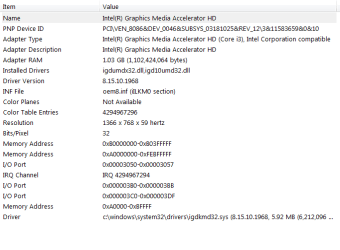
I don't know, but I took a snap shot.
 

Attachments

  • Capture.PNG
    Capture.PNG
    11.7 KB · Views: 10

My Computer

Computer Manufacturer/Model Number
Acer Aspire 4740
OS
Windows 7
CPU
Intel i3 Core
Motherboard
Intel
Memory
3.00Gb
Graphics Card(s)
Intel Graphics Media Accelerator HD
Sound Card
Realtel HD Audio
Monitor(s) Displays
Laptop display
Screen Resolution
1280x800
Hard Drives
350GB
Cooling
Fans
Keyboard
Build in keyboard (laptop)
Mouse
touch pad mouse
Internet Speed
512 Kbps = 64 KBPS
OK, that is an on-board graphic that uses your RAM since it has no own memory. There is little you can do about it since you seem to have an Acer laptop. In a desktop you could use a dedicated graphics card with own memory. But in a laptop that is not possible.
You could upgrade your RAM to 4GBs - then you would end up with about 3.2GBs useable.
 

My Computer

Computer Manufacturer/Model Number
HP, Dell, Gateway, Toshiba - 4 laptops and 2 desktops
OS
Vista, Windows7, Mint Mate, Zorin, Windows 8
CPU
from 1.6GHz Duo to i7
Monitor(s) Displays
2x HP w2207
Hard Drives
5x HDD, 7x SSD, 12x Externals
Keyboard
with trackball - no mices
Mouse
Trackball mice
Internet Speed
DSL 6000
OK, that is an on-board graphic that uses your RAM since it has no own memory. There is little you can do about it since you seem to have an Acer laptop. In a desktop you could use a dedicated graphics card with own memory. But in a laptop that is not possible.
You could upgrade your RAM to 4GBs - then you would end up with about 3.2GBs useable.


Ok, I don't want to upgrade because I already did from 1Gb to 3Gb.

Anyway, is 2.30GB enough for my laptop to go fast and play games?
 
Last edited:

My Computer

Computer Manufacturer/Model Number
Acer Aspire 4740
OS
Windows 7
CPU
Intel i3 Core
Motherboard
Intel
Memory
3.00Gb
Graphics Card(s)
Intel Graphics Media Accelerator HD
Sound Card
Realtel HD Audio
Monitor(s) Displays
Laptop display
Screen Resolution
1280x800
Hard Drives
350GB
Cooling
Fans
Keyboard
Build in keyboard (laptop)
Mouse
touch pad mouse
Internet Speed
512 Kbps = 64 KBPS
2.30 gb is fast enough but more ram will give better performance obviously but windows uses so much ram and the other components take the rest so most likly the rest of your memory is used to transfer and communicate faster to other devices

im running 8 gigs of ram but usable to the system itself is like 6.58 my vid card is a gigabyte so ther for the other gig went to my card the other ram went to hdd cpu ect nothing to worry about you will still see perfomance even though it doesn't say 3 gigs usable
 

My Computer

Computer type
PC/Desktop
Computer Manufacturer/Model Number
CoreI7-6700K MrFingerIII Special Builds
OS
Windows 10 Home Premium 64bit sp1
CPU
Intel I7-6700K @ 4.6 Ghz 1.344 volts everyday OC
Motherboard
Asrock Fatality K6 Z170 Socket 1151
Memory
32GB G-Skill TridentZ 3200mhz 16-18-18-38 DDR4
Graphics Card(s)
Sli Gigabyte Windforce GTX 980 G1
Sound Card
AC97 Creative Rage Tactic 3D Headphones Bluetooth
Monitor(s) Displays
27" Asus ROG Swift PG278Q G-Sync 48" Vizio Smart HD TV
Screen Resolution
2560x1440p 27"- 48" Currently Gaming at 2560x1440p Res 2K
Hard Drives
250GB Samsung Evo840SSD Seagate baracuda 500 GB WD Mybook 500Gb 1TB Seagate Barracuda
PSU
HX1050w Corsair Silver 80plus certified crosfire/sli
Case
Enthod Pro Full Tower
Cooling
Corsair H110i GT 280 mm High Performance WaterBlock
Keyboard
Logitech wireless keyboard
Mouse
Logitech wireless mouse
Internet Speed
Cox Cable 100+ mb
Antivirus
WebRoot Spysweeper with Antivirus
Browser
IE-10, Chrome, Opera
Other Info
My Other Rig is a AMD FX8320E @4.6Ghz 16GB Ballistic Sport Ram
Mobo Asrock Fatality 990FX 120GB OCZ SSD 1TB Seagate Barracuda Corsair H75 Cooling PSU Corsair CX750
GPU GTX Gigabyte 970G1
Anyway, is 2.30GB enough for my laptop go fast and play games?

Only if the game is solitaire. Despite the roses and sunshine Intel likes to spread around, the new CPU's with the integrated graphics (that is integrated into the cpu, not the motherboard) aren't very good. You laptop has the i3 330M and this is how well the integrated graphics does,

Notebookcheck: Intel Graphics Media Accelerator HD

The sad reality is that if you want to play games on a computer you either spend a small fortune on a laptop that actually has a decent graphics card in it to begin with (and that rules out anything with Intel graphics), or you get a desktop.
 

My Computer

Computer type
PC/Desktop
Computer Manufacturer/Model Number
Me
OS
Win 7 Ultimate x64
CPU
FX-8350 @ 4.6 GHz so far
Motherboard
Asus M5A97 EVO
Memory
ADATA XPG V1 Series Black 8GB DDR3 1600
Graphics Card(s)
Sapphire R9 270x Dual-X
Sound Card
Xonar DGX w/ Corsair Vengence 1300
Monitor(s) Displays
Acer S232HL Abid
Screen Resolution
1920x1080
Hard Drives
120 GB OCZ Vertex 3
500 GB Seagate 7200.12
PSU
Antec Earthwatts 650W Green
Case
Antec Three Hundred
Cooling
Cooler Master 212 EVO
Keyboard
Logitech G510
Mouse
Logitech G500s
Internet Speed
35000/3000
I can only comfirm what was already said. For games, you have to get used to Hearts and alike. Anything that needs a decent graphics support is out. For that you really would need a desktop in the $800 to $1000 range.
Your laptop is good though for surfing the net and office applications as well as the usual stuff one does outside gaming.
 

My Computer

Computer Manufacturer/Model Number
HP, Dell, Gateway, Toshiba - 4 laptops and 2 desktops
OS
Vista, Windows7, Mint Mate, Zorin, Windows 8
CPU
from 1.6GHz Duo to i7
Monitor(s) Displays
2x HP w2207
Hard Drives
5x HDD, 7x SSD, 12x Externals
Keyboard
with trackball - no mices
Mouse
Trackball mice
Internet Speed
DSL 6000
Back
Top