RamMap isn't working correctly

MauiBear2291

New member
Local time
7:08 PM
Messages
11
I've been using Ram Map successfully for a long period. All of a sudden, it won't load. A white screen appears as it did before but nothing happens, nothing loads or fills out the white square. I downloaded RamMap again, saved it to my hard drive (saw a post on that potentially fixing this problem) and again it just loaded a white square, nothing happens. I really depend on this tool since the memory mapping of Windows 7 hogs so much active memory that applications slow down to turtle pace. Any help would be greatly appreciated.

Cheers,

MauiBear
 

My Computer

Computer type
PC/Desktop
Computer Manufacturer/Model Number
HP
OS
Windows 7 Professional
CPU
Intel 5
Motherboard
ASUS
Antivirus
AVG
Browser
Chrome
I appreciate the advice, I did as suggested. It still doesn't load properly as described. I'm wondering if it relates to the anti virus program Bit defender which I switched to in November. I can't tell exactly when Ram Map stopped working, however, it's been in the last two months. Are there any other ways to adjust the memory usage besides Ram Map. Thank you.
 

My Computer

Computer type
PC/Desktop
Computer Manufacturer/Model Number
HP
OS
Windows 7 Professional
CPU
Intel 5
Motherboard
ASUS
Antivirus
AVG
Browser
Chrome
I used to use Bitdefender Free, but as a power user I found it got in the way. So now I have other things I do to stay abreast of malware. Like using Sandboxie for my browser and full disk clones to external hard drives.

It could be Bitdefender because I know it will stop debugging which is away that malware can take a hold of a system. If RAMMap uses any kind of debugging routines in its code, that could be way Bitdefender is blocking it, and you won't get a warning or anything like that. This again was why I got rid of Bitdefender or other anti-virus software because as a power user it got in the way.

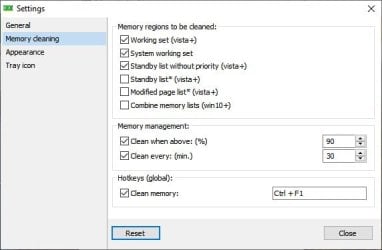
Are there any other ways to adjust the memory usage besides Ram Map.

Absent of using Bitdefender's removal utility and seeing if that fixes the issue, try the following which may be what you desire.

CleanMem - cleans unused system memory

RAMRush - RAM Optimizer Memory Optimizer

Wise Memory Optimizer - Free Up More Memory with One-Click

Mz RAM Booster

As always, scan all downloads at Virus Total.
 

My Computer

Computer type
PC/Desktop
OS
Windows 7 Ultimate x64

Attachments

  • mem-reduct_485460_full.jpg
    mem-reduct_485460_full.jpg
    22.3 KB · Views: 8

My Computer

Computer type
PC/Desktop
OS
Windows 7 Enterprise x64
I uninstalled Bitefinder, it did not help RamMap run. So, I took Wise Memory Optimizer as the replacement. It's the easiest among the one's you listed. Sandboxie doesn't run on W7. I'm downloading Microsoft Security Essentials for Defender. I remember it being friendly in terms of memory usage. If you have a cloud virus protection for W7, let me know. For now, I've at least satisfied my RamMap problem. Next on my list is faulty microphone performance when I'm on Zoom and Skype. People aren't hearing me even the the microphone green indicator is showing that it's working in the Sound area. Any ideas are appreciated, however, not part of this ticket. Thank you.
 

My Computer

Computer type
PC/Desktop
Computer Manufacturer/Model Number
HP
OS
Windows 7 Professional
CPU
Intel 5
Motherboard
ASUS
Antivirus
AVG
Browser
Chrome
Thank you for your help. I'll create another thread if appropriate, still working on it.
 

My Computer

Computer type
PC/Desktop
Computer Manufacturer/Model Number
HP
OS
Windows 7 Professional
CPU
Intel 5
Motherboard
ASUS
Antivirus
AVG
Browser
Chrome
Back
Top