Solved Ran Windows Defender Offline, can't boot up computer. Help please!

bsever

New member
Local time
10:18 PM
Messages
17
So a google search tells me that this seems to happen pretty often. Microsoft Malicious Software Removal Tool detected Alereon (sp?), directed me to use Windows Defender Offline. I did and now I can't boot up.

I have followed the directions given here to prior victims and have attached the FRST scan log. Thank you for any help you can give.
 

Attachments

My Computer My Computer

Computer type
PC/Desktop
Computer Manufacturer/Model Number
Dell
OS
Windows 7 64 bit
Antivirus
Symantec

My Computer My Computer

Computer type
PC/Desktop
Computer Manufacturer/Model Number
Own build (new) Desk1 / Asus ROG Win 7 / Desk2 1st build
OS
Desk1 7 Home Prem / Desk2 10 Pro / Main lap Asus ROG 10 Pro 2 laptop Toshiba 7 Pro Asus P2520 7 & 10
CPU
Desk1 i5 3750K / Laptop i7 GTX 860M / Desk2 i5 2500
Motherboard
Desk1 Asus P877-V / Desk2 Gigabyte H67 UD3H / Laptop ?
Memory
Desk1 8GB (1866) / Desk2 16GB (1333) / Laptop 8Gb DDR3
Graphics Card(s)
Desk 1& 2NVidia GTX 650 & Laptops on board Intel
Sound Card
Desk 1 & 2 -XONAR DG Realtek High Def audio Laptop
Monitor(s) Displays
Desk 1 Benq HD 2450 / Desk2 Philips 24" / Laptop 17.5"
Screen Resolution
1920x1080 D1 & D2 & Laptop 1
Hard Drives
Desk1 Samsung 120GB 830 SSD
Asus ROG 256GB 850 Pro SSD
Desk2 Samsung 840 256 SSD
Toshiba 120GB EVO
PSU
Desk 1 Corsair HX 1050/ Laptop ? / Desk 2 Corsair HX 650
Case
Desk 1 Cooler HAF XM ? Toshiba laptop / Desk2 Coolermaster
Cooling
Fans on all Desk1 -2 Desk2 - all Coolermasters 5 Laptop ?
Keyboard
Desk 1 MS Sidewinder X6 Desk 2 MS Sidewinder X 4
Mouse
Desk 1&2 - Gigabyte MS 900 gamer - laptop - Logitec wireless
Internet Speed
ADSL2+
Other Info
One other Desktop (tester) and spare Toshba laptop both with SSD's
Running Kaspersky 2016 ISS on all machines config'd identically
Logitec audio stereo systems on each machine (x3)
Canon MG5250MFC
Router/modem TP-Link running WPA2SK
alureon virus

ICit2lol gave you a starting point - Kaspersky is very good.

Follow one path at a time, take ICit2lol 's suggestion.

If your machine is still infected after running that, you can wait for someone more experience than I have to drop in.

This is a tough bug to squash, but members on the Security team have successfully tackled other cases.

I read through a few and the FRST report you posted jogeed something in my memory.

TDL4: custom:26000022 <===== ATTENTION!
There's a procedure to deal with the above. I believe it was one of the last things done to prevent reappearance. I just don't recall the details.

Hang in there, I'm sure one of the team will drop in to help.

Good Luck.
 

My Computer My Computer

Computer type
Laptop
Computer Manufacturer/Model Number
HP Pavilion dv6-6c10us
OS
x64 (6.3.9600) Win8.1 Pro & soon dual boot x64 (6.1.7601) Win7_SP1 HomePrem
CPU
AMD A6-3420M APU with Radeon(tm) HD Graphics
Motherboard
Hewlett-Packard 1805
Memory
6.00 GB
Graphics Card(s)
AMD Radeon(TM) HD 6520G
Sound Card
(1) AMD High Definition Audio Device (2) IDT High Definiti
Monitor(s) Displays
HP W2072a 20" LCD (1600 x 900) @ 60 Hz
Screen Resolution
1366 x 768 x 32 bits (4294967296 colors) @ 60 Hz
Hard Drives
ST640LM0 00 HM641JI SATA Disk Device
Keyboard
Logitech k520 wireless KB
Mouse
Logitech m320 wireless mouse (bundled with KB)
Internet Speed
15/5 | 54 MB Wireless 'n'
Antivirus
Realtime: Defender or Avast | On-demand: Malwarebytes, ESET
Browser
IE 11 on Win8, IE 10 on win 7
Other Info
Media: [Gimp, Audacity, VLC] || Comm: [WEmail 2012, Skype] || Productivity: [OpenOffice,| Textpad] || Utils: [Sysinternals, cCleaner, Speccy, Defraggler]
I dont think running another bootable rescue disk will help....he has already run WDO in an attempt to clean up the rootkit. Sounds like MBR is buggered as a consequence of that?

In this case, OP might consider clean install. Often a safe option with rootkits.
 

My Computer My Computer

Computer type
PC/Desktop
Computer Manufacturer/Model Number
Golden Mk. I.4
OS
Windows 10 Pro x64 ; Xubuntu x64
CPU
Intel i7 860 @ 2.80 GHz O/C'ed to 4.0GHz
Motherboard
Gigabyte P55A-UD3R Rev.1. Award BIOS F13
Memory
16GB Corsair Vengance DDR3 @ 661 MHz Dual Channel (9-9-9-24)
Graphics Card(s)
EVGA NVidia GTX 560 1024MB
Sound Card
Realtek Integrated
Monitor(s) Displays
Dual Samsung SyncMaster 2494HS
Screen Resolution
1920*1080 and 1920*1080
Hard Drives
1*Samsung 840 EVO 120GB SSD;
1*OCZ Vertex 2 60GB SSD;
2*Samsung F3 SpinPoint 1TB in RAID0;
1*Samsung F1 SpinPoint 1TB;
2*Western Digital 1TB External USB 3.0
1*Western Digital 500GB External USB 3.0
1*Seagate 500GB External USB 2.0
PSU
Thermaltake ToughPower QFan 750W
Case
Thermaltake Element S VK60001W2Z
Cooling
Corsair H60 Water Cooling, 2*230mm and 2*80mm case fans
Keyboard
Logitech G110
Mouse
Logitech MX518
Ok I only suggested cos the OP cannot boot at all so thought at least it was an option.

If the data needs saving then maybe using the Ubuntu to boot and retrieve that data might be worth a try before the clean install if he has stuff he needs to keep.

I know there is a tutorial on this but this is what I have used in the past

BOOTABLEUBUNTU

Make a bootable Ubuntu disk http://www.ubuntu.com/download

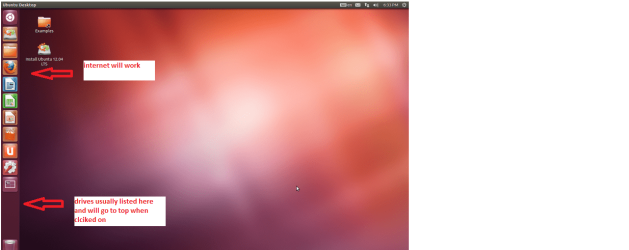
Set the BIOS to boot from theoptical when the machine boots it will show you a screen with TRY or INSTALL> select TRY

When it is finished - it takes verylittle time you will get a screen like in the pic .

Open the drive you want > Userand dig down until you get to the data / settings you may be able to copy /paste the material you want to an external source or other installed drive doingthis.

I am not sure if it will but I haverecovered tons of data etc using this method both on "dead" or justplain drives that you cannot get data from using Windows.
 

Attachments

  • Ubuntu screen.PNG
    Ubuntu screen.PNG
    123.3 KB · Views: 0

My Computer My Computer

Computer type
PC/Desktop
Computer Manufacturer/Model Number
Own build (new) Desk1 / Asus ROG Win 7 / Desk2 1st build
OS
Desk1 7 Home Prem / Desk2 10 Pro / Main lap Asus ROG 10 Pro 2 laptop Toshiba 7 Pro Asus P2520 7 & 10
CPU
Desk1 i5 3750K / Laptop i7 GTX 860M / Desk2 i5 2500
Motherboard
Desk1 Asus P877-V / Desk2 Gigabyte H67 UD3H / Laptop ?
Memory
Desk1 8GB (1866) / Desk2 16GB (1333) / Laptop 8Gb DDR3
Graphics Card(s)
Desk 1& 2NVidia GTX 650 & Laptops on board Intel
Sound Card
Desk 1 & 2 -XONAR DG Realtek High Def audio Laptop
Monitor(s) Displays
Desk 1 Benq HD 2450 / Desk2 Philips 24" / Laptop 17.5"
Screen Resolution
1920x1080 D1 & D2 & Laptop 1
Hard Drives
Desk1 Samsung 120GB 830 SSD
Asus ROG 256GB 850 Pro SSD
Desk2 Samsung 840 256 SSD
Toshiba 120GB EVO
PSU
Desk 1 Corsair HX 1050/ Laptop ? / Desk 2 Corsair HX 650
Case
Desk 1 Cooler HAF XM ? Toshiba laptop / Desk2 Coolermaster
Cooling
Fans on all Desk1 -2 Desk2 - all Coolermasters 5 Laptop ?
Keyboard
Desk 1 MS Sidewinder X6 Desk 2 MS Sidewinder X 4
Mouse
Desk 1&2 - Gigabyte MS 900 gamer - laptop - Logitec wireless
Internet Speed
ADSL2+
Other Info
One other Desktop (tester) and spare Toshba laptop both with SSD's
Running Kaspersky 2016 ISS on all machines config'd identically
Logitec audio stereo systems on each machine (x3)
Canon MG5250MFC
Router/modem TP-Link running WPA2SK
Thanks for the suggestions! I don't want to have to try the ubuntu recovery or the clean install, but thank you for pointing me in that direction so I know what my options are. I have seen some folks here get some help after having WDO leave their machines un-bootable and it seems to be a happy ever-after story for some, so I guess I'm looking for a miracle too. A fellow can dream.
 

My Computer My Computer

Computer type
PC/Desktop
Computer Manufacturer/Model Number
Dell
OS
Windows 7 64 bit
Antivirus
Symantec
Well mate you still have that rescue disk option it isn't going to cost you anything and what have you got to lose??

If you have all your data backed up then if it is store bought machine you have the option of factory defaulting it.

I just Googled the problem a while ago and there are a ton of refs there most mentioning that Aleuron problem.
 

My Computer My Computer

Computer type
PC/Desktop
Computer Manufacturer/Model Number
Own build (new) Desk1 / Asus ROG Win 7 / Desk2 1st build
OS
Desk1 7 Home Prem / Desk2 10 Pro / Main lap Asus ROG 10 Pro 2 laptop Toshiba 7 Pro Asus P2520 7 & 10
CPU
Desk1 i5 3750K / Laptop i7 GTX 860M / Desk2 i5 2500
Motherboard
Desk1 Asus P877-V / Desk2 Gigabyte H67 UD3H / Laptop ?
Memory
Desk1 8GB (1866) / Desk2 16GB (1333) / Laptop 8Gb DDR3
Graphics Card(s)
Desk 1& 2NVidia GTX 650 & Laptops on board Intel
Sound Card
Desk 1 & 2 -XONAR DG Realtek High Def audio Laptop
Monitor(s) Displays
Desk 1 Benq HD 2450 / Desk2 Philips 24" / Laptop 17.5"
Screen Resolution
1920x1080 D1 & D2 & Laptop 1
Hard Drives
Desk1 Samsung 120GB 830 SSD
Asus ROG 256GB 850 Pro SSD
Desk2 Samsung 840 256 SSD
Toshiba 120GB EVO
PSU
Desk 1 Corsair HX 1050/ Laptop ? / Desk 2 Corsair HX 650
Case
Desk 1 Cooler HAF XM ? Toshiba laptop / Desk2 Coolermaster
Cooling
Fans on all Desk1 -2 Desk2 - all Coolermasters 5 Laptop ?
Keyboard
Desk 1 MS Sidewinder X6 Desk 2 MS Sidewinder X 4
Mouse
Desk 1&2 - Gigabyte MS 900 gamer - laptop - Logitec wireless
Internet Speed
ADSL2+
Other Info
One other Desktop (tester) and spare Toshba laptop both with SSD's
Running Kaspersky 2016 ISS on all machines config'd identically
Logitec audio stereo systems on each machine (x3)
Canon MG5250MFC
Router/modem TP-Link running WPA2SK

My Computer My Computer

Computer type
PC/Desktop
Computer Manufacturer/Model Number
Dell
OS
Windows 7 64 bit
Antivirus
Symantec
I'm going to disagree that WDO cleaned up the malware. (Part of my Dale Carnegie training :p )
edit: I going to agree that the OP consider a clean install. Malware is getting "smarter" and it's possible that this bug knows about WDO and as a self defense mechanism, messes up the boot. Not sure at this point.

I dont think running another bootable rescue disk will help....he has already run WDO in an attempt to clean up the rootkit. Sounds like MBR is buggered as a consequence of that?

In this case, OP might consider clean install. Often a safe option with rootkits.

I'm also going to recommend the Kaspersky Rescue Disk that ICIT2lol started with.
- I'm not certain it has the TDSSkiller incorporated on the disk, but it's a good place to start.

Just be sure to write the disc on a clean machine

Kaspersky said:
Kaspersky Rescue Disk 10 is designed to scan, disinfect and restore infected operating systems. It should be used when it is impossible to boot the operating system.

Kaspersky Lab products are always upgraded and renewed. In order to restore your system, Kaspersky Lab specialists recommend to use the latest version of Kaspersky Rescue Disk 10.

You can download the distributive of Kaspersky Rescue Disk 10 from Kaspersky Lab servers.

There are always different options, but the path taken is your choice, bsever.
The Rescue disc won't hurt and it might give you a head start when a member of the Security Team stops by.

Your thread, your machine, your choice.
When someone does stop by you will more than likely get your miracle and step by step help. You've seen some of those threads, it takes a while.

Wait or Kasperky - you know what I think :)

Good luck getting rid of that miserable bug.

Edit: Just saw Kaspersky USB drive option when I was closing down open browser windows.
Also make sure the machine you create this on is free of malware
http://support.kaspersky.com/8092

 
Last edited:

My Computer My Computer

Computer type
Laptop
Computer Manufacturer/Model Number
HP Pavilion dv6-6c10us
OS
x64 (6.3.9600) Win8.1 Pro & soon dual boot x64 (6.1.7601) Win7_SP1 HomePrem
CPU
AMD A6-3420M APU with Radeon(tm) HD Graphics
Motherboard
Hewlett-Packard 1805
Memory
6.00 GB
Graphics Card(s)
AMD Radeon(TM) HD 6520G
Sound Card
(1) AMD High Definition Audio Device (2) IDT High Definiti
Monitor(s) Displays
HP W2072a 20" LCD (1600 x 900) @ 60 Hz
Screen Resolution
1366 x 768 x 32 bits (4294967296 colors) @ 60 Hz
Hard Drives
ST640LM0 00 HM641JI SATA Disk Device
Keyboard
Logitech k520 wireless KB
Mouse
Logitech m320 wireless mouse (bundled with KB)
Internet Speed
15/5 | 54 MB Wireless 'n'
Antivirus
Realtime: Defender or Avast | On-demand: Malwarebytes, ESET
Browser
IE 11 on Win8, IE 10 on win 7
Other Info
Media: [Gimp, Audacity, VLC] || Comm: [WEmail 2012, Skype] || Productivity: [OpenOffice,| Textpad] || Utils: [Sysinternals, cCleaner, Speccy, Defraggler]
Just a thought.
After WDO was the boot order set back to proper drive?
I will go back to watching.
 

My Computer My Computer

Computer type
PC/Desktop
Computer Manufacturer/Model Number
Home made Desktop
OS
Windows 10 Pro. 64/ version 1709 Windows 7 Pro/64
CPU
Intel i7-6800K @ 4.3
Motherboard
ASUS X-99 Deluxe II
Memory
Corsair Platinum 16 gig @2400
Graphics Card(s)
EVGA GTX 1070 OC
Monitor(s) Displays
Asus 27" LED LCD/VE278Q
Screen Resolution
1920-1080 or 1280-720 HDMI
Hard Drives
INTEL SSD 730-240 Gb Sata 3.0/
PSU
EVGA Platium 1200W
Case
Phanteks Luxe Tempered Glass 8 fans/ one radiator
Cooling
XSPC/ Water Cooled CPU
Keyboard
Das 4 Professional
Mouse
Logitech M705/MX Anywhere 2-S
Internet Speed
100 mbits
Antivirus
Microsoft Security Essentials/ Malwarebytes Premium 3.0/ SAS
Browser
I.E. 11 default/Firefox/ ISP Time Warner Cable/Spectrum
Other Info
LG BluRay Burner/
Sound system-KLipsch-THX/
Icy Dock ssd Hot Swap bays.
Just a thought.
After WDO was the boot order set back to proper drive?
I will go back to watching.

Surprisingly, it was set back to the proper drive after WDO.
 

My Computer My Computer

Computer type
PC/Desktop
Computer Manufacturer/Model Number
Dell
OS
Windows 7 64 bit
Antivirus
Symantec
Yes bsever mate there is a huge amount of replies from wherever re this problem and I am guessing any one of the replies may well be right but it takes very little time to run the rescue and if nothing else eliminates some things.
There are in that list others too of which I have not used but I am sure if the Kaspersky does not pick anything up the others may or may not pick up malware as nothing is 100% foolproof. That goes for any security you are using really if you think about it until a malware is put out and it is recognised as such then it cannot be detected, the best you can do is to use a good program with a good reputation.

If you want to like Slartybart says use the TDSS Killer it is here Malware Removal Tools | Free Virus Removal | Kaspersky Lab scroll down to the TDSS and use it - again it takes only a very short time to run and eliminates yet another probable cause.
 

My Computer My Computer

Computer type
PC/Desktop
Computer Manufacturer/Model Number
Own build (new) Desk1 / Asus ROG Win 7 / Desk2 1st build
OS
Desk1 7 Home Prem / Desk2 10 Pro / Main lap Asus ROG 10 Pro 2 laptop Toshiba 7 Pro Asus P2520 7 & 10
CPU
Desk1 i5 3750K / Laptop i7 GTX 860M / Desk2 i5 2500
Motherboard
Desk1 Asus P877-V / Desk2 Gigabyte H67 UD3H / Laptop ?
Memory
Desk1 8GB (1866) / Desk2 16GB (1333) / Laptop 8Gb DDR3
Graphics Card(s)
Desk 1& 2NVidia GTX 650 & Laptops on board Intel
Sound Card
Desk 1 & 2 -XONAR DG Realtek High Def audio Laptop
Monitor(s) Displays
Desk 1 Benq HD 2450 / Desk2 Philips 24" / Laptop 17.5"
Screen Resolution
1920x1080 D1 & D2 & Laptop 1
Hard Drives
Desk1 Samsung 120GB 830 SSD
Asus ROG 256GB 850 Pro SSD
Desk2 Samsung 840 256 SSD
Toshiba 120GB EVO
PSU
Desk 1 Corsair HX 1050/ Laptop ? / Desk 2 Corsair HX 650
Case
Desk 1 Cooler HAF XM ? Toshiba laptop / Desk2 Coolermaster
Cooling
Fans on all Desk1 -2 Desk2 - all Coolermasters 5 Laptop ?
Keyboard
Desk 1 MS Sidewinder X6 Desk 2 MS Sidewinder X 4
Mouse
Desk 1&2 - Gigabyte MS 900 gamer - laptop - Logitec wireless
Internet Speed
ADSL2+
Other Info
One other Desktop (tester) and spare Toshba laptop both with SSD's
Running Kaspersky 2016 ISS on all machines config'd identically
Logitec audio stereo systems on each machine (x3)
Canon MG5250MFC
Router/modem TP-Link running WPA2SK
Jacee is one of the best around here - I copied a post from a similar thread that might get you booted.

I noticed a slight difference between the other thread and your thread.

Your specs state Win7 x64 - is that correct?
If you already have the 64 bit version, you can skip the download, if you aren't certain, please download.

Is the exe named FRST64 or FRST? You want FRST64.exe

So the first thing I'd like you to do is download the
64 bit version of Farbar: Downloading Farbar Recovery Scan Tool
[download prompt should offer Run, Safe, Cancel bar]

Then follow the instruction in the quote.

Open notepad. Please copy the contents of the code box below. To do this highlight the contents of the box and right click on it. Paste this into the open notepad. Save it on the flashdrive as fixlist.txt


Code:
start
TDL4: custom:26000022
end

Now please enter System Recovery Options as you did to get the log.

Run FRST64 and press the Fix button just once and wait.
The tool will make a log on the flashdrive (Fixlog.txt) please post it to your reply.

Reboot and see if you can open windows normally..

The next steps Jacee asks OP to run AdwCleaner, but Cottonball (also one of the best) interjects wih something he sees in the FRST64 report. I'm not up on FARBR reports - so another member can take a look at it and determine if an additional script is required.

Given that those two are the best and there is some minor discussion about the order, the only thing I can safely say at this point is to follow the Jacee's quoted instructions above.

I'm sure the discussion was a minor detail - but they would be the ones who could answer if the order made a difference.
 

My Computer My Computer

Computer type
Laptop
Computer Manufacturer/Model Number
HP Pavilion dv6-6c10us
OS
x64 (6.3.9600) Win8.1 Pro & soon dual boot x64 (6.1.7601) Win7_SP1 HomePrem
CPU
AMD A6-3420M APU with Radeon(tm) HD Graphics
Motherboard
Hewlett-Packard 1805
Memory
6.00 GB
Graphics Card(s)
AMD Radeon(TM) HD 6520G
Sound Card
(1) AMD High Definition Audio Device (2) IDT High Definiti
Monitor(s) Displays
HP W2072a 20" LCD (1600 x 900) @ 60 Hz
Screen Resolution
1366 x 768 x 32 bits (4294967296 colors) @ 60 Hz
Hard Drives
ST640LM0 00 HM641JI SATA Disk Device
Keyboard
Logitech k520 wireless KB
Mouse
Logitech m320 wireless mouse (bundled with KB)
Internet Speed
15/5 | 54 MB Wireless 'n'
Antivirus
Realtime: Defender or Avast | On-demand: Malwarebytes, ESET
Browser
IE 11 on Win8, IE 10 on win 7
Other Info
Media: [Gimp, Audacity, VLC] || Comm: [WEmail 2012, Skype] || Productivity: [OpenOffice,| Textpad] || Utils: [Sysinternals, cCleaner, Speccy, Defraggler]
I am running the Kaspersky Rescue from USB as suggested earlier at the moment and will see what happens when that is over. The quoted text seems to be a fix that is unique to that case, but in the absence of further direction (and in deference to your expertise) I'll try the quoted fixlist text next if still necessary. I appreciate the guidance!

Edit: Kaspersky ran a quick scan of the disk boot sectors and hidden startup objects and didn't find anything, so I am having it run a scan of c drive and all other available objects/places to scan that it gave me. I have to leave for the night so I won't know the results of this scan until the morning, but if nothing turns up I guess I'll be at square one and will try the fix quoted by Slartybart. Thanks again.
 
Last edited:

My Computer My Computer

Computer type
PC/Desktop
Computer Manufacturer/Model Number
Dell
OS
Windows 7 64 bit
Antivirus
Symantec
What you have is a 'Rootkit'. I don't even try to help folks with this problem. My best advice is to wipe and do a "clean" install. You can read what a rootkit is all about here: Rootkit - Wikipedia, the free encyclopedia


There are experts who believe that the only reliable way to remove them is to re-install the operating system from trusted media.[82][83] This is because antivirus and malware removal tools running on an untrusted system may be ineffective against well-written kernel-mode rootkits.
I'm one of these 'experts'.
 

My Computer My Computer

Computer type
PC/Desktop
Computer Manufacturer/Model Number
Bruce ... somewhere in his 40's
OS
Windows 7 Ultimate 32bit SP1
CPU
Intel(R) Core(TM)2 Quad CPU @ 2.40GHz, 2400 MHz
Motherboard
INTEL/D975XBX2
Memory
4 GB
Graphics Card(s)
ATI Radeon HD 2600 Pro
Monitor(s) Displays
Samsung SyncMaster 914v
Screen Resolution
1280 x 1024
Hard Drives
2/500GB each ... ST3500630AS ATA Device.
One is not connected
PSU
Rocketfish 700 W
Case
G.Skill Gigabyte Chassis
Keyboard
Standard PS/2 Keyboard
Mouse
Microsoft PS/2 Mouse
Internet Speed
DSL
Antivirus
Avira Internet Security
Browser
IE 11
Other Info
ATI HDMI Audio
Jacee: Is there any hope for user data or is that also suspect?

bsever: Looks like we should have waited.
I was leaning on her posts anyway, so I'll lean her post# 15 above.
 

My Computer My Computer

Computer type
Laptop
Computer Manufacturer/Model Number
HP Pavilion dv6-6c10us
OS
x64 (6.3.9600) Win8.1 Pro & soon dual boot x64 (6.1.7601) Win7_SP1 HomePrem
CPU
AMD A6-3420M APU with Radeon(tm) HD Graphics
Motherboard
Hewlett-Packard 1805
Memory
6.00 GB
Graphics Card(s)
AMD Radeon(TM) HD 6520G
Sound Card
(1) AMD High Definition Audio Device (2) IDT High Definiti
Monitor(s) Displays
HP W2072a 20" LCD (1600 x 900) @ 60 Hz
Screen Resolution
1366 x 768 x 32 bits (4294967296 colors) @ 60 Hz
Hard Drives
ST640LM0 00 HM641JI SATA Disk Device
Keyboard
Logitech k520 wireless KB
Mouse
Logitech m320 wireless mouse (bundled with KB)
Internet Speed
15/5 | 54 MB Wireless 'n'
Antivirus
Realtime: Defender or Avast | On-demand: Malwarebytes, ESET
Browser
IE 11 on Win8, IE 10 on win 7
Other Info
Media: [Gimp, Audacity, VLC] || Comm: [WEmail 2012, Skype] || Productivity: [OpenOffice,| Textpad] || Utils: [Sysinternals, cCleaner, Speccy, Defraggler]
bsever,

Let's try this script...

:info: Please open Notepad (Start > All Programs > Accessories > Notepad)
Copy the entire contents of the code box below
Save it to the USB pen drive, and name it: fixlist.txt

start
HKLM-x32\...\Run: [] - [x]
C:\Windows\Installer\{3c1bccc7-061b-c6af-40d2-8b0efa244643}
C:\Windows\SysWOW64\config\systemprofile\AppData\Local\{3c1bccc7-061b-c6af-40d2-8b0efa244643}
C:\Users\POSTAL\AppData\Local\{3c1bccc7-061b-c6af-40d2-8b0efa244643}
C:\Users\POSTAL\AppData\Local\Temp\APNStub.exe
C:\Users\POSTAL\AppData\Local\Temp\imagepackage64.exe
C:\Users\POSTAL\AppData\Local\Temp\InstallFlashPlayer.exe
C:\Users\POSTAL\AppData\Local\Temp\jre-7u25-windows-i586-iftw.exe
C:\Users\POSTAL\AppData\Local\Temp\jre-7u45-windows-i586-iftw.exe
C:\Users\POSTAL\AppData\Local\Temp\lhi65wsr.dll
C:\Users\POSTAL\AppData\Local\Temp\mpam-fex64.exe
C:\Users\POSTAL\AppData\Local\Temp\qdg_ju8x.dll
C:\Users\POSTAL\AppData\Local\Temp\SearchWithGoogleUpdate.exe
C:\Users\POSTAL\AppData\Local\Temp\z6jjfaa1.dll
C:\Windows\svchost.exe
TDL4: custom:26000022
end

Once again, run FRST64 as you did before.
When the tool opens click Yes to disclaimer.

Now, press the Fix button, only once, and wait.

When done, FRST produces Fixlog.txt on the USB pen drive.

:ar: Please provide the content of Fixlog.txt on your reply.

Thanks!
 

My Computer My Computer

Computer type
PC/Desktop
Computer Manufacturer/Model Number
An ol' eMachines
OS
Windows 7 Home Premium
Internet Speed
Fine for me...I'm retired!
Thanks, cottonball. I've attached the Fixlog as requested.
 

Attachments

My Computer My Computer

Computer type
PC/Desktop
Computer Manufacturer/Model Number
Dell
OS
Windows 7 64 bit
Antivirus
Symantec
bsever,

The fixlog looks good, but, the big question is: Does the computer boot to Windows???
 

My Computer My Computer

Computer type
PC/Desktop
Computer Manufacturer/Model Number
An ol' eMachines
OS
Windows 7 Home Premium
Internet Speed
Fine for me...I'm retired!
Yes! What a sweet relief to see the desktop come up, oh sweet beautiful desktop. I didn't even think to try to reboot after the fix.

Thank you!!!
 

My Computer My Computer

Computer type
PC/Desktop
Computer Manufacturer/Model Number
Dell
OS
Windows 7 64 bit
Antivirus
Symantec
Back
Top