Random "access is denied" problem

samurle

New member
Local time
10:10 AM
Messages
10
For the last couple of months, I have been getting random "access is denied" on all types of files. This usually happens when I'm trying to modify, rename, or delete a file, like a .txt file or something else.

When I get the "access is denied" error message, I usually have to wait a couple of seconds or more before it goes away. Everything then works again and I can modify my file as normal.

At first, I ignored it. But, now, it's really getting on my nerves, as this has never happened before so frequently.

Since it started only a couple of months ago, I suspect it has something to with my operating system.
Perhaps it's related to a Microsoft security update. I don't know.
And my hard drive is certainly not defective or dying. That is not the issue.

I have disabled "Windows Defender", just in case it's working in the background.
I have no other "real-time" anti-virus software installed.

My best guess is that it's Windows explorer.exe that is accessing my files while I'm looking at them. But, I don't know how to tell it to leave my files alone.

Any suggestions?

OS: Windows 7 Pro SP1, 64-bit
 

My Computer My Computer

At a glance

64-bit Windows 7
OS
64-bit Windows 7
Mate some system specs would be good please http://www.sevenforums.com/tutorials/180324-system-info-see-your-system-specs.html

Now for starters please run these

http://www.sevenforums.com/tutorials/1538-sfc-scannow-command-system-file-checker.html

http://www.sevenforums.com/tutorials/433-disk-check.html< if necessary include the /f and /r in the command line as per Option2

http://www.superantispyware.com/

http://www.malwarebytes.org/products/malwarebytes_free/

http://www.bleepingcomputer.com/download/adwcleaner/

ADW download from bleeping computer delete any rubbish found with themalware scans

(NBIf one is running Kaspersky security it may rant about ADW - just ignore it ordisable Kaspersky while the ADW is being used)
 

My Computer My Computer

At a glance

Desk1 7 Home Prem / Desk2 10 Pro / Main lap A...Desk1 i5 3750K / Laptop i7 GTX 860M / Desk2 i...Desk1 8GB (1866) / Desk2 16GB (1333) / Laptop...Desk 1& 2NVidia GTX 650 & Laptops on board Intel
Computer type
PC/Desktop
Computer Manufacturer/Model Number
Own build (new) Desk1 / Asus ROG Win 7 / Desk2 1st build
OS
Desk1 7 Home Prem / Desk2 10 Pro / Main lap Asus ROG 10 Pro 2 laptop Toshiba 7 Pro Asus P2520 7 & 10
CPU
Desk1 i5 3750K / Laptop i7 GTX 860M / Desk2 i5 2500
Motherboard
Desk1 Asus P877-V / Desk2 Gigabyte H67 UD3H / Laptop ?
Memory
Desk1 8GB (1866) / Desk2 16GB (1333) / Laptop 8Gb DDR3
Graphics Card(s)
Desk 1& 2NVidia GTX 650 & Laptops on board Intel
Sound Card
Desk 1 & 2 -XONAR DG Realtek High Def audio Laptop
Monitor(s) Displays
Desk 1 Benq HD 2450 / Desk2 Philips 24" / Laptop 17.5"
Screen Resolution
1920x1080 D1 & D2 & Laptop 1
Hard Drives
Desk1 Samsung 120GB 830 SSD
Asus ROG 256GB 850 Pro SSD
Desk2 Samsung 840 256 SSD
Toshiba 120GB EVO
PSU
Desk 1 Corsair HX 1050/ Laptop ? / Desk 2 Corsair HX 650
Case
Desk 1 Cooler HAF XM ? Toshiba laptop / Desk2 Coolermaster
Cooling
Fans on all Desk1 -2 Desk2 - all Coolermasters 5 Laptop ?
Keyboard
Desk 1 MS Sidewinder X6 Desk 2 MS Sidewinder X 4
Mouse
Desk 1&2 - Gigabyte MS 900 gamer - laptop - Logitec wireless
Internet Speed
ADSL2+
Other Info
One other Desktop (tester) and spare Toshba laptop both with SSD's
Running Kaspersky 2016 ISS on all machines config'd identically
Logitec audio stereo systems on each machine (x3)
Canon MG5250MFC
Router/modem TP-Link running WPA2SK
My computer is clean of viruses. Just wondering if someone else has experienced the same problem on Windows 7, 64-bit.

This is what I do on a daily basis:

1. Open up Windows Explorer. Browse to a directory.
2. Open up MS Notepad.
3. Write something and save it to a .txt file.
4. Save the .txt file.
5. Write some more text.
6. Save the .txt file again.
7. Sometimes get random "access is denied" when trying to write to file. .Txt file will not save.

I am logged in as administrator. It doesn't matter if I run Notepad "as administrator" either.
The file I'm working on frequently gets locked down (by another process?), and I can't save it.

Sometimes I have to write to a completely new file, because the lock won't go away.
Very annoying and very unusual.

Hard drive is Western Digital WD1002FAEX1TB, 1TB internal SATA hard drive.
 

My Computer My Computer

At a glance

64-bit Windows 7
OS
64-bit Windows 7
Now I did say at the beginning that running those scans was for starters because I do things by elimination and usually from the obvious to the - well - less obvious. I wasn't suggesting for one moment you are infected.

I am left wondering if you also ran the SFC and CHKDSK?? because again it could just be some simple file corruption or bad sectors.

If those come up clean then it might be an idea to test the drive 14 Free Hard Drive Testing Tools (Updated October 2015) < see number 7 and I think I ma right in saying that Seatools can be used too (number 1 in that listing) - because I have used it in the past on WD's.

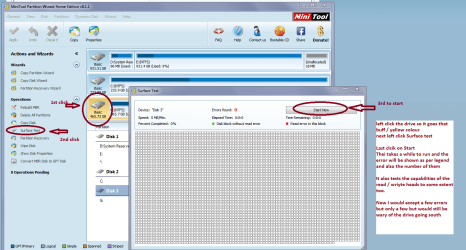
One more test is a surface test with this MiniTool Partition Wizard | Best partition magic alternative for Windows PC and Server see my pic for how it is run.

Once again I ma not suggesting that these are the problems and that testing the drive is just eliminating a possible cause.
 

Attachments

  • MINI TOOL SURFACE 2.PNG
    MINI TOOL SURFACE 2.PNG
    62.3 KB · Views: 0

My Computer My Computer

At a glance

Desk1 7 Home Prem / Desk2 10 Pro / Main lap A...Desk1 i5 3750K / Laptop i7 GTX 860M / Desk2 i...Desk1 8GB (1866) / Desk2 16GB (1333) / Laptop...Desk 1& 2NVidia GTX 650 & Laptops on board Intel
Computer type
PC/Desktop
Computer Manufacturer/Model Number
Own build (new) Desk1 / Asus ROG Win 7 / Desk2 1st build
OS
Desk1 7 Home Prem / Desk2 10 Pro / Main lap Asus ROG 10 Pro 2 laptop Toshiba 7 Pro Asus P2520 7 & 10
CPU
Desk1 i5 3750K / Laptop i7 GTX 860M / Desk2 i5 2500
Motherboard
Desk1 Asus P877-V / Desk2 Gigabyte H67 UD3H / Laptop ?
Memory
Desk1 8GB (1866) / Desk2 16GB (1333) / Laptop 8Gb DDR3
Graphics Card(s)
Desk 1& 2NVidia GTX 650 & Laptops on board Intel
Sound Card
Desk 1 & 2 -XONAR DG Realtek High Def audio Laptop
Monitor(s) Displays
Desk 1 Benq HD 2450 / Desk2 Philips 24" / Laptop 17.5"
Screen Resolution
1920x1080 D1 & D2 & Laptop 1
Hard Drives
Desk1 Samsung 120GB 830 SSD
Asus ROG 256GB 850 Pro SSD
Desk2 Samsung 840 256 SSD
Toshiba 120GB EVO
PSU
Desk 1 Corsair HX 1050/ Laptop ? / Desk 2 Corsair HX 650
Case
Desk 1 Cooler HAF XM ? Toshiba laptop / Desk2 Coolermaster
Cooling
Fans on all Desk1 -2 Desk2 - all Coolermasters 5 Laptop ?
Keyboard
Desk 1 MS Sidewinder X6 Desk 2 MS Sidewinder X 4
Mouse
Desk 1&2 - Gigabyte MS 900 gamer - laptop - Logitec wireless
Internet Speed
ADSL2+
Other Info
One other Desktop (tester) and spare Toshba laptop both with SSD's
Running Kaspersky 2016 ISS on all machines config'd identically
Logitec audio stereo systems on each machine (x3)
Canon MG5250MFC
Router/modem TP-Link running WPA2SK
...The file I'm working on frequently gets locked down (by another process?), and I can't save it....
Unlocker might be able to tell you what app or apps are locking the txt file.... if you can use Unlocker quick enough - before the problem goes away on its own.

Just watch out for the junk that Unlocker offers to install:
http://www.sevenforums.com/general-...ible-delete-leftover-folders.html#post2680113

Once Unlocker is installed...
...wait for the issue to happen
...quickly right click on the file from within Windows Explorer
...select Unlocker from the context menu
...deal with the UAC

If Unlocker tells you "No Locking handles found", then maybe you missed the event.

If need be, Process Monitor can be used to find out what is happening. Process Monitor can be filtered to only show entries pertaining to the one text file involved in the test.


It would help us to help you if you would complete your system specs - including any security related software (antivirus, anti-exploit apps and the like).
 

My Computer My Computer

At a glance

W7 Pro SP1 64biti78GBIntel HD Graphics
Computer type
Laptop
Computer Manufacturer/Model Number
Employer provided Dell Latitude
OS
W7 Pro SP1 64bit
CPU
i7
Memory
8GB
Graphics Card(s)
Intel HD Graphics
Hard Drives
crappy SSD
Antivirus
Employer mandated Symantec Endpoint Protection
Browser
Pale Moon 64bit, IE11 64bit & Chrome 64bit
Thanks, I do use Unlocker, and it is indeed Window's explorer.exe that's locking down all my files.

Frankly, I think this problem is somewhow related to Windows 7's no-refresh folder fiasco.
That is one of my major annoyances as well. Yet another problem with no solutions, thanks to Microsoft.
 

My Computer My Computer

At a glance

64-bit Windows 7
OS
64-bit Windows 7

My Computer My Computer

At a glance

W7 Pro SP1 64biti78GBIntel HD Graphics
Computer type
Laptop
Computer Manufacturer/Model Number
Employer provided Dell Latitude
OS
W7 Pro SP1 64bit
CPU
i7
Memory
8GB
Graphics Card(s)
Intel HD Graphics
Hard Drives
crappy SSD
Antivirus
Employer mandated Symantec Endpoint Protection
Browser
Pale Moon 64bit, IE11 64bit & Chrome 64bit
Back
Top