
Random BSOD caused ntoskrnl.exe driver

Zedara

New member
Local time
8:01 PM
Messages
3
Location
Serbia, Beograd
For a couple of months i got this BSOD happening randomly,it can sometimes all be fine for a week but it happen again.Most of the time i watch some video or movie on internet,just surfing(random).Maybe it has some connection with this issue that i have,which i mention in this forum thread:
http://www.sevenforums.com/hardware-devices/373320-glitchy-pixels-happening-sometimes.html
Short story,glitch pixels that looks like this as BSOD it happens sometimes.
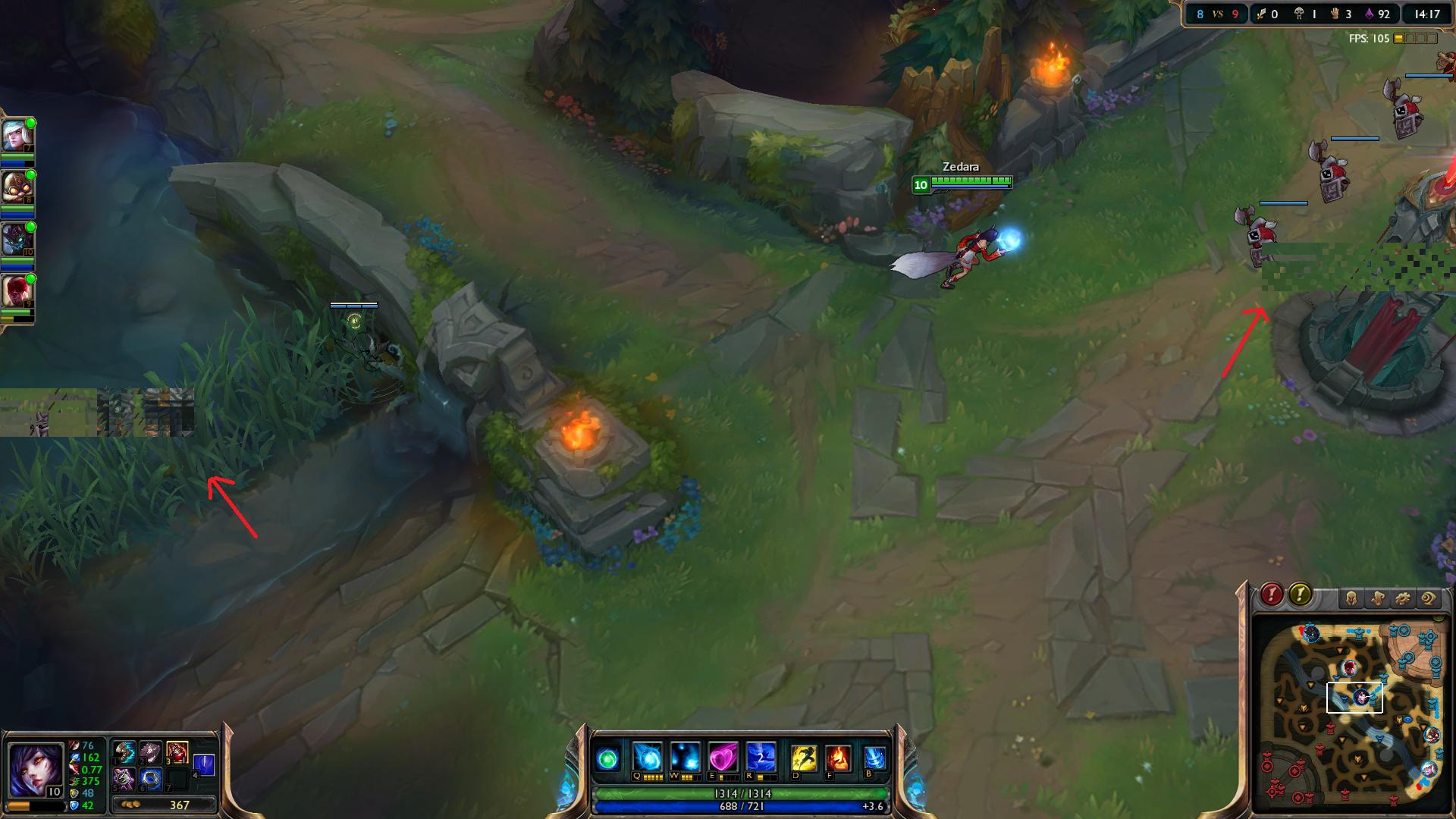
Nv5shex.jpg

Here is a txt file with recent dumps recorded with bluescreenviewer.
Any ideas,thank you.
 
Last edited:

My Computer

Computer type
PC/Desktop
Computer Manufacturer/Model Number
Custom
OS
Windows 7 Ultimate x64
CPU
AMD Athlon X4 750K Quad Core 3.4GHz
Motherboard
MSI 7721
Memory
2 x 4GB=8GB
Graphics Card(s)
AMD Radeon R7 260x
Hard Drives
WDC WD10 EzeX-08M2NA0 SATA Disk Device (Not sure if this is don't know where to find)
Antivirus
Microsoft Security Essentials
Browser
Google Chrome

My Computer

Computer type
PC/Desktop
Computer Manufacturer/Model Number
Self Assembled
OS
Microsoft Windows 10 Pro Insider Preview 64-bit
CPU
Intel(R) Core(TM) i3-4130 CPU @ 3.40GHz
Motherboard
Gigabyte Technology Co., Ltd. B85M-D3H
Memory
Corsair Vengence 4GB x2 (8.00GB Dual-Channel DDR3 @ 798MHz)
Graphics Card(s)
2047MB GeForce GTS 450 (ZOTAC International)
Sound Card
Onboard (Realtek High Definition Audio)
Monitor(s) Displays
LG Flatron E2040T
Screen Resolution
1600x900
Hard Drives
Western Digital 1 TB
Seagate 500 GB
PSU
Corsair VS550
Case
Cooler Master K380
Cooling
Cooler Master Seidon 120V Plus
Keyboard
Logitech MK260r
Mouse
Logitech MK260r
Internet Speed
PMPL Broadband
Antivirus
Windows Defender + MBAM
Browser
Firefox
Other Info
Dell Studio 15" Laptop
oh sorry,i edited post. Thanks
 

My Computer

Computer type
PC/Desktop
Computer Manufacturer/Model Number
Custom
OS
Windows 7 Ultimate x64
CPU
AMD Athlon X4 750K Quad Core 3.4GHz
Motherboard
MSI 7721
Memory
2 x 4GB=8GB
Graphics Card(s)
AMD Radeon R7 260x
Hard Drives
WDC WD10 EzeX-08M2NA0 SATA Disk Device (Not sure if this is don't know where to find)
Antivirus
Microsoft Security Essentials
Browser
Google Chrome
Code:
BugCheck 1000007E, {ffffffffc0000005, fffff800030519b1, fffff880009a9898, fffff880009a90f0}

[COLOR=Red]Probably caused by : memory_corruption [/COLOR]( nt!MmZeroPageThread+3c4 )

Followup: MachineOwner
---------
Code:
BugCheck A, {fffffa7fffffffd0, 2, 1, fffff800030cfe7c}

[COLOR=Red]Probably caused by : memory_corruption[/COLOR] ( nt!MiInsertPageInFreeOrZeroedList+54c )

Followup: MachineOwner
---------
Test your RAM modules for possible errors. Run memtest86+ for at least 8 consecutive passes.

If it start showing errors/red lines, stop testing. A single error is enough to determine that something is going bad there.

Take a camera snap of the memtest86+ screen before closing teh program and upload the image for us.
 

My Computer

Computer type
PC/Desktop
Computer Manufacturer/Model Number
Self Assembled
OS
Microsoft Windows 10 Pro Insider Preview 64-bit
CPU
Intel(R) Core(TM) i3-4130 CPU @ 3.40GHz
Motherboard
Gigabyte Technology Co., Ltd. B85M-D3H
Memory
Corsair Vengence 4GB x2 (8.00GB Dual-Channel DDR3 @ 798MHz)
Graphics Card(s)
2047MB GeForce GTS 450 (ZOTAC International)
Sound Card
Onboard (Realtek High Definition Audio)
Monitor(s) Displays
LG Flatron E2040T
Screen Resolution
1600x900
Hard Drives
Western Digital 1 TB
Seagate 500 GB
PSU
Corsair VS550
Case
Cooler Master K380
Cooling
Cooler Master Seidon 120V Plus
Keyboard
Logitech MK260r
Mouse
Logitech MK260r
Internet Speed
PMPL Broadband
Antivirus
Windows Defender + MBAM
Browser
Firefox
Other Info
Dell Studio 15" Laptop
Okay so i left it for a whole night(10 hours) and when i woke up i saw no errors but only 4 passes,and it said that test is done and press esc to exit forget to picture that.When i restarted test started again but right as it started bunch some errors popped.
WtJ4Cv0.jpg

I took a picture and ESC.
 

My Computer

Computer type
PC/Desktop
Computer Manufacturer/Model Number
Custom
OS
Windows 7 Ultimate x64
CPU
AMD Athlon X4 750K Quad Core 3.4GHz
Motherboard
MSI 7721
Memory
2 x 4GB=8GB
Graphics Card(s)
AMD Radeon R7 260x
Hard Drives
WDC WD10 EzeX-08M2NA0 SATA Disk Device (Not sure if this is don't know where to find)
Antivirus
Microsoft Security Essentials
Browser
Google Chrome
So memory corruption is detected.

Now follow the "Part 3: If You Have Errors:" of How to Test and Diagnose RAM Issues with Memtest86+

Errors/red lines means one or more RAM is faulty. But the fault may occur due to a faulty DIMM slot, too, which is a motherboard component. Using memtest86+, you can discriminate between a faulty RAM and a faulty motherboard.

How? Say you have two RAM sticks and two DIMM slots. You obtained errors at the test with all RAM sticks installed. Now, remove all the sticks but one. Test it in all the available slots, one by one. Continue the same procedure for all the available sticks.
How to make the inference that is it a RAM issue or it is a motherboard issue? Suppose you have got the result like that:
test|Slot1|Slot2
RAM1| Error | Error
RAM2|Good|Good
It is a RAM, a bad RAM.

But if you have got a result like that:
test|Slot1|Slot2
RAM1| Error |Good
RAM2| Error |Good
It is a motherboard issue. The particular slot is bad.

If it is a bad RAM, you need to change the RAM. Take the other existing (good) RAM to the shop and get one of the exactly same specification. The best is, get a totally new RAM KIT.

If it is a bad slot, it is a motherboard issue. But changing the motherboard needs a preparation for most of us; so dont populate that slot for the time being.
 

My Computer

Computer type
PC/Desktop
Computer Manufacturer/Model Number
Self Assembled
OS
Microsoft Windows 10 Pro Insider Preview 64-bit
CPU
Intel(R) Core(TM) i3-4130 CPU @ 3.40GHz
Motherboard
Gigabyte Technology Co., Ltd. B85M-D3H
Memory
Corsair Vengence 4GB x2 (8.00GB Dual-Channel DDR3 @ 798MHz)
Graphics Card(s)
2047MB GeForce GTS 450 (ZOTAC International)
Sound Card
Onboard (Realtek High Definition Audio)
Monitor(s) Displays
LG Flatron E2040T
Screen Resolution
1600x900
Hard Drives
Western Digital 1 TB
Seagate 500 GB
PSU
Corsair VS550
Case
Cooler Master K380
Cooling
Cooler Master Seidon 120V Plus
Keyboard
Logitech MK260r
Mouse
Logitech MK260r
Internet Speed
PMPL Broadband
Antivirus
Windows Defender + MBAM
Browser
Firefox
Other Info
Dell Studio 15" Laptop
Back
Top