Solved Random BSOD - Error 0x0000003b

I am running all 4, the first time you told me to switch them out last night, I thought you meant all 4 and just put them in different slots, and was too tired after that to just run 1. but so far, no bsod. but its so random, and can go a few days between, I wont really know right away, unfortunately.
 

My Computer

Computer Manufacturer/Model Number
scratch built
OS
Windows 7 home premium 64bit
CPU
AMD FX 4100 black edition quad core 3.6ghz (unlocked)
Motherboard
Gigabyte 78lm mATX
Memory
8gb crucial ballistix ddr3-1333
Graphics Card(s)
Geforce gt640 1gb
Sound Card
Realtek HD audio
Monitor(s) Displays
Gateway 21.5"
Screen Resolution
1920x1080
Hard Drives
Western Digital black 640gb system drive, western digital blue 1tb media
PSU
500w cooler master
Case
raidmax
Cooling
6 120mm fans (2 intakes on front) 3 exhaust, and heatsink
Internet Speed
25mb/s down, 5mb/s up
Alright. Update the thread when you're ready.
 

My Computer

Computer type
PC/Desktop
Computer Manufacturer/Model Number
Self assembled
OS
Windows 10 Home 64Bit
CPU
Intel Core i5 10400 @ 2.90GHz
Motherboard
Intel Corporation DG41WV (PROCESSOR)
Memory
8.00GB Single-Channel Unknown @ 1329MHz (16-20-20-38)
Sound Card
Realtek High Definition Audio
Monitor(s) Displays
DELL E170S
Screen Resolution
1280x1024 pixels
Hard Drives
931GB TOSHIBA DT01ACA100 (SATA)
238GB TEAM TM8PS7256G (SATA SSD)
Case
Nothing Fancy
Cooling
Fans
Keyboard
A4 Tech Co LTD
Mouse
A4 Tech Co Ltd/Logitech
Internet Speed
25 Mbps
You know, I just thought of something while I am sitting here working. Do you think the BSOD problem could be because of a theme I found on Deviant Art? The main part of the theme that I used was the task bar/start menu. and that is when the computer seems to freeze, Is when I go to the task bar to switch windows?

I have went back to a windows 7 default to test.
 

My Computer

Computer Manufacturer/Model Number
scratch built
OS
Windows 7 home premium 64bit
CPU
AMD FX 4100 black edition quad core 3.6ghz (unlocked)
Motherboard
Gigabyte 78lm mATX
Memory
8gb crucial ballistix ddr3-1333
Graphics Card(s)
Geforce gt640 1gb
Sound Card
Realtek HD audio
Monitor(s) Displays
Gateway 21.5"
Screen Resolution
1920x1080
Hard Drives
Western Digital black 640gb system drive, western digital blue 1tb media
PSU
500w cooler master
Case
raidmax
Cooling
6 120mm fans (2 intakes on front) 3 exhaust, and heatsink
Internet Speed
25mb/s down, 5mb/s up
Ok, if you had the problem even before you changed the graphics card then we might be struggling with different thing after all. I got into these problems after changing the card.

I haven´t done the memtest yet but those things I did before definitely helped me. No BSODs so far I today I have used computer for few hours without any problems. I updated also the Adobe Flash and I think I just see this out now if I face this jamming still. NVidia by the way has also this 3D component for Firefox. It can be turned off from Firefox settings...if nothing else comes to mind it might be one thing worth trying.
 

My Computer

OS
Win 7 64 bit
Well, the hotfix did not work, Just got another bsod...

Here is the most recent dump. I already said it seems to happen most when going to my task bar, but I noticed, majority of the time, when going to my task bar, I am switching to yahoo messenger window. I am uninstalling it and going to install a different version
 

My Computer

Computer Manufacturer/Model Number
scratch built
OS
Windows 7 home premium 64bit
CPU
AMD FX 4100 black edition quad core 3.6ghz (unlocked)
Motherboard
Gigabyte 78lm mATX
Memory
8gb crucial ballistix ddr3-1333
Graphics Card(s)
Geforce gt640 1gb
Sound Card
Realtek HD audio
Monitor(s) Displays
Gateway 21.5"
Screen Resolution
1920x1080
Hard Drives
Western Digital black 640gb system drive, western digital blue 1tb media
PSU
500w cooler master
Case
raidmax
Cooling
6 120mm fans (2 intakes on front) 3 exhaust, and heatsink
Internet Speed
25mb/s down, 5mb/s up
Will take a look soon
How does the computer work in safe mode?
 

My Computer

Computer type
PC/Desktop
Computer Manufacturer/Model Number
Self assembled
OS
Windows 10 Home 64Bit
CPU
Intel Core i5 10400 @ 2.90GHz
Motherboard
Intel Corporation DG41WV (PROCESSOR)
Memory
8.00GB Single-Channel Unknown @ 1329MHz (16-20-20-38)
Sound Card
Realtek High Definition Audio
Monitor(s) Displays
DELL E170S
Screen Resolution
1280x1024 pixels
Hard Drives
931GB TOSHIBA DT01ACA100 (SATA)
238GB TEAM TM8PS7256G (SATA SSD)
Case
Nothing Fancy
Cooling
Fans
Keyboard
A4 Tech Co LTD
Mouse
A4 Tech Co Ltd/Logitech
Internet Speed
25 Mbps
hmm, I have not really tried to use it in safe mode unless I have a virus I need to get rid of, as my job requires me to use my computer often for processing photos, the resolution just does not cut it unfortunately.
After installing that hotfix, I had 2 bsod's in about an hour, I quickly uninstalled it as it made things worse, Havent had one since, I also uninstalled yahoo, and am going to go awhile without using it to see it that helps as well.
 

My Computer

Computer Manufacturer/Model Number
scratch built
OS
Windows 7 home premium 64bit
CPU
AMD FX 4100 black edition quad core 3.6ghz (unlocked)
Motherboard
Gigabyte 78lm mATX
Memory
8gb crucial ballistix ddr3-1333
Graphics Card(s)
Geforce gt640 1gb
Sound Card
Realtek HD audio
Monitor(s) Displays
Gateway 21.5"
Screen Resolution
1920x1080
Hard Drives
Western Digital black 640gb system drive, western digital blue 1tb media
PSU
500w cooler master
Case
raidmax
Cooling
6 120mm fans (2 intakes on front) 3 exhaust, and heatsink
Internet Speed
25mb/s down, 5mb/s up
Ok. Yet again error code 3B :confused: Can you check how this computer works without your graphics card inserted? Like use the on-board graphics of the mother board if it has one. (You'll have to change settings from the BIOS to use the on-board VGA). I would also suggest a http://www.sevenforums.com/tutorials/1649-clean-install-windows-7-a.html to see if it eliminates these issues. You'll get the Win 7 Service pack 1 ISO for your version of windows on step 1 from the http://www.sevenforums.com/tutorials/219487-clean-reinstall-factory-oem-windows-7-a.html link.
 

My Computer

Computer type
PC/Desktop
Computer Manufacturer/Model Number
Self assembled
OS
Windows 10 Home 64Bit
CPU
Intel Core i5 10400 @ 2.90GHz
Motherboard
Intel Corporation DG41WV (PROCESSOR)
Memory
8.00GB Single-Channel Unknown @ 1329MHz (16-20-20-38)
Sound Card
Realtek High Definition Audio
Monitor(s) Displays
DELL E170S
Screen Resolution
1280x1024 pixels
Hard Drives
931GB TOSHIBA DT01ACA100 (SATA)
238GB TEAM TM8PS7256G (SATA SSD)
Case
Nothing Fancy
Cooling
Fans
Keyboard
A4 Tech Co LTD
Mouse
A4 Tech Co Ltd/Logitech
Internet Speed
25 Mbps
I was starting to lean to a clean install. At least it wont be as bad now that I have faster net. Thanks for all your help.
 

My Computer

Computer Manufacturer/Model Number
scratch built
OS
Windows 7 home premium 64bit
CPU
AMD FX 4100 black edition quad core 3.6ghz (unlocked)
Motherboard
Gigabyte 78lm mATX
Memory
8gb crucial ballistix ddr3-1333
Graphics Card(s)
Geforce gt640 1gb
Sound Card
Realtek HD audio
Monitor(s) Displays
Gateway 21.5"
Screen Resolution
1920x1080
Hard Drives
Western Digital black 640gb system drive, western digital blue 1tb media
PSU
500w cooler master
Case
raidmax
Cooling
6 120mm fans (2 intakes on front) 3 exhaust, and heatsink
Internet Speed
25mb/s down, 5mb/s up
I haven't been able to help much but :)
Update the thread when you're on a clean install and after observing it for a few days.
 

My Computer

Computer type
PC/Desktop
Computer Manufacturer/Model Number
Self assembled
OS
Windows 10 Home 64Bit
CPU
Intel Core i5 10400 @ 2.90GHz
Motherboard
Intel Corporation DG41WV (PROCESSOR)
Memory
8.00GB Single-Channel Unknown @ 1329MHz (16-20-20-38)
Sound Card
Realtek High Definition Audio
Monitor(s) Displays
DELL E170S
Screen Resolution
1280x1024 pixels
Hard Drives
931GB TOSHIBA DT01ACA100 (SATA)
238GB TEAM TM8PS7256G (SATA SSD)
Case
Nothing Fancy
Cooling
Fans
Keyboard
A4 Tech Co LTD
Mouse
A4 Tech Co Ltd/Logitech
Internet Speed
25 Mbps
Hey, you have tried to help, so its greatly appreciated for taking your time.


Now one last question before I go, I got the windows 7 upgrade CD when I went to windows 7. Am I able to just use that and install? Or do I really have to install XP first, then upgrade to 7.
I know that you cant directly upgrade from XP to 7 anyways, so is it possible to just install from the upgrade cd?
 

My Computer

Computer Manufacturer/Model Number
scratch built
OS
Windows 7 home premium 64bit
CPU
AMD FX 4100 black edition quad core 3.6ghz (unlocked)
Motherboard
Gigabyte 78lm mATX
Memory
8gb crucial ballistix ddr3-1333
Graphics Card(s)
Geforce gt640 1gb
Sound Card
Realtek HD audio
Monitor(s) Displays
Gateway 21.5"
Screen Resolution
1920x1080
Hard Drives
Western Digital black 640gb system drive, western digital blue 1tb media
PSU
500w cooler master
Case
raidmax
Cooling
6 120mm fans (2 intakes on front) 3 exhaust, and heatsink
Internet Speed
25mb/s down, 5mb/s up

My Computer

Computer type
PC/Desktop
Computer Manufacturer/Model Number
Self assembled
OS
Windows 10 Home 64Bit
CPU
Intel Core i5 10400 @ 2.90GHz
Motherboard
Intel Corporation DG41WV (PROCESSOR)
Memory
8.00GB Single-Channel Unknown @ 1329MHz (16-20-20-38)
Sound Card
Realtek High Definition Audio
Monitor(s) Displays
DELL E170S
Screen Resolution
1280x1024 pixels
Hard Drives
931GB TOSHIBA DT01ACA100 (SATA)
238GB TEAM TM8PS7256G (SATA SSD)
Case
Nothing Fancy
Cooling
Fans
Keyboard
A4 Tech Co LTD
Mouse
A4 Tech Co Ltd/Logitech
Internet Speed
25 Mbps
I have home premium. and I cant remember which version I have of XP
Thanks for the link, answered a lot of questions I had about it.
 

My Computer

Computer Manufacturer/Model Number
scratch built
OS
Windows 7 home premium 64bit
CPU
AMD FX 4100 black edition quad core 3.6ghz (unlocked)
Motherboard
Gigabyte 78lm mATX
Memory
8gb crucial ballistix ddr3-1333
Graphics Card(s)
Geforce gt640 1gb
Sound Card
Realtek HD audio
Monitor(s) Displays
Gateway 21.5"
Screen Resolution
1920x1080
Hard Drives
Western Digital black 640gb system drive, western digital blue 1tb media
PSU
500w cooler master
Case
raidmax
Cooling
6 120mm fans (2 intakes on front) 3 exhaust, and heatsink
Internet Speed
25mb/s down, 5mb/s up
You should download and clean install home premium then :)
 

My Computer

Computer type
PC/Desktop
Computer Manufacturer/Model Number
Self assembled
OS
Windows 10 Home 64Bit
CPU
Intel Core i5 10400 @ 2.90GHz
Motherboard
Intel Corporation DG41WV (PROCESSOR)
Memory
8.00GB Single-Channel Unknown @ 1329MHz (16-20-20-38)
Sound Card
Realtek High Definition Audio
Monitor(s) Displays
DELL E170S
Screen Resolution
1280x1024 pixels
Hard Drives
931GB TOSHIBA DT01ACA100 (SATA)
238GB TEAM TM8PS7256G (SATA SSD)
Case
Nothing Fancy
Cooling
Fans
Keyboard
A4 Tech Co LTD
Mouse
A4 Tech Co Ltd/Logitech
Internet Speed
25 Mbps
I have the CD thankfully, Purchased from amazon. I will do that tomorrow hopefully.
Usually when doing clean installs I run kill disk, think that is a good idea, just to make sure the drive is 100% clean
 

My Computer

Computer Manufacturer/Model Number
scratch built
OS
Windows 7 home premium 64bit
CPU
AMD FX 4100 black edition quad core 3.6ghz (unlocked)
Motherboard
Gigabyte 78lm mATX
Memory
8gb crucial ballistix ddr3-1333
Graphics Card(s)
Geforce gt640 1gb
Sound Card
Realtek HD audio
Monitor(s) Displays
Gateway 21.5"
Screen Resolution
1920x1080
Hard Drives
Western Digital black 640gb system drive, western digital blue 1tb media
PSU
500w cooler master
Case
raidmax
Cooling
6 120mm fans (2 intakes on front) 3 exhaust, and heatsink
Internet Speed
25mb/s down, 5mb/s up
I had yesterday a crash free evening again and even did lots of browsing and image editing. So the hotfix might have done the trick or then it was the flash update.

If the problem still continues my best chance I guess is clean install too.

Lets see, thanks for both of you on my behalf too. There has been plenty of useful tips in this thread.
 

My Computer

OS
Win 7 64 bit
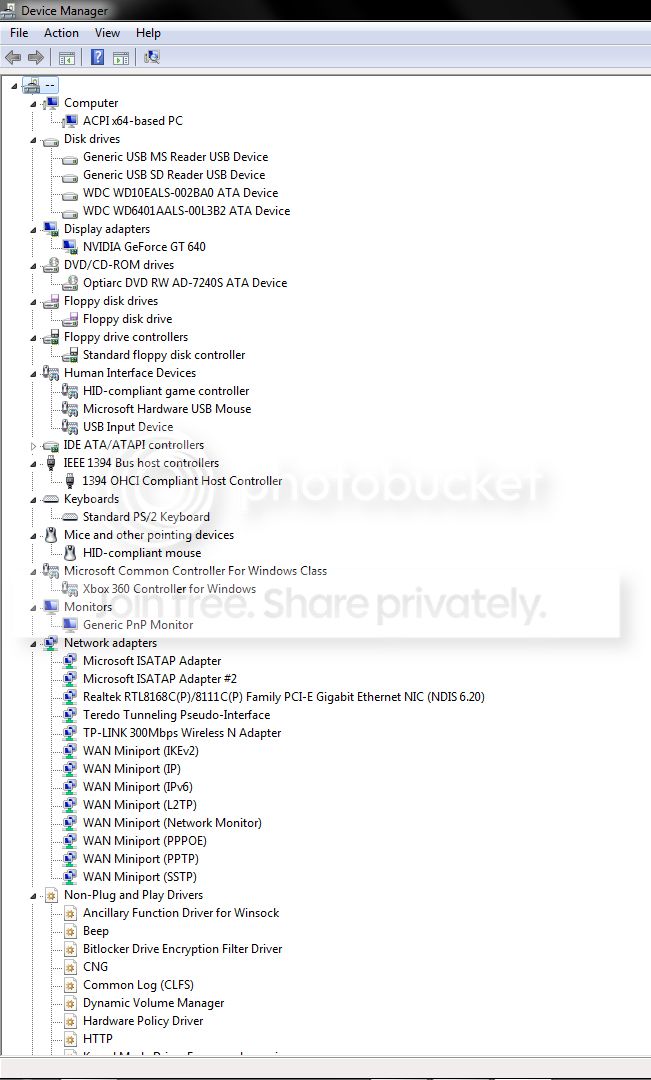
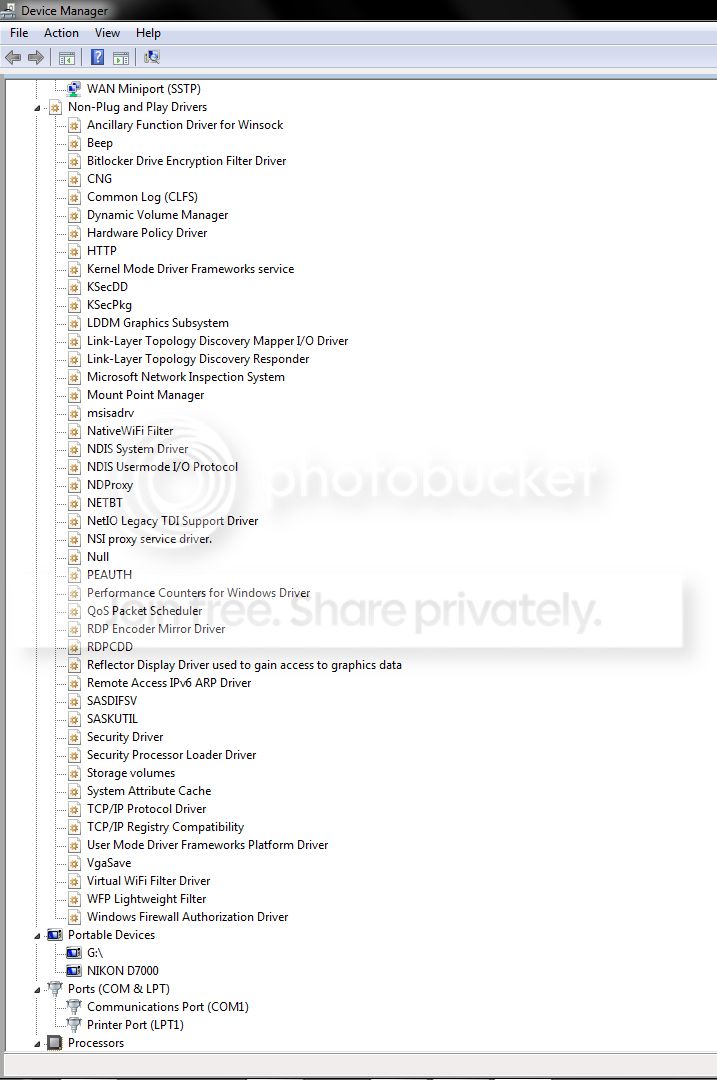
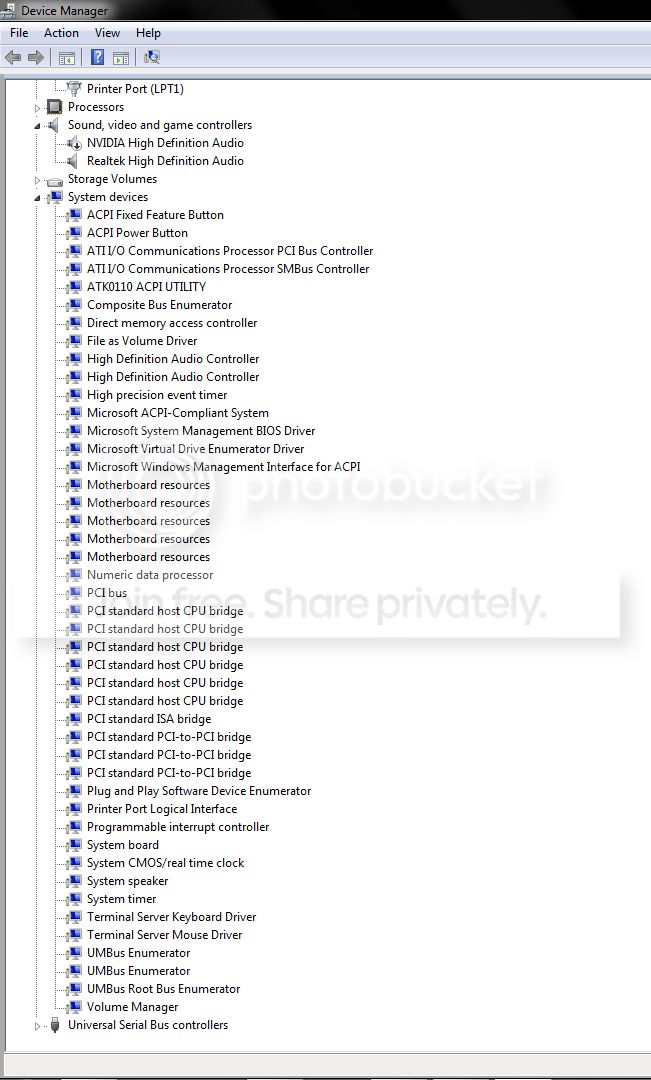
I am confused, I was just looking through my event log, and there is an error that pops up just about every day, AODdriver4.1, I do not have ATI anymore, and I have uninstalled all of the drivers for it. Why is it still on my computer, and how do I remove it?
 

My Computer

Computer Manufacturer/Model Number
scratch built
OS
Windows 7 home premium 64bit
CPU
AMD FX 4100 black edition quad core 3.6ghz (unlocked)
Motherboard
Gigabyte 78lm mATX
Memory
8gb crucial ballistix ddr3-1333
Graphics Card(s)
Geforce gt640 1gb
Sound Card
Realtek HD audio
Monitor(s) Displays
Gateway 21.5"
Screen Resolution
1920x1080
Hard Drives
Western Digital black 640gb system drive, western digital blue 1tb media
PSU
500w cooler master
Case
raidmax
Cooling
6 120mm fans (2 intakes on front) 3 exhaust, and heatsink
Internet Speed
25mb/s down, 5mb/s up
Post a snip of all items by expanding in device manager.
 

My Computer

Computer type
PC/Desktop
Computer Manufacturer/Model Number
Self assembled
OS
Windows 10 Home 64Bit
CPU
Intel Core i5 10400 @ 2.90GHz
Motherboard
Intel Corporation DG41WV (PROCESSOR)
Memory
8.00GB Single-Channel Unknown @ 1329MHz (16-20-20-38)
Sound Card
Realtek High Definition Audio
Monitor(s) Displays
DELL E170S
Screen Resolution
1280x1024 pixels
Hard Drives
931GB TOSHIBA DT01ACA100 (SATA)
238GB TEAM TM8PS7256G (SATA SSD)
Case
Nothing Fancy
Cooling
Fans
Keyboard
A4 Tech Co LTD
Mouse
A4 Tech Co Ltd/Logitech
Internet Speed
25 Mbps
Here is all of them, including the hidden (i did not expand the USB or the processors or storage devices, since it was not necessary for this)
screen1.jpg


screen2.jpg


screen3.jpg
 

My Computer

Computer Manufacturer/Model Number
scratch built
OS
Windows 7 home premium 64bit
CPU
AMD FX 4100 black edition quad core 3.6ghz (unlocked)
Motherboard
Gigabyte 78lm mATX
Memory
8gb crucial ballistix ddr3-1333
Graphics Card(s)
Geforce gt640 1gb
Sound Card
Realtek HD audio
Monitor(s) Displays
Gateway 21.5"
Screen Resolution
1920x1080
Hard Drives
Western Digital black 640gb system drive, western digital blue 1tb media
PSU
500w cooler master
Case
raidmax
Cooling
6 120mm fans (2 intakes on front) 3 exhaust, and heatsink
Internet Speed
25mb/s down, 5mb/s up
Back
Top