Random BSOD, error 0x0000009f

dannytill

New member
Local time
4:15 PM
Messages
24
I actually rarely get the BSOD. Usually the computer just reboots with no error displayed, nothing recorded in the event log. Only Twice has the error, 0x0000009f, been recorded. I have attached the grab all from SF diagnostics tool. As far as I can tell there is no particular event that triggers the reboot. Any help will be greatly appreciated as this is extremely frustrating.
 

My Computer

Computer type
PC/Desktop
Computer Manufacturer/Model Number
Asus U56E laptop
OS
Windows 7 Ultimate x64
CPU
Intel Core i5-3570K 3.40 GHz LGA1155 CPU
Motherboard
ASUS P8Z77-V PRO LGA 1155 Intel Z77
Memory
G.SKILL Ripjaws X Series 16GB SDRAM DDR3 F3-1600C9D-16GXM
Hard Drives
SanDisk SDSSDP-128G-G25 2.5" 128GB SATA III SSD
4 Seagate Barracuda 7200.14 ST3000DM001 3TB in a Raid 5
PSU
Thermaltake Black Widow W0319RU 850W ATX
Case
Thermaltake Level 10 Series Level 10 GTS Black
Cooling
Cooler Master Hyper 212 EVO and MegaFlow, 8 fans total
Hi dannytill :).

If I understood you correctly you're saying that you're always getting a bug check with the code
being 0x9F but they are never recorded?

The two bug checks are very old but have the same culprit.
0x9F which is DRIVER POWER STATE FAILURE that happens in
transitions between power states most commonly S0 (ON state) > S3 (Sleep state)
or vice-verse. You can read more HERE.

The most common cause is a device driver but sometimes it's the hardware itself
that is at fault.

In you case it appears to be caused by a very old driver.
Code:
lmvm [COLOR=Blue]AmUStor[/COLOR]
start             end                 module name
fffff880`08872000 fffff880`08887000   AmUStor  T (no symbols)           
    Loaded symbol image file: AmUStor.SYS
    Image path: \SystemRoot\system32\drivers\AmUStor.SYS
    Image name: AmUStor.SYS
    Timestamp:        [COLOR=Red][U]Thu Jan 13 14:06:26 2011[/U][/COLOR]

Please update or remove if not in use.
 

My Computer

Computer type
PC/Desktop
OS
Windows 10
CPU
Intel Core i5 3570K
Motherboard
Asus P8Z77V-PRO
Memory
16GB 1600Mhz G.Skill
Graphics Card(s)
Gigabyte GTX 970 G1-Gaming
PSU
Seasonic 1000W Platinum
Case
Fractal Design Define R4
Cooling
Noctua NH-D14
Thanks for the quick reply. I meant only those 2 times did it actually record a bug check code. The restarts happen all the time but usually the bug check code is 0 and no dump file is created. If you look at my event logs you can see the many, many restarts with bug check codes of 0. I will check on the driver you mentioned and hopefully that resolves my issue. Again, thank you very much and I'll let you know how it works out.
 

My Computer

Computer type
PC/Desktop
Computer Manufacturer/Model Number
Asus U56E laptop
OS
Windows 7 Ultimate x64
CPU
Intel Core i5-3570K 3.40 GHz LGA1155 CPU
Motherboard
ASUS P8Z77-V PRO LGA 1155 Intel Z77
Memory
G.SKILL Ripjaws X Series 16GB SDRAM DDR3 F3-1600C9D-16GXM
Hard Drives
SanDisk SDSSDP-128G-G25 2.5" 128GB SATA III SSD
4 Seagate Barracuda 7200.14 ST3000DM001 3TB in a Raid 5
PSU
Thermaltake Black Widow W0319RU 850W ATX
Case
Thermaltake Level 10 Series Level 10 GTS Black
Cooling
Cooler Master Hyper 212 EVO and MegaFlow, 8 fans total

My Computer

Computer type
PC/Desktop
OS
Windows 10
CPU
Intel Core i5 3570K
Motherboard
Asus P8Z77V-PRO
Memory
16GB 1600Mhz G.Skill
Graphics Card(s)
Gigabyte GTX 970 G1-Gaming
PSU
Seasonic 1000W Platinum
Case
Fractal Design Define R4
Cooling
Noctua NH-D14
It's a laptop. Asus U56E-RBL7. The link on asus.com is broken right now, not sure if they will fix it. I went to check for an updated driver for the card reader and that's what I found. I'm going to check elsewhere for a driver for the card reader. Hopefully Asus fixes the support link for my laptop soon.
 

My Computer

Computer type
PC/Desktop
Computer Manufacturer/Model Number
Asus U56E laptop
OS
Windows 7 Ultimate x64
CPU
Intel Core i5-3570K 3.40 GHz LGA1155 CPU
Motherboard
ASUS P8Z77-V PRO LGA 1155 Intel Z77
Memory
G.SKILL Ripjaws X Series 16GB SDRAM DDR3 F3-1600C9D-16GXM
Hard Drives
SanDisk SDSSDP-128G-G25 2.5" 128GB SATA III SSD
4 Seagate Barracuda 7200.14 ST3000DM001 3TB in a Raid 5
PSU
Thermaltake Black Widow W0319RU 850W ATX
Case
Thermaltake Level 10 Series Level 10 GTS Black
Cooling
Cooler Master Hyper 212 EVO and MegaFlow, 8 fans total
Oops :zip:!

Are you monitoring the thermals in any way?
Test for thermals and stability:

  • Download HWinfo and post a Screenshot of the sensors window, one at idle and another while putting load on the PC using Prime95 for the CPU side and Furmark for the GPU.
    • Before running Prime95 make sure to enable Round-off checking (see 1st post under the tutorial).
 

My Computer

Computer type
PC/Desktop
OS
Windows 10
CPU
Intel Core i5 3570K
Motherboard
Asus P8Z77V-PRO
Memory
16GB 1600Mhz G.Skill
Graphics Card(s)
Gigabyte GTX 970 G1-Gaming
PSU
Seasonic 1000W Platinum
Case
Fractal Design Define R4
Cooling
Noctua NH-D14
Hope you are still paying attention. Sorry it took so long to get the screenshots. I really don't think it has anything to do with stress. This is the first time I've heard my fan come on in long time. My laptop doesn't do except much for download stuff and surfing. Usually when it restarts I'm not doing anything particularly intense. I also updated the driver to a newer version from 2012, although Asus did not post on the downloads page for my particular model. I have still been getting restarts since so this did not help. Please let me know if you see anything or if I can provide more info. Thanks.

Edit:
On a side note I left the CPU stress test running all night and the laptop did not reboot once. I think I missed the part of the stress test tutorial where it says that Prime95 minimizes to the system tray and keeps running.
 
Last edited:

My Computer

Computer type
PC/Desktop
Computer Manufacturer/Model Number
Asus U56E laptop
OS
Windows 7 Ultimate x64
CPU
Intel Core i5-3570K 3.40 GHz LGA1155 CPU
Motherboard
ASUS P8Z77-V PRO LGA 1155 Intel Z77
Memory
G.SKILL Ripjaws X Series 16GB SDRAM DDR3 F3-1600C9D-16GXM
Hard Drives
SanDisk SDSSDP-128G-G25 2.5" 128GB SATA III SSD
4 Seagate Barracuda 7200.14 ST3000DM001 3TB in a Raid 5
PSU
Thermaltake Black Widow W0319RU 850W ATX
Case
Thermaltake Level 10 Series Level 10 GTS Black
Cooling
Cooler Master Hyper 212 EVO and MegaFlow, 8 fans total
Saved Event Log Error

This is the last time anything was recorded in the details section of the event log when a reboot occurred. This wasn't in the minidumps so I hope this helps.

- System

- Provider

[ Name] Microsoft-Windows-Kernel-Power
[ Guid] {331C3B3A-2005-44C2-AC5E-77220C37D6B4}

EventID 41

Version 2

Level 1

Task 63

Opcode 0

Keywords 0x8000000000000002

- TimeCreated

[ SystemTime] 2013-03-04T12:29:02.795635600Z

EventRecordID 72678

Correlation

- Execution

[ ProcessID] 4
[ ThreadID] 8

Channel System

Computer Shooter

- Security

[ UserID] S-1-5-18


- EventData

BugcheckCode 159
BugcheckParameter1 0x4
BugcheckParameter2 0x258
BugcheckParameter3 0xfffffa8006d2fb50
BugcheckParameter4 0xfffff80000b9c3d0
SleepInProgress false
PowerButtonTimestamp 0
 

My Computer

Computer type
PC/Desktop
Computer Manufacturer/Model Number
Asus U56E laptop
OS
Windows 7 Ultimate x64
CPU
Intel Core i5-3570K 3.40 GHz LGA1155 CPU
Motherboard
ASUS P8Z77-V PRO LGA 1155 Intel Z77
Memory
G.SKILL Ripjaws X Series 16GB SDRAM DDR3 F3-1600C9D-16GXM
Hard Drives
SanDisk SDSSDP-128G-G25 2.5" 128GB SATA III SSD
4 Seagate Barracuda 7200.14 ST3000DM001 3TB in a Raid 5
PSU
Thermaltake Black Widow W0319RU 850W ATX
Case
Thermaltake Level 10 Series Level 10 GTS Black
Cooling
Cooler Master Hyper 212 EVO and MegaFlow, 8 fans total

My Computer

Computer type
PC/Desktop
OS
Windows 10
CPU
Intel Core i5 3570K
Motherboard
Asus P8Z77V-PRO
Memory
16GB 1600Mhz G.Skill
Graphics Card(s)
Gigabyte GTX 970 G1-Gaming
PSU
Seasonic 1000W Platinum
Case
Fractal Design Define R4
Cooling
Noctua NH-D14
The event log was all I have for the last error. There was no dump file created and the event isn't even in the event log anymore I just saved the log when I saw that some info was actually recorded instead of just all 0's. I saved it just in case it was useful later. I said all that to say I don't their was anything else to post besides the event log. This is also the same error that was recorded in the other logs. 159 = 9F.
 
Last edited:

My Computer

Computer type
PC/Desktop
Computer Manufacturer/Model Number
Asus U56E laptop
OS
Windows 7 Ultimate x64
CPU
Intel Core i5-3570K 3.40 GHz LGA1155 CPU
Motherboard
ASUS P8Z77-V PRO LGA 1155 Intel Z77
Memory
G.SKILL Ripjaws X Series 16GB SDRAM DDR3 F3-1600C9D-16GXM
Hard Drives
SanDisk SDSSDP-128G-G25 2.5" 128GB SATA III SSD
4 Seagate Barracuda 7200.14 ST3000DM001 3TB in a Raid 5
PSU
Thermaltake Black Widow W0319RU 850W ATX
Case
Thermaltake Level 10 Series Level 10 GTS Black
Cooling
Cooler Master Hyper 212 EVO and MegaFlow, 8 fans total
Is there anything else I can provide? I am not sure how my other post did not follow the BSOD posting rules. Can you clarify?
 

My Computer

Computer type
PC/Desktop
Computer Manufacturer/Model Number
Asus U56E laptop
OS
Windows 7 Ultimate x64
CPU
Intel Core i5-3570K 3.40 GHz LGA1155 CPU
Motherboard
ASUS P8Z77-V PRO LGA 1155 Intel Z77
Memory
G.SKILL Ripjaws X Series 16GB SDRAM DDR3 F3-1600C9D-16GXM
Hard Drives
SanDisk SDSSDP-128G-G25 2.5" 128GB SATA III SSD
4 Seagate Barracuda 7200.14 ST3000DM001 3TB in a Raid 5
PSU
Thermaltake Black Widow W0319RU 850W ATX
Case
Thermaltake Level 10 Series Level 10 GTS Black
Cooling
Cooler Master Hyper 212 EVO and MegaFlow, 8 fans total
You did follow them but please do so each time you experience a crash, that way we always get the most
up to date view of the system and also some dump files generated after BSOD's you might have missed.
 

My Computer

Computer type
PC/Desktop
OS
Windows 10
CPU
Intel Core i5 3570K
Motherboard
Asus P8Z77V-PRO
Memory
16GB 1600Mhz G.Skill
Graphics Card(s)
Gigabyte GTX 970 G1-Gaming
PSU
Seasonic 1000W Platinum
Case
Fractal Design Define R4
Cooling
Noctua NH-D14
Ok I did another grab all. I'm still not technically getting a BSOD or dump files. My computer just restarts and never tells me why. I did update a bunch of drivers based on the info I got on the driveragent.com website but I just had a restart this morning so I guess none of that fixed the problem. I do still have 5 more 'bad' drivers according to their analysis. Please help if you can. This problem has been going on for a long time and I cannot figure it out. What does the driver verifier do in diagnostic tool? Could that help at all?
 

My Computer

Computer type
PC/Desktop
Computer Manufacturer/Model Number
Asus U56E laptop
OS
Windows 7 Ultimate x64
CPU
Intel Core i5-3570K 3.40 GHz LGA1155 CPU
Motherboard
ASUS P8Z77-V PRO LGA 1155 Intel Z77
Memory
G.SKILL Ripjaws X Series 16GB SDRAM DDR3 F3-1600C9D-16GXM
Hard Drives
SanDisk SDSSDP-128G-G25 2.5" 128GB SATA III SSD
4 Seagate Barracuda 7200.14 ST3000DM001 3TB in a Raid 5
PSU
Thermaltake Black Widow W0319RU 850W ATX
Case
Thermaltake Level 10 Series Level 10 GTS Black
Cooling
Cooler Master Hyper 212 EVO and MegaFlow, 8 fans total
Well (as you said) no new dumps were recorded,

Please export and upload your system event log.


  1. :orb: Start → type eventvwr → hit Enter.
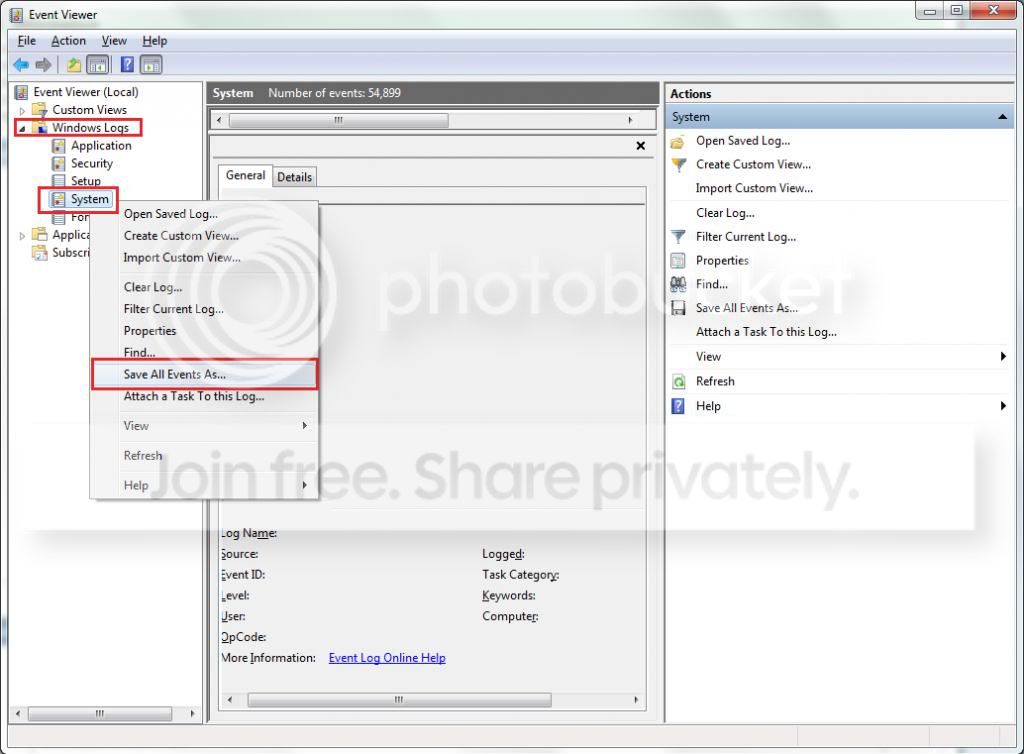
  2. Toggle open the triangle to the left of Windows Logs, right-click on System and choose Save All Events As...
  3. syseventvwrlog1_zps5b0a5395.jpg
  4. A dialogue box will pop up asking you to name the file and select the save directory, name the file the same as your Seven Forums user-name and save it to the desktop.
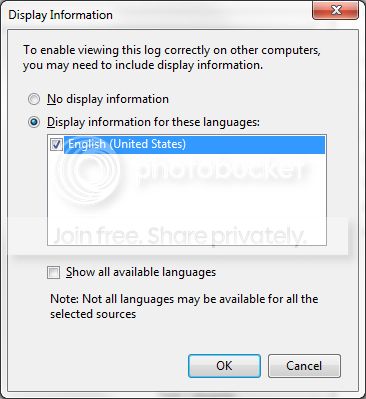
  5. A second dialogue box will appear asking you to select the Display Information, select Display information for these languages and check the box next to English (if you don't have English automatically offered check the box at the bottom to display additional languages - Show all available languages and check English).
  6. syseventvwrlog2_zpsdafa4dba.jpg
  7. Wait a few moments until the cursor returns to normal. The file will now be on your desktop (given it's the directory it was saved to) UserName.evtx, next to it there will be a folder called LocaleMetaData select both the .evtx file as well as the folder and compress them using Winrar / 7zip and attach it in your next post.
 

My Computer

Computer type
PC/Desktop
OS
Windows 10
CPU
Intel Core i5 3570K
Motherboard
Asus P8Z77V-PRO
Memory
16GB 1600Mhz G.Skill
Graphics Card(s)
Gigabyte GTX 970 G1-Gaming
PSU
Seasonic 1000W Platinum
Case
Fractal Design Define R4
Cooling
Noctua NH-D14
Ok as requested. Let me know if I can provide anything else. Thanks.
 

My Computer

Computer type
PC/Desktop
Computer Manufacturer/Model Number
Asus U56E laptop
OS
Windows 7 Ultimate x64
CPU
Intel Core i5-3570K 3.40 GHz LGA1155 CPU
Motherboard
ASUS P8Z77-V PRO LGA 1155 Intel Z77
Memory
G.SKILL Ripjaws X Series 16GB SDRAM DDR3 F3-1600C9D-16GXM
Hard Drives
SanDisk SDSSDP-128G-G25 2.5" 128GB SATA III SSD
4 Seagate Barracuda 7200.14 ST3000DM001 3TB in a Raid 5
PSU
Thermaltake Black Widow W0319RU 850W ATX
Case
Thermaltake Level 10 Series Level 10 GTS Black
Cooling
Cooler Master Hyper 212 EVO and MegaFlow, 8 fans total
Thanks for the files :) , I'll see if others can lend a hand with this case.
 

My Computer

Computer type
PC/Desktop
OS
Windows 10
CPU
Intel Core i5 3570K
Motherboard
Asus P8Z77V-PRO
Memory
16GB 1600Mhz G.Skill
Graphics Card(s)
Gigabyte GTX 970 G1-Gaming
PSU
Seasonic 1000W Platinum
Case
Fractal Design Define R4
Cooling
Noctua NH-D14
Upload the list of all the third party drivers Using NirSoft DriverView :

  • Download and execute Driverview
  • View > Hide Microsoft Drivers
  • Edit > Select all
  • File > Save Selected Items
  • In the Save dialog, Set the path to desktop, Put "Driverview" in the name field, and save.
  • Zip the .txt file and upload it.
 

My Computer

Computer type
PC/Desktop
Computer Manufacturer/Model Number
Self Assembled
OS
Microsoft Windows 10 Pro Insider Preview 64-bit
CPU
Intel(R) Core(TM) i3-4130 CPU @ 3.40GHz
Motherboard
Gigabyte Technology Co., Ltd. B85M-D3H
Memory
Corsair Vengence 4GB x2 (8.00GB Dual-Channel DDR3 @ 798MHz)
Graphics Card(s)
2047MB GeForce GTS 450 (ZOTAC International)
Sound Card
Onboard (Realtek High Definition Audio)
Monitor(s) Displays
LG Flatron E2040T
Screen Resolution
1600x900
Hard Drives
Western Digital 1 TB
Seagate 500 GB
PSU
Corsair VS550
Case
Cooler Master K380
Cooling
Cooler Master Seidon 120V Plus
Keyboard
Logitech MK260r
Mouse
Logitech MK260r
Internet Speed
PMPL Broadband
Antivirus
Windows Defender + MBAM
Browser
Firefox
Other Info
Dell Studio 15" Laptop
Here you go. Thanks for helping out.
 

My Computer

Computer type
PC/Desktop
Computer Manufacturer/Model Number
Asus U56E laptop
OS
Windows 7 Ultimate x64
CPU
Intel Core i5-3570K 3.40 GHz LGA1155 CPU
Motherboard
ASUS P8Z77-V PRO LGA 1155 Intel Z77
Memory
G.SKILL Ripjaws X Series 16GB SDRAM DDR3 F3-1600C9D-16GXM
Hard Drives
SanDisk SDSSDP-128G-G25 2.5" 128GB SATA III SSD
4 Seagate Barracuda 7200.14 ST3000DM001 3TB in a Raid 5
PSU
Thermaltake Black Widow W0319RU 850W ATX
Case
Thermaltake Level 10 Series Level 10 GTS Black
Cooling
Cooler Master Hyper 212 EVO and MegaFlow, 8 fans total
Daemon Tools, Alcohol 120% and Power Archiver Pro uses SCSI Pass Through Direct (SPTD), which is a well known BSOD causer. Uninstall Daemon Tools at first. Then download SPTD standalone installer from Disk-Tools.com, and execute the downloaded file as guided below :

  • Double click to open it.
  • Click this button only:
  • 2012-12-13_224441.jpg
  • If it is grayed out, as in the picture, there is no more SPTD in your system, and you just close the window.
Delete them all:

  • ASUS Ai Charger: C:\Windows\system32\DRIVERS\AiCharger.sys
  • ATK Generic Function Service: C:\Program Files (x86)\ASUS\ATK Package\ATKGFNEX\ASMMAP64.sys
  • ASUS Image Toolkit Disk Monitor Driver: C:\Windows\System32\Drivers\assd.sys
  • ATK WMIACPI Utility: C:\Program Files (x86)\ASUS\ATK Package\ATK WMIACPI\atkwmiacpi64.sys
All those are bloatware, and highly problematic. I'd recommend you to http://www.sevenforums.com/tutorials/219576-clean-up-factory-bloatware.html, with a special reference to Point #13
13. Consider a Clean Reinstall - Factory OEM Windows 7 which is often better than getting a new computer considering how pre-installed bloatware can corrupt Windows 7 even if it's completely cleaned up.
From the data you supplied earlier, some BSODs were caused by Norton.
fffff880`037c3838 fffff880`05727af3Unable to load image \??\C:\ProgramData\Symantec\Symantec Endpoint Protection\12.1.671.4971.105\Data\Definitions\BASHDefs\20130208.011\BHDrvx64.sys, Win32 error 0n2
*** WARNING: Unable to verify timestamp for BHDrvx64.sys
*** ERROR: Module load completed but symbols could not be loaded for BHDrvx64.sys
BHDrvx64+0x94af3
Uninstall Norton and all Symentec products using Norton Removal tool. At least as a test. Use Microsoft Security Essentials as your antivirus with windows inbuilt firewall, and free MBAM as the on demand scanner.
Download, install and update those, and then run full system scans with both of them, one by one.


Let us know the results.

 

My Computer

Computer type
PC/Desktop
Computer Manufacturer/Model Number
Self Assembled
OS
Microsoft Windows 10 Pro Insider Preview 64-bit
CPU
Intel(R) Core(TM) i3-4130 CPU @ 3.40GHz
Motherboard
Gigabyte Technology Co., Ltd. B85M-D3H
Memory
Corsair Vengence 4GB x2 (8.00GB Dual-Channel DDR3 @ 798MHz)
Graphics Card(s)
2047MB GeForce GTS 450 (ZOTAC International)
Sound Card
Onboard (Realtek High Definition Audio)
Monitor(s) Displays
LG Flatron E2040T
Screen Resolution
1600x900
Hard Drives
Western Digital 1 TB
Seagate 500 GB
PSU
Corsair VS550
Case
Cooler Master K380
Cooling
Cooler Master Seidon 120V Plus
Keyboard
Logitech MK260r
Mouse
Logitech MK260r
Internet Speed
PMPL Broadband
Antivirus
Windows Defender + MBAM
Browser
Firefox
Other Info
Dell Studio 15" Laptop
I have attempted a clean install before and still got random reboots. Only afterwards did I re-install all of Asus' drivers to see if that helped. That being said I will give you suggestions a shot and let you know how it goes. Should I try all of these steps at once or should I start with the SPTD drivers and go from there?
 

My Computer

Computer type
PC/Desktop
Computer Manufacturer/Model Number
Asus U56E laptop
OS
Windows 7 Ultimate x64
CPU
Intel Core i5-3570K 3.40 GHz LGA1155 CPU
Motherboard
ASUS P8Z77-V PRO LGA 1155 Intel Z77
Memory
G.SKILL Ripjaws X Series 16GB SDRAM DDR3 F3-1600C9D-16GXM
Hard Drives
SanDisk SDSSDP-128G-G25 2.5" 128GB SATA III SSD
4 Seagate Barracuda 7200.14 ST3000DM001 3TB in a Raid 5
PSU
Thermaltake Black Widow W0319RU 850W ATX
Case
Thermaltake Level 10 Series Level 10 GTS Black
Cooling
Cooler Master Hyper 212 EVO and MegaFlow, 8 fans total
Back
Top