Solved Random BSOD happening about 2-4x a day. Can anyone take a look please

DFrost

New member
Local time
5:11 PM
Messages
6
I have been getting BSOD at random times I can't seem to narrow down to where the problem stems from. I can say that it is apparently totally random, seems to be no correlation between what programs are processes are running. I've blown away the system twice just to be sure it wasn't an install issue, but I'm at a point where I've hit the limit of my technical knowledge. I posted this also in 3-4x Daily BSOD | Windows Forum if you follow the link I uploaded a zip file with my past 10 dumps and included a complete breakdown of system hardware with specs. Any help anyone can provide to help me narrow down what is causing it would be greatly appreciated. I attached it to this thread aswell.

I might add that this is a new computer I assembled a month ago, originally I was running XP and Ubuntu and never experienced any problems. I upgraded to Win7 then this started happening. Since then I've down a 2x wipe and reformat to a fresh install and I still get the BSOD. Please someone with a bit more knowledge than I provide any suggestions on where I should start looking. Once again your help and insight is appreciated.

Bests.
 

My Computer My Computer

At a glance

Win7FX6100 AMD
Computer type
PC/Desktop
Computer Manufacturer/Model Number
custom
OS
Win7
CPU
FX6100 AMD
Attaching my bootlog if that helps.
 

My Computer My Computer

At a glance

Win7FX6100 AMD
Computer type
PC/Desktop
Computer Manufacturer/Model Number
custom
OS
Win7
CPU
FX6100 AMD
Hi DFrost.

The AMD/ATI display driver is causing some issues here.
Code:
fffff880`046ae688  fffff880`056f92e0Unable to load image \SystemRoot\system32\DRIVERS\atikmdag.sys, Win32 error 0n2
*** WARNING: Unable to verify timestamp for atikmdag.sys
*** ERROR: Module load completed but symbols could not be loaded for atikmdag.sys
 atikmdag+0x5e2e0
And the driver is historically old.
Code:
fffff880`05400000 fffff880`05450000   atikmpag   (deferred)             
    Image path: \SystemRoot\system32\DRIVERS\atikmpag.sys
[COLOR=Red]    Image name: atikmpag.sys
    Timestamp:        Wed Apr 20 06:52:32 2011[/COLOR] (4DAE3558)
    CheckSum:         00050398
    ImageSize:        00050000
    Translations:     0000.04b0 0000.04e4 0409.04b0 0409.04e4
Update your ATI/AMD display driver.
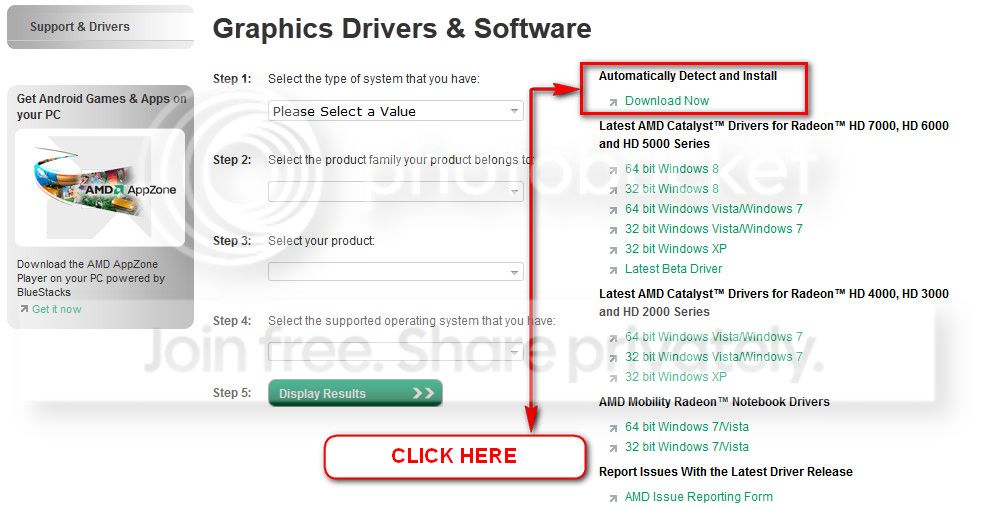
You can get it from the link in our forum, http://www.sevenforums.com/graphic-...alyst-video-driver-windows-7-a.html#post17671, or you may go to AMD Graphics Driver and Software and opt for Automatically Detect and Install the appropriate driver for your card.
ATI_zps0bc28aaa.jpg


During installation, you may opt for advanced installation, and install the display driver only, not the Catalyst Control Center.

Do some Disc checks.

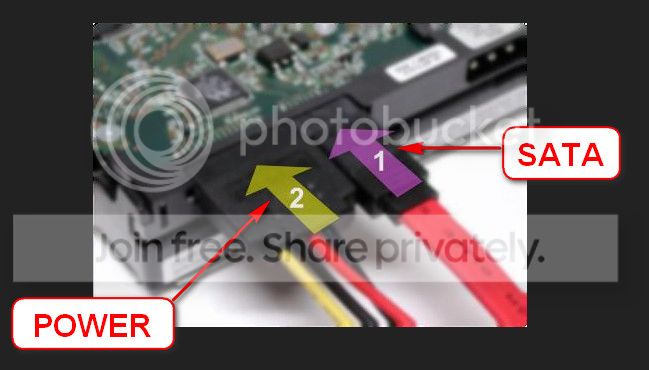
  1. Reseat the sata and power.
    72974453_zps85c47d93.jpg
  2. Run chkdsk /f/r, following the option two of the tutorial Disk Check
  3. Seatool for dos: SeaTools | Seagate download
    Burn it in a blank cd. boot from the CD, click on "Accept", wait for it to finish detecting the drives, then in the upper left corner select "Basic Tests", then select "Long Test" and let it run.
Test your RAM modules for possible errors.
How to Test and Diagnose RAM Issues with Memtest86+
Run memtest for at least 8 passes, preferably overnight.

Uninstall Norton and all Symentec products using Norton Removal tool. At least as a test. Use Microsoft Security Essentials as your antivirus with windows inbuilt firewall, and free MBAM as the on demand scanner.
Download, install and update those, and then run full system scans with both of them, one by one.

Let us know the results.
___________________________________________________________________________
BSOD ANALYSIS:
Code:
BugCheck A, {fffffa802b324200, 2, 0, fffff80002b79c5f}

Probably caused by : memory_corruption ( nt!MiIdentifyPfn+23f )

Followup: MachineOwner
------------------------------------------------------------------------
BugCheck A, {fffffa8028f2b618, 2, 0, fffff80002941c5f}

Probably caused by : memory_corruption ( nt!MiIdentifyPfn+23f )

Followup: MachineOwner
---------------------------------------------------------------------------
BugCheck A, {48, 2, 1, fffff80002927c8f}

Probably caused by : memory_corruption ( nt!MiIdentifyPfn+26f )

Followup: MachineOwner
---------
 

My Computer My Computer

At a glance

Microsoft Windows 10 Pro Insider Preview 64-bitIntel(R) Core(TM) i3-4130 CPU @ 3.40GHzCorsair Vengence 4GB x2 (8.00GB Dual-Channel ...2047MB GeForce GTS 450 (ZOTAC International)
Computer type
PC/Desktop
Computer Manufacturer/Model Number
Self Assembled
OS
Microsoft Windows 10 Pro Insider Preview 64-bit
CPU
Intel(R) Core(TM) i3-4130 CPU @ 3.40GHz
Motherboard
Gigabyte Technology Co., Ltd. B85M-D3H
Memory
Corsair Vengence 4GB x2 (8.00GB Dual-Channel DDR3 @ 798MHz)
Graphics Card(s)
2047MB GeForce GTS 450 (ZOTAC International)
Sound Card
Onboard (Realtek High Definition Audio)
Monitor(s) Displays
LG Flatron E2040T
Screen Resolution
1600x900
Hard Drives
Western Digital 1 TB
Seagate 500 GB
PSU
Corsair VS550
Case
Cooler Master K380
Cooling
Cooler Master Seidon 120V Plus
Keyboard
Logitech MK260r
Mouse
Logitech MK260r
Internet Speed
PMPL Broadband
Antivirus
Windows Defender + MBAM
Browser
Firefox
Other Info
Dell Studio 15" Laptop
Thank you for the response I will certainly let you know if that works. At the moment I'm coding, but I'm going to take a break in a little bit. I had planned on putting my RAM/CPU through a 2hr stress test using Linx, Prime95, and Memtest, to see if they spit out any issues. But before then I'll update the graphics driver and run chkdsk. So I guess you can expect a results reply within the 6-10hrs depending on how much up-time I get after I do all that. Thanks again. On a side note... something has me feeling that one of my DIMMs are not right. I pulled and reseated them, thinking that may have been the issue, but the majority of the time I get the screen is when I'm in my zone and doing 6 or 7 things at once. But I know that can't be the cause, multi-tasking, because there have been times where my comp was just sitting there doing nothing and then tweaked out. So Idk, I'll let you know how things turned out.

Bests.
 

My Computer My Computer

At a glance

Win7FX6100 AMD
Computer type
PC/Desktop
Computer Manufacturer/Model Number
custom
OS
Win7
CPU
FX6100 AMD
So here's the deal so far. Ran chkdsk no errors found/repaired. Uninstalled Norton and ran the Malware/essentials no problems found for viruses or malware. Ran Memtest for 1.5hrs, cancelled it and will run it again tonight while I sleep. Couldn't really get Prime95 to run right so ran tests with Linx. So far so good, before I was getting BSOD during the tests after about 20mins in. At this point on my second run at a much higher test rate, but I have to say, so far so good.
 

My Computer My Computer

At a glance

Win7FX6100 AMD
Computer type
PC/Desktop
Computer Manufacturer/Model Number
custom
OS
Win7
CPU
FX6100 AMD
Its ok :)
If problems are back, let us know :)
 

My Computer My Computer

At a glance

Microsoft Windows 10 Pro Insider Preview 64-bitIntel(R) Core(TM) i3-4130 CPU @ 3.40GHzCorsair Vengence 4GB x2 (8.00GB Dual-Channel ...2047MB GeForce GTS 450 (ZOTAC International)
Computer type
PC/Desktop
Computer Manufacturer/Model Number
Self Assembled
OS
Microsoft Windows 10 Pro Insider Preview 64-bit
CPU
Intel(R) Core(TM) i3-4130 CPU @ 3.40GHz
Motherboard
Gigabyte Technology Co., Ltd. B85M-D3H
Memory
Corsair Vengence 4GB x2 (8.00GB Dual-Channel DDR3 @ 798MHz)
Graphics Card(s)
2047MB GeForce GTS 450 (ZOTAC International)
Sound Card
Onboard (Realtek High Definition Audio)
Monitor(s) Displays
LG Flatron E2040T
Screen Resolution
1600x900
Hard Drives
Western Digital 1 TB
Seagate 500 GB
PSU
Corsair VS550
Case
Cooler Master K380
Cooling
Cooler Master Seidon 120V Plus
Keyboard
Logitech MK260r
Mouse
Logitech MK260r
Internet Speed
PMPL Broadband
Antivirus
Windows Defender + MBAM
Browser
Firefox
Other Info
Dell Studio 15" Laptop
Will do. Just to note. Completed a 6.5hr stress test using static memory reserve of 7GB on a random block swap, with all 6 cores operating at 100% utilization; No problems. Damn was it really Norton that was causing that?

That's why I hate paying for software... LOL
 

My Computer My Computer

At a glance

Win7FX6100 AMD
Computer type
PC/Desktop
Computer Manufacturer/Model Number
custom
OS
Win7
CPU
FX6100 AMD
Lol ... you need not to hate :) but there is some free AV product, which is hassles free, too ;)
 

My Computer My Computer

At a glance

Microsoft Windows 10 Pro Insider Preview 64-bitIntel(R) Core(TM) i3-4130 CPU @ 3.40GHzCorsair Vengence 4GB x2 (8.00GB Dual-Channel ...2047MB GeForce GTS 450 (ZOTAC International)
Computer type
PC/Desktop
Computer Manufacturer/Model Number
Self Assembled
OS
Microsoft Windows 10 Pro Insider Preview 64-bit
CPU
Intel(R) Core(TM) i3-4130 CPU @ 3.40GHz
Motherboard
Gigabyte Technology Co., Ltd. B85M-D3H
Memory
Corsair Vengence 4GB x2 (8.00GB Dual-Channel DDR3 @ 798MHz)
Graphics Card(s)
2047MB GeForce GTS 450 (ZOTAC International)
Sound Card
Onboard (Realtek High Definition Audio)
Monitor(s) Displays
LG Flatron E2040T
Screen Resolution
1600x900
Hard Drives
Western Digital 1 TB
Seagate 500 GB
PSU
Corsair VS550
Case
Cooler Master K380
Cooling
Cooler Master Seidon 120V Plus
Keyboard
Logitech MK260r
Mouse
Logitech MK260r
Internet Speed
PMPL Broadband
Antivirus
Windows Defender + MBAM
Browser
Firefox
Other Info
Dell Studio 15" Laptop
Arc,

Thanks for the help, all seems to be well on this end. On the AV note, who do you personally thinks makes the best windows based AV program? Free and paid. I bought Norton because I figured that would be all encompassing for a Win machine. Turns out it, as we both know now, it caused more probs than it was worth.
 

My Computer My Computer

At a glance

Win7FX6100 AMD
Computer type
PC/Desktop
Computer Manufacturer/Model Number
custom
OS
Win7
CPU
FX6100 AMD
MSE never causes BSOD's, and isn't a bad AV.
 

My Computer My Computer

At a glance

Windows 10 Pro x64 ; Xubuntu x64Intel i7 860 @ 2.80 GHz O/C'ed to 4.0GHz16GB Corsair Vengance DDR3 @ 661 MHz Dual Cha...EVGA NVidia GTX 560 1024MB
Computer type
PC/Desktop
Computer Manufacturer/Model Number
Golden Mk. I.4
OS
Windows 10 Pro x64 ; Xubuntu x64
CPU
Intel i7 860 @ 2.80 GHz O/C'ed to 4.0GHz
Motherboard
Gigabyte P55A-UD3R Rev.1. Award BIOS F13
Memory
16GB Corsair Vengance DDR3 @ 661 MHz Dual Channel (9-9-9-24)
Graphics Card(s)
EVGA NVidia GTX 560 1024MB
Sound Card
Realtek Integrated
Monitor(s) Displays
Dual Samsung SyncMaster 2494HS
Screen Resolution
1920*1080 and 1920*1080
Hard Drives
1*Samsung 840 EVO 120GB SSD;
1*OCZ Vertex 2 60GB SSD;
2*Samsung F3 SpinPoint 1TB in RAID0;
1*Samsung F1 SpinPoint 1TB;
2*Western Digital 1TB External USB 3.0
1*Western Digital 500GB External USB 3.0
1*Seagate 500GB External USB 2.0
PSU
Thermaltake ToughPower QFan 750W
Case
Thermaltake Element S VK60001W2Z
Cooling
Corsair H60 Water Cooling, 2*230mm and 2*80mm case fans
Keyboard
Logitech G110
Mouse
Logitech MX518
DFrost mate, all the AV programs (except McAfee and AVG; they dont protect) are good. But the actual fact is, windows is a clse source coded Operating System. So the third party AV programs and their various filters sometimes fail to match with the source code of windows. That is why sometimes they all cause BSODs. In my debugging experience I have not seen a single AV program that is not causing this BSOD trouble. Still, Eset is the least trouble causer as I have seen.

But I dont dare to suggest, as if it cause issues in your case.

MSE is as good as any other antivirus programs that is available in the market. The plus point is, it cause least issue; as it is having the matching filters with the OS itself. SO I suggest for MSE where I find an AV is the root of the issue.

Hope you understand it, mate? For any other further questions, you are welcome :)
 

My Computer My Computer

At a glance

Microsoft Windows 10 Pro Insider Preview 64-bitIntel(R) Core(TM) i3-4130 CPU @ 3.40GHzCorsair Vengence 4GB x2 (8.00GB Dual-Channel ...2047MB GeForce GTS 450 (ZOTAC International)
Computer type
PC/Desktop
Computer Manufacturer/Model Number
Self Assembled
OS
Microsoft Windows 10 Pro Insider Preview 64-bit
CPU
Intel(R) Core(TM) i3-4130 CPU @ 3.40GHz
Motherboard
Gigabyte Technology Co., Ltd. B85M-D3H
Memory
Corsair Vengence 4GB x2 (8.00GB Dual-Channel DDR3 @ 798MHz)
Graphics Card(s)
2047MB GeForce GTS 450 (ZOTAC International)
Sound Card
Onboard (Realtek High Definition Audio)
Monitor(s) Displays
LG Flatron E2040T
Screen Resolution
1600x900
Hard Drives
Western Digital 1 TB
Seagate 500 GB
PSU
Corsair VS550
Case
Cooler Master K380
Cooling
Cooler Master Seidon 120V Plus
Keyboard
Logitech MK260r
Mouse
Logitech MK260r
Internet Speed
PMPL Broadband
Antivirus
Windows Defender + MBAM
Browser
Firefox
Other Info
Dell Studio 15" Laptop
Back
Top