Random BSODs at odd intervals

LUCARiO

New member
Local time
11:54 AM
Messages
11
Hi,
So my PC was working fine before I went away for 4 days, I come back and now it is BSODing sometimes every half an hour, sometimes only twice a day. I can't seem to notice a pattern with the dump files anywhere and don't know what is causing it.

I should mention that recently I got a new case, Cooler and extension cables.

I should mention that when I removed the old cooler on my AMD PhenomII 965 that the CPU came right out of the socket with the cooler as it was stuck down. I don't want that to be a bias because I'm hoping that the cause of the BSOD could be something else so I don't have to essentially buy a new computer.

Any help is appreciated, and I've attached the Seven Forums zip file
 

My Computer

Computer Manufacturer/Model Number
AMD PhenomII Desktop
OS
Windows 7 Professional x64
CPU
MD Phenom II X4 965
Motherboard
Gigabyte GA-890GPA-UD3H
Memory
8.0GB Dual-Channel DDR3 @ 669MHz
Graphics Card(s)
ATI Radeon HD 5850
Screen Resolution
1920x1080
AVG was the apparent cause of some of the crashes. Try updating your network adapter drivers: Realtek

Code:
Rt64win7.sys         Mon Mar 22 05:57:14 2010 (4BA73EFA)

Also, run the three Prime95 tests: http://www.sevenforums.com/tutorials/100352-hardware-stress-test-prime95.html

...Summary of the dumps:
Code:
[font=lucida console]
Built by: 7601.17835.amd64fre.win7sp1_gdr.120503-2030
Debug session time: Sat Jul 28 20:10:42.591 2012 (UTC - 4:00)
System Uptime: 0 days 10:23:38.074
*** WARNING: Unable to verify timestamp for win32k.sys
*** ERROR: Module load completed but symbols could not be loaded for win32k.sys
Probably caused by : ntkrnlmp.exe ( nt!KeRemoveQueueEx+177 )
BUGCHECK_STR:  0x1e_c0000005
DEFAULT_BUCKET_ID:  WIN7_DRIVER_FAULT
PROCESS_NAME:  svchost.exe
FAILURE_BUCKET_ID:  X64_0x1e_c0000005_nt!KeRemoveQueueEx+177
BiosReleaseDate = 05/28/2010
SystemProductName = GA-890GPA-UD3H
¨¨¨¨¨¨¨¨¨¨¨¨¨¨¨¨¨¨¨¨¨¨¨¨¨¨¨¨¨¨¨¨¨¨¨¨¨¨¨¨¨¨¨¨¨¨¨¨¨¨¨¨¨¨¨¨¨¨¨¨¨¨¨¨¨¨¨¨¨¨¨¨¨¨¨¨¨¨¨¨¨¨¨¨¨¨``
Built by: 7601.17835.amd64fre.win7sp1_gdr.120503-2030
Debug session time: Sat Jul 28 07:13:19.711 2012 (UTC - 4:00)
System Uptime: 0 days 22:18:22.209
Probably caused by : Pool_Corruption ( nt!ExDeferredFreePool+a53 )
BUGCHECK_STR:  0x19_3
DEFAULT_BUCKET_ID:  WIN7_DRIVER_FAULT
PROCESS_NAME:  CCC.exe
FAILURE_BUCKET_ID:  X64_0x19_3_nt!ExDeferredFreePool+a53
BiosReleaseDate = 05/28/2010
SystemProductName = GA-890GPA-UD3H
¨¨¨¨¨¨¨¨¨¨¨¨¨¨¨¨¨¨¨¨¨¨¨¨¨¨¨¨¨¨¨¨¨¨¨¨¨¨¨¨¨¨¨¨¨¨¨¨¨¨¨¨¨¨¨¨¨¨¨¨¨¨¨¨¨¨¨¨¨¨¨¨¨¨¨¨¨¨¨¨¨¨¨¨¨¨``
Built by: 7601.17835.amd64fre.win7sp1_gdr.120503-2030
Debug session time: Sat Jul 28 09:46:23.745 2012 (UTC - 4:00)
System Uptime: 0 days 2:29:49.243
*** ERROR: Module load completed but symbols could not be loaded for Ntfs.sys
*** WARNING: Unable to verify timestamp for win32k.sys
*** ERROR: Module load completed but symbols could not be loaded for win32k.sys
Probably caused by : Pool_Corruption ( nt!ExDeferredFreePool+1ed )
DEFAULT_BUCKET_ID:  WIN7_DRIVER_FAULT
PROCESS_NAME:  System
BUGCHECK_STR:  0x24
FAILURE_BUCKET_ID:  X64_0x24_nt!ExDeferredFreePool+1ed
BiosReleaseDate = 05/28/2010
SystemProductName = GA-890GPA-UD3H
¨¨¨¨¨¨¨¨¨¨¨¨¨¨¨¨¨¨¨¨¨¨¨¨¨¨¨¨¨¨¨¨¨¨¨¨¨¨¨¨¨¨¨¨¨¨¨¨¨¨¨¨¨¨¨¨¨¨¨¨¨¨¨¨¨¨¨¨¨¨¨¨¨¨¨¨¨¨¨¨¨¨¨¨¨¨``
Built by: 7601.17835.amd64fre.win7sp1_gdr.120503-2030
Debug session time: Fri Jul 27 08:31:50.182 2012 (UTC - 4:00)
System Uptime: 1 days 7:45:47.665
*** ERROR: Module load completed but symbols could not be loaded for Ntfs.sys
*** WARNING: Unable to verify timestamp for win32k.sys
*** ERROR: Module load completed but symbols could not be loaded for win32k.sys
Probably caused by : Ntfs.sys ( Ntfs+a9550 )
DEFAULT_BUCKET_ID:  WIN7_DRIVER_FAULT
PROCESS_NAME:  googledrivesyn
BUGCHECK_STR:  0x24
FAILURE_BUCKET_ID:  X64_0x24_Ntfs+a9550
BiosReleaseDate = 05/28/2010
SystemProductName = GA-890GPA-UD3H
¨¨¨¨¨¨¨¨¨¨¨¨¨¨¨¨¨¨¨¨¨¨¨¨¨¨¨¨¨¨¨¨¨¨¨¨¨¨¨¨¨¨¨¨¨¨¨¨¨¨¨¨¨¨¨¨¨¨¨¨¨¨¨¨¨¨¨¨¨¨¨¨¨¨¨¨¨¨¨¨¨¨¨¨¨¨``
Built by: 7601.17835.amd64fre.win7sp1_gdr.120503-2030
Debug session time: Fri Jul 27 08:54:07.020 2012 (UTC - 4:00)
System Uptime: 0 days 0:21:36.129
Probably caused by : Pool_Corruption ( nt!ExDeferredFreePool+1ed )
DEFAULT_BUCKET_ID:  WIN7_DRIVER_FAULT
BUGCHECK_STR:  0x3B
PROCESS_NAME:  CCC.exe
FAILURE_BUCKET_ID:  X64_0x3B_nt!ExDeferredFreePool+1ed
BiosReleaseDate = 05/28/2010
SystemProductName = GA-890GPA-UD3H
¨¨¨¨¨¨¨¨¨¨¨¨¨¨¨¨¨¨¨¨¨¨¨¨¨¨¨¨¨¨¨¨¨¨¨¨¨¨¨¨¨¨¨¨¨¨¨¨¨¨¨¨¨¨¨¨¨¨¨¨¨¨¨¨¨¨¨¨¨¨¨¨¨¨¨¨¨¨¨¨¨¨¨¨¨¨``
Built by: 7601.17835.amd64fre.win7sp1_gdr.120503-2030
Debug session time: Thu Jul 26 00:45:18.850 2012 (UTC - 4:00)
System Uptime: 1 days 0:20:03.333
*** WARNING: Unable to verify timestamp for win32k.sys
*** ERROR: Module load completed but symbols could not be loaded for win32k.sys
Probably caused by : ntkrnlmp.exe ( nt! ?? ::FNODOBFM::`string'+4ac3 )
BUGCHECK_STR:  0x1a_41284
DEFAULT_BUCKET_ID:  WIN7_DRIVER_FAULT
PROCESS_NAME:  WmiApSrv.exe
FAILURE_BUCKET_ID:  X64_0x1a_41284_nt!_??_::FNODOBFM::_string_+4ac3
BiosReleaseDate = 05/28/2010
SystemProductName = GA-890GPA-UD3H
¨¨¨¨¨¨¨¨¨¨¨¨¨¨¨¨¨¨¨¨¨¨¨¨¨¨¨¨¨¨¨¨¨¨¨¨¨¨¨¨¨¨¨¨¨¨¨¨¨¨¨¨¨¨¨¨¨¨¨¨¨¨¨¨¨¨¨¨¨¨¨¨¨¨¨¨¨¨¨¨¨¨¨¨¨¨``
Built by: 7601.17835.amd64fre.win7sp1_gdr.120503-2030
Debug session time: Tue Jul 24 23:29:43.660 2012 (UTC - 4:00)
System Uptime: 0 days 0:46:44.159
*** ERROR: Symbol file could not be found.  Defaulted to export symbols for fltmgr.sys - 
*** WARNING: Unable to verify timestamp for luafv.sys
*** ERROR: Module load completed but symbols could not be loaded for luafv.sys
Probably caused by : Pool_Corruption ( nt!ExDeferredFreePool+a53 )
BUGCHECK_STR:  0x19_3
DEFAULT_BUCKET_ID:  WIN7_DRIVER_FAULT
PROCESS_NAME:  Rainmeter.exe
FAILURE_BUCKET_ID:  X64_0x19_3_nt!ExDeferredFreePool+a53
BiosReleaseDate = 05/28/2010
SystemProductName = GA-890GPA-UD3H
¨¨¨¨¨¨¨¨¨¨¨¨¨¨¨¨¨¨¨¨¨¨¨¨¨¨¨¨¨¨¨¨¨¨¨¨¨¨¨¨¨¨¨¨¨¨¨¨¨¨¨¨¨¨¨¨¨¨¨¨¨¨¨¨¨¨¨¨¨¨¨¨¨¨¨¨¨¨¨¨¨¨¨¨¨¨``
Built by: 7601.17835.amd64fre.win7sp1_gdr.120503-2030
Debug session time: Tue Jul 24 22:42:04.181 2012 (UTC - 4:00)
System Uptime: 0 days 12:05:06.289
*** ERROR: Module load completed but symbols could not be loaded for Ntfs.sys
*** ERROR: Symbol file could not be found.  Defaulted to export symbols for fltmgr.sys - 
*** WARNING: Unable to verify timestamp for avgidsfiltera.sys
*** ERROR: Module load completed but symbols could not be loaded for avgidsfiltera.sys
Probably caused by : avgidsfiltera.sys ( avgidsfiltera+36e9 )
DEFAULT_BUCKET_ID:  WIN7_DRIVER_FAULT
PROCESS_NAME:  System
BUGCHECK_STR:  0x7E
FAILURE_BUCKET_ID:  X64_0x7E_avgidsfiltera+36e9
BiosReleaseDate = 05/28/2010
SystemProductName = GA-890GPA-UD3H
¨¨¨¨¨¨¨¨¨¨¨¨¨¨¨¨¨¨¨¨¨¨¨¨¨¨¨¨¨¨¨¨¨¨¨¨¨¨¨¨¨¨¨¨¨¨¨¨¨¨¨¨¨¨¨¨¨¨¨¨¨¨¨¨¨¨¨¨¨¨¨¨¨¨¨¨¨¨¨¨¨¨¨¨¨¨``
Built by: 7601.17835.amd64fre.win7sp1_gdr.120503-2030
Debug session time: Tue Jul 24 01:11:26.860 2012 (UTC - 4:00)
System Uptime: 0 days 0:10:16.358
*** ERROR: Module load completed but symbols could not be loaded for Ntfs.sys
*** ERROR: Symbol file could not be found.  Defaulted to export symbols for fltmgr.sys - 
*** WARNING: Unable to verify timestamp for avgidsfiltera.sys
*** ERROR: Module load completed but symbols could not be loaded for avgidsfiltera.sys
Probably caused by : Ntfs.sys ( Ntfs+fe84 )
DEFAULT_BUCKET_ID:  WIN7_DRIVER_FAULT
PROCESS_NAME:  chrome.exe
BUGCHECK_STR:  0x24
FAILURE_BUCKET_ID:  X64_0x24_Ntfs+fe84
BiosReleaseDate = 05/28/2010
SystemProductName = GA-890GPA-UD3H
¨¨¨¨¨¨¨¨¨¨¨¨¨¨¨¨¨¨¨¨¨¨¨¨¨¨¨¨¨¨¨¨¨¨¨¨¨¨¨¨¨¨¨¨¨¨¨¨¨¨¨¨¨¨¨¨¨¨¨¨¨¨¨¨¨¨¨¨¨¨¨¨¨¨¨¨¨¨¨¨¨¨¨¨¨¨``
Built by: 7601.17835.amd64fre.win7sp1_gdr.120503-2030
Debug session time: Mon Jul 23 21:06:59.258 2012 (UTC - 4:00)
System Uptime: 0 days 10:05:45.367
Probably caused by : ntkrnlmp.exe ( nt! ?? ::FNODOBFM::`string'+4ac3 )
BUGCHECK_STR:  0x1a_41284
DEFAULT_BUCKET_ID:  WIN7_DRIVER_FAULT
PROCESS_NAME:  chrome.exe
FAILURE_BUCKET_ID:  X64_0x1a_41284_nt!_??_::FNODOBFM::_string_+4ac3
BiosReleaseDate = 05/28/2010
SystemProductName = GA-890GPA-UD3H
¨¨¨¨¨¨¨¨¨¨¨¨¨¨¨¨¨¨¨¨¨¨¨¨¨¨¨¨¨¨¨¨¨¨¨¨¨¨¨¨¨¨¨¨¨¨¨¨¨¨¨¨¨¨¨¨¨¨¨¨¨¨¨¨¨¨¨¨¨¨¨¨¨¨¨¨¨¨¨¨¨¨¨¨¨¨``
Built by: 7601.17835.amd64fre.win7sp1_gdr.120503-2030
Debug session time: Tue Jul 24 07:23:12.424 2012 (UTC - 4:00)
System Uptime: 0 days 6:11:04.922
*** ERROR: Module load completed but symbols could not be loaded for Ntfs.sys
*** WARNING: Unable to verify timestamp for win32k.sys
*** ERROR: Module load completed but symbols could not be loaded for win32k.sys
Probably caused by : Ntfs.sys ( Ntfs+a9550 )
DEFAULT_BUCKET_ID:  WIN7_DRIVER_FAULT
PROCESS_NAME:  avgidsagent.ex
BUGCHECK_STR:  0x24
FAILURE_BUCKET_ID:  X64_0x24_Ntfs+a9550
BiosReleaseDate = 05/28/2010
SystemProductName = GA-890GPA-UD3H
¨¨¨¨¨¨¨¨¨¨¨¨¨¨¨¨¨¨¨¨¨¨¨¨¨¨¨¨¨¨¨¨¨¨¨¨¨¨¨¨¨¨¨¨¨¨¨¨¨¨¨¨¨¨¨¨¨¨¨¨¨¨¨¨¨¨¨¨¨¨¨¨¨¨¨¨¨¨¨¨¨¨¨¨¨¨``
Built by: 7601.17835.amd64fre.win7sp1_gdr.120503-2030
Debug session time: Tue Jul 24 01:00:25.792 2012 (UTC - 4:00)
System Uptime: 0 days 3:52:43.900
Probably caused by : ntkrnlmp.exe ( nt!KeRemoveQueueEx+177 )
BUGCHECK_STR:  0x1e_c0000005
DEFAULT_BUCKET_ID:  WIN7_DRIVER_FAULT
PROCESS_NAME:  svchost.exe
FAILURE_BUCKET_ID:  X64_0x1e_c0000005_nt!KeRemoveQueueEx+177
BiosReleaseDate = 05/28/2010
SystemProductName = GA-890GPA-UD3H
¨¨¨¨¨¨¨¨¨¨¨¨¨¨¨¨¨¨¨¨¨¨¨¨¨¨¨¨¨¨¨¨¨¨¨¨¨¨¨¨¨¨¨¨¨¨¨¨¨¨¨¨¨¨¨¨¨¨¨¨¨¨¨¨¨¨¨¨¨¨¨¨¨¨¨¨¨¨¨¨¨¨¨¨¨¨``
Built by: 7601.17835.amd64fre.win7sp1_gdr.120503-2030
Debug session time: Tue Jul 24 07:47:05.053 2012 (UTC - 4:00)
System Uptime: 0 days 0:23:12.162
Probably caused by : Pool_Corruption ( nt!ExDeferredFreePool+cbb )
BUGCHECK_STR:  0x19_3
DEFAULT_BUCKET_ID:  WIN7_DRIVER_FAULT
PROCESS_NAME:  CCC.exe
FAILURE_BUCKET_ID:  X64_0x19_3_nt!ExDeferredFreePool+cbb
BiosReleaseDate = 05/28/2010
SystemProductName = GA-890GPA-UD3H
¨¨¨¨¨¨¨¨¨¨¨¨¨¨¨¨¨¨¨¨¨¨¨¨¨¨¨¨¨¨¨¨¨¨¨¨¨¨¨¨¨¨¨¨¨¨¨¨¨¨¨¨¨¨¨¨¨¨¨¨¨¨¨¨¨¨¨¨¨¨¨¨¨¨¨¨¨¨¨¨¨¨¨¨¨¨``
Built by: 7601.17835.amd64fre.win7sp1_gdr.120503-2030
Debug session time: Tue Jul 24 10:36:15.658 2012 (UTC - 4:00)
System Uptime: 0 days 2:48:28.767
Probably caused by : win32k.sys ( win32k!XEPALOBJ::vUnrefPalette+f )
DEFAULT_BUCKET_ID:  WIN7_DRIVER_FAULT
BUGCHECK_STR:  0x3B
PROCESS_NAME:  chrome.exe
FAILURE_BUCKET_ID:  X64_0x3B_win32k!XEPALOBJ::vUnrefPalette+f
BiosReleaseDate = 05/28/2010
SystemProductName = GA-890GPA-UD3H
¨¨¨¨¨¨¨¨¨¨¨¨¨¨¨¨¨¨¨¨¨¨¨¨¨¨¨¨¨¨¨¨¨¨¨¨¨¨¨¨¨¨¨¨¨¨¨¨¨¨¨¨¨¨¨¨¨¨¨¨¨¨¨¨¨¨¨¨¨¨¨¨¨¨¨¨¨¨¨¨¨¨¨¨¨¨``
Built by: 7601.17835.amd64fre.win7sp1_gdr.120503-2030
Debug session time: Mon Jul 23 11:00:32.064 2012 (UTC - 4:00)
System Uptime: 0 days 0:24:01.547
Probably caused by : ntkrnlmp.exe ( nt! ?? ::FNODOBFM::`string'+4ac3 )
BUGCHECK_STR:  0x1a_41284
DEFAULT_BUCKET_ID:  WIN7_DRIVER_FAULT
PROCESS_NAME:  chrome.exe
FAILURE_BUCKET_ID:  X64_0x1a_41284_nt!_??_::FNODOBFM::_string_+4ac3
BiosReleaseDate = 05/28/2010
SystemProductName = GA-890GPA-UD3H
¨¨¨¨¨¨¨¨¨¨¨¨¨¨¨¨¨¨¨¨¨¨¨¨¨¨¨¨¨¨¨¨¨¨¨¨¨¨¨¨¨¨¨¨¨¨¨¨¨¨¨¨¨¨¨¨¨¨¨¨¨¨¨¨¨¨¨¨¨¨¨¨¨¨¨¨¨¨¨¨¨¨¨¨¨¨``
*** WARNING: Unable to verify timestamp for ntoskrnl.exe
*** ERROR: Module load completed but symbols could not be loaded for ntoskrnl.exe
Built by: 7601.17592.amd64fre.win7sp1_gdr.110408-1631
Debug session time: Mon Jun 27 08:01:09.891 2011 (UTC - 4:00)
System Uptime: 0 days 0:52:50.000
*** WARNING: Unable to verify timestamp for ntoskrnl.exe
*** ERROR: Module load completed but symbols could not be loaded for ntoskrnl.exe
*** ERROR: Module load completed but symbols could not be loaded for Ntfs.sys
*** ERROR: Module load completed but symbols could not be loaded for fileinfo.sys
*** ERROR: Symbol file could not be found.  Defaulted to export symbols for fltmgr.sys - 
Probably caused by : fileinfo.sys ( fileinfo+1047 )
DEFAULT_BUCKET_ID:  WIN7_DRIVER_FAULT
BUGCHECK_STR:  0x24
BiosReleaseDate = 05/28/2010
SystemProductName = GA-890GPA-UD3H
¨¨¨¨¨¨¨¨¨¨¨¨¨¨¨¨¨¨¨¨¨¨¨¨¨¨¨¨¨¨¨¨¨¨¨¨¨¨¨¨¨¨¨¨¨¨¨¨¨¨¨¨¨¨¨¨¨¨¨¨¨¨¨¨¨¨¨¨¨¨¨¨¨¨¨¨¨¨¨¨¨¨¨¨¨¨``
*** ERROR: Module load completed but symbols could not be loaded for ntoskrnl.exe
Built by: 7601.17592.amd64fre.win7sp1_gdr.110408-1631
Debug session time: Mon Jun 27 08:21:29.597 2011 (UTC - 4:00)
System Uptime: 0 days 0:19:14.080
*** ERROR: Module load completed but symbols could not be loaded for ntoskrnl.exe
Probably caused by : dxgmms1.sys ( dxgmms1!VIDMM_APERTURE_SEGMENT::EvictResource+25d )
DEFAULT_BUCKET_ID:  WIN7_DRIVER_FAULT
BUGCHECK_STR:  0x3B
BiosReleaseDate = 05/28/2010
SystemProductName = GA-890GPA-UD3H
¨¨¨¨¨¨¨¨¨¨¨¨¨¨¨¨¨¨¨¨¨¨¨¨¨¨¨¨¨¨¨¨¨¨¨¨¨¨¨¨¨¨¨¨¨¨¨¨¨¨¨¨¨¨¨¨¨¨¨¨¨¨¨¨¨¨¨¨¨¨¨¨¨¨¨¨¨¨¨¨¨¨¨¨¨¨``
  
[/font]
 

My Computer

Computer Manufacturer/Model Number
Custom
OS
Windows 7 Professional x64
CPU
Intel i7 2600K OC'd @ 4620 MHz
Motherboard
Asus P8Z68-V Pro
Memory
16GB GSkill Sniper 2133 Mhz (4x4GB)
Graphics Card(s)
EVGA GeForce GTX 480 SuperClocked+
Sound Card
Realtek High Definition Audio
Monitor(s) Displays
2x Acer S273HLbmii 27"
Screen Resolution
2 x 1920x1080
Hard Drives
64GB Crucial M4 SSD

Storage: Hitachi 1TB 5400RPM, Samsung 1.5TB 5400RPM
PSU
Corsair HW Series 750w (modular)
Case
Cooler Master HAF 932 Advanced Blue Edition
Cooling
CM Hyper 212+ CPU cooler, 3x 230mm + 1x 140mm case fans
Keyboard
Logitech MK320 (wireless)
Mouse
Logitech MK320 (wireless)
Internet Speed
30 Mb/s : 2 Mb/s
Thanks for the reply Jonathon.

I tried getting windows to update the drivers for the Realtek network adapters and it says that I have the latest drivers.
If AVG is the problem would you suggest uninstalling and reinstalling the program?
 

My Computer

Computer Manufacturer/Model Number
AMD PhenomII Desktop
OS
Windows 7 Professional x64
CPU
MD Phenom II X4 965
Motherboard
Gigabyte GA-890GPA-UD3H
Memory
8.0GB Dual-Channel DDR3 @ 669MHz
Graphics Card(s)
ATI Radeon HD 5850
Screen Resolution
1920x1080
Download the Realtek drivers directly from the link I posted and then run the EXE. I'm guessing you tried to use Device Manager to update the drivers?

AVG isn't really known to cause BSODs, but an uninstallation/reinstallation wouldn't hurt. If nothing else, it will ensure you're running the latest version.
 

My Computer

Computer Manufacturer/Model Number
Custom
OS
Windows 7 Professional x64
CPU
Intel i7 2600K OC'd @ 4620 MHz
Motherboard
Asus P8Z68-V Pro
Memory
16GB GSkill Sniper 2133 Mhz (4x4GB)
Graphics Card(s)
EVGA GeForce GTX 480 SuperClocked+
Sound Card
Realtek High Definition Audio
Monitor(s) Displays
2x Acer S273HLbmii 27"
Screen Resolution
2 x 1920x1080
Hard Drives
64GB Crucial M4 SSD

Storage: Hitachi 1TB 5400RPM, Samsung 1.5TB 5400RPM
PSU
Corsair HW Series 750w (modular)
Case
Cooler Master HAF 932 Advanced Blue Edition
Cooling
CM Hyper 212+ CPU cooler, 3x 230mm + 1x 140mm case fans
Keyboard
Logitech MK320 (wireless)
Mouse
Logitech MK320 (wireless)
Internet Speed
30 Mb/s : 2 Mb/s
Alright so I downloaded and ran the installer for the drivers and it told me that it was the current drivers, but I repaired them anyway. I'm about uninstall and reinstall AVG soon.

I'm actually getting an SSD today so I'm probably going to end up starting off clean with Windows 7 so hopefully things like AVG and these drivers shouldn't be much of an issue. Do you think it could be hardware related to the CPU though?
 

My Computer

Computer Manufacturer/Model Number
AMD PhenomII Desktop
OS
Windows 7 Professional x64
CPU
MD Phenom II X4 965
Motherboard
Gigabyte GA-890GPA-UD3H
Memory
8.0GB Dual-Channel DDR3 @ 669MHz
Graphics Card(s)
ATI Radeon HD 5850
Screen Resolution
1920x1080
It could be, unfortunately. If the BSODs persist after the clean install, go ahead and run the Prime95 tests to check.
 

My Computer

Computer Manufacturer/Model Number
Custom
OS
Windows 7 Professional x64
CPU
Intel i7 2600K OC'd @ 4620 MHz
Motherboard
Asus P8Z68-V Pro
Memory
16GB GSkill Sniper 2133 Mhz (4x4GB)
Graphics Card(s)
EVGA GeForce GTX 480 SuperClocked+
Sound Card
Realtek High Definition Audio
Monitor(s) Displays
2x Acer S273HLbmii 27"
Screen Resolution
2 x 1920x1080
Hard Drives
64GB Crucial M4 SSD

Storage: Hitachi 1TB 5400RPM, Samsung 1.5TB 5400RPM
PSU
Corsair HW Series 750w (modular)
Case
Cooler Master HAF 932 Advanced Blue Edition
Cooling
CM Hyper 212+ CPU cooler, 3x 230mm + 1x 140mm case fans
Keyboard
Logitech MK320 (wireless)
Mouse
Logitech MK320 (wireless)
Internet Speed
30 Mb/s : 2 Mb/s
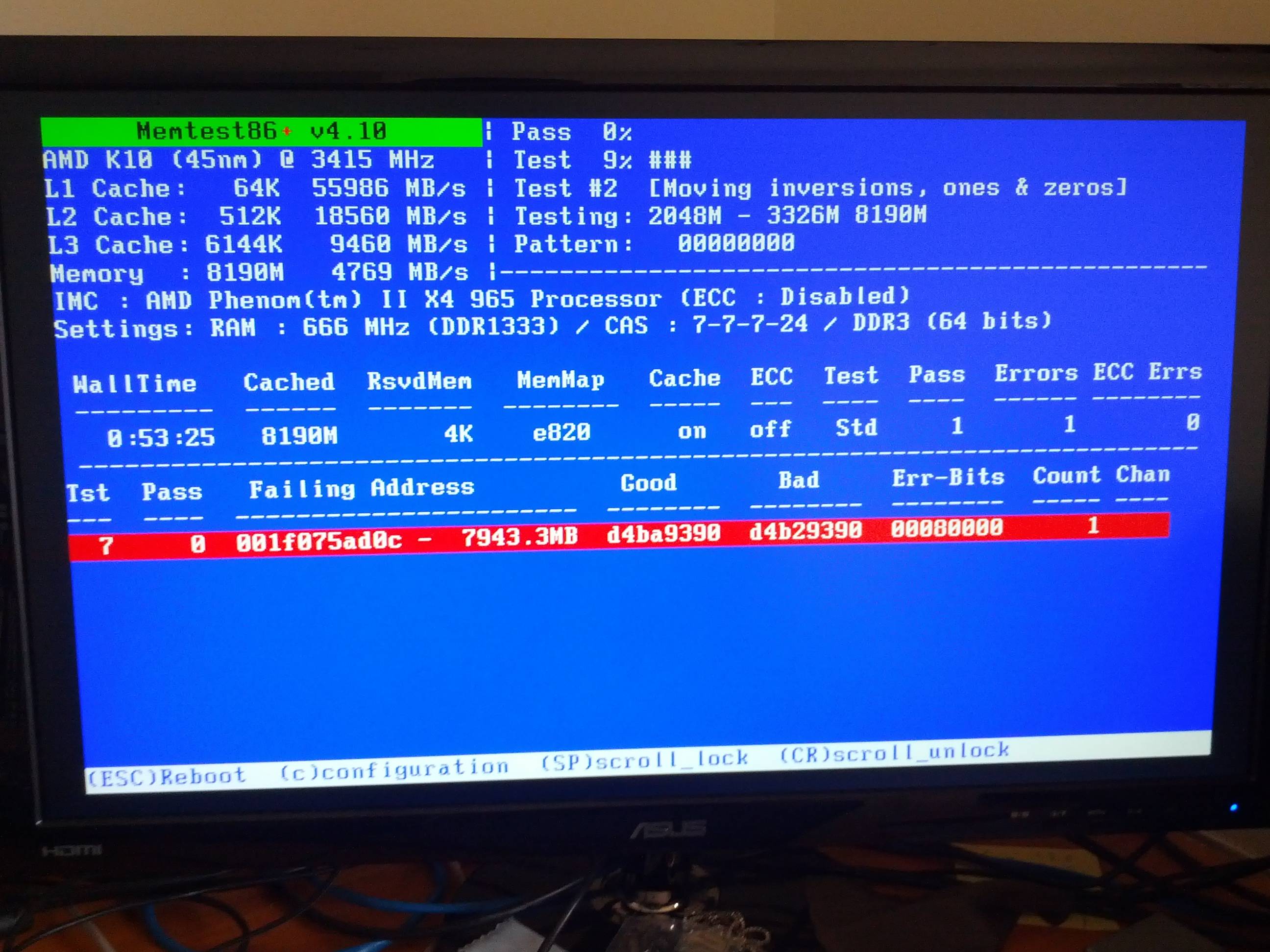
I had another though which was that I ran a memtest which returned this result
gpcEg.jpg


Any ideas what it means?
 

My Computer

Computer Manufacturer/Model Number
AMD PhenomII Desktop
OS
Windows 7 Professional x64
CPU
MD Phenom II X4 965
Motherboard
Gigabyte GA-890GPA-UD3H
Memory
8.0GB Dual-Channel DDR3 @ 669MHz
Graphics Card(s)
ATI Radeon HD 5850
Screen Resolution
1920x1080
It means RAM is a very likely cause for at least some of your BSODs. Try replacing your RAM, see if that helps anything.
 

My Computer

Computer Manufacturer/Model Number
Custom
OS
Windows 7 Professional x64
CPU
Intel i7 2600K OC'd @ 4620 MHz
Motherboard
Asus P8Z68-V Pro
Memory
16GB GSkill Sniper 2133 Mhz (4x4GB)
Graphics Card(s)
EVGA GeForce GTX 480 SuperClocked+
Sound Card
Realtek High Definition Audio
Monitor(s) Displays
2x Acer S273HLbmii 27"
Screen Resolution
2 x 1920x1080
Hard Drives
64GB Crucial M4 SSD

Storage: Hitachi 1TB 5400RPM, Samsung 1.5TB 5400RPM
PSU
Corsair HW Series 750w (modular)
Case
Cooler Master HAF 932 Advanced Blue Edition
Cooling
CM Hyper 212+ CPU cooler, 3x 230mm + 1x 140mm case fans
Keyboard
Logitech MK320 (wireless)
Mouse
Logitech MK320 (wireless)
Internet Speed
30 Mb/s : 2 Mb/s
Lucario,
AVG has been known to cause problems.
On your new system, I strongly recommend using Microsoft Security Essential, MSE.
Link for MSE is in my signature.

MSE is the one and the only security software that I use, that I recommend and that I install.
 

My Computer

Computer Manufacturer/Model Number
Toshiba Satellite S875D-S7239 laptop
OS
MS Windows 7 Ultimate SP1 64-bit
CPU
AMD A10-4600M
Motherboard
AMD Pumori (Socket FT1)
Memory
6.00 GB Dual-Channel DDR3 @ 798MHz (11-11-12-28)
Graphics Card(s)
AMD Radeon HD 7660G
Sound Card
High Definition Audio Device
Monitor(s) Displays
Generic PnP Monitor (1600x900@60Hz)
Screen Resolution
1600x900@60Hz
Hard Drives
SSD 119GB Corsair CSSD-V128GB2 ATA Device
Keyboard
Standard PS/2 Keyboard
Mouse
HP Wireless Optical Mobile Mouse Model FHA-3410
Internet Speed
What the local pub, local coffee shop offers.
Other Info
Optical Drive:MATSHITA BD-CMB UJ160B ATA Device


Also have an Asus ha1002xp netbook with Win 7 Ultimate installed.
Karl - the later versions (post-2009) of AVG are not known to cause BSODs anymore. If AVG is showing as the probable cause of a BSOD, it is far more likely the network adapter drivers are the real cause. In this case, it looks like the cause is a combination of bad RAM and old network adapter drivers.
 

My Computer

Computer Manufacturer/Model Number
Custom
OS
Windows 7 Professional x64
CPU
Intel i7 2600K OC'd @ 4620 MHz
Motherboard
Asus P8Z68-V Pro
Memory
16GB GSkill Sniper 2133 Mhz (4x4GB)
Graphics Card(s)
EVGA GeForce GTX 480 SuperClocked+
Sound Card
Realtek High Definition Audio
Monitor(s) Displays
2x Acer S273HLbmii 27"
Screen Resolution
2 x 1920x1080
Hard Drives
64GB Crucial M4 SSD

Storage: Hitachi 1TB 5400RPM, Samsung 1.5TB 5400RPM
PSU
Corsair HW Series 750w (modular)
Case
Cooler Master HAF 932 Advanced Blue Edition
Cooling
CM Hyper 212+ CPU cooler, 3x 230mm + 1x 140mm case fans
Keyboard
Logitech MK320 (wireless)
Mouse
Logitech MK320 (wireless)
Internet Speed
30 Mb/s : 2 Mb/s
Karl - the later versions (post-2009) of AVG are not known to cause BSODs anymore. If AVG is showing as the probable cause of a BSOD, it is far more likely the network adapter drivers are the real cause. In this case, it looks like the cause is a combination of bad RAM and old network adapter drivers.

Jonathan,

Thanks. I must have had the misfortune of running across several people with old versions of AVG.

Karl
 

My Computer

Computer Manufacturer/Model Number
Toshiba Satellite S875D-S7239 laptop
OS
MS Windows 7 Ultimate SP1 64-bit
CPU
AMD A10-4600M
Motherboard
AMD Pumori (Socket FT1)
Memory
6.00 GB Dual-Channel DDR3 @ 798MHz (11-11-12-28)
Graphics Card(s)
AMD Radeon HD 7660G
Sound Card
High Definition Audio Device
Monitor(s) Displays
Generic PnP Monitor (1600x900@60Hz)
Screen Resolution
1600x900@60Hz
Hard Drives
SSD 119GB Corsair CSSD-V128GB2 ATA Device
Keyboard
Standard PS/2 Keyboard
Mouse
HP Wireless Optical Mobile Mouse Model FHA-3410
Internet Speed
What the local pub, local coffee shop offers.
Other Info
Optical Drive:MATSHITA BD-CMB UJ160B ATA Device


Also have an Asus ha1002xp netbook with Win 7 Ultimate installed.
Check the timestamps on the AVG drivers, as well as the network adapter drivers. Not to say you won't ever run across an installation that's acting up with something, but certainly rarely enough we can't go around indiscriminately recommending removals.
 

My Computer

Computer Manufacturer/Model Number
Custom
OS
Windows 7 Professional x64
CPU
Intel i7 2600K OC'd @ 4620 MHz
Motherboard
Asus P8Z68-V Pro
Memory
16GB GSkill Sniper 2133 Mhz (4x4GB)
Graphics Card(s)
EVGA GeForce GTX 480 SuperClocked+
Sound Card
Realtek High Definition Audio
Monitor(s) Displays
2x Acer S273HLbmii 27"
Screen Resolution
2 x 1920x1080
Hard Drives
64GB Crucial M4 SSD

Storage: Hitachi 1TB 5400RPM, Samsung 1.5TB 5400RPM
PSU
Corsair HW Series 750w (modular)
Case
Cooler Master HAF 932 Advanced Blue Edition
Cooling
CM Hyper 212+ CPU cooler, 3x 230mm + 1x 140mm case fans
Keyboard
Logitech MK320 (wireless)
Mouse
Logitech MK320 (wireless)
Internet Speed
30 Mb/s : 2 Mb/s
Why would it be showing as AVG but then be the network drivers? Well I've uninstalled AVG and installed MSE, mainly because AVG was becoming a nuisance anyway. I updated the drivers like you said and after that I was still having problems. I'll wait and see if I still have BSOD without it, but then I'm thinking I need to test which part of my PC is faulty. I'm tossing up whether I should do a rebuild or not, but if I do then I was going to skip out on the RAM and GPU because I though it was a CPU problem, but now it might not be. Could you get any conclusive evidence from that memtest result?
 

My Computer

Computer Manufacturer/Model Number
AMD PhenomII Desktop
OS
Windows 7 Professional x64
CPU
MD Phenom II X4 965
Motherboard
Gigabyte GA-890GPA-UD3H
Memory
8.0GB Dual-Channel DDR3 @ 669MHz
Graphics Card(s)
ATI Radeon HD 5850
Screen Resolution
1920x1080
Lucario,

how many memory sticks are in your compuer?

If more than one, then remove all except for one of them.

Now your system will run slower, that is true, but are you getting any bsods?

Also, practical advise: Memory tests can increase your CPU temps.

High temps cause more problems.

boils down to I suggest directing a fan at the computer to keep temps down while testing.

Now another piece of practical advise, and I know others will disagee, but practically speaking after 4 passes and no error showing up you are fine.

=========================================================

There are many factors which contribute to a BSOD. Frequently, the BSOD itself is a secondary result of other factors.

When one is lucky, the BSOD dumps will nail the culprit. This is not always the case.

To give me a feel of your system, and all others, who pass by and don't want to dig thru the uploaded .ZIP file, would you please fill out your system specs:

Update your SevenForums System Specs
User CP (located on the top menu bar) |
Your Profile | Edit System Spec
(left-hand column)

To gather info, use Speccy (my favorite) or SIW or System Info

In the System Manufacturer Block, enter:
Manufacturer and Model and
ADD the word laptop, desktop, netbook or tablet.
For example:
Toshiba Satellite L305D notebook.

Provide full windows version info, for example:
MS Windows 7 Ultimate SP1 64-bit

Use the “Other Info” block for Optical Reader,
Mouse, touchpad, wifi adapter, speakers, monitor, etc

Scroll down and click on SAVE CHANGES.

You will find that in Speccy, you can select info from the display
using your mouse/touchpad and then paste that info into your specs.

SIW is a marvelous program, but the free version does not offer
this capability.
==================================================
thanks,
karl
 

My Computer

Computer Manufacturer/Model Number
Toshiba Satellite S875D-S7239 laptop
OS
MS Windows 7 Ultimate SP1 64-bit
CPU
AMD A10-4600M
Motherboard
AMD Pumori (Socket FT1)
Memory
6.00 GB Dual-Channel DDR3 @ 798MHz (11-11-12-28)
Graphics Card(s)
AMD Radeon HD 7660G
Sound Card
High Definition Audio Device
Monitor(s) Displays
Generic PnP Monitor (1600x900@60Hz)
Screen Resolution
1600x900@60Hz
Hard Drives
SSD 119GB Corsair CSSD-V128GB2 ATA Device
Keyboard
Standard PS/2 Keyboard
Mouse
HP Wireless Optical Mobile Mouse Model FHA-3410
Internet Speed
What the local pub, local coffee shop offers.
Other Info
Optical Drive:MATSHITA BD-CMB UJ160B ATA Device


Also have an Asus ha1002xp netbook with Win 7 Ultimate installed.
I'd recommend replacing the RAM on the basis of that memory test. Memtest86 showed one error, and I'm not sure if I can remember it ever misfiring.
 

My Computer

Computer Manufacturer/Model Number
Custom
OS
Windows 7 Professional x64
CPU
Intel i7 2600K OC'd @ 4620 MHz
Motherboard
Asus P8Z68-V Pro
Memory
16GB GSkill Sniper 2133 Mhz (4x4GB)
Graphics Card(s)
EVGA GeForce GTX 480 SuperClocked+
Sound Card
Realtek High Definition Audio
Monitor(s) Displays
2x Acer S273HLbmii 27"
Screen Resolution
2 x 1920x1080
Hard Drives
64GB Crucial M4 SSD

Storage: Hitachi 1TB 5400RPM, Samsung 1.5TB 5400RPM
PSU
Corsair HW Series 750w (modular)
Case
Cooler Master HAF 932 Advanced Blue Edition
Cooling
CM Hyper 212+ CPU cooler, 3x 230mm + 1x 140mm case fans
Keyboard
Logitech MK320 (wireless)
Mouse
Logitech MK320 (wireless)
Internet Speed
30 Mb/s : 2 Mb/s
the program doesn't hiccup, but rams do.
 

My Computer

Computer Manufacturer/Model Number
Toshiba Satellite S875D-S7239 laptop
OS
MS Windows 7 Ultimate SP1 64-bit
CPU
AMD A10-4600M
Motherboard
AMD Pumori (Socket FT1)
Memory
6.00 GB Dual-Channel DDR3 @ 798MHz (11-11-12-28)
Graphics Card(s)
AMD Radeon HD 7660G
Sound Card
High Definition Audio Device
Monitor(s) Displays
Generic PnP Monitor (1600x900@60Hz)
Screen Resolution
1600x900@60Hz
Hard Drives
SSD 119GB Corsair CSSD-V128GB2 ATA Device
Keyboard
Standard PS/2 Keyboard
Mouse
HP Wireless Optical Mobile Mouse Model FHA-3410
Internet Speed
What the local pub, local coffee shop offers.
Other Info
Optical Drive:MATSHITA BD-CMB UJ160B ATA Device


Also have an Asus ha1002xp netbook with Win 7 Ultimate installed.

My Computer

Computer Manufacturer/Model Number
Custom
OS
Windows 7 Professional x64
CPU
Intel i7 2600K OC'd @ 4620 MHz
Motherboard
Asus P8Z68-V Pro
Memory
16GB GSkill Sniper 2133 Mhz (4x4GB)
Graphics Card(s)
EVGA GeForce GTX 480 SuperClocked+
Sound Card
Realtek High Definition Audio
Monitor(s) Displays
2x Acer S273HLbmii 27"
Screen Resolution
2 x 1920x1080
Hard Drives
64GB Crucial M4 SSD

Storage: Hitachi 1TB 5400RPM, Samsung 1.5TB 5400RPM
PSU
Corsair HW Series 750w (modular)
Case
Cooler Master HAF 932 Advanced Blue Edition
Cooling
CM Hyper 212+ CPU cooler, 3x 230mm + 1x 140mm case fans
Keyboard
Logitech MK320 (wireless)
Mouse
Logitech MK320 (wireless)
Internet Speed
30 Mb/s : 2 Mb/s
Because I'm lazy for the time being, I'll paste a snapshot summary of my system from speccy.

I have 4 sticks, each is 2GB each I believe.
I will try reseating the RAM if necessary, however, as odd as it seems, now that I have AVG uninstalled I haven't had a BSOD. However I will give it until the end of the day, and I think I might be able to pick up the SSD today as well. All these things considered I will see if I need to replace parts.

The weirdest thing I saw about that memtest result was that usually when I have run it with dodgy RAM it has shown a slew of bad sectors, though this time it didn't make much sense with the error.
I had trouble with RAM before to do with the clock timings that the Motherboard had set them to, but I had since changed them and thought they were ok. I will look into it more though, and see if I need to do anything else.
I'll leave the post unsolved for the meantime, but let you guys know how I do. Thanks so much for the help :D

Summary
Operating System
MS Windows 7 64-bit SP1
CPU
AMD Phenom II X4 965 31 °C
Deneb 45nm Technology
RAM
8.0GB Dual-Channel DDR3 @ 669MHz (7-7-7-24)
Motherboard
Gigabyte Technology Co., Ltd. GA-890GPA-UD3H (Socket M2)
Graphics
VS248 @ 1920x1080
VS248 @ 1920x1080
VS248 @ 1920x1080
ATI Radeon HD 5800 Series
Hard Drives
977GB Western Digital WDC WD1002FAEX-00Z3A0 ATA Device (SATA) 27 °C
Optical Drives
ATAPI iHAS324 B ATA Device
ELBY CLONEDRIVE SCSI CdRom Device
Audio
AMD High Definition Audio Device
Operating System
MS Windows 7 64-bit SP1
Installation Date: 25 September 2010, 18:25
Serial Number: BBBBB-BBBBB-BBBBB-BBBBB-BBBBB
Windows Security Center
Firewall Enabled
Antivirus Disabled
Windows Defender
Windows Defender Disabled
fault Config Proxy Bypass
 

My Computer

Computer Manufacturer/Model Number
AMD PhenomII Desktop
OS
Windows 7 Professional x64
CPU
MD Phenom II X4 965
Motherboard
Gigabyte GA-890GPA-UD3H
Memory
8.0GB Dual-Channel DDR3 @ 669MHz
Graphics Card(s)
ATI Radeon HD 5850
Screen Resolution
1920x1080
Lucario,
do us all a favor and make it possible for any one looking at the thread at any point in time to be able to view your specs by putting them into your System Specs as specified in the procedure.

I'll await your completed System Specs before proceeding.
thanks,
karl
 

My Computer

Computer Manufacturer/Model Number
Toshiba Satellite S875D-S7239 laptop
OS
MS Windows 7 Ultimate SP1 64-bit
CPU
AMD A10-4600M
Motherboard
AMD Pumori (Socket FT1)
Memory
6.00 GB Dual-Channel DDR3 @ 798MHz (11-11-12-28)
Graphics Card(s)
AMD Radeon HD 7660G
Sound Card
High Definition Audio Device
Monitor(s) Displays
Generic PnP Monitor (1600x900@60Hz)
Screen Resolution
1600x900@60Hz
Hard Drives
SSD 119GB Corsair CSSD-V128GB2 ATA Device
Keyboard
Standard PS/2 Keyboard
Mouse
HP Wireless Optical Mobile Mouse Model FHA-3410
Internet Speed
What the local pub, local coffee shop offers.
Other Info
Optical Drive:MATSHITA BD-CMB UJ160B ATA Device


Also have an Asus ha1002xp netbook with Win 7 Ultimate installed.
Ok, so I've gone and added the details! Now I'm installing Win7 on the new SSD and getting odd BSOD now.

STOP: 0c0000007E (0xFFFFFFFFC0000420, 0xFFFFF880012AB7BE, 0xFFFFF880009A8A58, 0xFFFFF880009A8180)

Any ideas on this one?!
 

My Computer

Computer Manufacturer/Model Number
AMD PhenomII Desktop
OS
Windows 7 Professional x64
CPU
MD Phenom II X4 965
Motherboard
Gigabyte GA-890GPA-UD3H
Memory
8.0GB Dual-Channel DDR3 @ 669MHz
Graphics Card(s)
ATI Radeon HD 5850
Screen Resolution
1920x1080
Back
Top