Random BSOD's: Memory_management, bad pool header etc.

Post the dumps you get after doing the steps in the tutorial.

We'll see what we can do.
 

My Computer My Computer

Computer type
PC/Desktop
Computer Manufacturer/Model Number
Self assembled
OS
Windows 10 Home 64Bit
CPU
Intel Core i5 10400 @ 2.90GHz
Motherboard
Intel Corporation DG41WV (PROCESSOR)
Memory
8.00GB Single-Channel Unknown @ 1329MHz (16-20-20-38)
Sound Card
Realtek High Definition Audio
Monitor(s) Displays
DELL E170S
Screen Resolution
1280x1024 pixels
Hard Drives
931GB TOSHIBA DT01ACA100 (SATA)
238GB TEAM TM8PS7256G (SATA SSD)
Case
Nothing Fancy
Cooling
Fans
Keyboard
A4 Tech Co LTD
Mouse
A4 Tech Co Ltd/Logitech
Internet Speed
25 Mbps
Had another BSOD, attaching minidump.
 

My Computer My Computer

Computer type
PC/Desktop
OS
Windows 7 Home premium 64bit
Update your DirectX from here.
:ar: DirectX Update

Driver Reference Table

Code:
STACK_COMMAND:  kb

FOLLOWUP_IP: 
dxgmms1!VidSchiIsHardwareCompletedDependingCommandForFlip+18
fffff880`0437b4d4 448b9084000000  mov     r10d,dword ptr [rax+84h]

SYMBOL_STACK_INDEX:  3

SYMBOL_NAME:  dxgmms1!VidSchiIsHardwareCompletedDependingCommandForFlip+18

FOLLOWUP_NAME:  MachineOwner

MODULE_NAME: dxgmms1

IMAGE_NAME:  [COLOR="blue"]dxgmms1.sys[/COLOR]

DEBUG_FLR_IMAGE_TIMESTAMP:  4ce799c1

FAILURE_BUCKET_ID:  X64_0xD1_dxgmms1!VidSchiIsHardwareCompletedDependingCommandForFlip+18

BUCKET_ID:  X64_0xD1_dxgmms1!VidSchiIsHardwareCompletedDependingCommandForFlip+18

Followup: MachineOwner
---------

3: kd> lmvm dxgmms1
start             end                 module name
fffff880`0436d000 fffff880`043b3000   dxgmms1    (pdb symbols)          c:\symbols\dxgmms1.pdb\0901C357E9E846EE8C2FBCC8107163201\dxgmms1.pdb
    Loaded symbol image file: dxgmms1.sys
    Mapped memory image file: c:\symbols\dxgmms1.sys\4CE799C146000\dxgmms1.sys
    Image path: \SystemRoot\System32\drivers\dxgmms1.sys
    Image name: dxgmms1.sys
    Timestamp:        [COLOR="Blue"]Sat Nov 20 15:49:53 2010 (4CE799C1)[/COLOR]
    CheckSum:         00047A89
    ImageSize:        00046000
    File version:     6.1.7601.17514
    Product version:  6.1.7601.17514
    File flags:       0 (Mask 3F)
    File OS:          40004 NT Win32
    File type:        3.7 Driver
    File date:        00000000.00000000
    Translations:     0409.04b0
    CompanyName:      Microsoft Corporation
    ProductName:      Microsoft® Windows® Operating System
    InternalName:     dxgmms1.sys
    OriginalFilename: dxgmms1.sys
    ProductVersion:   6.1.7601.17514
    FileVersion:      6.1.7601.17514 (win7sp1_rtm.101119-1850)
    FileDescription:  DirectX Graphics MMS
    LegalCopyright:   © Microsoft Corporation. All rights reserved.

Get the latest drivers for your graphics card as well.

Post back if you get more dumps.
 

My Computer My Computer

Computer type
PC/Desktop
Computer Manufacturer/Model Number
Self assembled
OS
Windows 10 Home 64Bit
CPU
Intel Core i5 10400 @ 2.90GHz
Motherboard
Intel Corporation DG41WV (PROCESSOR)
Memory
8.00GB Single-Channel Unknown @ 1329MHz (16-20-20-38)
Sound Card
Realtek High Definition Audio
Monitor(s) Displays
DELL E170S
Screen Resolution
1280x1024 pixels
Hard Drives
931GB TOSHIBA DT01ACA100 (SATA)
238GB TEAM TM8PS7256G (SATA SSD)
Case
Nothing Fancy
Cooling
Fans
Keyboard
A4 Tech Co LTD
Mouse
A4 Tech Co Ltd/Logitech
Internet Speed
25 Mbps
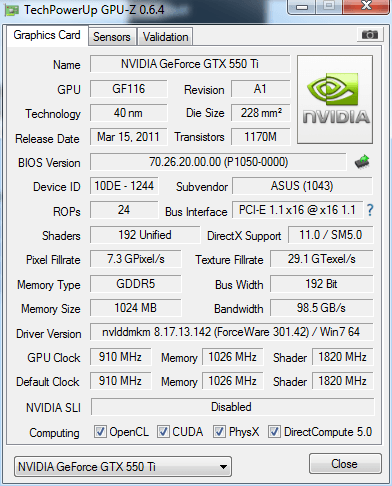
Can you help me with the video card drivers? I've updated them recently so idk if I downloaded the correct one

VGA = Asus GeForce GTX550 Ti DirectCU
 

My Computer My Computer

Computer type
PC/Desktop
OS
Windows 7 Home premium 64bit

My Computer My Computer

Computer type
PC/Desktop
Computer Manufacturer/Model Number
Self assembled
OS
Windows 10 Home 64Bit
CPU
Intel Core i5 10400 @ 2.90GHz
Motherboard
Intel Corporation DG41WV (PROCESSOR)
Memory
8.00GB Single-Channel Unknown @ 1329MHz (16-20-20-38)
Sound Card
Realtek High Definition Audio
Monitor(s) Displays
DELL E170S
Screen Resolution
1280x1024 pixels
Hard Drives
931GB TOSHIBA DT01ACA100 (SATA)
238GB TEAM TM8PS7256G (SATA SSD)
Case
Nothing Fancy
Cooling
Fans
Keyboard
A4 Tech Co LTD
Mouse
A4 Tech Co Ltd/Logitech
Internet Speed
25 Mbps
Yes its the vga :P downloading now

EDIT: Done downloading + installed drivers.
 

My Computer My Computer

Computer type
PC/Desktop
OS
Windows 7 Home premium 64bit
Good luck :p

Post dumps if you get them.
 

My Computer My Computer

Computer type
PC/Desktop
Computer Manufacturer/Model Number
Self assembled
OS
Windows 10 Home 64Bit
CPU
Intel Core i5 10400 @ 2.90GHz
Motherboard
Intel Corporation DG41WV (PROCESSOR)
Memory
8.00GB Single-Channel Unknown @ 1329MHz (16-20-20-38)
Sound Card
Realtek High Definition Audio
Monitor(s) Displays
DELL E170S
Screen Resolution
1280x1024 pixels
Hard Drives
931GB TOSHIBA DT01ACA100 (SATA)
238GB TEAM TM8PS7256G (SATA SSD)
Case
Nothing Fancy
Cooling
Fans
Keyboard
A4 Tech Co LTD
Mouse
A4 Tech Co Ltd/Logitech
Internet Speed
25 Mbps
got another bsod attaching minidump.
 

My Computer My Computer

Computer type
PC/Desktop
OS
Windows 7 Home premium 64bit

My Computer My Computer

Computer type
PC/Desktop
Computer Manufacturer/Model Number
Self assembled
OS
Windows 10 Home 64Bit
CPU
Intel Core i5 10400 @ 2.90GHz
Motherboard
Intel Corporation DG41WV (PROCESSOR)
Memory
8.00GB Single-Channel Unknown @ 1329MHz (16-20-20-38)
Sound Card
Realtek High Definition Audio
Monitor(s) Displays
DELL E170S
Screen Resolution
1280x1024 pixels
Hard Drives
931GB TOSHIBA DT01ACA100 (SATA)
238GB TEAM TM8PS7256G (SATA SSD)
Case
Nothing Fancy
Cooling
Fans
Keyboard
A4 Tech Co LTD
Mouse
A4 Tech Co Ltd/Logitech
Internet Speed
25 Mbps
I used that yesterday, it makes my computer VERY laggy
 

My Computer My Computer

Computer type
PC/Desktop
OS
Windows 7 Home premium 64bit
Do I only need to run it for ONE BSOD?
 

My Computer My Computer

Computer type
PC/Desktop
OS
Windows 7 Home premium 64bit
But does it crash and go BSOD?

Use these utilities to see the temps of your comp
CPUID - System & hardware benchmark, monitoring, reporting
For GPU GPU-Z Video card GPU Information Utility

Did you do a complete scan of your system after installing MSE?

Run http://www.sevenforums.com/tutorials/1538-sfc-scannow-command-system-file-checker.html and reboot if it finds violations.

Get into safe mode and see how your computer performs there.

I'm out of ideas. Post back the results of above.

See you
 

My Computer My Computer

Computer type
PC/Desktop
Computer Manufacturer/Model Number
Self assembled
OS
Windows 10 Home 64Bit
CPU
Intel Core i5 10400 @ 2.90GHz
Motherboard
Intel Corporation DG41WV (PROCESSOR)
Memory
8.00GB Single-Channel Unknown @ 1329MHz (16-20-20-38)
Sound Card
Realtek High Definition Audio
Monitor(s) Displays
DELL E170S
Screen Resolution
1280x1024 pixels
Hard Drives
931GB TOSHIBA DT01ACA100 (SATA)
238GB TEAM TM8PS7256G (SATA SSD)
Case
Nothing Fancy
Cooling
Fans
Keyboard
A4 Tech Co LTD
Mouse
A4 Tech Co Ltd/Logitech
Internet Speed
25 Mbps
Btw: did a quickscan with MSE, will do full scan 2moro.
 

My Computer My Computer

Computer type
PC/Desktop
OS
Windows 7 Home premium 64bit
Thanks

Let me know how your computer performs in safe mode & the temps of your computer
 

My Computer My Computer

Computer type
PC/Desktop
Computer Manufacturer/Model Number
Self assembled
OS
Windows 10 Home 64Bit
CPU
Intel Core i5 10400 @ 2.90GHz
Motherboard
Intel Corporation DG41WV (PROCESSOR)
Memory
8.00GB Single-Channel Unknown @ 1329MHz (16-20-20-38)
Sound Card
Realtek High Definition Audio
Monitor(s) Displays
DELL E170S
Screen Resolution
1280x1024 pixels
Hard Drives
931GB TOSHIBA DT01ACA100 (SATA)
238GB TEAM TM8PS7256G (SATA SSD)
Case
Nothing Fancy
Cooling
Fans
Keyboard
A4 Tech Co LTD
Mouse
A4 Tech Co Ltd/Logitech
Internet Speed
25 Mbps
ran both programs screenshot posted + files attached.

dfc.png
 

My Computer My Computer

Computer type
PC/Desktop
OS
Windows 7 Home premium 64bit
Thanks.

Tell me did you get any bsods so far? Does your system hang/freeze with the verifier on?

How does your computer perform in safe mode?
 

My Computer My Computer

Computer type
PC/Desktop
Computer Manufacturer/Model Number
Self assembled
OS
Windows 10 Home 64Bit
CPU
Intel Core i5 10400 @ 2.90GHz
Motherboard
Intel Corporation DG41WV (PROCESSOR)
Memory
8.00GB Single-Channel Unknown @ 1329MHz (16-20-20-38)
Sound Card
Realtek High Definition Audio
Monitor(s) Displays
DELL E170S
Screen Resolution
1280x1024 pixels
Hard Drives
931GB TOSHIBA DT01ACA100 (SATA)
238GB TEAM TM8PS7256G (SATA SSD)
Case
Nothing Fancy
Cooling
Fans
Keyboard
A4 Tech Co LTD
Mouse
A4 Tech Co Ltd/Logitech
Internet Speed
25 Mbps
Didnt try verifier and safe mode yet, running full MSE scan atm, didnt get any BSODS since that last one.
 

My Computer My Computer

Computer type
PC/Desktop
OS
Windows 7 Home premium 64bit
Back
Top