Random BSOD's ntoskrnl.exe

ThiefOfOranges

New member
Local time
3:33 PM
Messages
4
Okay, so I have a custom built PC (Specs in my profile). Well, I used to game on it regularly last summer before heading to school, and I never got any BSOD's or errors or anything really. Well when I got back this summer, I started getting gamename.exe has stopped working for all games I had when I attempted to play them, and then I started getting the BSOD's.

At first it seemed like it was just from gaming but then they started happening just randomly. While downloading, watching videos, etc. Just basic stuff.

I researched about as much as I could, tried memtest, no errors. Tried using seatools, no issues that it found with the HDD. Now I have completely formatted my HDD and reinstalled windows, but to no avail. I'm sure there's a lot of out of date drivers, considering I recently formatted (like yesterday). Hell, I'm pretty sure I have the oldest version of Win 7.

I included a couple screencaps from BlueScreenView in my zip file. The one titled "abnormal," I've only seen once. The other one I've seen about 10-15 times.

If anybody could point me in the right direction, I'd be extremely grateful. Just FYI, my MOBO is brand new, as is the RAM, and I just bought a 650w PSU, so I wouldn't expect it to be a hardware issue. I've spent about $900-$1000 on this computer, and I really need to figure out how to get it running right again. Thanks for any and all help. :)
 

My Computer

Computer type
PC/Desktop
Computer Manufacturer/Model Number
Custom Build
OS
Windows 7 Ultimate x64
CPU
AMD Phenom II X4 965 Black Edition Deneb 3.4GHz
Motherboard
BIOSTAR A960D+ AM3+ AMD 760G Micro ATX
Memory
Crucial Ballistix Sport 8GB 240-Pin DDR3 SDRAM DDR3
Graphics Card(s)
Asus GeForce GTX 560
Hard Drives
1TB Seagate HDD, don't know exact model number.
Antivirus
Currently none
Browser
Chrome
Which antivirus do you use?

Scan the system for possible virus infection with the following programs only.

Do some Disc checks.

  1. Re-seat the sata and power.
    72974453_zps85c47d93.jpg
  2. Run chkdsk /f/r, following the option two of the tutorial Disk Check
  3. Seatool for dos: SeaTools | Seagate download
    Burn it in a blank cd. boot from the CD, click on "Accept", wait for it to finish detecting the drives, then in the upper left corner select "Basic Tests", then select "Long Test" and let it run.
  4. Post a screenshot of your HDD using CrystalDiskInfo - Software - Crystal Dew World.
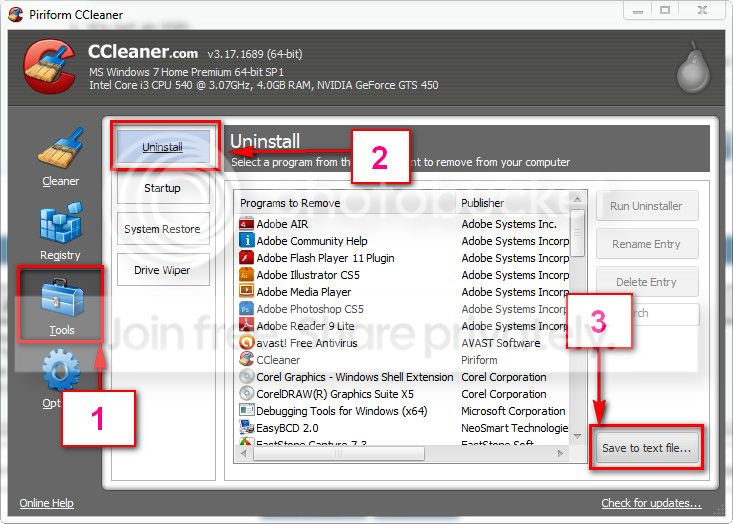
Download and install CCleaner. Then run it.
Go to "Tools" .... by default it will open the "uninstall" tab.
Click on save as text file. Save it on your desktop.
Upload the text file for us.
2012-11-02_224417.jpg


Let us know the results.

___________________________________________________________________________________
BSOD ANALYSIS:

Code:
BugCheck 1A, {41287, 80, 0, 0}

Probably caused by : ntkrnlmp.exe ( nt! ?? ::FNODOBFM::`string'+454f5 )

Followup: MachineOwner
----------------------------------------------------------------------------------
BugCheck 24, {1904fb, fffff88006d0e198, fffff88006d0d9f0, fffff8000311c003}

Probably caused by : ntkrnlmp.exe ( nt!FsRtlAddToTunnelCache+117 )

Followup: MachineOwner
---------
 

My Computer

Computer type
PC/Desktop
Computer Manufacturer/Model Number
Self Assembled
OS
Microsoft Windows 10 Pro Insider Preview 64-bit
CPU
Intel(R) Core(TM) i3-4130 CPU @ 3.40GHz
Motherboard
Gigabyte Technology Co., Ltd. B85M-D3H
Memory
Corsair Vengence 4GB x2 (8.00GB Dual-Channel DDR3 @ 798MHz)
Graphics Card(s)
2047MB GeForce GTS 450 (ZOTAC International)
Sound Card
Onboard (Realtek High Definition Audio)
Monitor(s) Displays
LG Flatron E2040T
Screen Resolution
1600x900
Hard Drives
Western Digital 1 TB
Seagate 500 GB
PSU
Corsair VS550
Case
Cooler Master K380
Cooling
Cooler Master Seidon 120V Plus
Keyboard
Logitech MK260r
Mouse
Logitech MK260r
Internet Speed
PMPL Broadband
Antivirus
Windows Defender + MBAM
Browser
Firefox
Other Info
Dell Studio 15" Laptop
Hi Arc, thanks for the relatively speedy response!

To answer your first question, I currently have no antivirus. Since I formatted my drive two days ago, I haven't really gotten around to that yet.

Okay, I ran the scans as instructed, and everything came back clean. I also re-seated the SATA and power cable and they are firmly in place as we speak.

I then ran the disk check, and to be honest, I'm not really sure of the outcome. Obviously it's a long process, so I was watching TV. When I heard the MOBO beep, I turned back to the PC, but it didn't give me any information after it booted up. BUT, I can tell you, I ran it before and it did not have any errors or anything, so I assume the same outcome would occur again.

Anyway, on to Seatools, I already ran Seatools for windows before I posted this, and it told me the drive was fine. But I did not run it the way you said, so I suppose I can download the Seatools for dos and run it as you instructed. Anyway, I attached the files you requested, and I'll get back to you after I run Seatools again.

Thanks.
 

My Computer

Computer type
PC/Desktop
Computer Manufacturer/Model Number
Custom Build
OS
Windows 7 Ultimate x64
CPU
AMD Phenom II X4 965 Black Edition Deneb 3.4GHz
Motherboard
BIOSTAR A960D+ AM3+ AMD 760G Micro ATX
Memory
Crucial Ballistix Sport 8GB 240-Pin DDR3 SDRAM DDR3
Graphics Card(s)
Asus GeForce GTX 560
Hard Drives
1TB Seagate HDD, don't know exact model number.
Antivirus
Currently none
Browser
Chrome
Okay well I ran it, and it said,
"DST Completed without error
Short DST Passed
Long Test Passed"

So are there anymore options?
 

My Computer

Computer type
PC/Desktop
Computer Manufacturer/Model Number
Custom Build
OS
Windows 7 Ultimate x64
CPU
AMD Phenom II X4 965 Black Edition Deneb 3.4GHz
Motherboard
BIOSTAR A960D+ AM3+ AMD 760G Micro ATX
Memory
Crucial Ballistix Sport 8GB 240-Pin DDR3 SDRAM DDR3
Graphics Card(s)
Asus GeForce GTX 560
Hard Drives
1TB Seagate HDD, don't know exact model number.
Antivirus
Currently none
Browser
Chrome
Not seeing any more reason of a Stop )xF4 right now, but we have to wait and observe the situation for the result if anything is done by Seatools there.
 

My Computer

Computer type
PC/Desktop
Computer Manufacturer/Model Number
Self Assembled
OS
Microsoft Windows 10 Pro Insider Preview 64-bit
CPU
Intel(R) Core(TM) i3-4130 CPU @ 3.40GHz
Motherboard
Gigabyte Technology Co., Ltd. B85M-D3H
Memory
Corsair Vengence 4GB x2 (8.00GB Dual-Channel DDR3 @ 798MHz)
Graphics Card(s)
2047MB GeForce GTS 450 (ZOTAC International)
Sound Card
Onboard (Realtek High Definition Audio)
Monitor(s) Displays
LG Flatron E2040T
Screen Resolution
1600x900
Hard Drives
Western Digital 1 TB
Seagate 500 GB
PSU
Corsair VS550
Case
Cooler Master K380
Cooling
Cooler Master Seidon 120V Plus
Keyboard
Logitech MK260r
Mouse
Logitech MK260r
Internet Speed
PMPL Broadband
Antivirus
Windows Defender + MBAM
Browser
Firefox
Other Info
Dell Studio 15" Laptop
So is there nothing else to do? Just to check in, I haven't had a BSOD since 6/13 at 4:15PM. I'm not sure if it's fixed, or if it's just a coincidence, but I'd usually get at least 3-4 per day.
 

My Computer

Computer type
PC/Desktop
Computer Manufacturer/Model Number
Custom Build
OS
Windows 7 Ultimate x64
CPU
AMD Phenom II X4 965 Black Edition Deneb 3.4GHz
Motherboard
BIOSTAR A960D+ AM3+ AMD 760G Micro ATX
Memory
Crucial Ballistix Sport 8GB 240-Pin DDR3 SDRAM DDR3
Graphics Card(s)
Asus GeForce GTX 560
Hard Drives
1TB Seagate HDD, don't know exact model number.
Antivirus
Currently none
Browser
Chrome
It seemed to be a disc/storage failure. It is expected that the disc checks will repair the problems if those are repairable. So now it is to wait and observe only.

Give it the time. Perform the stressful and crash prone operation. If it crashes, let us know. Otherwise inform us after a week.
 

My Computer

Computer type
PC/Desktop
Computer Manufacturer/Model Number
Self Assembled
OS
Microsoft Windows 10 Pro Insider Preview 64-bit
CPU
Intel(R) Core(TM) i3-4130 CPU @ 3.40GHz
Motherboard
Gigabyte Technology Co., Ltd. B85M-D3H
Memory
Corsair Vengence 4GB x2 (8.00GB Dual-Channel DDR3 @ 798MHz)
Graphics Card(s)
2047MB GeForce GTS 450 (ZOTAC International)
Sound Card
Onboard (Realtek High Definition Audio)
Monitor(s) Displays
LG Flatron E2040T
Screen Resolution
1600x900
Hard Drives
Western Digital 1 TB
Seagate 500 GB
PSU
Corsair VS550
Case
Cooler Master K380
Cooling
Cooler Master Seidon 120V Plus
Keyboard
Logitech MK260r
Mouse
Logitech MK260r
Internet Speed
PMPL Broadband
Antivirus
Windows Defender + MBAM
Browser
Firefox
Other Info
Dell Studio 15" Laptop
Back
Top