Random BSODs, only thing in common - from browser

bsodeath

New member
Local time
5:20 AM
Messages
12
Hello everyone!

I've been having a problem recently with BSOD. I could not determine the pattern, only thing in common - they seem to happen when I'm using a browser, most likely from pages with Adobe Flash (tho it's just a guess). Tried switching from Chrome to FF, didn't help. Neither did turning of the Flash Player hardware acceleration.

Among other things tried - Memtest overnight (OK), Seatools from boot up (OK). GPU driver wiped with DDU from safe mode, installed fresh, didn't help.

I ran driver verifier and BSODed on login, but my knowledge on the subject is insufficient to determine the cause.

I'd assume it's a hardware fault since it's quite old, if there was not for this particular 'always from the browser' moment, and the system being quite stable otherwise.

P.S. Hopefully I'm posting this according to the instructions :p
 

My Computer My Computer

At a glance

W7Ux64Core 2 66008 GbNvidia GTS 250
Computer type
PC/Desktop
Computer Manufacturer/Model Number
Unknown
OS
W7Ux64
CPU
Core 2 6600
Motherboard
Gigabyte
Memory
8 Gb
Graphics Card(s)
Nvidia GTS 250
Antivirus
MSE
One thing that might help to know is exactly how old the hardware is. Also have you tried to update to the latest version of flash? It sounds to me like something possibly corrupted some files somewhere. Also I just looked at some of the files that you uploaded and i noticed that it appears windows was logging plenty of memory dump errors; probably most likely from the hardware itself as you said it probably was. Especially if its really old. If a device is really old; and you have the latest operating system; chances are it may not be 100% compatible with windows 7.
 

My Computer My Computer

At a glance

Windows 7 ultimate 64-bitIntel I7 2600K 3.4ghzCorsair 16gb ddr3 1600mhzNvidia Geforce gt 430
Computer type
PC/Desktop
Computer Manufacturer/Model Number
custom built
OS
Windows 7 ultimate 64-bit
CPU
Intel I7 2600K 3.4ghz
Motherboard
Asus Evo P8P67
Memory
Corsair 16gb ddr3 1600mhz
Graphics Card(s)
Nvidia Geforce gt 430
Sound Card
Sound Blaster Titanium x-fi pci express
Monitor(s) Displays
Dell E198WFP
Hard Drives
1 western digital 2TB drive.
PSU
Antec 1200 watt
Case
Inwin Dragon Rider
Cooling
6 case supplied cooling fans
Keyboard
logitech mk700
Mouse
logitech m705
Internet Speed
25-50mbps download; 10mbps upload(i think)
Antivirus
avg free 2014
Browser
mozilla firefox
Other Info
Also have a pretty bad speaker setup which is a klipsch promedia 5.1 surround speaker setup with huge subwoofer and lg blu ray player/writer. Also a hp officejet pro 8600 plus wireless all in one and a logitech s7500 webcam.
Welcome to SF bsodeath :).

The main culprit is the nVidia driver / hardware, but updating the Ethernet driver won't hurt as well.

Code:
lmvm rt64win7
Browse full module list
start             end                 module name
fffff880`03f54000 fffff880`03f86000   Rt64win7   (deferred)             
    Image path: \SystemRoot\system32\DRIVERS\Rt64win7.sys
    Image name: Rt64win7.sys
    Browse all global symbols  functions  data
    Timestamp:        [COLOR=Red][U]Thu Feb 26 11:04:13 2009[/U][/COLOR]

Description | Version | Update | File Size | Download
Win7 and WinServer 2008 R2 Auto Installation Program (SID:1624016) | 7.076 | 2013/11/26 | 5969k | Choose a server


Please follow this detailed quote and roll-back the driver to a known stable release.

Install the 314.22 WHQL only.


  • Uninstall All nvidia items in Control Panel > Programs and features
    • 3D Vision Control Driver
    • 3D Vision Driver
    • Graphics Driver
    • HD Audio Driver
    • PhysX
    • nvidia Update
    (Are you using nvidia chipset drivers? If so, dont uninstall anything other than those are listed).
  • Now follow Drivers - Clean Left over Files after Uninstalling
  • Boot normally now. Download 314.22 WHQL. While installing, Select Custom (Advanced) install. In the next page, follow this settings:

Unfortunately your motherboard doesn't have onboard graphics, do you have a different
GPU you can test with?

Keep us posted.
 

My Computer My Computer

At a glance

Windows 10Intel Core i5 3570K16GB 1600Mhz G.SkillGigabyte GTX 970 G1-Gaming
Computer type
PC/Desktop
OS
Windows 10
CPU
Intel Core i5 3570K
Motherboard
Asus P8Z77V-PRO
Memory
16GB 1600Mhz G.Skill
Graphics Card(s)
Gigabyte GTX 970 G1-Gaming
PSU
Seasonic 1000W Platinum
Case
Fractal Design Define R4
Cooling
Noctua NH-D14
Thank you all for the replies, it is highly appreciated :)


@matts6887 I'm not really sure how old is the hardware but I'd say over 3-4 years old. I updated to the latest Flash version just in case.


@YoYo155 I followed your instructions, installed network adapter driver and did the clean nVidia driver install. Only problem is in between uninstalling the old driver and installing 314.22 Windows installed it's own driver (WDDM 1.1 if I'm not mistaking). Hopefully it won't influence the outcome negatively.

Once again, than you all for helping!
 

My Computer My Computer

At a glance

W7Ux64Core 2 66008 GbNvidia GTS 250
Computer type
PC/Desktop
Computer Manufacturer/Model Number
Unknown
OS
W7Ux64
CPU
Core 2 6600
Motherboard
Gigabyte
Memory
8 Gb
Graphics Card(s)
Nvidia GTS 250
Antivirus
MSE
Thank you all for the replies, it is highly appreciated :)


@matts6887 I'm not really sure how old is the hardware but I'd say over 3-4 years old. I updated to the latest Flash version just in case.


@YoYo155 I followed your instructions, installed network adapter driver and did the clean nVidia driver install. Only problem is in between uninstalling the old driver and installing 314.22 Windows installed it's own driver (WDDM 1.1 if I'm not mistaking). Hopefully it won't influence the outcome negatively.

Once again, than you all for helping!

if you have updated to the latest version of flash and you are still having the issue; i would agree with yoyo155 Even if windows inst alled the old driver; you should still be able to update it again after it installs the old driver.
 

My Computer My Computer

At a glance

Windows 7 ultimate 64-bitIntel I7 2600K 3.4ghzCorsair 16gb ddr3 1600mhzNvidia Geforce gt 430
Computer type
PC/Desktop
Computer Manufacturer/Model Number
custom built
OS
Windows 7 ultimate 64-bit
CPU
Intel I7 2600K 3.4ghz
Motherboard
Asus Evo P8P67
Memory
Corsair 16gb ddr3 1600mhz
Graphics Card(s)
Nvidia Geforce gt 430
Sound Card
Sound Blaster Titanium x-fi pci express
Monitor(s) Displays
Dell E198WFP
Hard Drives
1 western digital 2TB drive.
PSU
Antec 1200 watt
Case
Inwin Dragon Rider
Cooling
6 case supplied cooling fans
Keyboard
logitech mk700
Mouse
logitech m705
Internet Speed
25-50mbps download; 10mbps upload(i think)
Antivirus
avg free 2014
Browser
mozilla firefox
Other Info
Also have a pretty bad speaker setup which is a klipsch promedia 5.1 surround speaker setup with huge subwoofer and lg blu ray player/writer. Also a hp officejet pro 8600 plus wireless all in one and a logitech s7500 webcam.
Well, I'm back. After few days without problems, my PC crashed again, and again every crash was from a browser.

Right now I don't have an access to another GPU, it'll take me some time to replace it and see if it solves my problem.

Just in case, latest "Grab all" attached.

Once again, thank you all :)
 

My Computer My Computer

At a glance

W7Ux64Core 2 66008 GbNvidia GTS 250
Computer type
PC/Desktop
Computer Manufacturer/Model Number
Unknown
OS
W7Ux64
CPU
Core 2 6600
Motherboard
Gigabyte
Memory
8 Gb
Graphics Card(s)
Nvidia GTS 250
Antivirus
MSE
Hi again :), sorry for the late reply.

Again the main issue appears to be with nVidia, but other bugchecks indicate a possible
DISK corruption / infection.

Please scan for possible infection and file corruption.

   Warning
The Following Method Should NOT Be Performed On An SSD!


Testing the HDD:


  1. Perform a Disk Check | Disk Check- Scroll down to OPTION TWO of the tutorial and use the /R switch in the CHKDSK command | chkdsk C: /R.
  2. Then Post the Disk Check results following | This Tutorial.
  3. Once back in Windows, download Crystal Disk Info and post a screenshot (multiple shots if you have more than one drive).
  4. Download SeaTools for DOS if you don't want to use a CD to test the HDD you can use YUMI – Multiboot USB Creator to create a bootable USB (instructions are found at the bottom of both pages).
  5. If SeaTools for DOS is unable to recognize your HDD:
  6. Visit HDDdiag and follow the instructions | Or follow the instructions below.
If SeaTools For DOS does not recognize the drive;
Boot into the BIOS using the *Fx key.
Look for an entry called SATA Mode (or something similar), it should be set to IDE / AHCI.
It's probably set to AHCI which is why SeaTools doesn't recognize them in the DOS environment.
Set it to IDE then save and exit usually by pressing the F10 key.
Now boot into SeaTools and it should detect the drives.
Start the Long Test and let it run.
Upon completion don't try to boot into Windows as it will only result in a BSOD, go back into the BIOS
and change the SATA setting back to what it was in the first place.


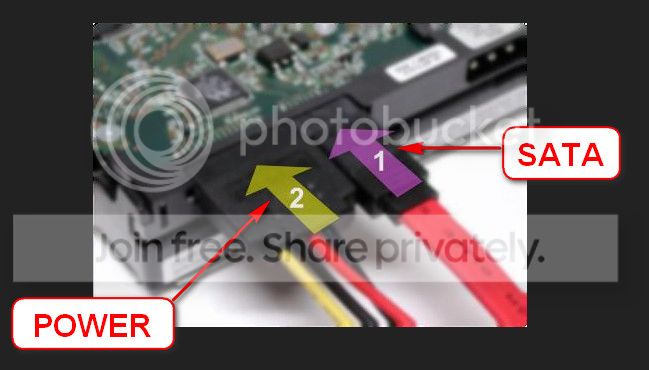
Re-seat the sata and power.

72974453_zps85c47d93.jpg


(*Kaspersky Rescue CD from a USB thumbdrive)

Let us know the results.
 

My Computer My Computer

At a glance

Windows 10Intel Core i5 3570K16GB 1600Mhz G.SkillGigabyte GTX 970 G1-Gaming
Computer type
PC/Desktop
OS
Windows 10
CPU
Intel Core i5 3570K
Motherboard
Asus P8Z77V-PRO
Memory
16GB 1600Mhz G.Skill
Graphics Card(s)
Gigabyte GTX 970 G1-Gaming
PSU
Seasonic 1000W Platinum
Case
Fractal Design Define R4
Cooling
Noctua NH-D14
Hey, thank you for replying. I'm in the process of running all the listed tests, as soon as I'm done I'll post the results. Thank you once again :)
 

My Computer My Computer

At a glance

W7Ux64Core 2 66008 GbNvidia GTS 250
Computer type
PC/Desktop
Computer Manufacturer/Model Number
Unknown
OS
W7Ux64
CPU
Core 2 6600
Motherboard
Gigabyte
Memory
8 Gb
Graphics Card(s)
Nvidia GTS 250
Antivirus
MSE
Be sure to keep us updates :) .
 

My Computer My Computer

At a glance

Windows 10Intel Core i5 3570K16GB 1600Mhz G.SkillGigabyte GTX 970 G1-Gaming
Computer type
PC/Desktop
OS
Windows 10
CPU
Intel Core i5 3570K
Motherboard
Asus P8Z77V-PRO
Memory
16GB 1600Mhz G.Skill
Graphics Card(s)
Gigabyte GTX 970 G1-Gaming
PSU
Seasonic 1000W Platinum
Case
Fractal Design Define R4
Cooling
Noctua NH-D14
I ran [most of] the tests. I'll attach the screenshots of sfc/scannow and Crystal Disk, as well as the results of anti-virus runs and 'chkdsk'.

Kaspersky found some kind of ad-aware among the Format factory files, and deleted them. In the meantime there was another BSoD, yet again - from the browser, but this one was something new: "DRIVER_OVERRAN_STACK_BUFFER" :shock:

Did another "Grab all" :D

Will post the Seatools test results ASAP.

Once again, thank you all for help!
 

My Computer My Computer

At a glance

W7Ux64Core 2 66008 GbNvidia GTS 250
Computer type
PC/Desktop
Computer Manufacturer/Model Number
Unknown
OS
W7Ux64
CPU
Core 2 6600
Motherboard
Gigabyte
Memory
8 Gb
Graphics Card(s)
Nvidia GTS 250
Antivirus
MSE
The results look very good :) .

I have to conclude a defective GPU, I believe it to be the Memory in particular as to cover all bases
I would try turning off Use Hardware Acceleration and posibly try a different PCI-e slot if possible.


My Computer My Computer

At a glance

Windows 10Intel Core i5 3570K16GB 1600Mhz G.SkillGigabyte GTX 970 G1-Gaming
Computer type
PC/Desktop
OS
Windows 10
CPU
Intel Core i5 3570K
Motherboard
Asus P8Z77V-PRO
Memory
16GB 1600Mhz G.Skill
Graphics Card(s)
Gigabyte GTX 970 G1-Gaming
PSU
Seasonic 1000W Platinum
Case
Fractal Design Define R4
Cooling
Noctua NH-D14
Once again, thank you. I turned off Hardware Acceleration for now, will look into changing a PCI slot or even GPU as soon as it becomes possible.
 

My Computer My Computer

At a glance

W7Ux64Core 2 66008 GbNvidia GTS 250
Computer type
PC/Desktop
Computer Manufacturer/Model Number
Unknown
OS
W7Ux64
CPU
Core 2 6600
Motherboard
Gigabyte
Memory
8 Gb
Graphics Card(s)
Nvidia GTS 250
Antivirus
MSE
It's my pleasure, really :) .
 

My Computer My Computer

At a glance

Windows 10Intel Core i5 3570K16GB 1600Mhz G.SkillGigabyte GTX 970 G1-Gaming
Computer type
PC/Desktop
OS
Windows 10
CPU
Intel Core i5 3570K
Motherboard
Asus P8Z77V-PRO
Memory
16GB 1600Mhz G.Skill
Graphics Card(s)
Gigabyte GTX 970 G1-Gaming
PSU
Seasonic 1000W Platinum
Case
Fractal Design Define R4
Cooling
Noctua NH-D14
Back
Top