Random BSODs While Gaming/Casual Use

thatguy126

New member
Local time
2:36 PM
Messages
5
Receiving random stutters/BSODs while casually using my computer, gaming (LoL, Skyrim), and streaming video online. Most of the stutters occur when LoL client is open (not in-game) or when uTorrent is open. BSODs are a new occurrence (started today) and are random as far as I can tell.

I was using a GTX 650 TI when blue screens occured, I have since put in my old 8800GT to see if that resolves the issues.
 
Last edited:

My Computer

Computer type
PC/Desktop
OS
Windows 7 Ultimate x64
Welcome to the forum.

A stop F4 is usually hard drive (storage device) related.

Code:
*******************************************************************************
*                                                                             *
*                        Bugcheck Analysis                                    *
*                                                                             *
*******************************************************************************

Use !analyze -v to get detailed debugging information.

BugCheck F4, {3, fffffa800ebbcb30, fffffa800ebbce10, fffff800035957b0}

----- ETW minidump data unavailable-----
Probably caused by : csrss.exe

Followup: MachineOwner
---------

Code:
Model	Samsung SSD 840 EVO 120GB ATA Device

Please follow this:
If you have an SSD, make sure the following are up to date:
  • SSD firmware
  • BIOS Version
  • Chipset Drivers
  • Hard disk controller drivers/SATA drivers
  • If you have a Marvell IDE ATA/ATAPI device, make sure the drivers are up to date from the Intel site or Marvell site and not from your motherboard/vendor support site.
Code:
Start Menu\Programs\DAEMON Tools Lite	Public:Start Menu\Programs\DAEMON Tools Lite	Public
Daemon Tools/Alchohol is known to cause BSODs:
How to remove sptd.sys from system
Registry and SPTD problems | DAEMON Pro Help

Reduce items at start-up: http://www.sevenforums.com/tutorials/1401-startup-programs-change.html

Perform a clean boot: http://www.sevenforums.com/tutorial...ation-conflicts-performing-clean-startup.html

Run a System file check (SFC): http://www.sevenforums.com/tutorials/1538-sfc-scannow-command-system-file-checker.html

Post screenshot(s) of your Hard Drive(s) using Crystal Disk Info Software: CrystalDiskInfo - Software - Crystal Dew World

Run a Hard Drive test: http://www.sevenforums.com/tutorials/313457-seatools-dos-windows-how-use.html


Run Disk Check on your Hard Drive(s): http://www.sevenforums.com/tutorials/433-disk-check.html

Keep us posted.
 

My Computer

Computer type
PC/Desktop
Computer Manufacturer/Model Number
Self assembled
OS
Windows 10 Home 64Bit
CPU
Intel Core i5 10400 @ 2.90GHz
Motherboard
Intel Corporation DG41WV (PROCESSOR)
Memory
8.00GB Single-Channel Unknown @ 1329MHz (16-20-20-38)
Sound Card
Realtek High Definition Audio
Monitor(s) Displays
DELL E170S
Screen Resolution
1280x1024 pixels
Hard Drives
931GB TOSHIBA DT01ACA100 (SATA)
238GB TEAM TM8PS7256G (SATA SSD)
Case
Nothing Fancy
Cooling
Fans
Keyboard
A4 Tech Co LTD
Mouse
A4 Tech Co Ltd/Logitech
Internet Speed
25 Mbps
My SSD has latest firmware and my MOBO has latest BIOS. I updated a few of my motherboard's drivers (chipset, USB, and audio) per your recommendation. I believe everything is up to date now. However, all my issues are still present after all updates and doing a clean boot/the other things you recommended.

The only thing that has resolved my BSODs, freezes, and stutters has been to switch my PCI-E configuration in my BIOS to gen2. When I do this I receive no random BSODs, stutters, or freezes.

In the 48 hours I have been running on gen2 my computer has yet to freeze or BSOD. However, it does have other issues. Now whenever I start up Windows, open a program, close a program, adjust volume, make a video full screen, or numerous other things I get brief audio crackles. Also, my screen occasionally goes black and my graphics driver will crash when watching videos in full screen, but not yet while gaming.

When I switch back to Gen3 the above crackling/crash issues go away, but the stutter, BSOD, and freeze issues come back, if I can even get Windows to boot at all. Usually when running in gen3 my computer will freeze on the Windows password screen. If I make it through the password screen without it freezing it will freeze or BSOD within 30 minutes of having booted up, regardless if I am just surfing the net or running a game.

What else could the F4 error be besides an SSD issue? The SSD I am running Windows on is brand new. I had a 120GB Kingston HyperX drive a few weeks ago, but the piece that holds the sata cable onto the metal connectors broke off and I couldn't get it to work any longer so I bought a new one. Most of the issues I am having were still present on that drive.

Start-up:
Removed all non-essential items

Clean boot:
Did this, issues were still present.

SFC:
Did this, found nothing.

Crystal Disk Info:
Samsung 840 EVO: http://gyazo.com/7ef28255d5e76e99277b55b847c81f6d
ST3500320AS: http://gyazo.com/e3ca75da7fa4aeb024cff2d0392c0b32

Hard Drive test:
Ran this, found nothing.

Disk Check:
Ran this, found nothing.

 

My Computer

Computer type
PC/Desktop
OS
Windows 7 Ultimate x64
Make it sure that the SSD is properly seated; and run Seatools for DOS on the Seagate HDD.
 

My Computer

Computer type
PC/Desktop
Computer Manufacturer/Model Number
Self Assembled
OS
Microsoft Windows 10 Pro Insider Preview 64-bit
CPU
Intel(R) Core(TM) i3-4130 CPU @ 3.40GHz
Motherboard
Gigabyte Technology Co., Ltd. B85M-D3H
Memory
Corsair Vengence 4GB x2 (8.00GB Dual-Channel DDR3 @ 798MHz)
Graphics Card(s)
2047MB GeForce GTS 450 (ZOTAC International)
Sound Card
Onboard (Realtek High Definition Audio)
Monitor(s) Displays
LG Flatron E2040T
Screen Resolution
1600x900
Hard Drives
Western Digital 1 TB
Seagate 500 GB
PSU
Corsair VS550
Case
Cooler Master K380
Cooling
Cooler Master Seidon 120V Plus
Keyboard
Logitech MK260r
Mouse
Logitech MK260r
Internet Speed
PMPL Broadband
Antivirus
Windows Defender + MBAM
Browser
Firefox
Other Info
Dell Studio 15" Laptop
Make it sure that the SSD is properly seated; and run Seatools for DOS on the Seagate HDD.

My SSD is mounted onto a 2.5" adapter and is securely located in my 3.5" drive bay. That is what you meant by seated, right?

I also downloaded and ran SeaTools for DOS and the short test passed. Do I need to run the long test?
 

My Computer

Computer type
PC/Desktop
OS
Windows 7 Ultimate x64
My SSD is mounted onto a 2.5" adapter and is securely located in my 3.5" drive bay. That is what you meant by seated, right?
If there is no loose connection, its all good :)

I also downloaded and ran SeaTools for DOS and the short test passed. Do I need to run the long test?
No need, but it would be better to have another CrystalDiscInfo screenshot of the Seagate HDD after passing seatools test.

Now wait and observe how it is going after following the instructions of post #2.
 

My Computer

Computer type
PC/Desktop
Computer Manufacturer/Model Number
Self Assembled
OS
Microsoft Windows 10 Pro Insider Preview 64-bit
CPU
Intel(R) Core(TM) i3-4130 CPU @ 3.40GHz
Motherboard
Gigabyte Technology Co., Ltd. B85M-D3H
Memory
Corsair Vengence 4GB x2 (8.00GB Dual-Channel DDR3 @ 798MHz)
Graphics Card(s)
2047MB GeForce GTS 450 (ZOTAC International)
Sound Card
Onboard (Realtek High Definition Audio)
Monitor(s) Displays
LG Flatron E2040T
Screen Resolution
1600x900
Hard Drives
Western Digital 1 TB
Seagate 500 GB
PSU
Corsair VS550
Case
Cooler Master K380
Cooling
Cooler Master Seidon 120V Plus
Keyboard
Logitech MK260r
Mouse
Logitech MK260r
Internet Speed
PMPL Broadband
Antivirus
Windows Defender + MBAM
Browser
Firefox
Other Info
Dell Studio 15" Laptop
My SSD is mounted onto a 2.5" adapter and is securely located in my 3.5" drive bay. That is what you meant by seated, right?
If there is no loose connection, its all good :)

I also downloaded and ran SeaTools for DOS and the short test passed. Do I need to run the long test?
No need, but it would be better to have another CrystalDiscInfo screenshot of the Seagate HDD after passing seatools test.

Now wait and observe how it is going after following the instructions of post #2.

All HDD (and other) cables are securely fastened.

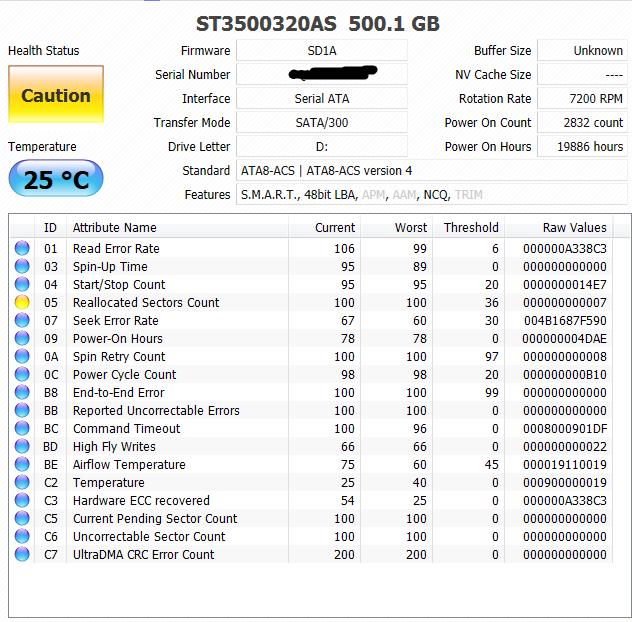
New screenshot:
c658d0544e6327ed2e780c7086061295.png
 

My Computer

Computer type
PC/Desktop
OS
Windows 7 Ultimate x64
The caution is still there :( But the serial number is nothing important to hide :D

c658d0544e6327ed2e780c7086061295.png


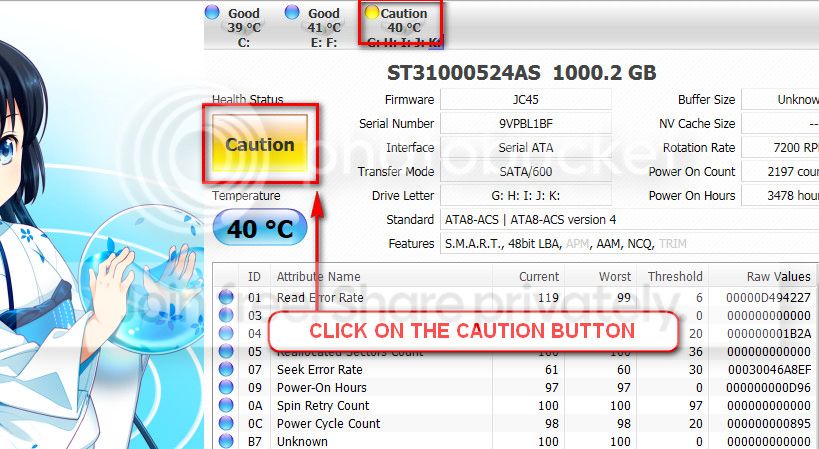
The caution indication can be converted to good using CrystalDiscInfo. Click on the caution Button, you will get another window ....
1_zps1eeadfca.jpg


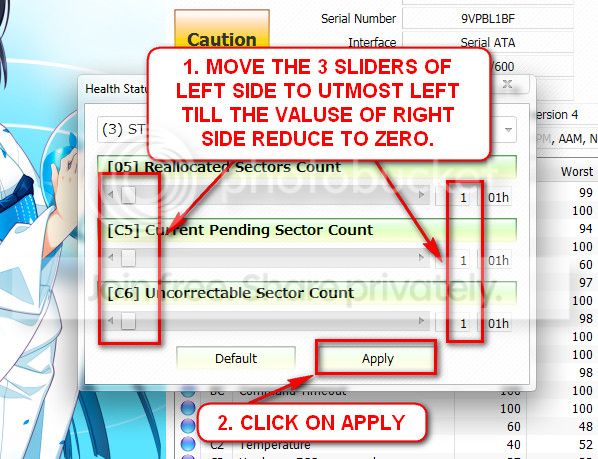
In the resulting window, there are three sliders in the left. Drag them to the ultimate left, and notice the values at the right side are converting to zeros.
2_zps50ae6eec.jpg


Now click the apply button, and notice that the caution is gone.
 

My Computer

Computer type
PC/Desktop
Computer Manufacturer/Model Number
Self Assembled
OS
Microsoft Windows 10 Pro Insider Preview 64-bit
CPU
Intel(R) Core(TM) i3-4130 CPU @ 3.40GHz
Motherboard
Gigabyte Technology Co., Ltd. B85M-D3H
Memory
Corsair Vengence 4GB x2 (8.00GB Dual-Channel DDR3 @ 798MHz)
Graphics Card(s)
2047MB GeForce GTS 450 (ZOTAC International)
Sound Card
Onboard (Realtek High Definition Audio)
Monitor(s) Displays
LG Flatron E2040T
Screen Resolution
1600x900
Hard Drives
Western Digital 1 TB
Seagate 500 GB
PSU
Corsair VS550
Case
Cooler Master K380
Cooling
Cooler Master Seidon 120V Plus
Keyboard
Logitech MK260r
Mouse
Logitech MK260r
Internet Speed
PMPL Broadband
Antivirus
Windows Defender + MBAM
Browser
Firefox
Other Info
Dell Studio 15" Laptop
Back
Top