Random BSODs

Restart manually and then execute the SF diag tool again. Let us see if the dump got recorded or not.
 

My Computer My Computer

At a glance

Microsoft Windows 10 Pro Insider Preview 64-bitIntel(R) Core(TM) i3-4130 CPU @ 3.40GHzCorsair Vengence 4GB x2 (8.00GB Dual-Channel ...2047MB GeForce GTS 450 (ZOTAC International)
Computer type
PC/Desktop
Computer Manufacturer/Model Number
Self Assembled
OS
Microsoft Windows 10 Pro Insider Preview 64-bit
CPU
Intel(R) Core(TM) i3-4130 CPU @ 3.40GHz
Motherboard
Gigabyte Technology Co., Ltd. B85M-D3H
Memory
Corsair Vengence 4GB x2 (8.00GB Dual-Channel DDR3 @ 798MHz)
Graphics Card(s)
2047MB GeForce GTS 450 (ZOTAC International)
Sound Card
Onboard (Realtek High Definition Audio)
Monitor(s) Displays
LG Flatron E2040T
Screen Resolution
1600x900
Hard Drives
Western Digital 1 TB
Seagate 500 GB
PSU
Corsair VS550
Case
Cooler Master K380
Cooling
Cooler Master Seidon 120V Plus
Keyboard
Logitech MK260r
Mouse
Logitech MK260r
Internet Speed
PMPL Broadband
Antivirus
Windows Defender + MBAM
Browser
Firefox
Other Info
Dell Studio 15" Laptop
I don't know if few most recent dump files show anything, but verifier was enabled when it crashed...
 

My Computer My Computer

At a glance

Windows 7 Professional x64Intel Core i54 GBIntel HD Graphics
Computer type
Laptop
Computer Manufacturer/Model Number
MSI CR620
OS
Windows 7 Professional x64
CPU
Intel Core i5
Motherboard
Micro-Star International CR620
Memory
4 GB
Graphics Card(s)
Intel HD Graphics
Hard Drives
2.5 SATA HDD 320GB
Antivirus
MSE
Browser
Google Chrome
There are six new BSODs, and all them are 0x7F (not DV enabled, obviously. If DV is enabled, the Default bucket ID shows it.)

According to Carrona.org, STOP 0x0000007F: UNEXPECTED_KERNEL_MODE_TRAP
Usual causes:
Memory corruption, Hardware (memory in particular), Overclocking failure, Installing a faulty or mismatched hardware (especially memory) or a failure after installing it, 3rd party firewall, Device drivers, SCSI/network/BIOS updates needed, Improperly seated cards, Incompatible storage devices, Overclocking, Virus scanner, Backup tool, Bad motherboard, Missing Service Pack

Here, for your case, the service pack is not missing. And your virus scanners are MSE and MBAM, which are not the issues. No third party firewall is not visible apparently. No SCSI in use. Network (Atheros and realtek) are up to date.

So check for the rest.

  1. If possible, disable the Virtual WiFi adapter.
  2. If the 4 GB is more than one module, make it sure the FSBs are matching.
  3. Test your RAM modules for possible errors.
    How to Test and Diagnose RAM Issues with Memtest86+

    Run memtest for at least 8 passes, preferably overnight.
  4. As you are getting BSODs, you should stop overclocking (if it is present there) and run all the hardware components like CPU, GPU and RAM to their default settings. Also set the BIOS to default, too.
    How To Clear CMOS (Reset BIOS)
  5. Do some Disc checks.
    • Run chkdsk /f/r, following the option two of the tutorial Disk Check
    • Seatool for dos: SeaTools | Seagate download
    • Burn it in a blank cd. boot from the CD, click on "Accept", wait for it to finish detecting the drives, then in the upper left corner select "Basic Tests", then select "Long Test" and let it run.
  6. If you have any BsckUp tool, Uninstall it.
  7. If all of them works good, you should contract the vendor, as your's an OEM license which is tagged with the motherboard.
 

My Computer My Computer

At a glance

Microsoft Windows 10 Pro Insider Preview 64-bitIntel(R) Core(TM) i3-4130 CPU @ 3.40GHzCorsair Vengence 4GB x2 (8.00GB Dual-Channel ...2047MB GeForce GTS 450 (ZOTAC International)
Computer type
PC/Desktop
Computer Manufacturer/Model Number
Self Assembled
OS
Microsoft Windows 10 Pro Insider Preview 64-bit
CPU
Intel(R) Core(TM) i3-4130 CPU @ 3.40GHz
Motherboard
Gigabyte Technology Co., Ltd. B85M-D3H
Memory
Corsair Vengence 4GB x2 (8.00GB Dual-Channel DDR3 @ 798MHz)
Graphics Card(s)
2047MB GeForce GTS 450 (ZOTAC International)
Sound Card
Onboard (Realtek High Definition Audio)
Monitor(s) Displays
LG Flatron E2040T
Screen Resolution
1600x900
Hard Drives
Western Digital 1 TB
Seagate 500 GB
PSU
Corsair VS550
Case
Cooler Master K380
Cooling
Cooler Master Seidon 120V Plus
Keyboard
Logitech MK260r
Mouse
Logitech MK260r
Internet Speed
PMPL Broadband
Antivirus
Windows Defender + MBAM
Browser
Firefox
Other Info
Dell Studio 15" Laptop
Verifier was enabled, I don't know why it won't show it...
I disabled the virtual wi-fi adapter. Going to run a chkdsk disk check now. I'll try with SeaTools later.
 

My Computer My Computer

At a glance

Windows 7 Professional x64Intel Core i54 GBIntel HD Graphics
Computer type
Laptop
Computer Manufacturer/Model Number
MSI CR620
OS
Windows 7 Professional x64
CPU
Intel Core i5
Motherboard
Micro-Star International CR620
Memory
4 GB
Graphics Card(s)
Intel HD Graphics
Hard Drives
2.5 SATA HDD 320GB
Antivirus
MSE
Browser
Google Chrome
I ran chksdsk. It seems like everything was fine. Couldn't find a CD and I was to lazy to go to a shop, so I haven't run the seatools test. Yet.
Oh and another thing.. I tried running verifier again.. Can you take a look at the last few dump files? Do they say anything?
 

My Computer My Computer

At a glance

Windows 7 Professional x64Intel Core i54 GBIntel HD Graphics
Computer type
Laptop
Computer Manufacturer/Model Number
MSI CR620
OS
Windows 7 Professional x64
CPU
Intel Core i5
Motherboard
Micro-Star International CR620
Memory
4 GB
Graphics Card(s)
Intel HD Graphics
Hard Drives
2.5 SATA HDD 320GB
Antivirus
MSE
Browser
Google Chrome
There are three verifier enabled dumps, and only one caught a problem, Intel(R) HD Graphics.
Code:
*******************************************************************************
*                                                                             *
*                        Bugcheck Analysis                                    *
*                                                                             *
*******************************************************************************

Use !analyze -v to get detailed debugging information.

BugCheck 50, {fffff88007530004, 1, fffff88004c8a74b, 0}

*** WARNING: Unable to verify timestamp for igdkmd64.sys
*** ERROR: Module load completed but symbols could not be loaded for igdkmd64.sys

Could not read faulting driver name
Probably caused by : igdkmd64.sys ( igdkmd64+6774b )

Followup: MachineOwner
---------
And the driver is kinda old.
Code:
fffff880`04c23000 fffff880`057e1140   igdkmd64 T (no symbols)           
    Loaded symbol image file: igdkmd64.sys
    Image path: \SystemRoot\system32\DRIVERS\igdkmd64.sys
[COLOR=Red]    Image name: igdkmd64.sys
    Timestamp:        Tue Jul 31 23:20:01 2012[/COLOR] (50181AC9)
    CheckSum:         00BC426F
    ImageSize:        00BBE140
    Translations:     0000.04b0 0000.04e4 0409.04b0 0409.04e4
Update the Intel HD Graphics Driver, either from our forum link, http://www.sevenforums.com/graphic-...-graphics-driver-windows-7-a.html#post2166304, or You may get it from Intel Download Center.
Moreover, you may run the Intel (R) Driver Update Utility to auto detect the appropriate driver for your computer.

Probably I have suggested it to you earlier. Drivers are not updated still.
Only crash dump analysis other than action will not lead to a solution at all.

Is the computer hot? Report us the heat of the computer after a couple of hours of your normal usage. Upload a screenshot of the summery tab of Speccy.
 

My Computer My Computer

At a glance

Microsoft Windows 10 Pro Insider Preview 64-bitIntel(R) Core(TM) i3-4130 CPU @ 3.40GHzCorsair Vengence 4GB x2 (8.00GB Dual-Channel ...2047MB GeForce GTS 450 (ZOTAC International)
Computer type
PC/Desktop
Computer Manufacturer/Model Number
Self Assembled
OS
Microsoft Windows 10 Pro Insider Preview 64-bit
CPU
Intel(R) Core(TM) i3-4130 CPU @ 3.40GHz
Motherboard
Gigabyte Technology Co., Ltd. B85M-D3H
Memory
Corsair Vengence 4GB x2 (8.00GB Dual-Channel DDR3 @ 798MHz)
Graphics Card(s)
2047MB GeForce GTS 450 (ZOTAC International)
Sound Card
Onboard (Realtek High Definition Audio)
Monitor(s) Displays
LG Flatron E2040T
Screen Resolution
1600x900
Hard Drives
Western Digital 1 TB
Seagate 500 GB
PSU
Corsair VS550
Case
Cooler Master K380
Cooling
Cooler Master Seidon 120V Plus
Keyboard
Logitech MK260r
Mouse
Logitech MK260r
Internet Speed
PMPL Broadband
Antivirus
Windows Defender + MBAM
Browser
Firefox
Other Info
Dell Studio 15" Laptop
Just a suggestion, you could at least shake off that laziness and buy a CD in order to eliminate
the HDD as an issue, after Arc's hard work in analysing your issues :)

Perhaps re-reading through the thread and checking you have indeed followed the fixes and
installed the drivers suggested may help in fixing your issue.

cheers

Dave
 

My Computer My Computer

At a glance

Windows 7 Professional 64bitAMD Athlon (tm) X2 5200+ Dual Core 2712 Mhz4GBNividia GeForce 8600 GTS- DIED 25/7/2013 R.I.P
Computer type
PC/Desktop
OS
Windows 7 Professional 64bit
CPU
AMD Athlon (tm) X2 5200+ Dual Core 2712 Mhz
Motherboard
Asus
Memory
4GB
Graphics Card(s)
Nividia GeForce 8600 GTS- DIED 25/7/2013 R.I.P
Sound Card
None
Monitor(s) Displays
22" Yuraku LCD (Dont ask)
Screen Resolution
1280x960
Hard Drives
2TB WD Caviar green
PSU
Windy up type
Case
Scout cm Storm
Cooling
Hair dryer on full cool power ;-)
Keyboard
QWERTY
Mouse
Microsoft Special
Internet Speed
BT Infinity 9.38Mb/s Wheeeeeeeeeeeeeeee!!
Antivirus
MSE
Browser
Internet Explore 10 and Chrome
Other Info
Don't shout...I've got a Hangover!
Is that the original factory preinstalled Win7 that's so corrupt no tech enthusiast would run it? If so I'd take the time now to get a perfect Clean Reinstall - Factory OEM Windows 7 without the corrupting bloatware and duplicate utilities that have better versions built into Win7.

A Factory Preinstall is the worst possible install of Win7 you can have.

The Clean Reinstall using our tools and methods is the best possible install of Win7 you can have, better than 90% of installs out there.

You choose.
 
Yeah, this stuff does smell of corrupted installation media to me too. The only thing you need is the sticker, follow tutorial posted by gregrocker.
 

My Computer My Computer

At a glance

Win 7 Pro 64-bit 7601AMD Phenom 9650 QuadCore, revision DR-B35 GB yes I run 2x 2GB and 1x 1GB, different b...NVIDIA GeForce 9800 GT 512 Mb, unknown manufa...
Computer type
PC/Desktop
Computer Manufacturer/Model Number
custom built
OS
Win 7 Pro 64-bit 7601
CPU
AMD Phenom 9650 QuadCore, revision DR-B3
Motherboard
ASUS M4A78
Memory
5 GB yes I run 2x 2GB and 1x 1GB, different brand, spank me.
Graphics Card(s)
NVIDIA GeForce 9800 GT 512 Mb, unknown manufacturer.
Sound Card
Crappy Realtek Integrated Audio
Monitor(s) Displays
Fujitsu Siemens P19-3P
Screen Resolution
1280 x 1024 x 32 bits @ 60 Hz Oh yeah, 4:3 rocks!
Hard Drives
(1) MAXTOR S TM3320613AS SATA Disk Device (2) STM35004 18AS SATA Disk Device (3) TOSHIBA USB 2.5"-HDD
PSU
whatever, around 450w
Case
Scavenged from old company PC, 10+ years old
Cooling
CPU fan, GPU fan, case fan, nothing fancy
Keyboard
Microsoft, PS/2, white.
Mouse
Optical, logitec.
Internet Speed
effective max speeds: 70-ish kB/s down 30-ish kB/s up
Antivirus
Avira, free edition.
Browser
Firefox with FXChrome to make it look like Google Chrome :P
Other Info
Was discarded by previous owner due to "horrible performance".
Was running Win Xp from a IDE drive. Yeah. Was a pain.
SATA II drive and Win7 and it zips away! Yay!

My Computer My Computer

At a glance

Desk1 7 Home Prem / Desk2 10 Pro / Main lap A...Desk1 i5 3750K / Laptop i7 GTX 860M / Desk2 i...Desk1 8GB (1866) / Desk2 16GB (1333) / Laptop...Desk 1& 2NVidia GTX 650 & Laptops on board Intel
Computer type
PC/Desktop
Computer Manufacturer/Model Number
Own build (new) Desk1 / Asus ROG Win 7 / Desk2 1st build
OS
Desk1 7 Home Prem / Desk2 10 Pro / Main lap Asus ROG 10 Pro 2 laptop Toshiba 7 Pro Asus P2520 7 & 10
CPU
Desk1 i5 3750K / Laptop i7 GTX 860M / Desk2 i5 2500
Motherboard
Desk1 Asus P877-V / Desk2 Gigabyte H67 UD3H / Laptop ?
Memory
Desk1 8GB (1866) / Desk2 16GB (1333) / Laptop 8Gb DDR3
Graphics Card(s)
Desk 1& 2NVidia GTX 650 & Laptops on board Intel
Sound Card
Desk 1 & 2 -XONAR DG Realtek High Def audio Laptop
Monitor(s) Displays
Desk 1 Benq HD 2450 / Desk2 Philips 24" / Laptop 17.5"
Screen Resolution
1920x1080 D1 & D2 & Laptop 1
Hard Drives
Desk1 Samsung 120GB 830 SSD
Asus ROG 256GB 850 Pro SSD
Desk2 Samsung 840 256 SSD
Toshiba 120GB EVO
PSU
Desk 1 Corsair HX 1050/ Laptop ? / Desk 2 Corsair HX 650
Case
Desk 1 Cooler HAF XM ? Toshiba laptop / Desk2 Coolermaster
Cooling
Fans on all Desk1 -2 Desk2 - all Coolermasters 5 Laptop ?
Keyboard
Desk 1 MS Sidewinder X6 Desk 2 MS Sidewinder X 4
Mouse
Desk 1&2 - Gigabyte MS 900 gamer - laptop - Logitec wireless
Internet Speed
ADSL2+
Other Info
One other Desktop (tester) and spare Toshba laptop both with SSD's
Running Kaspersky 2016 ISS on all machines config'd identically
Logitec audio stereo systems on each machine (x3)
Canon MG5250MFC
Router/modem TP-Link running WPA2SK
Thanks for all the suggestions guys. I'll try to run some tests, running sfc right now. Got a CD, will burn SeaTools as soon as possible. Also updating the graphics driver. Screenshot coming up too. If nothing helps then I'll try a clean install of the OS. Well I'll just try everything you suggested. If that doesn't help I'll probably throw this computer out the window :)
 

My Computer My Computer

At a glance

Windows 7 Professional x64Intel Core i54 GBIntel HD Graphics
Computer type
Laptop
Computer Manufacturer/Model Number
MSI CR620
OS
Windows 7 Professional x64
CPU
Intel Core i5
Motherboard
Micro-Star International CR620
Memory
4 GB
Graphics Card(s)
Intel HD Graphics
Hard Drives
2.5 SATA HDD 320GB
Antivirus
MSE
Browser
Google Chrome
Wouldn't it be just as easy to use the Seatools from Downloads?? I do as the the versions do change from time to time:)
 

My Computer My Computer

At a glance

Desk1 7 Home Prem / Desk2 10 Pro / Main lap A...Desk1 i5 3750K / Laptop i7 GTX 860M / Desk2 i...Desk1 8GB (1866) / Desk2 16GB (1333) / Laptop...Desk 1& 2NVidia GTX 650 & Laptops on board Intel
Computer type
PC/Desktop
Computer Manufacturer/Model Number
Own build (new) Desk1 / Asus ROG Win 7 / Desk2 1st build
OS
Desk1 7 Home Prem / Desk2 10 Pro / Main lap Asus ROG 10 Pro 2 laptop Toshiba 7 Pro Asus P2520 7 & 10
CPU
Desk1 i5 3750K / Laptop i7 GTX 860M / Desk2 i5 2500
Motherboard
Desk1 Asus P877-V / Desk2 Gigabyte H67 UD3H / Laptop ?
Memory
Desk1 8GB (1866) / Desk2 16GB (1333) / Laptop 8Gb DDR3
Graphics Card(s)
Desk 1& 2NVidia GTX 650 & Laptops on board Intel
Sound Card
Desk 1 & 2 -XONAR DG Realtek High Def audio Laptop
Monitor(s) Displays
Desk 1 Benq HD 2450 / Desk2 Philips 24" / Laptop 17.5"
Screen Resolution
1920x1080 D1 & D2 & Laptop 1
Hard Drives
Desk1 Samsung 120GB 830 SSD
Asus ROG 256GB 850 Pro SSD
Desk2 Samsung 840 256 SSD
Toshiba 120GB EVO
PSU
Desk 1 Corsair HX 1050/ Laptop ? / Desk 2 Corsair HX 650
Case
Desk 1 Cooler HAF XM ? Toshiba laptop / Desk2 Coolermaster
Cooling
Fans on all Desk1 -2 Desk2 - all Coolermasters 5 Laptop ?
Keyboard
Desk 1 MS Sidewinder X6 Desk 2 MS Sidewinder X 4
Mouse
Desk 1&2 - Gigabyte MS 900 gamer - laptop - Logitec wireless
Internet Speed
ADSL2+
Other Info
One other Desktop (tester) and spare Toshba laptop both with SSD's
Running Kaspersky 2016 ISS on all machines config'd identically
Logitec audio stereo systems on each machine (x3)
Canon MG5250MFC
Router/modem TP-Link running WPA2SK
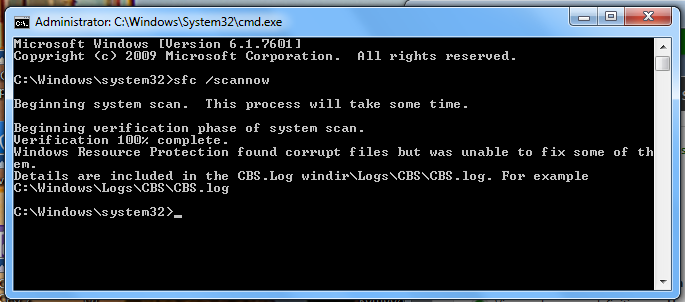
Sooooo I ran SeaTools tests, both long and short, no problems were found. Also ran sfc, some problems were found and fixed, but some were not fixed. It said this:
Yu3gXaR.png


Oh and I was trying to update my graphics driver.The update utility gave me the same driver. I saw the thread on the forum with these drivers, but there were only drivers for 3rd and 2nd generation processors and mine is 1st generation I think. So I decided to update it with DriverScanner.

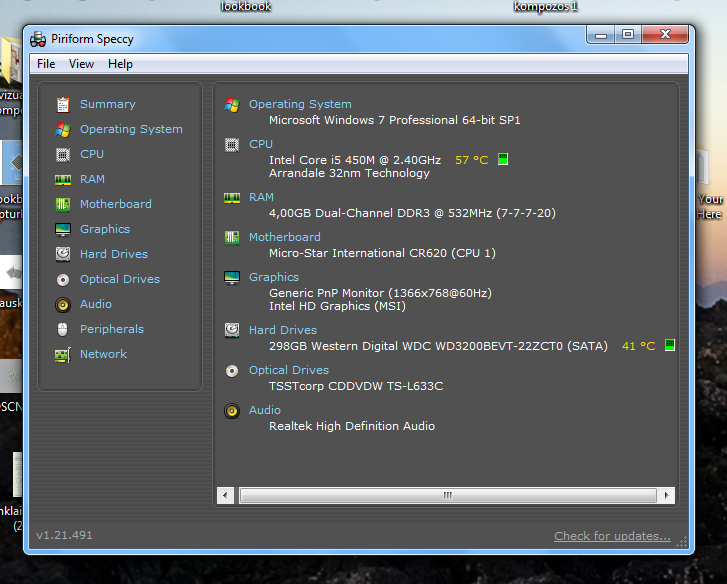
Anyways, here's a screenshot from Speecy:
HHpCgC9.png

CPU temperature most of the time is from 40C to 60C, hard drive is about 40C-45C most of the time. It's probably sightly too hot. Or is it normal?

Oh and another thing. Desktop gadgets and window manager crash randomly pretty often. Also the battery is being weird. When I unplug and battery reaches 80% (today it was 90%), computer turns off without any warning, and when I turn it back on again the fan gets really loud and computer turns off after a few seconds, so I need to plug in.. Could this have anything to do with the blue screens?

Also, I checked some crash dumps myself with BlueScreenView and some were caused by SynTP.sys, which I believe should be my touchpad driver. I guess I should update it.. Also some were caused by graphics driver obviously. Also one was caused by ataport.SYS.. What is that? I googled it, it said it was a virus. Is this true? :shock: I ran TDSSKiller again, it didn't kill anything.. :D
 

My Computer My Computer

At a glance

Windows 7 Professional x64Intel Core i54 GBIntel HD Graphics
Computer type
Laptop
Computer Manufacturer/Model Number
MSI CR620
OS
Windows 7 Professional x64
CPU
Intel Core i5
Motherboard
Micro-Star International CR620
Memory
4 GB
Graphics Card(s)
Intel HD Graphics
Hard Drives
2.5 SATA HDD 320GB
Antivirus
MSE
Browser
Google Chrome
ataport.sys is the controller driver for ata channels under IDE ATA/ATAPI controllers. It is one of the most vulnerable driver for rootkit infections. And if it is is detected, the first step is to be taken is to scan the system for possible virus infection with the following programs.

Do those. Save the TDSSKiller log and upload it here.

If it is not a virus, it is the error of the controller itself. But the chance is minimum, as you use all the generic drivers.

If possible, opt for a BIOS update. No BIOS update is available in MSI Global ? Notebook & Tablet - CR620

The CPU temperature is critical. It may tend to high to cause failures. I would suggest you to either get it serviced so that the ventilations are cleared and thermal pastes are re-applied etc, or as a temporary solution use a cooling pad.
 

My Computer My Computer

At a glance

Microsoft Windows 10 Pro Insider Preview 64-bitIntel(R) Core(TM) i3-4130 CPU @ 3.40GHzCorsair Vengence 4GB x2 (8.00GB Dual-Channel ...2047MB GeForce GTS 450 (ZOTAC International)
Computer type
PC/Desktop
Computer Manufacturer/Model Number
Self Assembled
OS
Microsoft Windows 10 Pro Insider Preview 64-bit
CPU
Intel(R) Core(TM) i3-4130 CPU @ 3.40GHz
Motherboard
Gigabyte Technology Co., Ltd. B85M-D3H
Memory
Corsair Vengence 4GB x2 (8.00GB Dual-Channel DDR3 @ 798MHz)
Graphics Card(s)
2047MB GeForce GTS 450 (ZOTAC International)
Sound Card
Onboard (Realtek High Definition Audio)
Monitor(s) Displays
LG Flatron E2040T
Screen Resolution
1600x900
Hard Drives
Western Digital 1 TB
Seagate 500 GB
PSU
Corsair VS550
Case
Cooler Master K380
Cooling
Cooler Master Seidon 120V Plus
Keyboard
Logitech MK260r
Mouse
Logitech MK260r
Internet Speed
PMPL Broadband
Antivirus
Windows Defender + MBAM
Browser
Firefox
Other Info
Dell Studio 15" Laptop
Run SFC again a few more times to see if it can repair the OS, but if not the next step is to run a Repair Install.

However if this is the original factory preinstalled Win7 then now is the time to get a perfect Clean Reinstall - Factory OEM Windows 7. I've already told you that is the worst possible install of Win7 one can have, so I don't know why you're continuiing to mess with it unless you prefer crap.
http://www.sevenforums.com/tutorials/219487-clean-reinstall-factory-oem-windows-7-a.html#post1839164
 
I won't have this computer for 2 days, soooo I'll post the log thing on Friday. Will run a scan with Windows Defender Offline. I don't have a cooling pad, but I use plastic bottle caps to keep an air gap there. I don't know if this helps, but still it's still probably better than nothing. I should really get it cleaned sometime soon.
I can't do the reinstall now, the earliest I can do it is in 2 weeks. Maybe if I'm lucky next week.
 

My Computer My Computer

At a glance

Windows 7 Professional x64Intel Core i54 GBIntel HD Graphics
Computer type
Laptop
Computer Manufacturer/Model Number
MSI CR620
OS
Windows 7 Professional x64
CPU
Intel Core i5
Motherboard
Micro-Star International CR620
Memory
4 GB
Graphics Card(s)
Intel HD Graphics
Hard Drives
2.5 SATA HDD 320GB
Antivirus
MSE
Browser
Google Chrome
Back
Top