JavaScript is disabled. For a better experience, please enable JavaScript in your browser before proceeding.
You are using an out of date browser. It may not display this or other websites correctly.
You should upgrade or use an
alternative browser .
Random CMD.exe popping up
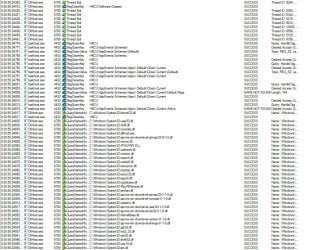
Okay so I migrated to an SSD yesterday and am now getting random cmd screens flashing up. No commands as you can see in screenshot I got with Snagit. It flashes for literally one frame. Also with ProcMon I for these processes coming up at the time it flashes. Any help is appreciated!
2015-06-14_20-24-59.jpg
9.1 KB
· Views: 20
2015-06-14_20-32-11.jpg
248.4 KB
· Views: 4
Computer type PC/Desktop Computer Manufacturer/Model Number Custom Build OS Windows 7 Ultimate x64 CPU AMD FX-6350 6-core Motherboard Asus Sabertooth 990FX Memory 16GB Corsair Vengance Graphics Card(s) Asus 7770 2GB Ghz edition Hard Drives 1- Sandisk 240GB SSD Antivirus aVast Browser Chrome
a.k.a. UNI
Guru
Gold Member
Filter Process Monitor to only show
Process and Thread Activity .
We want to see what is starting what and we want to see the command line info in the details section. After gathering the data, select the first line, press Ctrl + F and search for
cmd.exe . Soon after the line that the search finds, there should be an
Operation called
Process Start .
Double click on that
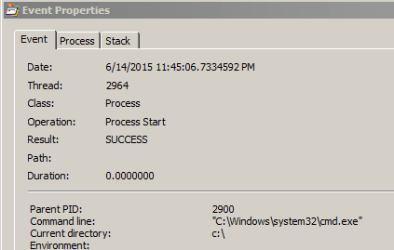
Process Start line and show us a screen shot of the command line details:
The screenshot above is just Explorer.exe starting cmd.exe. The command line for that event won't have any info after cdm.exe.
BTW, Snagit's slow frame rate makes it hard to see stuff like this. I use an old version of CamStudio (version 2) installed in the root of the OS drive to capture events like these. Then I use Media Player Classic to step thru the video frame by frame.
Computer type Laptop Computer Manufacturer/Model Number Employer provided Dell Latitude OS W7 Pro SP1 64bit CPU i7 Memory 8GB Graphics Card(s) Intel HD Graphics Hard Drives crappy SSD Antivirus Employer mandated Symantec Endpoint Protection Browser Pale Moon 64bit, IE11 64bit & Chrome 64bit
New member
Thread Starter
2015-06-15_20-05-43.jpg
48.4 KB
· Views: 6
Computer type PC/Desktop Computer Manufacturer/Model Number Custom Build OS Windows 7 Ultimate x64 CPU AMD FX-6350 6-core Motherboard Asus Sabertooth 990FX Memory 16GB Corsair Vengance Graphics Card(s) Asus 7770 2GB Ghz edition Hard Drives 1- Sandisk 240GB SSD Antivirus aVast Browser Chrome
a.k.a. UNI
Guru
Gold Member
Interesting.
I should have also asked for the first row where the Ctrl + F search finds cmd.exe. That should be a
Process Create operation. What is the process in the column named
Process Name ? In other words, what process starts cmd.exe?
Here is my example of Explorer starting cmd.exe:
Computer type Laptop Computer Manufacturer/Model Number Employer provided Dell Latitude OS W7 Pro SP1 64bit CPU i7 Memory 8GB Graphics Card(s) Intel HD Graphics Hard Drives crappy SSD Antivirus Employer mandated Symantec Endpoint Protection Browser Pale Moon 64bit, IE11 64bit & Chrome 64bit
New member
Thread Starter
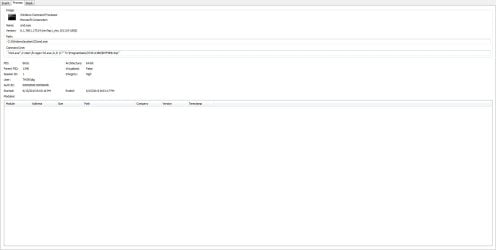
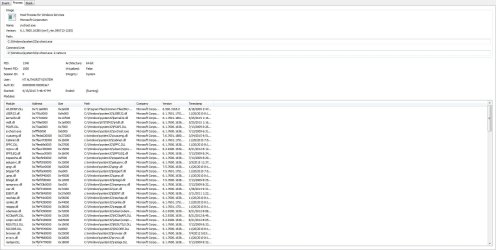
Okay here is where the process is created and the command line details.
2015-06-15_22-17-21.jpg
12.4 KB
· Views: 5
2015-06-15_22-17-48.jpg
185.4 KB
· Views: 6
Computer type PC/Desktop Computer Manufacturer/Model Number Custom Build OS Windows 7 Ultimate x64 CPU AMD FX-6350 6-core Motherboard Asus Sabertooth 990FX Memory 16GB Corsair Vengance Graphics Card(s) Asus 7770 2GB Ghz edition Hard Drives 1- Sandisk 240GB SSD Antivirus aVast Browser Chrome
a.k.a. UNI
Guru
Gold Member
I have no idea why that service is starting cmd which starts regsvr32 and does something with a tmp file.
Computer type Laptop Computer Manufacturer/Model Number Employer provided Dell Latitude OS W7 Pro SP1 64bit CPU i7 Memory 8GB Graphics Card(s) Intel HD Graphics Hard Drives crappy SSD Antivirus Employer mandated Symantec Endpoint Protection Browser Pale Moon 64bit, IE11 64bit & Chrome 64bit
Three-Toed Sloth
Guru
Gold Member
VIP
All I can think of is malware!
Computer type Laptop Computer Manufacturer/Model Number Asus K52F or Lenovo B51-80 OS Win 7 x64 Home Premium (and x86 VirtualBox VM)/Win10 CPU i3 370M/i7 6500U Motherboard Asus/Lenovo Memory 8GB - finally :)/8GB Graphics Card(s) it's an i3, dude!/dual Intel&nVidia Sound Card onboard Monitor(s) Displays 15.6" built-in Screen Resolution 1366x768/1920x1080 Hard Drives 750GB Seagate internal PSU n/a Internet Speed as much as I can get - usually on a dongle/phone, so <1MB/s Antivirus MSE/Defender Browser IE11/12/Edge/Chrome/FF(if I must)
New member
Guru
Gold Member
VIP
Computer type PC/Desktop Computer Manufacturer/Model Number Custom Build OS Windows 7 Ultimate x64 SP1 CPU AMD Phenom 2 1090T Motherboard Gigabyte GA-890FXA-UD5 Memory 2x8GB Kingston HyperX Fury Black 1600Mhz Unganged Graphics Card(s) MSI GTX 970 Gaming 4G Sound Card Realtek On-Board HD 7.1 Audio / Logitech G35 Monitor(s) Displays 3xAcer GD245HQ Screen Resolution 1920x1080 Hard Drives Samsung 850 Pro 512GB SSD - OS / PSU HighPower 1000W Case Cooler Master HAF 932 Cooling Noctua NH-D14 Keyboard Logitech G19 Mouse Logitech G500 Internet Speed 100/4 Mbit Cable (100GB quota) Antivirus ZoneAlarm Extreme Security / MBAM Pro / MBAE Free / SAS Free Browser IE 11 - Firefox - Chrome Other Info Logitech F710/ G27/ G940/ Z5500 // TrackIR 5 // Nvidia 3D Surround Vision
3 Brain Cells
Guru
Gold Member
VIP
jhock2012 do you have or have you ever had any products or programs by IObits on this computer??
Computer type PC/Desktop Computer Manufacturer/Model Number Home made Desktop OS Windows 10 Pro. 64/ version 1709 Windows 7 Pro/64 CPU Intel i7-6800K @ 4.3 Motherboard ASUS X-99 Deluxe II Memory Corsair Platinum 16 gig @2400 Graphics Card(s) EVGA GTX 1070 OC Monitor(s) Displays Asus 27" LED LCD/VE278Q Screen Resolution 1920-1080 or 1280-720 HDMI Hard Drives INTEL SSD 730-240 Gb Sata 3.0/ PSU EVGA Platium 1200W Case Phanteks Luxe Tempered Glass 8 fans/ one radiator Cooling XSPC/ Water Cooled CPU Keyboard Das 4 Professional Mouse Logitech M705/MX Anywhere 2-S Internet Speed 100 mbits Antivirus Microsoft Security Essentials/ Malwarebytes Premium 3.0/ SAS Browser I.E. 11 default/Firefox/ ISP Time Warner Cable/Spectrum Other Info LG BluRay Burner/