For about a month, the computer suddenly turns off. Although some times there are graphic anomalies on the desktop. However eventually, the computer will power off on its own.
(EDIT: as time has gone on...the graphic anomalies have become constant, i'm now testing to see if it is something simple like a bad surge protector or power bar)
No activity seems to be related to this.
The computer is about 6 years old.
I ran the program that is requested in the BSOD thread. This may be of some help. (see attached)
Thanks for your help.
Attachments
WIT-18_07_2015_203748_89.zip
306.9 KB
· Views: 0
Last edited:
My Computer
Computer type
PC/Desktop
OS
Windows 7 Professional x64
CPU
AMD Phenom II X6 1090T Black Edition 3.2GHZ
Motherboard
ASUS Crosshair IV Extreme AM3
Memory
(4x) Corsair Dominator 4GB DDR3-1600
Graphics Card(s)
Sapphire Radeon HD 6970 2GB GDDR5
Sound Card
Integrated
Monitor(s) Displays
(3x) ASUS VW266H 25.5 LCD 1920X1200 2MS
Screen Resolution
6048x1200
Hard Drives
SSD= (2x) OCZ Vertex 2 Extended 180GB 2.5IN SATA2
HDD= (3x) Seagate Barracuda XT 7200 2TB SATA 6.0GB/S
DVD= (2x) LG 24X Super Multi SATA DVD Writer
BRDVD= LG 12X SATA Reader
Different surge protector or wall outlet did not help.
My Computer
Computer type
PC/Desktop
OS
Windows 7 Professional x64
CPU
AMD Phenom II X6 1090T Black Edition 3.2GHZ
Motherboard
ASUS Crosshair IV Extreme AM3
Memory
(4x) Corsair Dominator 4GB DDR3-1600
Graphics Card(s)
Sapphire Radeon HD 6970 2GB GDDR5
Sound Card
Integrated
Monitor(s) Displays
(3x) ASUS VW266H 25.5 LCD 1920X1200 2MS
Screen Resolution
6048x1200
Hard Drives
SSD= (2x) OCZ Vertex 2 Extended 180GB 2.5IN SATA2
HDD= (3x) Seagate Barracuda XT 7200 2TB SATA 6.0GB/S
DVD= (2x) LG 24X Super Multi SATA DVD Writer
BRDVD= LG 12X SATA Reader
In addition to what Gokay wants mate try this ditty of mine and let us know re the PSU readout (it should be the section Nuvoton as I mention)
Using HW Info
PART A:
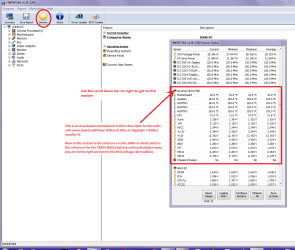
You can test the volts on the PSU with HW Info HWiNFO, HWiNFO32/64 - Download < download the right bit version and close the right hand window select Sensors and scroll down to the power section where you will see what the volts are doing see my pic. In my pic the section (Nuvoton) with VBATT is a dead give away you are in the section for the rail voltages. There are other section titles and one that pops up often is ITE
Now the voltage on the different rails have to be within 5% =+/- of what is required or the machine will not work properly if at all.
The original right hand window shows the machine running and is handy for that but for looking at the components in some detail close it and use the main left hand side panel
FOR OTHER COMPONENTS
PART B:
Open each small square with + in it on the section the components are in and then click on the individual component/s (it will highlight in blue) - in the right hand side will appear all sorts of details including brands speeds and other essential info that particular device. See pic for example.
Attachments
HW INFO DESKTOP PSU.PNG
52.6 KB
· Views: 1
My Computer
Computer type
PC/Desktop
Computer Manufacturer/Model Number
Own build (new) Desk1 / Asus ROG Win 7 / Desk2 1st build
OS
Desk1 7 Home Prem / Desk2 10 Pro / Main lap Asus ROG 10 Pro 2 laptop Toshiba 7 Pro Asus P2520 7 & 10
One other Desktop (tester) and spare Toshba laptop both with SSD's
Running Kaspersky 2016 ISS on all machines config'd identically
Logitec audio stereo systems on each machine (x3)
Canon MG5250MFC
Router/modem TP-Link running WPA2SK
Thanks guys. I may be getting ahead of myself...but yesterday the crashes stopped after I unistalled some software (secunia psi) and did some general cleaning up with CCleaner. I was there for 8 hours and no crashes.
Regarding the temperature...the side of the case was off with a house fan pointed at it. One case fan was dead...which I knew already. But I don't think it is the temperatures.. CPU, GPU and PSU fan are all working...including the case fan at the front...in front of the hdd's. The PSU fan seemed weak, but it works.
It is 40C with the humidity here right now...lol, so everything is hot. But the crashes started 6 weeks ago before that.
This is a friends computer, and not easy for me to get at. I will mark this as being solved for now, but will check out the hwinfo software. Thanks.
My Computer
Computer type
PC/Desktop
OS
Windows 7 Professional x64
CPU
AMD Phenom II X6 1090T Black Edition 3.2GHZ
Motherboard
ASUS Crosshair IV Extreme AM3
Memory
(4x) Corsair Dominator 4GB DDR3-1600
Graphics Card(s)
Sapphire Radeon HD 6970 2GB GDDR5
Sound Card
Integrated
Monitor(s) Displays
(3x) ASUS VW266H 25.5 LCD 1920X1200 2MS
Screen Resolution
6048x1200
Hard Drives
SSD= (2x) OCZ Vertex 2 Extended 180GB 2.5IN SATA2
HDD= (3x) Seagate Barracuda XT 7200 2TB SATA 6.0GB/S
DVD= (2x) LG 24X Super Multi SATA DVD Writer
BRDVD= LG 12X SATA Reader
One other Desktop (tester) and spare Toshba laptop both with SSD's
Running Kaspersky 2016 ISS on all machines config'd identically
Logitec audio stereo systems on each machine (x3)
Canon MG5250MFC
Router/modem TP-Link running WPA2SK