Random freezes while doing anything

henndrong

New member
Local time
5:15 AM
Messages
12
Hello, I recently have this problem where my computer will randomly freeze. I found out about this whilst playing LoL where i would have a fps range of 50-60 and the game would just freeze for about 5 seconds and the fps will drop to 5 then go back up to normal, however my music that's playing continues to play even when my game freezes . I thought that it was just in the game, but it started to happen whilst i was surfing the net, going thru my files and playing other games.

Any help would be great
 

My Computer

Computer type
PC/Desktop
Computer Manufacturer/Model Number
Lenovo
OS
Windows 7 Home Premium 64bit
CPU
Interl(R) Core(TM) 2 Quad CPU Q8400 @2.66GHz (2CPUs),~2.7GHz
Graphics Card(s)
NVIDIA GeForce GT 240M
Hard Drives
ST310000528AS ATA Device
Browser
Chrome
Hello henndrong,

Please upload your Msinfo file :)
MSINFO32:
  • Please go to Start and type in "msinfo32.exe" (without the quotes) and press Enter.
  • Save the report as an .nfo file, then zip up the .nfo file and upload/attach the .zip file with your next post.
  • Also, save a copy as a .txt file and include it also (it's much more difficult to read, but we have greater success in getting the info from it).
 
Last edited:

My Computer

Computer type
PC/Desktop
Computer Manufacturer/Model Number
Self assembled
OS
Windows 10 Home 64Bit
CPU
Intel Core i5 10400 @ 2.90GHz
Motherboard
Intel Corporation DG41WV (PROCESSOR)
Memory
8.00GB Single-Channel Unknown @ 1329MHz (16-20-20-38)
Sound Card
Realtek High Definition Audio
Monitor(s) Displays
DELL E170S
Screen Resolution
1280x1024 pixels
Hard Drives
931GB TOSHIBA DT01ACA100 (SATA)
238GB TEAM TM8PS7256G (SATA SSD)
Case
Nothing Fancy
Cooling
Fans
Keyboard
A4 Tech Co LTD
Mouse
A4 Tech Co Ltd/Logitech
Internet Speed
25 Mbps
Hi koolkat, here is what i got from that
 

Attachments

My Computer

Computer type
PC/Desktop
Computer Manufacturer/Model Number
Lenovo
OS
Windows 7 Home Premium 64bit
CPU
Interl(R) Core(TM) 2 Quad CPU Q8400 @2.66GHz (2CPUs),~2.7GHz
Graphics Card(s)
NVIDIA GeForce GT 240M
Hard Drives
ST310000528AS ATA Device
Browser
Chrome
Thank you. Please complete the steps below.


Reduce items at start-up:
Perform a clean boot:
Scan with Kaspersky TDSSKiller:
ESET online scanner:
Run the System File Checker that scans the of all protected Windows 7 system files and replaces incorrect corrupted, changed/modified, or damaged versions with the correct versions if possible:
Post a screenshot of your Hard Drive(s) using Crystal Disk Info software:
Run a Hard Drive test:
Run Disk Check on your hard disk for file system errors and bad sectors on it:
 

My Computer

Computer type
PC/Desktop
Computer Manufacturer/Model Number
Self assembled
OS
Windows 10 Home 64Bit
CPU
Intel Core i5 10400 @ 2.90GHz
Motherboard
Intel Corporation DG41WV (PROCESSOR)
Memory
8.00GB Single-Channel Unknown @ 1329MHz (16-20-20-38)
Sound Card
Realtek High Definition Audio
Monitor(s) Displays
DELL E170S
Screen Resolution
1280x1024 pixels
Hard Drives
931GB TOSHIBA DT01ACA100 (SATA)
238GB TEAM TM8PS7256G (SATA SSD)
Case
Nothing Fancy
Cooling
Fans
Keyboard
A4 Tech Co LTD
Mouse
A4 Tech Co Ltd/Logitech
Internet Speed
25 Mbps
Hi koolkat, another problem has risen . As I was trying to do step 2 , I restarted my pc and windows recovery came up. I selected startup repair but after 2 hours it was still not done. I cancelled and restarted my pc. This time my Bios said S.M.A.R.T status bad. I have 2 drives tho c and d drive. now after American Trends it just goes black . Please help!
 

My Computer

Computer type
PC/Desktop
Computer Manufacturer/Model Number
Lenovo
OS
Windows 7 Home Premium 64bit
CPU
Interl(R) Core(TM) 2 Quad CPU Q8400 @2.66GHz (2CPUs),~2.7GHz
Graphics Card(s)
NVIDIA GeForce GT 240M
Hard Drives
ST310000528AS ATA Device
Browser
Chrome
Black screen on Sony Vaio

I have a Sony Vaio that I was using to make a boot dvd for my main PC . Half way downloading the screen froze in a with a static pattern on my screen. I removed the power and when I turned it back on after the Vaio screen it showed a (_) and would just remain black after a few minutes it will just restart and do the same process. I try to press f10 and it goes to Starting Windoes after that it will be a black screen with a movable cursor. I really need help
 
Last edited by a moderator:

My Computer

Computer type
PC/Desktop
Computer Manufacturer/Model Number
Lenovo
OS
Windows 7 Home Premium 64bit
CPU
Interl(R) Core(TM) 2 Quad CPU Q8400 @2.66GHz (2CPUs),~2.7GHz
Graphics Card(s)
NVIDIA GeForce GT 240M
Hard Drives
ST310000528AS ATA Device
Browser
Chrome
What was done from the steps that were given?
 

My Computer

Computer type
PC/Desktop
Computer Manufacturer/Model Number
Self assembled
OS
Windows 10 Home 64Bit
CPU
Intel Core i5 10400 @ 2.90GHz
Motherboard
Intel Corporation DG41WV (PROCESSOR)
Memory
8.00GB Single-Channel Unknown @ 1329MHz (16-20-20-38)
Sound Card
Realtek High Definition Audio
Monitor(s) Displays
DELL E170S
Screen Resolution
1280x1024 pixels
Hard Drives
931GB TOSHIBA DT01ACA100 (SATA)
238GB TEAM TM8PS7256G (SATA SSD)
Case
Nothing Fancy
Cooling
Fans
Keyboard
A4 Tech Co LTD
Mouse
A4 Tech Co Ltd/Logitech
Internet Speed
25 Mbps
Hi Koolkat , it was the hide all microsoft and disable all programmes for a clean startup. as I was restarting Windows installed some update and when it went back on it went to system recovery and I had 4 choices. I picked the one about startup errors it said there was no errors and restarted again then black screen
 

My Computer

Computer type
PC/Desktop
Computer Manufacturer/Model Number
Lenovo
OS
Windows 7 Home Premium 64bit
CPU
Interl(R) Core(TM) 2 Quad CPU Q8400 @2.66GHz (2CPUs),~2.7GHz
Graphics Card(s)
NVIDIA GeForce GT 240M
Hard Drives
ST310000528AS ATA Device
Browser
Chrome
The hard drive is suspect.

If you disconnect the hard drive (PC off - unplug the sata data cable) and start the PC, you should get a message saying "no boot device". But you should also be able to get into the BIOS Settings and stay there without error or black screen.

If it does black screen let us know.
 

My Computer

Computer type
PC/Desktop
Computer Manufacturer/Model Number
Home Built - Jan 2013
OS
Windows 7 64 Bit Home Premium SP1
CPU
i7-3820
Motherboard
Asus P9X79-PRO - Bios 4608
Memory
GSkill F3-14900CL9Q - 16GB
Graphics Card(s)
EVGA GeForce GTX660 - Driver 352.86
Sound Card
On board Realtek ALC898
Monitor(s) Displays
Acer S271HL
Screen Resolution
1920 x 1080
Hard Drives
#1- Samsung 840 Pro Series
#2- Western Digital WD1002FAEX Sata3 Black
#3- Western Digital WD1002FAEX Sata3 Black
PSU
Corsair CMPSU-850TX-V2 - 850 watt (by Seasonic)
Case
Corsair Obsidian 550D
Cooling
Standard 3 120mm case fans, Cooler Master Hyper 212 EVO
Keyboard
MS KC-0405
Mouse
Intellimouse 5-button
Internet Speed
56 Mbits/Sec (on a good day)
Antivirus
Avast & Malwarebytes
Browser
Firefox
Other Info
Asus DVD - DRW-24B1ST 24X
Hi I am able to get to BIOS without disconnecting my hard drive when it goes the American Megatrend it says F1 to Setup. And I am able to do that. It goes black after the American Trends it shows a screen saying something about PXE ROM then 5 seconds later black screen
 

My Computer

Computer type
PC/Desktop
Computer Manufacturer/Model Number
Lenovo
OS
Windows 7 Home Premium 64bit
CPU
Interl(R) Core(TM) 2 Quad CPU Q8400 @2.66GHz (2CPUs),~2.7GHz
Graphics Card(s)
NVIDIA GeForce GT 240M
Hard Drives
ST310000528AS ATA Device
Browser
Chrome
Sounds like this here:
Message during startup: Exiting PXE Boot ROM

Try setting your hard disk as the first boot device.
Do not reinstall Windows from the hidden partition (it will erase everything you currently have).

See if you can start windows that way. If the hard disk is already the first boot device, or if you still can't start Windows after setting it, then you may be looking at a bad hard drive.
Check your connections.
 

My Computer

Computer type
PC/Desktop
Computer Manufacturer/Model Number
Home Built - Jan 2013
OS
Windows 7 64 Bit Home Premium SP1
CPU
i7-3820
Motherboard
Asus P9X79-PRO - Bios 4608
Memory
GSkill F3-14900CL9Q - 16GB
Graphics Card(s)
EVGA GeForce GTX660 - Driver 352.86
Sound Card
On board Realtek ALC898
Monitor(s) Displays
Acer S271HL
Screen Resolution
1920 x 1080
Hard Drives
#1- Samsung 840 Pro Series
#2- Western Digital WD1002FAEX Sata3 Black
#3- Western Digital WD1002FAEX Sata3 Black
PSU
Corsair CMPSU-850TX-V2 - 850 watt (by Seasonic)
Case
Corsair Obsidian 550D
Cooling
Standard 3 120mm case fans, Cooler Master Hyper 212 EVO
Keyboard
MS KC-0405
Mouse
Intellimouse 5-button
Internet Speed
56 Mbits/Sec (on a good day)
Antivirus
Avast & Malwarebytes
Browser
Firefox
Other Info
Asus DVD - DRW-24B1ST 24X
My 2 cents most Googles on that point at a hard drive failing or failure.

I you want you can try this if you can set the bIOS to boot from a disk or USB stick


BOOTABLE UBUNTU

Make a bootable Ubuntu disk http://www.ubuntu.com/download

Set the BIOS to boot from theoptical when the machine boots it will show you a screen with TRY or INSTALL> select TRYnot INSTALL

When it is finished - it takes verylittle time you will get a screen like in the pic .

Open the drive you want > Userand dig down until you get to the data / settings you may be able to copy /paste the material you want to an external source or other installed drive doingthis.

I am not sure if it will but I haverecovered tons of data etc using this method both on "dead" or justplain drives that you cannot get data from using Windows.

Now instead of just trying to recover data you can access the internet and download Seatools or some drive test and run it on the drive C: that comes up as in the pic.

But as I said depends on access to the BIOS.

Just a matter of interest has the machine been dropped or damaged i some way just lately??
 

Attachments

  • Ubuntu screen.PNG
    Ubuntu screen.PNG
    103 KB · Views: 2

My Computer

Computer type
PC/Desktop
Computer Manufacturer/Model Number
Own build (new) Desk1 / Asus ROG Win 7 / Desk2 1st build
OS
Desk1 7 Home Prem / Desk2 10 Pro / Main lap Asus ROG 10 Pro 2 laptop Toshiba 7 Pro Asus P2520 7 & 10
CPU
Desk1 i5 3750K / Laptop i7 GTX 860M / Desk2 i5 2500
Motherboard
Desk1 Asus P877-V / Desk2 Gigabyte H67 UD3H / Laptop ?
Memory
Desk1 8GB (1866) / Desk2 16GB (1333) / Laptop 8Gb DDR3
Graphics Card(s)
Desk 1& 2NVidia GTX 650 & Laptops on board Intel
Sound Card
Desk 1 & 2 -XONAR DG Realtek High Def audio Laptop
Monitor(s) Displays
Desk 1 Benq HD 2450 / Desk2 Philips 24" / Laptop 17.5"
Screen Resolution
1920x1080 D1 & D2 & Laptop 1
Hard Drives
Desk1 Samsung 120GB 830 SSD
Asus ROG 256GB 850 Pro SSD
Desk2 Samsung 840 256 SSD
Toshiba 120GB EVO
PSU
Desk 1 Corsair HX 1050/ Laptop ? / Desk 2 Corsair HX 650
Case
Desk 1 Cooler HAF XM ? Toshiba laptop / Desk2 Coolermaster
Cooling
Fans on all Desk1 -2 Desk2 - all Coolermasters 5 Laptop ?
Keyboard
Desk 1 MS Sidewinder X6 Desk 2 MS Sidewinder X 4
Mouse
Desk 1&2 - Gigabyte MS 900 gamer - laptop - Logitec wireless
Internet Speed
ADSL2+
Other Info
One other Desktop (tester) and spare Toshba laptop both with SSD's
Running Kaspersky 2016 ISS on all machines config'd identically
Logitec audio stereo systems on each machine (x3)
Canon MG5250MFC
Router/modem TP-Link running WPA2SK
Will try all of those . And yes it has sort off . It's a Lenovo B500 all in one and last week the stand was too short and hit the wall behind it.
 

My Computer

Computer type
PC/Desktop
Computer Manufacturer/Model Number
Lenovo
OS
Windows 7 Home Premium 64bit
CPU
Interl(R) Core(TM) 2 Quad CPU Q8400 @2.66GHz (2CPUs),~2.7GHz
Graphics Card(s)
NVIDIA GeForce GT 240M
Hard Drives
ST310000528AS ATA Device
Browser
Chrome
Hmm interesting as I found a few searches that mentioned damaging the drive by force ie dropping the machine . I suppose you have tried just re-seating everything again - the drive RAM sticks etc?

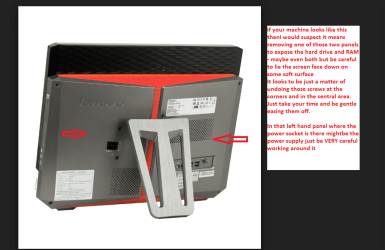
Now not knowing that type of machine or the one it is I am not able to say where to fnd the hard drive or RAM.

If we need them these are the drivers if they haven't been posted already
Drivers and software - IdeaCentre B500 All-In-One
 

Attachments

  • LEN1.PNG
    LEN1.PNG
    85.6 KB · Views: 1

My Computer

Computer type
PC/Desktop
Computer Manufacturer/Model Number
Own build (new) Desk1 / Asus ROG Win 7 / Desk2 1st build
OS
Desk1 7 Home Prem / Desk2 10 Pro / Main lap Asus ROG 10 Pro 2 laptop Toshiba 7 Pro Asus P2520 7 & 10
CPU
Desk1 i5 3750K / Laptop i7 GTX 860M / Desk2 i5 2500
Motherboard
Desk1 Asus P877-V / Desk2 Gigabyte H67 UD3H / Laptop ?
Memory
Desk1 8GB (1866) / Desk2 16GB (1333) / Laptop 8Gb DDR3
Graphics Card(s)
Desk 1& 2NVidia GTX 650 & Laptops on board Intel
Sound Card
Desk 1 & 2 -XONAR DG Realtek High Def audio Laptop
Monitor(s) Displays
Desk 1 Benq HD 2450 / Desk2 Philips 24" / Laptop 17.5"
Screen Resolution
1920x1080 D1 & D2 & Laptop 1
Hard Drives
Desk1 Samsung 120GB 830 SSD
Asus ROG 256GB 850 Pro SSD
Desk2 Samsung 840 256 SSD
Toshiba 120GB EVO
PSU
Desk 1 Corsair HX 1050/ Laptop ? / Desk 2 Corsair HX 650
Case
Desk 1 Cooler HAF XM ? Toshiba laptop / Desk2 Coolermaster
Cooling
Fans on all Desk1 -2 Desk2 - all Coolermasters 5 Laptop ?
Keyboard
Desk 1 MS Sidewinder X6 Desk 2 MS Sidewinder X 4
Mouse
Desk 1&2 - Gigabyte MS 900 gamer - laptop - Logitec wireless
Internet Speed
ADSL2+
Other Info
One other Desktop (tester) and spare Toshba laptop both with SSD's
Running Kaspersky 2016 ISS on all machines config'd identically
Logitec audio stereo systems on each machine (x3)
Canon MG5250MFC
Router/modem TP-Link running WPA2SK
Hi I wont be able to try those out as im out of the country. will try when I get back. Just wanted to ask would formatting after retrieving my data make me able to use the pc again?
 

My Computer

Computer type
PC/Desktop
Computer Manufacturer/Model Number
Lenovo
OS
Windows 7 Home Premium 64bit
CPU
Interl(R) Core(TM) 2 Quad CPU Q8400 @2.66GHz (2CPUs),~2.7GHz
Graphics Card(s)
NVIDIA GeForce GT 240M
Hard Drives
ST310000528AS ATA Device
Browser
Chrome
Of course formatting is only getting the drive ready for a reinstall or whatever you intend doing with it. But try the other stuff first.
 

My Computer

Computer type
PC/Desktop
Computer Manufacturer/Model Number
Own build (new) Desk1 / Asus ROG Win 7 / Desk2 1st build
OS
Desk1 7 Home Prem / Desk2 10 Pro / Main lap Asus ROG 10 Pro 2 laptop Toshiba 7 Pro Asus P2520 7 & 10
CPU
Desk1 i5 3750K / Laptop i7 GTX 860M / Desk2 i5 2500
Motherboard
Desk1 Asus P877-V / Desk2 Gigabyte H67 UD3H / Laptop ?
Memory
Desk1 8GB (1866) / Desk2 16GB (1333) / Laptop 8Gb DDR3
Graphics Card(s)
Desk 1& 2NVidia GTX 650 & Laptops on board Intel
Sound Card
Desk 1 & 2 -XONAR DG Realtek High Def audio Laptop
Monitor(s) Displays
Desk 1 Benq HD 2450 / Desk2 Philips 24" / Laptop 17.5"
Screen Resolution
1920x1080 D1 & D2 & Laptop 1
Hard Drives
Desk1 Samsung 120GB 830 SSD
Asus ROG 256GB 850 Pro SSD
Desk2 Samsung 840 256 SSD
Toshiba 120GB EVO
PSU
Desk 1 Corsair HX 1050/ Laptop ? / Desk 2 Corsair HX 650
Case
Desk 1 Cooler HAF XM ? Toshiba laptop / Desk2 Coolermaster
Cooling
Fans on all Desk1 -2 Desk2 - all Coolermasters 5 Laptop ?
Keyboard
Desk 1 MS Sidewinder X6 Desk 2 MS Sidewinder X 4
Mouse
Desk 1&2 - Gigabyte MS 900 gamer - laptop - Logitec wireless
Internet Speed
ADSL2+
Other Info
One other Desktop (tester) and spare Toshba laptop both with SSD's
Running Kaspersky 2016 ISS on all machines config'd identically
Logitec audio stereo systems on each machine (x3)
Canon MG5250MFC
Router/modem TP-Link running WPA2SK
Hi I am unable to Try Ubuntu as after I hit enter a black screen will appear with a small red box . I also tried to reformat and reinstall windows but it said I could not install windows on my drive. Just would like to confirm if that is the problem so I can replace my hdd
 

My Computer

Computer type
PC/Desktop
Computer Manufacturer/Model Number
Lenovo
OS
Windows 7 Home Premium 64bit
CPU
Interl(R) Core(TM) 2 Quad CPU Q8400 @2.66GHz (2CPUs),~2.7GHz
Graphics Card(s)
NVIDIA GeForce GT 240M
Hard Drives
ST310000528AS ATA Device
Browser
Chrome
Henndrong the Ubuntu should install from the disk and the hard drive has nothing to do with that process.

Now I am suspecting the RAM mate try this

MEMTEST

http://www.sevenforums.com/tutorials/105647-ram-test-memtest86.htmlthis one you will need to make a bootable disk set theBIOS to optical (or USB if preferred) boot the machine and let it run for at LEAST 8passes unless the errors come up straight away. Takes fair timeto complete and some leave it running overnight.

Ifthe errors come up quickly then you can stop it and you will have to test eachstick and maybe in each slot to sort the bad one out.
 

My Computer

Computer type
PC/Desktop
Computer Manufacturer/Model Number
Own build (new) Desk1 / Asus ROG Win 7 / Desk2 1st build
OS
Desk1 7 Home Prem / Desk2 10 Pro / Main lap Asus ROG 10 Pro 2 laptop Toshiba 7 Pro Asus P2520 7 & 10
CPU
Desk1 i5 3750K / Laptop i7 GTX 860M / Desk2 i5 2500
Motherboard
Desk1 Asus P877-V / Desk2 Gigabyte H67 UD3H / Laptop ?
Memory
Desk1 8GB (1866) / Desk2 16GB (1333) / Laptop 8Gb DDR3
Graphics Card(s)
Desk 1& 2NVidia GTX 650 & Laptops on board Intel
Sound Card
Desk 1 & 2 -XONAR DG Realtek High Def audio Laptop
Monitor(s) Displays
Desk 1 Benq HD 2450 / Desk2 Philips 24" / Laptop 17.5"
Screen Resolution
1920x1080 D1 & D2 & Laptop 1
Hard Drives
Desk1 Samsung 120GB 830 SSD
Asus ROG 256GB 850 Pro SSD
Desk2 Samsung 840 256 SSD
Toshiba 120GB EVO
PSU
Desk 1 Corsair HX 1050/ Laptop ? / Desk 2 Corsair HX 650
Case
Desk 1 Cooler HAF XM ? Toshiba laptop / Desk2 Coolermaster
Cooling
Fans on all Desk1 -2 Desk2 - all Coolermasters 5 Laptop ?
Keyboard
Desk 1 MS Sidewinder X6 Desk 2 MS Sidewinder X 4
Mouse
Desk 1&2 - Gigabyte MS 900 gamer - laptop - Logitec wireless
Internet Speed
ADSL2+
Other Info
One other Desktop (tester) and spare Toshba laptop both with SSD's
Running Kaspersky 2016 ISS on all machines config'd identically
Logitec audio stereo systems on each machine (x3)
Canon MG5250MFC
Router/modem TP-Link running WPA2SK
The Ubuntu disk I made had Memtest. Do I need to make another? Ill try with the one provided with Ubuntu 1st
 

My Computer

Computer type
PC/Desktop
Computer Manufacturer/Model Number
Lenovo
OS
Windows 7 Home Premium 64bit
CPU
Interl(R) Core(TM) 2 Quad CPU Q8400 @2.66GHz (2CPUs),~2.7GHz
Graphics Card(s)
NVIDIA GeForce GT 240M
Hard Drives
ST310000528AS ATA Device
Browser
Chrome
Depends on whether you were using a RW disk or a write only. If it isa write onlt then it might just not work as both programs are in bootable form - best make a separate one for each and keep for future use.
 

My Computer

Computer type
PC/Desktop
Computer Manufacturer/Model Number
Own build (new) Desk1 / Asus ROG Win 7 / Desk2 1st build
OS
Desk1 7 Home Prem / Desk2 10 Pro / Main lap Asus ROG 10 Pro 2 laptop Toshiba 7 Pro Asus P2520 7 & 10
CPU
Desk1 i5 3750K / Laptop i7 GTX 860M / Desk2 i5 2500
Motherboard
Desk1 Asus P877-V / Desk2 Gigabyte H67 UD3H / Laptop ?
Memory
Desk1 8GB (1866) / Desk2 16GB (1333) / Laptop 8Gb DDR3
Graphics Card(s)
Desk 1& 2NVidia GTX 650 & Laptops on board Intel
Sound Card
Desk 1 & 2 -XONAR DG Realtek High Def audio Laptop
Monitor(s) Displays
Desk 1 Benq HD 2450 / Desk2 Philips 24" / Laptop 17.5"
Screen Resolution
1920x1080 D1 & D2 & Laptop 1
Hard Drives
Desk1 Samsung 120GB 830 SSD
Asus ROG 256GB 850 Pro SSD
Desk2 Samsung 840 256 SSD
Toshiba 120GB EVO
PSU
Desk 1 Corsair HX 1050/ Laptop ? / Desk 2 Corsair HX 650
Case
Desk 1 Cooler HAF XM ? Toshiba laptop / Desk2 Coolermaster
Cooling
Fans on all Desk1 -2 Desk2 - all Coolermasters 5 Laptop ?
Keyboard
Desk 1 MS Sidewinder X6 Desk 2 MS Sidewinder X 4
Mouse
Desk 1&2 - Gigabyte MS 900 gamer - laptop - Logitec wireless
Internet Speed
ADSL2+
Other Info
One other Desktop (tester) and spare Toshba laptop both with SSD's
Running Kaspersky 2016 ISS on all machines config'd identically
Logitec audio stereo systems on each machine (x3)
Canon MG5250MFC
Router/modem TP-Link running WPA2SK
Back
Top