Random Freezes

Salv0

New member
Local time
10:03 PM
Messages
14
Hi all :)
I have a laptop Acer Aspire 7720G, with Win 7 RTM installed from original ISO ( by zuko.. ) to try it before purchase..but it randomly freezes for 30-40 secs : (
Mouse can move, keyboard works but if I try to open folders or other, they don't :(

I thought it could be a RAM problem, so I run a memtest.. but no errors..
Now dunno what to do xD I've reinstalled 2 times but there are always freezes..what can be the problem? maybe a bad ISO? or a bad burn?

Thank you all in advance for the help :)
And really really sorry if this is the wrong forum section xD
 

My Computer

OS
Windows 7 64-bit
CPU
Intel Core i7 920
Motherboard
Asus P6T
Memory
Corsair Dominator 1600
Graphics Card(s)
Gainward GTX 295
Monitor(s) Displays
Asus MK241H
Screen Resolution
1920x1200
Hard Drives
Western Digital Velociraptor
PSU
Enermax Revolution 85+ 850W
Case
Antec Nine Hundred Two
Cooling
Noctua NH-U12P SE
Keyboard
Razer Reclusa
Mouse
Razer Copperhead
Internet Speed
7MB
If your using the Hardware in your specs then you should have no problems running Windows 7, you may just have a bad ISO or a bad burn, maybe try installing a different ISO from somewhere or just wait till the 6th when it gets released on Technet and MSDN.
 

My Computer

Computer Manufacturer/Model Number
Home Brew
OS
Windows 7 Ultimate Vista Ultimate x64
CPU
Core 2 Duo E8500 3.16Ghz @ 3.8Ghz
Motherboard
eVGA 750i FTW
Memory
2x2Gigs Patriot PC2-6400 LL
Graphics Card(s)
Inno3D GeForce GTX260 216 SP
Monitor(s) Displays
ASUS VW222U 22" 2ms Response time
Screen Resolution
1680x1050
Hard Drives
SATA 150GB
SATA II 250GB
USB IDE 750GB Ext.
PSU
HYTEC 600W & Thermaltake 650W Toughpower Power Exp
Case
Thermaltake Armor LCS (Liquid Cooling System)
Cooling
Liquid Cooling System
Keyboard
Logitech G15 Gaming Keyboard
Mouse
Logitech G9 Gaming Mouse
the hw in the specs is my desktop xD now I'm on the notebook Acer Aspire 7720G
with:
4GB ram
Core 2 Duo T7500 ( 2.2ghz )
ATI Mobility Radeon HD2600

Anyway thank you for the answer!! : ))
 

My Computer

OS
Windows 7 64-bit
CPU
Intel Core i7 920
Motherboard
Asus P6T
Memory
Corsair Dominator 1600
Graphics Card(s)
Gainward GTX 295
Monitor(s) Displays
Asus MK241H
Screen Resolution
1920x1200
Hard Drives
Western Digital Velociraptor
PSU
Enermax Revolution 85+ 850W
Case
Antec Nine Hundred Two
Cooling
Noctua NH-U12P SE
Keyboard
Razer Reclusa
Mouse
Razer Copperhead
Internet Speed
7MB
Check Task Manager (right click on the Task Bar or press Ctrl-Shift-Esc)
Select the Processes tab
Select the View menu item
Select the Select columns item
Put check marks next to I/O Reads and I/O Other - then click OK to exit
Resize the Task Manager window so you can see all columns
Wait for the mouse to lock up - do any of the Image Names show excessively high numbers in any of the columns?
 

My Computer

Computer Manufacturer/Model Number
Home built (x64), Lenovo x61s Tablet, Samsung Netbook
OS
Win7 x64 + x86
CPU
Intel i7 920, other Intel chips, and the Atom in the netbook
Motherboard
Asus P6T Deluxe
Memory
12 gB; 4 gB Lenovo; 1 gB Samsung netbook
Graphics Card(s)
ATI 4870
Sound Card
Yes, I have one of these
Monitor(s) Displays
32" Sharp Aquos TV
Screen Resolution
800x600 - I have vision issues
Hard Drives
4 - 150 gB Velociraptors in RAID 5
Promise controller
PSU
1000 watt (can't recall the brand)
Case
Antec 300
Cooling
Big honking cooler that was rated highly at Toms Hardware
Keyboard
Microsoft Natural
Mouse
Logitech Trackman
Internet Speed
Cable
Other Info
GeekSquad UPS
CyberPower UPS
DLink DNS-323 NAS (2 tB)
Netgear wireless router as an access point
Netgear wired router FSV-318
Home network consists of
4 desktop computers (2 Vista, 2 Win7)
1 netbook (Win7)
4 laptop computers (XP, 2-Vista, Win7)
Wii and XBox 360
Check Task Manager (right click on the Task Bar or press Ctrl-Shift-Esc)
Select the Processes tab
Select the View menu item
Select the Select columns item
Put check marks next to I/O Reads and I/O Other - then click OK to exit
Resize the Task Manager window so you can see all columns
Wait for the mouse to lock up - do any of the Image Names show excessively high numbers in any of the columns?

Doing this passes, I had these results:


The first time
1stFreeze.png


The second time, some days later.
2ndFreeze.png


ç_ç
Thank you in advance for the help
 

My Computer

OS
Windows 7 64-bit
CPU
Intel Core i7 920
Motherboard
Asus P6T
Memory
Corsair Dominator 1600
Graphics Card(s)
Gainward GTX 295
Monitor(s) Displays
Asus MK241H
Screen Resolution
1920x1200
Hard Drives
Western Digital Velociraptor
PSU
Enermax Revolution 85+ 850W
Case
Antec Nine Hundred Two
Cooling
Noctua NH-U12P SE
Keyboard
Razer Reclusa
Mouse
Razer Copperhead
Internet Speed
7MB
it could be driver problems. i have a Gainward GTS 250 and i have the same issue. i installed a bunch of nvidia drivers, even let the windows own driver and the problem still persists. even on a clean RTM install (first time this happened on RC 7100, both versions are x64) or you could wait the ISO from MSDN ^^. i know i m waiting :|
 

My Computer

OS
Windows 7 RTM x64
CPU
Intel Core2Duo E6550 @ 3.2 Ghz (1.38 vCore)
Motherboard
Gigabyte GA-650I-DS4L
Memory
2x1 GB DDR2 Kingston HyperX CL5
Graphics Card(s)
Gainward GeForce 250 GTS 512 MB
Sound Card
N/A
Monitor(s) Displays
LG L1942S 19"
Hard Drives
1xSeagate Barracuda 250 GB 7200 RPM SATA3
1xMaxtor Diamond Max 80 GB 7200 RPM IDE
PSU
Thermaltake 470 W
Case
Thermaltake Mambo
Cooling
1x120 mm front fan + 1x120 mm exhaust fan
I also thought that was a Video driver problems, so I first tried with 7 own driver and then with ATI Catalyst 9.7..but no results ç_ç
Anyway let's wait for 6 August XD
 

My Computer

OS
Windows 7 64-bit
CPU
Intel Core i7 920
Motherboard
Asus P6T
Memory
Corsair Dominator 1600
Graphics Card(s)
Gainward GTX 295
Monitor(s) Displays
Asus MK241H
Screen Resolution
1920x1200
Hard Drives
Western Digital Velociraptor
PSU
Enermax Revolution 85+ 850W
Case
Antec Nine Hundred Two
Cooling
Noctua NH-U12P SE
Keyboard
Razer Reclusa
Mouse
Razer Copperhead
Internet Speed
7MB
I had some freezing issues until I updated my motherboard bios with latest version, then they went away
 

My Computer

OS
vista ultimate 64 bit
uhm could this works on a notebook? :O
 

My Computer

OS
Windows 7 64-bit
CPU
Intel Core i7 920
Motherboard
Asus P6T
Memory
Corsair Dominator 1600
Graphics Card(s)
Gainward GTX 295
Monitor(s) Displays
Asus MK241H
Screen Resolution
1920x1200
Hard Drives
Western Digital Velociraptor
PSU
Enermax Revolution 85+ 850W
Case
Antec Nine Hundred Two
Cooling
Noctua NH-U12P SE
Keyboard
Razer Reclusa
Mouse
Razer Copperhead
Internet Speed
7MB
just updated my BIOS and nothing new on the sky...
 

My Computer

OS
Windows 7 RTM x64
CPU
Intel Core2Duo E6550 @ 3.2 Ghz (1.38 vCore)
Motherboard
Gigabyte GA-650I-DS4L
Memory
2x1 GB DDR2 Kingston HyperX CL5
Graphics Card(s)
Gainward GeForce 250 GTS 512 MB
Sound Card
N/A
Monitor(s) Displays
LG L1942S 19"
Hard Drives
1xSeagate Barracuda 250 GB 7200 RPM SATA3
1xMaxtor Diamond Max 80 GB 7200 RPM IDE
PSU
Thermaltake 470 W
Case
Thermaltake Mambo
Cooling
1x120 mm front fan + 1x120 mm exhaust fan
I'll try to format and install the 64 bit 7..on my friend pc runs fine..
 

My Computer

OS
Windows 7 64-bit
CPU
Intel Core i7 920
Motherboard
Asus P6T
Memory
Corsair Dominator 1600
Graphics Card(s)
Gainward GTX 295
Monitor(s) Displays
Asus MK241H
Screen Resolution
1920x1200
Hard Drives
Western Digital Velociraptor
PSU
Enermax Revolution 85+ 850W
Case
Antec Nine Hundred Two
Cooling
Noctua NH-U12P SE
Keyboard
Razer Reclusa
Mouse
Razer Copperhead
Internet Speed
7MB
i had 7100 RC when this happened the first time and i made a clean install of the RTM and i still have this :). but good luck!
 

My Computer

OS
Windows 7 RTM x64
CPU
Intel Core2Duo E6550 @ 3.2 Ghz (1.38 vCore)
Motherboard
Gigabyte GA-650I-DS4L
Memory
2x1 GB DDR2 Kingston HyperX CL5
Graphics Card(s)
Gainward GeForce 250 GTS 512 MB
Sound Card
N/A
Monitor(s) Displays
LG L1942S 19"
Hard Drives
1xSeagate Barracuda 250 GB 7200 RPM SATA3
1xMaxtor Diamond Max 80 GB 7200 RPM IDE
PSU
Thermaltake 470 W
Case
Thermaltake Mambo
Cooling
1x120 mm front fan + 1x120 mm exhaust fan
UPDATE:

Finally I've found a solution for my problem:
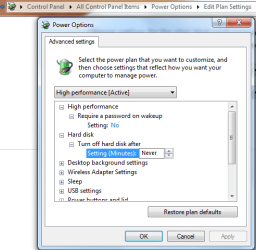
I changed the power plan to High Performance, then changed the power options for ( Plugged in options ):

Turn off HD after: Never
Sleep: Never
PCI Express -> Link State power management: Off

;)
 

My Computer

OS
Windows 7 64-bit
CPU
Intel Core i7 920
Motherboard
Asus P6T
Memory
Corsair Dominator 1600
Graphics Card(s)
Gainward GTX 295
Monitor(s) Displays
Asus MK241H
Screen Resolution
1920x1200
Hard Drives
Western Digital Velociraptor
PSU
Enermax Revolution 85+ 850W
Case
Antec Nine Hundred Two
Cooling
Noctua NH-U12P SE
Keyboard
Razer Reclusa
Mouse
Razer Copperhead
Internet Speed
7MB
UPDATE:

Finally I've found a solution for my problem:
I changed the power plan to High Performance, then changed the power options for ( Plugged in options ):

Turn off HD after: Never
Sleep: Never
PCI Express -> Link State power management: Off

;)

That is why I keep this screen shot handy.
 

Attachments

  • power plan settings.PNG
    power plan settings.PNG
    18.8 KB · Views: 41

My Computer

Computer type
PC/Desktop
Computer Manufacturer/Model Number
Home built
OS
Windows 7 Ult, Windows 8.1 Pro,
CPU
Q9650-4.275GHz, E8600 4.5GHz, E6750-3.8GHz
Motherboard
Evga 780i FTW
Memory
G.Skill PC2 9600 1200Mhz 5 5 5 15 2T
Graphics Card(s)
GTX480
Sound Card
Asus Xonar D2
Monitor(s) Displays
HannsG
Screen Resolution
1680X1050
Hard Drives
GSkill Phoenix Pro 120GB SSD
PSU
ThermalTake Toughpower 1000Watt modular
Case
ThermalTake XaserV
Cooling
Xigmatek S1283
Keyboard
Logitech G15
Mouse
Logitech G9
Internet Speed
T1
Back
Top