Random Freezing for Notebook ASUS F6VE Windows 7 Professional 32bit

devower

New member
Local time
2:31 AM
Messages
32
Here's my computer Specs

Model: Asus F6VE

Processor : P8800 @2.66GHz
Installed Ram: 4 GB (3GB Usable)
Graphics: ATI HD4570

System Type: Windows 7 Professional 32bit

The Random Freezing occurs since July/August 2011, it occurs when I used Skype/Gaming/Browing videos streaming, since thats the major things I do.

I had formatted my laptop and installed a new copy but Doesnt help. The probelm had already occurred 2 months.

So I bought down to ASUS since it was under warranty.

Ram: Tested ok
HDD : Tested ok

Firstly, the system was running fine, so they did a format but when I bought it home, the freeze occured,

Then they changed the hard disk even though it was tested ok, but the freeze occurred.

Followed by the whole motherboard was changed, and yet the freeze occur

So I was told not to install and drivers, using the generic drivers that were already installed in my system + the latest ATI driver, it was working fine, for 2 days,

However I noticed after the windows update where SP1 was installed, my system starts to freeze again. I downloaded the hotfix but doesnt help, anyone have any idea what to do next or could it be other hardware failure?
 

My Computer My Computer

At a glance

Windows 7 Professional 32bitP88004 GBATI HD 4570
Computer Manufacturer/Model Number
ASUSTek / F6VE
OS
Windows 7 Professional 32bit
CPU
P8800
Motherboard
ASUS Notebook series
Memory
4 GB
Graphics Card(s)
ATI HD 4570
Monitor(s) Displays
ASUS
Hard Drives
ST9500325AS ATA
Here's my computer Specs

Model: Asus F6VE

Processor : P8800 @2.66GHz
Installed Ram: 4 GB (3GB Usable)
Graphics: ATI HD4570

System Type: Windows 7 Professional 32bit

The Random Freezing occurs since July/August 2011, it occurs when I used Skype/Gaming/Browing videos streaming, since thats the major things I do.

I had formatted my laptop and installed a new copy but Doesnt help. The probelm had already occurred 2 months.

So I bought down to ASUS since it was under warranty.

Ram: Tested ok
HDD : Tested ok

Firstly, the system was running fine, so they did a format but when I bought it home, the freeze occured,

Then they changed the hard disk even though it was tested ok, but the freeze occurred.

Followed by the whole motherboard was changed, and yet the freeze occur

So I was told not to install and drivers, using the generic drivers that were already installed in my system + the latest ATI driver, it was working fine, for 2 days,

However I noticed after the windows update where SP1 was installed, my system starts to freeze again. I downloaded the hotfix but doesnt help, anyone have any idea what to do next or could it be other hardware failure?

Doesnt sound like hardware since it worked fine for two days after re-install.. Sounds more like a driver

Please run these two tests to verify your memory and find which driver is causing the problem.


1-Memtest.

*Download a copy of Memtest86 and burn the ISO to a CD using Iso Recorder or another ISO burning program. Memtest86+ - Advanced Memory Diagnostic Tool

*Boot from the CD, and leave it running for at least 5 or 6 passes.

Just remember, any time Memtest reports errors, it can be either bad RAM or a bad motherboard slot.

Test the sticks individually, and if you find a good one, test it in all slots.

http://www.sevenforums.com/tutorials/105647-ram-test-memtest86.html


2-Driver verifier

I'd suggest that you first backup your data and then make sure you've got access to another computer so you can contact us if problems arise. Then make a System Restore point (so you can restore the system using the Vista/Win7 Startup Repair feature).

In Windows 7 you can make a Startup Repair disk by going to Start....All Programs...Maintenance...Create a System Repair Disc - with Windows Vista you'll have to use your installation disk or the "Repair your computer" option at the top of the Safe Mode menu .

Then, here's the procedure:
- Go to Start and type in "verifier" (without the quotes) and press Enter
- Select "Create custom settings (for code developers)" and click "Next"
- Select "Select individual settings from a full list" and click "Next"
- Select everything EXCEPT FOR "Low Resource Simulation" and click "Next"
- Select "Select driver names from a list" and click "Next"
Then select all drivers NOT provided by Microsoft and click "Next"
- Select "Finish" on the next page.

Reboot the system and wait for it to crash to the Blue Screen. Continue to use your system normally, and if you know what causes the crash, do that repeatedly. The objective here is to get the system to crash because Driver Verifier is stressing the drivers out. If it doesn't crash for you, then let it run for at least 36 hours of continuous operation (an estimate on my part).

If you can't get into Windows because it crashes too soon, try it in Safe Mode.
If you can't get into Safe Mode, try using System Restore from your installation DVD to set the system back to the previous restore point that you created.

http://www.sevenforums.com/tutorials/101379-driver-verifier-enable-disable.html
 

My Computer My Computer

At a glance

Win 8 Release candidate 8400[email protected]4 gigsNvidia 9600M
Computer Manufacturer/Model Number
HP Pavillion dv-7 1005 Tx
OS
Win 8 Release candidate 8400
CPU
[email protected]
Memory
4 gigs
Graphics Card(s)
Nvidia 9600M
Sound Card
HD built-in
Monitor(s) Displays
17" Wxga
Screen Resolution
1440x900
Cooling
none
Internet Speed
45Mb down 5Mb up
Thanks for the quick reply, I will try it right away, I dont really get crashes/ blue screen.

It's intermitted freeze,
My system just stops responding and after 5 seconds - 5 minutes it will resume as if its normal and nothing had happened. Really random.

The motherboard had been changed and yet this problem occurs, mainly on skype/warcraft 3.

Btw, The problem starts to occur only after SP1 was installed + various updates on the 3rd day
thats why it's working fine on the first 2 days, really hope I could find the driver that is causing the problem, because I am having this problem for 2-3 months already!@!!

Anyway thanks for the quick help reply, really appreciate it, I will do the tests right away.
 
Last edited:

My Computer My Computer

At a glance

Windows 7 Professional 32bitP88004 GBATI HD 4570
Computer Manufacturer/Model Number
ASUSTek / F6VE
OS
Windows 7 Professional 32bit
CPU
P8800
Motherboard
ASUS Notebook series
Memory
4 GB
Graphics Card(s)
ATI HD 4570
Monitor(s) Displays
ASUS
Hard Drives
ST9500325AS ATA
Hi, I am running on safe mode now, because it crashes before I am able to get into windows after using verifier.

The Error I got is

Windows has recovered from an unexpected shutdown

Problem Signature:
Problem Event Name: BlueScreen
OS Version: 6.1.7601.2.1.0.256.48


Additional information about the problem:
BCcode: c4
BCP1: 000000F6
BCP2: 00000060
BCP3: A21E95F0
BCP4: 92E875EE
OS Version: 6_1_7601
Service Pack: 1_0
Product: 256_1


I am currently in safe mode, please advise what to do next. Really thank you Very Very much.

View attachment 179481 --> This is the minidump I recieved
 
Last edited:

My Computer My Computer

At a glance

Windows 7 Professional 32bitP88004 GBATI HD 4570
Computer Manufacturer/Model Number
ASUSTek / F6VE
OS
Windows 7 Professional 32bit
CPU
P8800
Motherboard
ASUS Notebook series
Memory
4 GB
Graphics Card(s)
ATI HD 4570
Monitor(s) Displays
ASUS
Hard Drives
ST9500325AS ATA
Hi, I am running on safe mode now, because it crashes before I am able to get into windows after using verifier.

The Error I got is

Windows has recovered from an unexpected shutdown

Problem Signature:
Problem Event Name: BlueScreen
OS Version: 6.1.7601.2.1.0.256.48


Additional information about the problem:
BCcode: c4
BCP1: 000000F6
BCP2: 00000060
BCP3: A21E95F0
BCP4: 92E875EE
OS Version: 6_1_7601
Service Pack: 1_0
Product: 256_1


I am currently in safe mode, please advise what to do next. Really thank you Very Very much.

View attachment 179481 --> This is the minidump I recieved

This is absoluely no surprise. DRIVER VERIFIED and Related to SPBBCDrv.sys SPBBC driver from Symantec.


I would remove Symantec and replace with Microsoft Security Essentials.


http://us.norton.com/support/kb/web_view.jsp?wv_type=public_web&docurl=20080710133834EN

Virus, Spyware & Malware Protection | Microsoft Security Essentials
 

My Computer My Computer

At a glance

Win 8 Release candidate 8400[email protected]4 gigsNvidia 9600M
Computer Manufacturer/Model Number
HP Pavillion dv-7 1005 Tx
OS
Win 8 Release candidate 8400
CPU
[email protected]
Memory
4 gigs
Graphics Card(s)
Nvidia 9600M
Sound Card
HD built-in
Monitor(s) Displays
17" Wxga
Screen Resolution
1440x900
Cooling
none
Internet Speed
45Mb down 5Mb up
Thanks alot I would do it immediately!!

Random Freezing occurs again after removal of Symantec and installation of Security Essentials, this time I am 48mins on skype when it occurred. Testing verifier again, this time I am able to log in to windows, hopefully I get BSOD to get the minidump. Will update again once I get it.

I encounted freeze without BSOD after enabling verifier, system still running hope it crashes soon
 
Last edited:

My Computer My Computer

At a glance

Windows 7 Professional 32bitP88004 GBATI HD 4570
Computer Manufacturer/Model Number
ASUSTek / F6VE
OS
Windows 7 Professional 32bit
CPU
P8800
Motherboard
ASUS Notebook series
Memory
4 GB
Graphics Card(s)
ATI HD 4570
Monitor(s) Displays
ASUS
Hard Drives
ST9500325AS ATA
I had ran the verifier test for more than 36 hours with my drivers, as well as Mem86 test shows fine after 6 tests, however there's still freezing occuring while using Skype or playing games like Warcraft 3 (Dota).

I havent encountered any BSOD, so could the problem be related to SP1 updates of Windows 7? or some updates after SP1?
 

My Computer My Computer

At a glance

Windows 7 Professional 32bitP88004 GBATI HD 4570
Computer Manufacturer/Model Number
ASUSTek / F6VE
OS
Windows 7 Professional 32bit
CPU
P8800
Motherboard
ASUS Notebook series
Memory
4 GB
Graphics Card(s)
ATI HD 4570
Monitor(s) Displays
ASUS
Hard Drives
ST9500325AS ATA
I had ran the verifier test for more than 36 hours with my drivers, as well as Mem86 test shows fine after 6 tests, however there's still freezing occuring while using Skype or playing games like Warcraft 3 (Dota).

I havent encountered any BSOD, so could the problem be related to SP1 updates of Windows 7? or some updates after SP1?

If you have new crashes please upload the DMP ifles.

Have you removed Symantec?
 

My Computer My Computer

At a glance

Win 8 Release candidate 8400[email protected]4 gigsNvidia 9600M
Computer Manufacturer/Model Number
HP Pavillion dv-7 1005 Tx
OS
Win 8 Release candidate 8400
CPU
[email protected]
Memory
4 gigs
Graphics Card(s)
Nvidia 9600M
Sound Card
HD built-in
Monitor(s) Displays
17" Wxga
Screen Resolution
1440x900
Cooling
none
Internet Speed
45Mb down 5Mb up
I had ran the verifier test for more than 36 hours with my drivers, as well as Mem86 test shows fine after 6 tests, however there's still freezing occuring while using Skype or playing games like Warcraft 3 (Dota).

I havent encountered any BSOD, so could the problem be related to SP1 updates of Windows 7? or some updates after SP1?

If you have new crashes please upload the DMP ifles.

Have you removed Symantec?


Yup I removed symantec (Replaced with microsoft security essential), I dont recieve any crashes however it just freezes randomly for no apparent reason, and continue working as normal as if nothing had happened after 5 secs to 5 mins.

I felt that the frequency had reduced after symantec removal, however the problem is still not solved.

Lol.. Right after I posted this I recieved a minidump. After about 50 hours of operating my computer.

View attachment 179879

Problem signature:
Problem Event Name: BlueScreen
OS Version: 6.1.7601.2.1.0.256.48
Locale ID: 1033
Additional information about the problem:
BCCode: 50
BCP1: C6B6F000
BCP2: 00000000
BCP3: 82A341C2
BCP4: 00000000
OS Version: 6_1_7601
Service Pack: 1_0
Product: 256_1
Files that help describe the problem:
C:\Windows\Minidump\101911-23493-01.dmp
C:\Users\Dragonn\AppData\Local\Temp\WER-96861-0.sysdata.xml
Read our privacy statement online:
http://go.microsoft.com/fwlink/?linkid=104288&clcid=0x0409
If the online privacy statement is not available, please read our privacy statement offline:
C:\Windows\system32\en-US\erofflps.txt


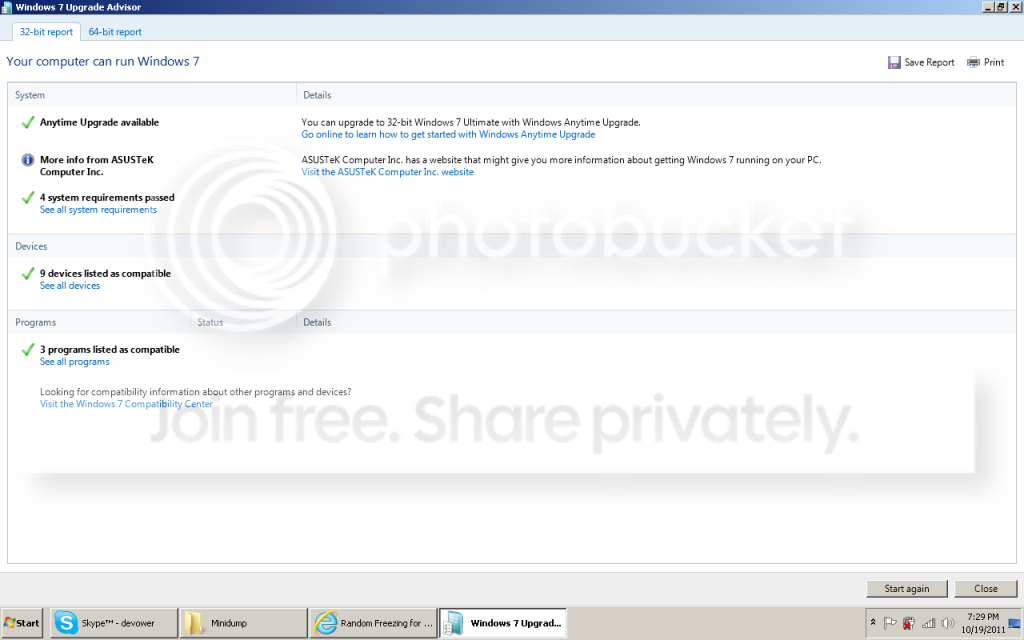
I had ran a Windows Upgrade Advisor

Windows7UpgradeAdvisorASUSF6VE.png
 
Last edited:

My Computer My Computer

At a glance

Windows 7 Professional 32bitP88004 GBATI HD 4570
Computer Manufacturer/Model Number
ASUSTek / F6VE
OS
Windows 7 Professional 32bit
CPU
P8800
Motherboard
ASUS Notebook series
Memory
4 GB
Graphics Card(s)
ATI HD 4570
Monitor(s) Displays
ASUS
Hard Drives
ST9500325AS ATA
View attachment 179910

Here is my Windows_NT6_BSOD_jcgriff2 for your references, really thanks alot and sorry to trouble you.
 

My Computer My Computer

At a glance

Windows 7 Professional 32bitP88004 GBATI HD 4570
Computer Manufacturer/Model Number
ASUSTek / F6VE
OS
Windows 7 Professional 32bit
CPU
P8800
Motherboard
ASUS Notebook series
Memory
4 GB
Graphics Card(s)
ATI HD 4570
Monitor(s) Displays
ASUS
Hard Drives
ST9500325AS ATA
View attachment 179910

Here is my Windows_NT6_BSOD_jcgriff2 for your references, really thanks alot and sorry to trouble you.

Newest crash was Related to safedrv.sys from Garena.com. I would remove it at least to test.

Old drivers needing updating.
Code:
ATKACPI.sys    12/14/2006 3:11:57 AM        0x925d7000    0x925df000    0x00008000    0x4580f93d                        
ASMMAP.sys    2/4/2007 3:52:50 PM        0x9d877000    0x9d87e000    0x00007000    0x45c63992                        
WinRing0.sys    7/26/2008 9:25:10 AM        0x9ff9a000    0x9ff9b980    0x00001980    0x488b25b6                        
AGRSM.sys    11/10/2008 10:56:37 AM        0x94628000    0x9472e000    0x00106000    0x49184ba5

How To Find Drivers:
- search Google for the name of the driver
- compare the Google results with what's installed on your system to figure out which device/program it belongs to
- visit the web site of the manufacturer of the hardware/program to get the latest drivers (DON'T use Windows Update or the Update driver function of Device Manager).
- if there are difficulties in locating them, post back with questions and someone will try and help you locate the appropriate program.
- - The most common drivers are listed on this page: Driver Reference Driver Reference
- - Driver manufacturer links are on this page: Drivers and Downloads
 

My Computer My Computer

At a glance

Win 8 Release candidate 8400[email protected]4 gigsNvidia 9600M
Computer Manufacturer/Model Number
HP Pavillion dv-7 1005 Tx
OS
Win 8 Release candidate 8400
CPU
[email protected]
Memory
4 gigs
Graphics Card(s)
Nvidia 9600M
Sound Card
HD built-in
Monitor(s) Displays
17" Wxga
Screen Resolution
1440x900
Cooling
none
Internet Speed
45Mb down 5Mb up
I had updated this,

ATKACPI.sys 12/14/2006 3:11:57 AM 0x925d7000 0x925df000 0x00008000 0x4580f93d


Through the drivers reference website (Date/TimeStamp), I had the latest version below,

ASMMAP.sys 2/4/2007 3:52:50 PM 0x9d877000 0x9d87e000 0x00007000 0x45c63992
AGRSM.sys 11/10/2008 10:56:37 AM 0x94628000 0x9472e000 0x00106000 0x49184ba5
WinRing0.sys 7/26/2008 9:25:10 AM 0x9ff9a000 0x9ff9b980 0x00001980 0x488b25b6


But freezing still occuring after removal of Garena and updating of ATKACPI.sys, just by Using Skype alone it freezes..
 
Last edited:

My Computer My Computer

At a glance

Windows 7 Professional 32bitP88004 GBATI HD 4570
Computer Manufacturer/Model Number
ASUSTek / F6VE
OS
Windows 7 Professional 32bit
CPU
P8800
Motherboard
ASUS Notebook series
Memory
4 GB
Graphics Card(s)
ATI HD 4570
Monitor(s) Displays
ASUS
Hard Drives
ST9500325AS ATA
I had updated this,

ATKACPI.sys 12/14/2006 3:11:57 AM 0x925d7000 0x925df000 0x00008000 0x4580f93d


Through the drivers reference website (Date/TimeStamp), I had the latest version below,

ASMMAP.sys 2/4/2007 3:52:50 PM 0x9d877000 0x9d87e000 0x00007000 0x45c63992
AGRSM.sys 11/10/2008 10:56:37 AM 0x94628000 0x9472e000 0x00106000 0x49184ba5
WinRing0.sys 7/26/2008 9:25:10 AM 0x9ff9a000 0x9ff9b980 0x00001980 0x488b25b6


But freezing still occuring after removal of Garena and updating of ATKACPI.sys, just by Using Skype alone it freezes..

For updating drivers you cant use a drivers reference site as they often dont have the most up to date drivers. IF indeed those are the newest drivers they are probably not compatible in win 7 unless installed in compatibility mode and even then may not work.
 

My Computer My Computer

At a glance

Win 8 Release candidate 8400[email protected]4 gigsNvidia 9600M
Computer Manufacturer/Model Number
HP Pavillion dv-7 1005 Tx
OS
Win 8 Release candidate 8400
CPU
[email protected]
Memory
4 gigs
Graphics Card(s)
Nvidia 9600M
Sound Card
HD built-in
Monitor(s) Displays
17" Wxga
Screen Resolution
1440x900
Cooling
none
Internet Speed
45Mb down 5Mb up
I had updated this,

ATKACPI.sys 12/14/2006 3:11:57 AM 0x925d7000 0x925df000 0x00008000 0x4580f93d


Through the drivers reference website (Date/TimeStamp), I had the latest version below,

ASMMAP.sys 2/4/2007 3:52:50 PM 0x9d877000 0x9d87e000 0x00007000 0x45c63992
AGRSM.sys 11/10/2008 10:56:37 AM 0x94628000 0x9472e000 0x00106000 0x49184ba5
WinRing0.sys 7/26/2008 9:25:10 AM 0x9ff9a000 0x9ff9b980 0x00001980 0x488b25b6


But freezing still occuring after removal of Garena and updating of ATKACPI.sys, just by Using Skype alone it freezes..

For updating drivers you cant use a drivers reference site as they often dont have the most up to date drivers. IF indeed those are the newest drivers they are probably not compatible in win 7 unless installed in compatibility mode and even then may not work.


Ahh I see so sorry, I need help in getting this 2 drivers WinRing0.sys (Lots of broken links for download) and ASMMAP.sys seems to be lenovo hotkey, but i'm using asus weird.. Lol
 

My Computer My Computer

At a glance

Windows 7 Professional 32bitP88004 GBATI HD 4570
Computer Manufacturer/Model Number
ASUSTek / F6VE
OS
Windows 7 Professional 32bit
CPU
P8800
Motherboard
ASUS Notebook series
Memory
4 GB
Graphics Card(s)
ATI HD 4570
Monitor(s) Displays
ASUS
Hard Drives
ST9500325AS ATA
Hi zigzag3143,

I am 99.9% sure that SP1 updates had caused some incompatibilityto my system, preharps driver, turning off automatic updates would solve the problem, as I had formatted it, without SP1, and it worked perfectly fine.

But as soon as SP1 was updated Freezing occurs back when I turn on Skype especially. Will turning off updates cause any problems in the near future?

Or are there any suspect drivers that need not be used/compatible with Win 7 but not Win 7 SP1, causing my system to freeze, so that I could remove them.
 

My Computer My Computer

At a glance

Windows 7 Professional 32bitP88004 GBATI HD 4570
Computer Manufacturer/Model Number
ASUSTek / F6VE
OS
Windows 7 Professional 32bit
CPU
P8800
Motherboard
ASUS Notebook series
Memory
4 GB
Graphics Card(s)
ATI HD 4570
Monitor(s) Displays
ASUS
Hard Drives
ST9500325AS ATA
Hi zigzag3143,

I am 99.9% sure that SP1 updates had caused some incompatibilityto my system, preharps driver, turning off automatic updates would solve the problem, as I had formatted it, without SP1, and it worked perfectly fine.

But as soon as SP1 was updated Freezing occurs back when I turn on Skype especially. Will turning off updates cause any problems in the near future?

Or are there any suspect drivers that need not be used/compatible with Win 7 but not Win 7 SP1, causing my system to freeze, so that I could remove them.

Turning off update is NOT recommended because discovered vulnerablities would not be patched.

Have you run the update readiness tool?


Ensure you install the correct 64 or 32bit option for your system)

Download the System Update Readiness Tool (64bit)
Download the System Update Readiness Tool (32bit)

ISC Diary | Windows 7 / 2008 R2 Service Pack 1 Problems

links courtesy jmh
 

My Computer My Computer

At a glance

Win 8 Release candidate 8400[email protected]4 gigsNvidia 9600M
Computer Manufacturer/Model Number
HP Pavillion dv-7 1005 Tx
OS
Win 8 Release candidate 8400
CPU
[email protected]
Memory
4 gigs
Graphics Card(s)
Nvidia 9600M
Sound Card
HD built-in
Monitor(s) Displays
17" Wxga
Screen Resolution
1440x900
Cooling
none
Internet Speed
45Mb down 5Mb up
Trying to get on to that link, doesnt seems to be loading, I think that webpage/server is lagging, will try again later and update once I run the tools, Thanks! :D


Ok got it, running it now

View attachment 180539 View attachment 180540
Got the logged file from C://Windows/Logs/CBS
 
Last edited:

My Computer My Computer

At a glance

Windows 7 Professional 32bitP88004 GBATI HD 4570
Computer Manufacturer/Model Number
ASUSTek / F6VE
OS
Windows 7 Professional 32bit
CPU
P8800
Motherboard
ASUS Notebook series
Memory
4 GB
Graphics Card(s)
ATI HD 4570
Monitor(s) Displays
ASUS
Hard Drives
ST9500325AS ATA
Random freezing still occuring, Totally random, you cant predict, you can only know when you use applications such as viewing videos/gaming/skype then it will freeze at random, could be 5mins could be 1 hour could be 3 hours, after System Update Readiness Tool (32bit)
 

My Computer My Computer

At a glance

Windows 7 Professional 32bitP88004 GBATI HD 4570
Computer Manufacturer/Model Number
ASUSTek / F6VE
OS
Windows 7 Professional 32bit
CPU
P8800
Motherboard
ASUS Notebook series
Memory
4 GB
Graphics Card(s)
ATI HD 4570
Monitor(s) Displays
ASUS
Hard Drives
ST9500325AS ATA
Random freezing still occuring, Totally random, you cant predict, you can only know when you use applications such as viewing videos/gaming/skype then it will freeze at random, could be 5mins could be 1 hour could be 3 hours, after System Update Readiness Tool (32bit)

Sounds like a video issue. It could also be net framework, etc.
 

My Computer My Computer

At a glance

Win 8 Release candidate 8400[email protected]4 gigsNvidia 9600M
Computer Manufacturer/Model Number
HP Pavillion dv-7 1005 Tx
OS
Win 8 Release candidate 8400
CPU
[email protected]
Memory
4 gigs
Graphics Card(s)
Nvidia 9600M
Sound Card
HD built-in
Monitor(s) Displays
17" Wxga
Screen Resolution
1440x900
Cooling
none
Internet Speed
45Mb down 5Mb up
Ahh, 1 thing I realised, the moment the first freezing occurs, the next freeze will be quite soon when I start gaming/viewing videos, until when I restart my computer then it will take longer before it starts freezing. Meaning after using about 2 hours then when it first freeze, the next freeze takes around 1 hour or less until I restart my computer and it takes awhile before freezing occurs again.

Freezing occurs more frequently when using skype, without video calls, normal calls can cause freezing too.
 

My Computer My Computer

At a glance

Windows 7 Professional 32bitP88004 GBATI HD 4570
Computer Manufacturer/Model Number
ASUSTek / F6VE
OS
Windows 7 Professional 32bit
CPU
P8800
Motherboard
ASUS Notebook series
Memory
4 GB
Graphics Card(s)
ATI HD 4570
Monitor(s) Displays
ASUS
Hard Drives
ST9500325AS ATA
Back
Top