
hello again everybody.
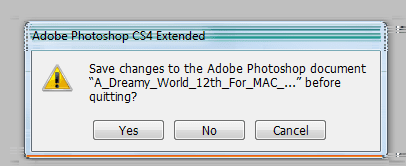
Ive been having this graphical problem ever since i upgraded to windows 7. At random times usually when under a state of graphical processing (closing/opening windows, moving windows clicking or hovering over the close/minimize/maximize buttons). sometimes they are small, and sometimes they cover the entire screen, making it difficult to see and click. Refreshing the page/window/program may get rid of them for the time, but they always come back.
i originally thought it was because i patched my theme files to use custom themes (using 'ux theme core'). but ive reinstalled windows and still i see these glitches.
I wonder if its the fact that my laptop has trouble running win7, because it was originally for vista. even though it passed the requirements.
my drivers are all up to date, and my computer is not even a year old.
can anyone shed some light on this?
Laptop Specs:
Dell Studio 1555
Windows 7 Ultimate x64, build 7600
intel core 2 duo processor
Video Adapter: Mobile Intel(R) 4 Series Express Chipset Family
Video Processor: Mobile Intel(R) 4 Series Express Chipset Family
Windows System Assessment
CPU Score 6.30 (Calculations per second)
Memory Score 6.30 (Memory operations per second)
Graphics Score 4.10 (Desktop performance for Windows Aero)
D3D Score 3.40 (3D business and gaming graphics performance)
Disk Score 5.60 (Disk data transfer rate)
Windows Experience Index 3.40 (Base score)
Glitch Pictures:



Ive been having this graphical problem ever since i upgraded to windows 7. At random times usually when under a state of graphical processing (closing/opening windows, moving windows clicking or hovering over the close/minimize/maximize buttons). sometimes they are small, and sometimes they cover the entire screen, making it difficult to see and click. Refreshing the page/window/program may get rid of them for the time, but they always come back.
i originally thought it was because i patched my theme files to use custom themes (using 'ux theme core'). but ive reinstalled windows and still i see these glitches.
I wonder if its the fact that my laptop has trouble running win7, because it was originally for vista. even though it passed the requirements.
my drivers are all up to date, and my computer is not even a year old.
can anyone shed some light on this?
Laptop Specs:
Dell Studio 1555
Windows 7 Ultimate x64, build 7600
intel core 2 duo processor
Video Adapter: Mobile Intel(R) 4 Series Express Chipset Family
Video Processor: Mobile Intel(R) 4 Series Express Chipset Family
Windows System Assessment
CPU Score 6.30 (Calculations per second)
Memory Score 6.30 (Memory operations per second)
Graphics Score 4.10 (Desktop performance for Windows Aero)
D3D Score 3.40 (3D business and gaming graphics performance)
Disk Score 5.60 (Disk data transfer rate)
Windows Experience Index 3.40 (Base score)
Glitch Pictures:
My Computer
- Computer Manufacturer/Model Number
- Dell Studio 1555
- OS
- Windows 7 Ultimate
