
Solved Random Internet Drops During Specific Time Period

shadok

New member
Local time
9:30 AM
Messages
6
Hey everyone, I looked around a bit and although I found quite a few similar issues, I was unable to find any exactly like the one I'm having.

Basically, every weekday, during the approximate hours of 7am-5pm, my internet will constantly drop. By this, I do not mean it completely stops working. I mean that every few seconds, or minutes, my internet will cut out for about 5 seconds. The reason that this is such a huge problem is I play online video games, and working random part-time hours quite often places me in between these hours when playing. Also, these drops take place even if I'm not on games. My computer will usually be the only one online, and no matter what I'm doing (even just doing something like reading an article online), the problem persists.

My ISP is Comcast, and my router is an ASUS RT-N56U.

Here is my system information:

OS Name Microsoft Windows 7 Home Premium
Version 6.1.7601 Service Pack 1 Build 7601
Other OS Description Not Available
OS Manufacturer Microsoft Corporation
System Name KYLE-PC
System Manufacturer System manufacturer
System Model System Product Name
System Type x64-based PC
Processor Intel(R) Core(TM) i7-3770 CPU @ 3.40GHz, 3401 Mhz, 4 Core(s), 8 Logical Processor(s)
BIOS Version/Date American Megatrends Inc. 0703, 2/14/2012
SMBIOS Version 2.7
Windows Directory C:\Windows
System Directory C:\Windows\system32
Boot Device \Device\HarddiskVolume1
Locale United States
Hardware Abstraction Layer Version = "6.1.7601.17514"
User Name Kyle-PC\Kyle
Time Zone Eastern Daylight Time
Installed Physical Memory (RAM) 16.0 GB
Total Physical Memory 16.0 GB
Available Physical Memory 12.7 GB
Total Virtual Memory 31.9 GB
Available Virtual Memory 27.4 GB
Page File Space 16.0 GB
Page File C:\pagefile.sys

I should also mention that the router is new, and the problem existed before I bought it. I believed that my old router was the problem, and clearly I am wrong. Also, my router has a WEP on it so there shouldn't be anyone leaching off of my network. These also are nowhere near peak hours, which adds even more confusion. I do live near a school, which would normally be open around these hours. However, it's summer.. so that isn't the case. Thanks in advance for any help!
 
Last edited:

My Computer

OS
Windows 7 64bit
You should change your wireless security to WPA2 with AES encryption.

The WEP you are using now is outdated and easily hacked into and usually will not work correctly with Windows 7 drivers. This could also cause the connection problems you are seeing now.

You should also uninstall any third party A/V software on this system as they are famous for causing such as you are describing.
 

My Computer

Computer type
PC/Desktop
Computer Manufacturer/Model Number
Home built
OS
Windows 7 Ult, Windows 8.1 Pro,
CPU
Q9650-4.275GHz, E8600 4.5GHz, E6750-3.8GHz
Motherboard
Evga 780i FTW
Memory
G.Skill PC2 9600 1200Mhz 5 5 5 15 2T
Graphics Card(s)
GTX480
Sound Card
Asus Xonar D2
Monitor(s) Displays
HannsG
Screen Resolution
1680X1050
Hard Drives
GSkill Phoenix Pro 120GB SSD
PSU
ThermalTake Toughpower 1000Watt modular
Case
ThermalTake XaserV
Cooling
Xigmatek S1283
Keyboard
Logitech G15
Mouse
Logitech G9
Internet Speed
T1
Thanks for the fast reply. I switched my router to WPA2 with AES encryption, and the problem still persists. As for A/V, I'm only using Security Essentials.
 

My Computer

OS
Windows 7 64bit
Thanks for the fast reply. I switched my router to WPA2 with AES encryption, and the problem still persists. As for A/V, I'm only using Security Essentials.

You will also want to change the security and encryption for this connection in Windows under "Manage Wireless Connections" in the network and sharing center. :)

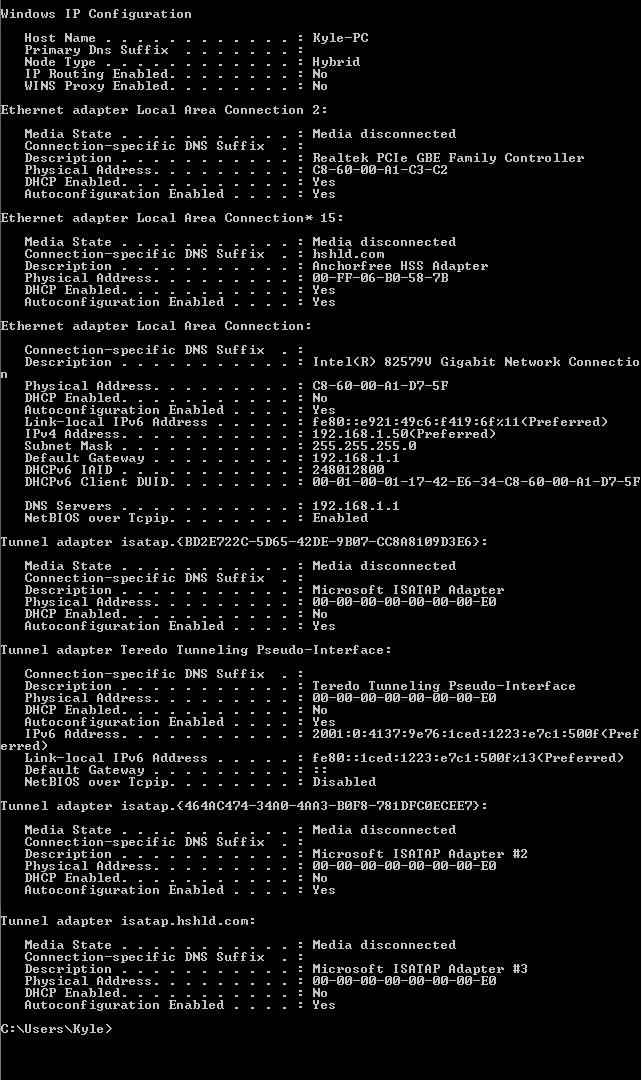
If you can post a screen shot of your ipconfig/all it may help me to post other problems.

This could also be a channel crossover problem. To find a clean channel install the Xirrus software which shows you which channels your neighbors are using. You can post the read out here if you need help. http://www.xirrus.com/Products/Wi-Fi-Inspector
 

My Computer

Computer type
PC/Desktop
Computer Manufacturer/Model Number
Home built
OS
Windows 7 Ult, Windows 8.1 Pro,
CPU
Q9650-4.275GHz, E8600 4.5GHz, E6750-3.8GHz
Motherboard
Evga 780i FTW
Memory
G.Skill PC2 9600 1200Mhz 5 5 5 15 2T
Graphics Card(s)
GTX480
Sound Card
Asus Xonar D2
Monitor(s) Displays
HannsG
Screen Resolution
1680X1050
Hard Drives
GSkill Phoenix Pro 120GB SSD
PSU
ThermalTake Toughpower 1000Watt modular
Case
ThermalTake XaserV
Cooling
Xigmatek S1283
Keyboard
Logitech G15
Mouse
Logitech G9
Internet Speed
T1
I was unable to find "Manage Wireless Connections", could this be because this connection is wired? Or is it simply because I'm a moron? :( I have a wired connection to my router. Either way, here is that screenshot:
IyN4p.png
 

My Computer

OS
Windows 7 64bit
Sorry I just assumed that when you mentioned using WEP security that you were using a wireless connection.

I don't see any problems with the ipconfig. Intermittent connection problem are hard to track down. Most likely it's a driver problem so updating the Intel driver may help.

If you haven't done so yet, you might want to try resetting your router and see if it has any effect on the problem.
 

My Computer

Computer type
PC/Desktop
Computer Manufacturer/Model Number
Home built
OS
Windows 7 Ult, Windows 8.1 Pro,
CPU
Q9650-4.275GHz, E8600 4.5GHz, E6750-3.8GHz
Motherboard
Evga 780i FTW
Memory
G.Skill PC2 9600 1200Mhz 5 5 5 15 2T
Graphics Card(s)
GTX480
Sound Card
Asus Xonar D2
Monitor(s) Displays
HannsG
Screen Resolution
1680X1050
Hard Drives
GSkill Phoenix Pro 120GB SSD
PSU
ThermalTake Toughpower 1000Watt modular
Case
ThermalTake XaserV
Cooling
Xigmatek S1283
Keyboard
Logitech G15
Mouse
Logitech G9
Internet Speed
T1
Sorry about the confusion there. I have tried resetting the router, and I've actually updated all of my drivers recently as well, neither of which worked. Since this problem always seems to occur at about the same time of day, could it be something that my ISP has done or needs to do? It just seems very strange to me that anything on my end could cause this considering it's always during a specific time period. If it were constant, obviously I would think it had to do with hardware/software. I plan on contacting my ISP, I just want to make sure it's something that they're needed for. I also want to try to get an idea of what the exact problem is, since those people are usually pretty clueless (being told to reset my modem/router 20 times, then paying them to come out and replace my modem only to have it not work is not my intention). Thanks again for the help thus far!
 

My Computer

OS
Windows 7 64bit
Sorry about the confusion there. I have tried resetting the router, and I've actually updated all of my drivers recently as well, neither of which worked. Since this problem always seems to occur at about the same time of day, could it be something that my ISP has done or needs to do? It just seems very strange to me that anything on my end could cause this considering it's always during a specific time period. If it were constant, obviously I would think it had to do with hardware/software. I plan on contacting my ISP, I just want to make sure it's something that they're needed for. I also want to try to get an idea of what the exact problem is, since those people are usually pretty clueless (being told to reset my modem/router 20 times, then paying them to come out and replace my modem only to have it not work is not my intention). Thanks again for the help thus far!

It would either be an installed program, hardware or software "as you suspect" maybe doing strange things or the ISP is having problems because it seems to be occurring on a schedule which is rather strange.
 

My Computer

Computer type
PC/Desktop
Computer Manufacturer/Model Number
Home built
OS
Windows 7 Ult, Windows 8.1 Pro,
CPU
Q9650-4.275GHz, E8600 4.5GHz, E6750-3.8GHz
Motherboard
Evga 780i FTW
Memory
G.Skill PC2 9600 1200Mhz 5 5 5 15 2T
Graphics Card(s)
GTX480
Sound Card
Asus Xonar D2
Monitor(s) Displays
HannsG
Screen Resolution
1680X1050
Hard Drives
GSkill Phoenix Pro 120GB SSD
PSU
ThermalTake Toughpower 1000Watt modular
Case
ThermalTake XaserV
Cooling
Xigmatek S1283
Keyboard
Logitech G15
Mouse
Logitech G9
Internet Speed
T1
I guess I'll try to contact my ISP in a bit, then I'll post back here with whether or not it was any help. Thanks again for the help so far.
 

My Computer

OS
Windows 7 64bit
I'll guess try to contact my ISP in a bit, then I'll post back here with whether or not it was any help. Thanks again for the help so far.

If it is from an installed program you might try uninstalling which ever programs could be causing this one at a time checking for consistent connectivity after each one is uninstalled. Process of elimination as it were.

If this is some sort of problem with the network stack or winsock then running the file below would fix that.

You can also try booting up in safe mode with networking to help determine if this is from an installed program or not.
http://www.sevenforums.com/tutorials/69585-safe-mode.html

You might also want to try using a different DNS server than the one you are using now.

You can do this by going into your routers settings and changing the DNS servers to something else like Google's DNS at 8.8.8.8 and 8.8.4.4
 

Attachments

My Computer

Computer type
PC/Desktop
Computer Manufacturer/Model Number
Home built
OS
Windows 7 Ult, Windows 8.1 Pro,
CPU
Q9650-4.275GHz, E8600 4.5GHz, E6750-3.8GHz
Motherboard
Evga 780i FTW
Memory
G.Skill PC2 9600 1200Mhz 5 5 5 15 2T
Graphics Card(s)
GTX480
Sound Card
Asus Xonar D2
Monitor(s) Displays
HannsG
Screen Resolution
1680X1050
Hard Drives
GSkill Phoenix Pro 120GB SSD
PSU
ThermalTake Toughpower 1000Watt modular
Case
ThermalTake XaserV
Cooling
Xigmatek S1283
Keyboard
Logitech G15
Mouse
Logitech G9
Internet Speed
T1
Thanks again for the input, I finally managed to fix the problem. I guess the guy who they sent out said that I had a lot of incoming and outgoing static? He basically checked that all of the cables in the house were tight, messed with all of the cables outside, then replaced the modem to be safe. Even he wasn't entirely sure what the exact problem was, and basically just did everything he could think of to try and ensure that it was fixed. Happy to finally be able to play games again without waiting all day for the drops to stop! :D
 

My Computer

OS
Windows 7 64bit
Back
Top