
misterkay2
New member
- Local time
- 5:17 PM
- Messages
- 7
Random "ping spikes/connection resetting" on computer's end, not route
Make and Model of Wi-Fi Driver and Laptop:
Wi-Fi Driver: Intel(R) Centrino(R) Ultimate-N 6300 AGN (Driver version 15.9.0.5. Last possible version for Win7, apparently, as support ended)
Laptop: Dell Latitude E6530
tl;dr: Large "ping spikes" on computer end. Not at fault of the router or anything from what I've tested. Wondering if some of the ideas I've got in mind are safe/worth trying. Also using this thread to log anything else I've tried, so that maybe if I fix this issue beyond "just use ethernet lol", I can archive it for any future users with this problem.
Context: Bought this laptop used off of Amazon for a decent steal, it's been working great for probably a couple of years now.
I wanted to upgrade to Internet Explorer 11 (so I could try out a very dumb flash emulator for an old MMO... long story, doesn't matter, didn't work out).
However, upon upgrading to Internet Explorer 11 at the time, my wi-fi has been having some very odd issues. Anything that was "streaming" worked just fine such as Youtube, Twitch, Discord, etc.
However... websites/applications that don't use whatever "rollback" (I guess that's the term?) these popular sites do, tend to constantly disconnect. Websites that limit download speeds to kilobytes per second, for example, or smaller, browser-based IRC stuff.
Alongside this, sometimes my browser just flat-out stops connecting for a bit. It'll be loading an image and then the image will just stop, or sometimes opening a link on a new tab just brings me to a blank page. Any error codes from Chromium told me that the "connection was reset".
Now normally, a smart user would just use System Restore to roll back before the updates. But for some reason or another, the "updates" installed with having Internet Explorer 11 didn't exactly register in Windows Update, so, it didn't automatically make a restore point, so I pretty much had nothing to fall back on.
However, at the same time, I noticed that Avast had planted its pretty little icon on my desktop despite not having it there before, maybe making me think that a recent update it had might also be part of the problem. I know Avast constantly probes at my internet, be it for its shield or for other reasons.
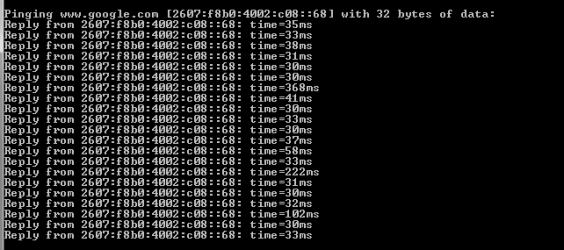
After some testing between router settings and my wi-fi driver settings, I've 100%, without a doubt, found it to be the latter. Going to router settings and pinging Google brings back stable results, meanwhile going to my command prompt and doing the same brought back this:
What I've already tried:
-Reverting back to IE8 and uninstalling updates related to IE11 (that i knew of... only problem was, after doing that, trying to load Windows did some weird stuff. like booting up with nothing at all but the background and the spinner for a while, then resetting before going back to normal)
-Power cycling router and modem
-Toying with driver settings (turning 802.11N mode off, changing wireless mode to 4 instead of 6, lowering roaming aggressiveness. changed everything back to normal once i realized it only made things worse)
(Note about changing wireless mode: Ping spikes were "lessened" in milliseconds, but, same problems occurred. This is why I put "ping spikes" in quotes, since I don't think ping spikes are the problem here... maybe.)
-Trying to find an older version of the driver and installing it (all it did was remove my driver entirely... had to do a system restore and pray for the best)
-Trying to update with the same version of the driver from archive.org's Dell backups (still didn't work, had to do another system restore)
(Note about installing drivers: Computer forces me to install through Intel's program)
-Checking what programs connected to the internet (forgot the exact command), only "hidden" ones were Avast and a core dell program.
-Setting Avast to passive mode (haven't fully uninstalled yet)
-Uninstalling any Avast shields that I think would connect with the internet (such as web shields, etc.)
-Installing pretty much every important/optional Windows Update that I think might improve stability, just in case
-Used ipconfig to flush dns and all that.
What I'm probably gonna try next:
-Uninstalling Avast through Control Panel -> Uninstall Program and just getting free MalwareBytes or something.
(normally this would be common sense, but... in my experience, programs don't uninstall all the way like I want them to. plus, it seems like uninstallers just get worse and worse and don't just delete the program)
-Giving up and going with an Ethernet cable... and tripping over wires, likely
What I'd really prefer not to do:
-Completely uninstall the driver and try to install the latest version I can find again (support's entirely ended for my driver... and with my past experience as I've noted, I'm kinda scared of just losing my wireless for good here)
-Reinstall windows (Don't exactly have a disc for that, aside from like, my external hard drive, but I've never really tried it before.)
Make and Model of Wi-Fi Driver and Laptop:
Wi-Fi Driver: Intel(R) Centrino(R) Ultimate-N 6300 AGN (Driver version 15.9.0.5. Last possible version for Win7, apparently, as support ended)
Laptop: Dell Latitude E6530
tl;dr: Large "ping spikes" on computer end. Not at fault of the router or anything from what I've tested. Wondering if some of the ideas I've got in mind are safe/worth trying. Also using this thread to log anything else I've tried, so that maybe if I fix this issue beyond "just use ethernet lol", I can archive it for any future users with this problem.
Context: Bought this laptop used off of Amazon for a decent steal, it's been working great for probably a couple of years now.
I wanted to upgrade to Internet Explorer 11 (so I could try out a very dumb flash emulator for an old MMO... long story, doesn't matter, didn't work out).
However, upon upgrading to Internet Explorer 11 at the time, my wi-fi has been having some very odd issues. Anything that was "streaming" worked just fine such as Youtube, Twitch, Discord, etc.
However... websites/applications that don't use whatever "rollback" (I guess that's the term?) these popular sites do, tend to constantly disconnect. Websites that limit download speeds to kilobytes per second, for example, or smaller, browser-based IRC stuff.
Alongside this, sometimes my browser just flat-out stops connecting for a bit. It'll be loading an image and then the image will just stop, or sometimes opening a link on a new tab just brings me to a blank page. Any error codes from Chromium told me that the "connection was reset".
Now normally, a smart user would just use System Restore to roll back before the updates. But for some reason or another, the "updates" installed with having Internet Explorer 11 didn't exactly register in Windows Update, so, it didn't automatically make a restore point, so I pretty much had nothing to fall back on.
However, at the same time, I noticed that Avast had planted its pretty little icon on my desktop despite not having it there before, maybe making me think that a recent update it had might also be part of the problem. I know Avast constantly probes at my internet, be it for its shield or for other reasons.
After some testing between router settings and my wi-fi driver settings, I've 100%, without a doubt, found it to be the latter. Going to router settings and pinging Google brings back stable results, meanwhile going to my command prompt and doing the same brought back this:
What I've already tried:
-Reverting back to IE8 and uninstalling updates related to IE11 (that i knew of... only problem was, after doing that, trying to load Windows did some weird stuff. like booting up with nothing at all but the background and the spinner for a while, then resetting before going back to normal)
-Power cycling router and modem
-Toying with driver settings (turning 802.11N mode off, changing wireless mode to 4 instead of 6, lowering roaming aggressiveness. changed everything back to normal once i realized it only made things worse)
(Note about changing wireless mode: Ping spikes were "lessened" in milliseconds, but, same problems occurred. This is why I put "ping spikes" in quotes, since I don't think ping spikes are the problem here... maybe.)
-Trying to find an older version of the driver and installing it (all it did was remove my driver entirely... had to do a system restore and pray for the best)
-Trying to update with the same version of the driver from archive.org's Dell backups (still didn't work, had to do another system restore)
(Note about installing drivers: Computer forces me to install through Intel's program)
-Checking what programs connected to the internet (forgot the exact command), only "hidden" ones were Avast and a core dell program.
-Setting Avast to passive mode (haven't fully uninstalled yet)
-Uninstalling any Avast shields that I think would connect with the internet (such as web shields, etc.)
-Installing pretty much every important/optional Windows Update that I think might improve stability, just in case
-Used ipconfig to flush dns and all that.
What I'm probably gonna try next:
-Uninstalling Avast through Control Panel -> Uninstall Program and just getting free MalwareBytes or something.
(normally this would be common sense, but... in my experience, programs don't uninstall all the way like I want them to. plus, it seems like uninstallers just get worse and worse and don't just delete the program)
-Giving up and going with an Ethernet cable... and tripping over wires, likely
What I'd really prefer not to do:
-Completely uninstall the driver and try to install the latest version I can find again (support's entirely ended for my driver... and with my past experience as I've noted, I'm kinda scared of just losing my wireless for good here)
-Reinstall windows (Don't exactly have a disc for that, aside from like, my external hard drive, but I've never really tried it before.)
Last edited:
My Computers
System One System Two
-
- Computer type
- Laptop
- Computer Manufacturer/Model Number
- Dell
- OS
- Windows 7 Professional x64 SP1
- CPU
- Intel Core i5 3210M @ 2.50GHz ( Ivy Bridge 22nm Technology )
- Motherboard
- Dell Inc. 0JC5MT (SOCKET 0)
- Graphics Card(s)
- Intel HD Graphics 4000 (Dell)
- Antivirus
- Avast
- Browser
- All
-
- Computer type
- PC/Desktop
