Random reboot during the win7 install

dexyy

New member
Local time
5:33 PM
Messages
6
Hi

I have a fujtisu siemens laptop and I use XP home now.
I would like to use other OS but when I install it, the laptop is rebooting after having chosen to boot.

I tried to install XP pro but I couldnt... I choice the correct boot device (optical dvd) and when the blue screen show(initializing the installer) the laptop reboot:(

I thought my optical driver went wrong. My xp home is good therefore first i tried to install after when i logged on my xp home:
the win7 installer copy the neccesary files etc. and when it finished i had to restart tha laptop.
When the boot mgr showed I chose the windows 7 but after this it restarted...
i chose same and it restarted again...

I tried other fujitsu laptop but the problem is same:(

does anobody have any ide what is the wrong?

Please help me
 

My Computer

OS
windows 7
A very common issue is that your XP Home (if it came installed on the lappy) contains files necessary for the lappy (needed by the BIOS). This is a purposeful setup by the lappy maker. Your XP Pro disc (maybe retail version, maybe from a different lappy) does not contain the needed files.

There are ways around this and a couple of lengthy threads here that detail the issue. I'll see if I can remember where they are.

Monk
 

My Computer

Computer Manufacturer/Model Number
Custom
OS
Dual boot XP Pro SP3x86 and Win7 Pro x64
CPU
AMD Phenom II x3 720 BE OCed to 3.3 GHz
Motherboard
Asus M3A79T Deluxe
Memory
2x2GB OCZ OCZ2RPR10664GK PC2-8500 DDR2
Graphics Card(s)
Sapphire ATi Radeon 4830 HD x2 (XFire)
Sound Card
Integrated (SoundMax)
Monitor(s) Displays
Dual: LG L227WTG/LG M237WD
Screen Resolution
1680 x 1050; 1920 x1280
Hard Drives
3 WDC WD7501AALS-00J7B0
PSU
Zalman 750HD Modular
Case
Antec 900
Cooling
4 120mm, 1 200mm fans
Keyboard
Black with lots of keys
Mouse
Razer Lachesis, Logitech RumbePad2, Logitech Marble
Internet Speed
Who counts
Other Info
7:1 SS
Boot the WIn7 DVD, press Shift F10 as it is booting up, which opens a Command Line, type:

DISKPART
LIST DISK
SELECT DISK # (for Windows 7 disk)
clean
create partition primary
select partition 1
assign letter=c:
active
format
exit

Now boot the WIn7 DVD, select Install Now and Custom Install to the partition you have created.

When installation restarts do not choose any boot menu items at all, until it asks you for User input.
 
Boot the WIn7 DVD, press Shift F10 as it is booting up, which opens a Command Line, type:

DISKPART
LIST DISK
SELECT DISK # (for Windows 7 disk)
clean
create partition primary
select partition 1
assign letter=c:
active
format
exit

Now boot the WIn7 DVD, select Install Now and Custom Install to the partition you have created.

When installation restarts do not choose any boot menu items at all, until it asks you for User input.


I cant boot from dvd... because when start the booting from dvd it restarts
i cant get over there:(

I tried to format full winchester with xp cd but it doesnt boot too
 

My Computer

OS
windows 7
Try tapping Shift F10 while booting the DVD anyway to see if it works.

What do you mean it restarts? Does it start up Windows?

Are you getting a "Press any key to boot from CD/DVD" prompt?

Follow this exactly: Boot from CD - How to Boot your Computer from a Bootable CD or DVD - Boot to CD

While in BIOS setup, see if you can set SATA controller to AHCI, then try install. Next try IDE.

Also in BIOS check what version you have and compare it to latest BIOS version on the manufacturer's SUpport Downloads webpage for your model computer or mobo.
 
Did the DVD come with an Upgrade Kit for a Vista machine you bought?

If so, this will only sometimes work on another machine.

Are you sure it is Win7 DVD install media? Open or Explore the files on DVD and post back what they are.
 
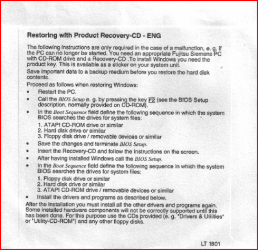
How to install Win XP on a Fujitsu Siemens.

Capture.PNG
 

My Computer

OS
ME/XP/Vista/Win7
Did the DVD come with an Upgrade Kit for a Vista machine you bought?

If so, this will only sometimes work on another machine.

Are you sure it is Win7 DVD install media? Open or Explore the files on DVD and post back what they are.

The win 7 dvd isnt upgrade version. I should be able to install it:confused:
I bought the laptop with xp home (preinstalled) and got a xp home cd. I tried to the boot with but it reboot during the boot (when blue screen is showed):(

I can see only these folders and files on dvd:

boot
efi
sources
support
upgrade(netfx)
autorun.inf
bootmgr
MediaMeta.xml
setup.exe
 

My Computer

OS
windows 7
Did the DVD come with an Upgrade Kit for a Vista machine you bought?

If so, this will only sometimes work on another machine.

Are you sure it is Win7 DVD install media? Open or Explore the files on DVD and post back what they are.

The win 7 dvd isnt upgrade version. I should be able to install it:confused:
I bought the laptop with xp home (preinstalled) and got a xp home cd. I tried to the boot with but it reboot during the boot (when blue screen is showed):(

I can see only these folders and files on dvd:

boot
efi
sources
support
upgrade(netfx)
autorun.inf
bootmgr
MediaMeta.xml
setup.exe

You said you "got DVD from other PC" so it sounded like it came with it.

This is a Win7 DVD installer so it should boot if you follow the steps given in earlier posts to boot DVD or troubleshoot boot failure.

You do want to install Win7 on this machine, correct? Are you going to remove it from any other machine it is installed on to use the Product Key for this install, or buy another Product Key to use on this one?

Or do you want to reinstall XP?
 
Back
Top