Random "Resolving Host..." requiring reboot

Halestormed

New member
Local time
12:45 PM
Messages
11
This particular problem has been driving me nuts for a few weeks now. I'll be happily browsing, usually in Chrome, when all of a sudden pages stop loading with the "Resolving Host..." message in the bottom left corner. The page will then never load and nor will any other, and I'll usually get the dinosaur pic with no internet connection message if I open new tabs. The connection itself doesn't go down as any downloads I may have going will continue as normal. I've tried every suggestion I could find online, from changing DNS server to Google, reinstalling network card, adobe flash, browser extensions, java, but none of it seems to make any difference. I may be able to browse for an hour or 5 minutes but the more I fiddle the worse it seems to get. Any help would be greatly appreciated. Cheers.
 

My Computer

Computer type
PC/Desktop
Computer Manufacturer/Model Number
custom build
OS
Windows 7 Ultimate x64 SP1
CPU
AMD FX(tm)-4300 Quad-Core 3.80GHz
Motherboard
Gigabyte 990FXA-UD3
Memory
4.00GB
Graphics Card(s)
ATI Radeon HD4890
Hard Drives
Kingston 120GB Solid-state Sata (C: drive)
2x WDC 1TB Sata
Antivirus
avast!
Browser
Google Chrome
sounds to me like your modem and router need a reset. Unplug both of them, then wait about a minute; the plug the modem back in and let it fully boot; then plug the router back in and let it boot fully. If its a all in one modem and router just unplug it, wait a minute or so then plug it back in to hopefully reset the connection.
 

My Computer

Computer type
PC/Desktop
Computer Manufacturer/Model Number
custom built
OS
Windows 7 ultimate 64-bit
CPU
Intel I7 2600K 3.4ghz
Motherboard
Asus Evo P8P67
Memory
Corsair 16gb ddr3 1600mhz
Graphics Card(s)
Nvidia Geforce gt 430
Sound Card
Sound Blaster Titanium x-fi pci express
Monitor(s) Displays
Dell E198WFP
Hard Drives
1 western digital 2TB drive.
PSU
Antec 1200 watt
Case
Inwin Dragon Rider
Cooling
6 case supplied cooling fans
Keyboard
logitech mk700
Mouse
logitech m705
Internet Speed
25-50mbps download; 10mbps upload(i think)
Antivirus
avg free 2014
Browser
mozilla firefox
Other Info
Also have a pretty bad speaker setup which is a klipsch promedia 5.1 surround speaker setup with huge subwoofer and lg blu ray player/writer. Also a hp officejet pro 8600 plus wireless all in one and a logitech s7500 webcam.
It might, in fact, be the one thing I've overlooked. Done it now...see how it goes I suppose. Cheers,
 

My Computer

Computer type
PC/Desktop
Computer Manufacturer/Model Number
custom build
OS
Windows 7 Ultimate x64 SP1
CPU
AMD FX(tm)-4300 Quad-Core 3.80GHz
Motherboard
Gigabyte 990FXA-UD3
Memory
4.00GB
Graphics Card(s)
ATI Radeon HD4890
Hard Drives
Kingston 120GB Solid-state Sata (C: drive)
2x WDC 1TB Sata
Antivirus
avast!
Browser
Google Chrome
Ah well, it worked for an evening and about an hour today, then back to "resolving host..." again.
 

My Computer

Computer type
PC/Desktop
Computer Manufacturer/Model Number
custom build
OS
Windows 7 Ultimate x64 SP1
CPU
AMD FX(tm)-4300 Quad-Core 3.80GHz
Motherboard
Gigabyte 990FXA-UD3
Memory
4.00GB
Graphics Card(s)
ATI Radeon HD4890
Hard Drives
Kingston 120GB Solid-state Sata (C: drive)
2x WDC 1TB Sata
Antivirus
avast!
Browser
Google Chrome
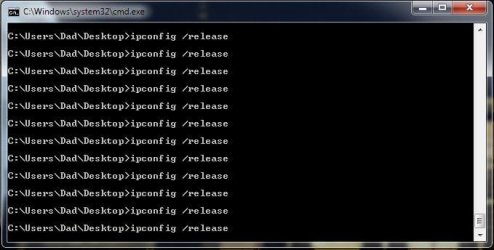
I've tried the ipconfig/ release thing etc but that doesn't seem to work. Could this be related? If I open a command prompt and type in ipconfig/ release it just keeps scrolling down forever. Consequently, I can never get to ipconfig /renew. Any more ideas would be greatly welcomed while I still have some hair to pull out.
 

My Computer

Computer type
PC/Desktop
Computer Manufacturer/Model Number
custom build
OS
Windows 7 Ultimate x64 SP1
CPU
AMD FX(tm)-4300 Quad-Core 3.80GHz
Motherboard
Gigabyte 990FXA-UD3
Memory
4.00GB
Graphics Card(s)
ATI Radeon HD4890
Hard Drives
Kingston 120GB Solid-state Sata (C: drive)
2x WDC 1TB Sata
Antivirus
avast!
Browser
Google Chrome
Welcome to Seven Forums Halestormed. Try creating and running this bat file by Jacee, see if that works;

@Echo on
pushd\windows\system32\drivers\etc
attrib -h -s -r hosts
echo 127.0.0.1 localhost>HOSTS
attrib +r +h +s hosts
popd
ipconfig /release
ipconfig /renew
ipconfig /flushdns
netsh winsock reset all
netsh int ip reset all
shutdown -r -t 1
del %0


Save as flush.bat to your desktop.
Double click on the flush.bat file to run it.Vista and Windows 7... right click the .bat file and choose to run as Administrator. Your computer will reboot itself.

If no go, try booting to Safe Mode and running the bat file there.

http://www.sevenforums.com/tutorials/69585-safe-mode.html

A Guy
 

My Computer

Computer type
PC/Desktop
OS
Windows 10 Home x64
CPU
INTEL Core i5-750 Quad-Core 3.37GHz
Motherboard
ASUS P7P55D
Memory
HyperX Fury Black Series 8GB (2 x 4GB) 1866Mhz
Graphics Card(s)
EVGA GeForce GTX 750 Superclocked 1GB 128-Bit GDDR5
Monitor(s) Displays
LG 32MA68HY 32" IPS
Screen Resolution
1920 x 1080
Hard Drives
Samsung 840 Evo 120GB, SEAGATE 500GB Barracuda® 7200.12, SATA 3 Gb/s, 7200 RPM, 16MB cache
PSU
ANTEC TruePower New TP-550, 80 PLUS, 550W
Case
ANTEC Three Hundred Illusion
Cooling
COOLER MASTER Hyper 212 Plus, 4 x 120mm 1 x 140mm Noctua's
Internet Speed
85 + Mbps
Antivirus
Avast
Browser
Vivaldi
Hi A Guy. Thanks for that. Tried it and it gets stuck with the command box open and endlessly scrolling "ipconfig /release". It did the same thing when I tried it in safe mode. I'm at a loss.
 

My Computer

Computer type
PC/Desktop
Computer Manufacturer/Model Number
custom build
OS
Windows 7 Ultimate x64 SP1
CPU
AMD FX(tm)-4300 Quad-Core 3.80GHz
Motherboard
Gigabyte 990FXA-UD3
Memory
4.00GB
Graphics Card(s)
ATI Radeon HD4890
Hard Drives
Kingston 120GB Solid-state Sata (C: drive)
2x WDC 1TB Sata
Antivirus
avast!
Browser
Google Chrome
When you say
endlessly scrolling "ipconfig /release"
, what exactly does that mean? A screenshot if possible

http://www.sevenforums.com/tutorials/9733-screenshots-files-upload-post-seven-forums.html

It may not be the cause of your issue, but it is puzzling. Can you run an ipconfig /all and post a txt of that as well?

Start> In search box type cmd> Right click on cmd.exe in results above and choose Run as administrator> When command prompt opens type

ipconfig /all

Enter

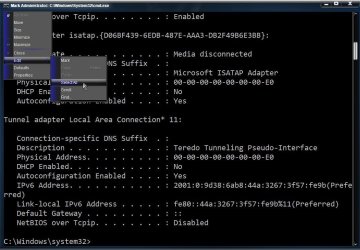
To copy the output, click the little command prompt icon in the upper left> Edit> Mark

Mark.jpg

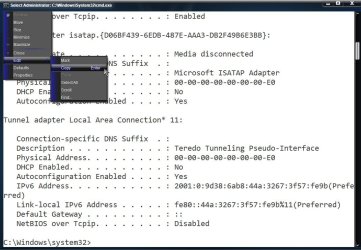
Click the little command prompt icon in the upper left> Edit> Select all

Select.jpg

Click the little command prompt icon in the upper left> Edit> Copy

Copy.jpg

Open notepad and paste the text there (Right click> Paste or Ctrl-V)

Attach the txt file to your next post.

A Guy
 

My Computer

Computer type
PC/Desktop
OS
Windows 10 Home x64
CPU
INTEL Core i5-750 Quad-Core 3.37GHz
Motherboard
ASUS P7P55D
Memory
HyperX Fury Black Series 8GB (2 x 4GB) 1866Mhz
Graphics Card(s)
EVGA GeForce GTX 750 Superclocked 1GB 128-Bit GDDR5
Monitor(s) Displays
LG 32MA68HY 32" IPS
Screen Resolution
1920 x 1080
Hard Drives
Samsung 840 Evo 120GB, SEAGATE 500GB Barracuda® 7200.12, SATA 3 Gb/s, 7200 RPM, 16MB cache
PSU
ANTEC TruePower New TP-550, 80 PLUS, 550W
Case
ANTEC Three Hundred Illusion
Cooling
COOLER MASTER Hyper 212 Plus, 4 x 120mm 1 x 140mm Noctua's
Internet Speed
85 + Mbps
Antivirus
Avast
Browser
Vivaldi
Hi again. OK here's a (I hope) screenshot of what I get when I try to run flush.bat from my desktop.

Clipboard02.jpg

Here's a text file of my ipconfig /all:

View attachment ipconfigall.txt

Good luck.
 

My Computer

Computer type
PC/Desktop
Computer Manufacturer/Model Number
custom build
OS
Windows 7 Ultimate x64 SP1
CPU
AMD FX(tm)-4300 Quad-Core 3.80GHz
Motherboard
Gigabyte 990FXA-UD3
Memory
4.00GB
Graphics Card(s)
ATI Radeon HD4890
Hard Drives
Kingston 120GB Solid-state Sata (C: drive)
2x WDC 1TB Sata
Antivirus
avast!
Browser
Google Chrome
I don't see anything odd in the txt, there are 2 VPN adaptors listed? I'll ask for some other eyes on this since I'm on a different time then you, and I've never experienced the looping issue. As I say, it may ultimately not be connected to your problem, but it is an oddity/concern. Your original problem is a DNS issue of some sort. A Guy
 

My Computer

Computer type
PC/Desktop
OS
Windows 10 Home x64
CPU
INTEL Core i5-750 Quad-Core 3.37GHz
Motherboard
ASUS P7P55D
Memory
HyperX Fury Black Series 8GB (2 x 4GB) 1866Mhz
Graphics Card(s)
EVGA GeForce GTX 750 Superclocked 1GB 128-Bit GDDR5
Monitor(s) Displays
LG 32MA68HY 32" IPS
Screen Resolution
1920 x 1080
Hard Drives
Samsung 840 Evo 120GB, SEAGATE 500GB Barracuda® 7200.12, SATA 3 Gb/s, 7200 RPM, 16MB cache
PSU
ANTEC TruePower New TP-550, 80 PLUS, 550W
Case
ANTEC Three Hundred Illusion
Cooling
COOLER MASTER Hyper 212 Plus, 4 x 120mm 1 x 140mm Noctua's
Internet Speed
85 + Mbps
Antivirus
Avast
Browser
Vivaldi
Open a command prompt - std is fine for this exercise

type the following commands

cd \

dir /s /a ipcon*.* > "%USERPROFILE%\Downloads\ListIPcon.txt"
exit

In Windows Explorer, navigate to your Downloads folder
Attatch ListIPcon.txt to a new post (use the paperclip icon on the posting menu)

Notes:
%USERPROFILE% is a variable that points to your User Profile (i.e C:\Users\Dad)
You can see all variable assignments if you type the command set in a command prompt window

This might tell you why the ipconfig /release loops. Then once that is resolved, you can move forward.
I think ipconfig with any option will loop - because there's a batch file that gets launched instead of the exe file. The list will tell you (or me) if that's the case.
 

My Computer

Computer type
Laptop
Computer Manufacturer/Model Number
HP Pavilion dv6-6c10us
OS
x64 (6.3.9600) Win8.1 Pro & soon dual boot x64 (6.1.7601) Win7_SP1 HomePrem
CPU
AMD A6-3420M APU with Radeon(tm) HD Graphics
Motherboard
Hewlett-Packard 1805
Memory
6.00 GB
Graphics Card(s)
AMD Radeon(TM) HD 6520G
Sound Card
(1) AMD High Definition Audio Device (2) IDT High Definiti
Monitor(s) Displays
HP W2072a 20" LCD (1600 x 900) @ 60 Hz
Screen Resolution
1366 x 768 x 32 bits (4294967296 colors) @ 60 Hz
Hard Drives
ST640LM0 00 HM641JI SATA Disk Device
Keyboard
Logitech k520 wireless KB
Mouse
Logitech m320 wireless mouse (bundled with KB)
Internet Speed
15/5 | 54 MB Wireless 'n'
Antivirus
Realtime: Defender or Avast | On-demand: Malwarebytes, ESET
Browser
IE 11 on Win8, IE 10 on win 7
Other Info
Media: [Gimp, Audacity, VLC] || Comm: [WEmail 2012, Skype] || Productivity: [OpenOffice,| Textpad] || Utils: [Sysinternals, cCleaner, Speccy, Defraggler]
I think you're right Slartybart. The file I was using to release/renew my ipconfig was named ipconfig.bat and was looping because of that. Once I renamed it ipconfig2.bat it ran as it should.

View attachment ipconfigall.txt
 

My Computer

Computer type
PC/Desktop
Computer Manufacturer/Model Number
custom build
OS
Windows 7 Ultimate x64 SP1
CPU
AMD FX(tm)-4300 Quad-Core 3.80GHz
Motherboard
Gigabyte 990FXA-UD3
Memory
4.00GB
Graphics Card(s)
ATI Radeon HD4890
Hard Drives
Kingston 120GB Solid-state Sata (C: drive)
2x WDC 1TB Sata
Antivirus
avast!
Browser
Google Chrome
Oh, and the 2 VPN adaptors are both like Hotspot Shield, which I occasionally use but does not run at startup. I've tried uninstalling it, and it disappears from ipconfig /all but doesn't fix the problem of "resolving host..." so I put it back.
 

My Computer

Computer type
PC/Desktop
Computer Manufacturer/Model Number
custom build
OS
Windows 7 Ultimate x64 SP1
CPU
AMD FX(tm)-4300 Quad-Core 3.80GHz
Motherboard
Gigabyte 990FXA-UD3
Memory
4.00GB
Graphics Card(s)
ATI Radeon HD4890
Hard Drives
Kingston 120GB Solid-state Sata (C: drive)
2x WDC 1TB Sata
Antivirus
avast!
Browser
Google Chrome
Cool - but ...

The release / renew did not solve the issue.

The only thing I can think of is that there is some redirection going on, hence the "Resolving host..."

Please run the following utilities

TFC - cleans up temporary files across your system
restart the machine

AdwCleaner - checks for and fixes malware
restart the machine

After that, you might have to dig deeper into hosts and browser proxies - but see if TFC or AdwCleaner solve it.

Restart your machine in case there are any system operations pending

Click here to download Old Timer-TFC.
>> save the application to your Desktop.
:info: Old Timer-TFC is a standalone application, there is no install.

:warn:Save your work and close all open windows.
TFC will close ALL open programs including your browser!

Right click, run as administrator TFC

Click the Start button to begin the cleaning up temporary files and folders.
:warn: Do not work on other things while TFC is running - most applications use some sort of temporary files. Just let TFC run by itself on the machine until it completes.

:busted: If TFC prompts you to reboot, do so immediately.
:busted: If TFC does NOT prompt you, then reboot your machine immediately after TFC has completed.


AdwCleaner is a two step process. Scan then Clean

Click here to download AdwCleaner (author: Xplode)
--> save the application to your Desktop.

  • Right-click AdwCleaner.exe on your Desktop and select Run As Administrator to run the scanner with full privilege rights.
    AdwCleaner is a standalone executable, there is no install.

  • Click on the Scan button.
    • AdwCleaner begins scanning your system. It might take some time to complete.

    • Review the detected objects grouped under each of the tabs.
      --> If there is something you KNOW should NOT be cleaned, clear the checkbox
      picture.php
      next to the object. If you're not sure about an object, paste the scan logfile (AdwCleaner[R#].txt) in a new post for a member to review and advise you.
      Otherwise, go to the next step.

  • After the scan has finished and you have reviewed the objects to be cleaned, click on the Clean button.
    • Answer OK to the close all programs prompt, then follow the onscreen prompts.
    • Answer OK to the restart the computer prompt to complete the removal process.
      The AdwCleaner log file is opened in your default Text editor when the machine has restarted.
      Each time AdwCleaner runs, the log file number [#] is incremented, the highest number is the most recent. There are two log files, one for the scan (AdwCleaner[R#].txt) and one for the clean (AdwCleaner[S#].txt).
Paste the entire clean logfile (AdwCleaner[S#].txt) in your next post.
--> AdwCleaner logs are located in the C:\AdwCleaner folder if you need to reference them again
 

My Computer

Computer type
Laptop
Computer Manufacturer/Model Number
HP Pavilion dv6-6c10us
OS
x64 (6.3.9600) Win8.1 Pro & soon dual boot x64 (6.1.7601) Win7_SP1 HomePrem
CPU
AMD A6-3420M APU with Radeon(tm) HD Graphics
Motherboard
Hewlett-Packard 1805
Memory
6.00 GB
Graphics Card(s)
AMD Radeon(TM) HD 6520G
Sound Card
(1) AMD High Definition Audio Device (2) IDT High Definiti
Monitor(s) Displays
HP W2072a 20" LCD (1600 x 900) @ 60 Hz
Screen Resolution
1366 x 768 x 32 bits (4294967296 colors) @ 60 Hz
Hard Drives
ST640LM0 00 HM641JI SATA Disk Device
Keyboard
Logitech k520 wireless KB
Mouse
Logitech m320 wireless mouse (bundled with KB)
Internet Speed
15/5 | 54 MB Wireless 'n'
Antivirus
Realtime: Defender or Avast | On-demand: Malwarebytes, ESET
Browser
IE 11 on Win8, IE 10 on win 7
Other Info
Media: [Gimp, Audacity, VLC] || Comm: [WEmail 2012, Skype] || Productivity: [OpenOffice,| Textpad] || Utils: [Sysinternals, cCleaner, Speccy, Defraggler]
OK, ran both those programs. I unchecked hotspot shield entries from adwcleaner clean but then decided I'd uninstall it, remove its entries under network adapters in device manager and run adwcleaner again. I'll post both logs.

First one:

# AdwCleaner v3.310 - Report created 22/09/2014 at 20:07:22
# Updated 12/09/2014 by Xplode
# Operating System : Windows 7 Ultimate Service Pack 1 (64 bits)
# Username : Dad - PAUL
# Running from : C:\Users\Dad\Desktop\AdwCleaner.exe
# Option : Clean

***** [ Services ] *****

[x] Not Deleted : hshld
[x] Not Deleted : hsstrayservice
[x] Not Deleted : hsswd

***** [ Files / Folders ] *****

[x] Not Deleted : C:\ProgramData\hotspot shield
[x] Not Deleted : C:\ProgramData\Microsoft\Windows\Start Menu\Programs\hotspot shield
[x] Not Deleted : C:\Program Files (x86)\hotspot shield
[x] Not Deleted : C:\Windows\SysWOW64\hotspot shield
[x] Not Deleted : C:\Users\Dad\AppData\Roaming\hotspot shield

***** [ Scheduled Tasks ] *****


***** [ Shortcuts ] *****


***** [ Registry ] *****

Key Deleted : HKLM\SOFTWARE\Microsoft\Tracing\au__rasapi32
Key Deleted : HKLM\SOFTWARE\Microsoft\Tracing\au__rasmancs
Key Deleted : HKLM\SOFTWARE\Classes\AppID\{C007DADD-132A-624C-088E-59EE6CF0711F}
Key Deleted : HKCU\Software\Microsoft\Internet Explorer\SearchScopes\{014DB5FA-EAFB-4592-A95B-F44D3EE87FA9}
[x] Not Deleted : HKCU\Software\anchorfree
Key Deleted : HKCU\Software\IM
Key Deleted : HKCU\Software\SweetIM
Key Deleted : HKCU\Software\usyndication.com
[x] Not Deleted : HKLM\SOFTWARE\hotspotshield
Key Deleted : HKLM\SOFTWARE\SweetIM
[x] Not Deleted : HKLM\SOFTWARE\Microsoft\Windows\CurrentVersion\Uninstall\hotspotshield
[x] Not Deleted : [x64] HKCU\Software\anchorfree

***** [ Browsers ] *****

-\\ Internet Explorer v8.0.7601.17514


-\\ Google Chrome v37.0.2062.120

[ File : C:\Users\Dad\AppData\Local\Google\Chrome\User Data\Default\preferences ]


*************************

AdwCleaner[R0].txt - [2004 octets] - [20/07/2014 21:59:50]
AdwCleaner[R1].txt - [2172 octets] - [22/09/2014 19:56:35]
AdwCleaner[S0].txt - [1783 octets] - [20/07/2014 22:11:43]
AdwCleaner[S1].txt - [1910 octets] - [22/09/2014 20:07:22]

########## EOF - C:\AdwCleaner\AdwCleaner[S1].txt - [1970 octets] ##########


Second one:

# AdwCleaner v3.310 - Report created 22/09/2014 at 20:27:16
# Updated 12/09/2014 by Xplode
# Operating System : Windows 7 Ultimate Service Pack 1 (64 bits)
# Username : Dad - PAUL
# Running from : C:\Users\Dad\Desktop\AdwCleaner.exe
# Option : Clean

***** [ Services ] *****

[#] Service Deleted : hsswd

***** [ Files / Folders ] *****

Folder Deleted : C:\ProgramData\Microsoft\Windows\Start Menu\Programs\hotspot shield
Folder Deleted : C:\Windows\SysWOW64\hotspot shield

***** [ Scheduled Tasks ] *****


***** [ Shortcuts ] *****


***** [ Registry ] *****


***** [ Browsers ] *****

-\\ Internet Explorer v8.0.7601.17514


-\\ Google Chrome v37.0.2062.120

[ File : C:\Users\Dad\AppData\Local\Google\Chrome\User Data\Default\preferences ]


*************************

AdwCleaner[R0].txt - [2004 octets] - [20/07/2014 21:59:50]
AdwCleaner[R1].txt - [2172 octets] - [22/09/2014 19:56:35]
AdwCleaner[R2].txt - [1182 octets] - [22/09/2014 20:26:15]
AdwCleaner[S0].txt - [1783 octets] - [20/07/2014 22:11:43]
AdwCleaner[S1].txt - [2054 octets] - [22/09/2014 20:07:22]
AdwCleaner[S2].txt - [1114 octets] - [22/09/2014 20:27:16]

########## EOF - C:\AdwCleaner\AdwCleaner[S2].txt - [1174 octets] ##########


Cheers
 

My Computer

Computer type
PC/Desktop
Computer Manufacturer/Model Number
custom build
OS
Windows 7 Ultimate x64 SP1
CPU
AMD FX(tm)-4300 Quad-Core 3.80GHz
Motherboard
Gigabyte 990FXA-UD3
Memory
4.00GB
Graphics Card(s)
ATI Radeon HD4890
Hard Drives
Kingston 120GB Solid-state Sata (C: drive)
2x WDC 1TB Sata
Antivirus
avast!
Browser
Google Chrome
Thanks - any change in issue status?

Also, I just want to make sure that you have restarted your machine after the 2nd AdwCleaner run.

+ edit
Sheesh! I almost missed it

Please follow the SweetPacks removal instructions here:
SweetPacks Toolbar and SweetIM Toolbar Removal Guide

Basically, AdwCleaner is the main tool, but it is preceded by Rkill (kills rogue process first) and succeeded by Malwarebytes as a follow-up / clean-up tool

All instructions are in the guide - post the logs here please.

step 21 in the guide suggests Secunia to detect vulnerable apps - you can skip this step.​
- edit
 

My Computer

Computer type
Laptop
Computer Manufacturer/Model Number
HP Pavilion dv6-6c10us
OS
x64 (6.3.9600) Win8.1 Pro & soon dual boot x64 (6.1.7601) Win7_SP1 HomePrem
CPU
AMD A6-3420M APU with Radeon(tm) HD Graphics
Motherboard
Hewlett-Packard 1805
Memory
6.00 GB
Graphics Card(s)
AMD Radeon(TM) HD 6520G
Sound Card
(1) AMD High Definition Audio Device (2) IDT High Definiti
Monitor(s) Displays
HP W2072a 20" LCD (1600 x 900) @ 60 Hz
Screen Resolution
1366 x 768 x 32 bits (4294967296 colors) @ 60 Hz
Hard Drives
ST640LM0 00 HM641JI SATA Disk Device
Keyboard
Logitech k520 wireless KB
Mouse
Logitech m320 wireless mouse (bundled with KB)
Internet Speed
15/5 | 54 MB Wireless 'n'
Antivirus
Realtime: Defender or Avast | On-demand: Malwarebytes, ESET
Browser
IE 11 on Win8, IE 10 on win 7
Other Info
Media: [Gimp, Audacity, VLC] || Comm: [WEmail 2012, Skype] || Productivity: [OpenOffice,| Textpad] || Utils: [Sysinternals, cCleaner, Speccy, Defraggler]
Please DO NOT reinstall HotSpot shield - it might contain some malware. A cursory search shows a few things associated with that pgm.
Anchorfree might be the most difficult as it might have roots.

The malware might have come from someplace else, but there are indications that hotspot on some machines introduced the bad guys. FB is another possible source of infection (indicated in the search results).
 

My Computer

Computer type
Laptop
Computer Manufacturer/Model Number
HP Pavilion dv6-6c10us
OS
x64 (6.3.9600) Win8.1 Pro & soon dual boot x64 (6.1.7601) Win7_SP1 HomePrem
CPU
AMD A6-3420M APU with Radeon(tm) HD Graphics
Motherboard
Hewlett-Packard 1805
Memory
6.00 GB
Graphics Card(s)
AMD Radeon(TM) HD 6520G
Sound Card
(1) AMD High Definition Audio Device (2) IDT High Definiti
Monitor(s) Displays
HP W2072a 20" LCD (1600 x 900) @ 60 Hz
Screen Resolution
1366 x 768 x 32 bits (4294967296 colors) @ 60 Hz
Hard Drives
ST640LM0 00 HM641JI SATA Disk Device
Keyboard
Logitech k520 wireless KB
Mouse
Logitech m320 wireless mouse (bundled with KB)
Internet Speed
15/5 | 54 MB Wireless 'n'
Antivirus
Realtime: Defender or Avast | On-demand: Malwarebytes, ESET
Browser
IE 11 on Win8, IE 10 on win 7
Other Info
Media: [Gimp, Audacity, VLC] || Comm: [WEmail 2012, Skype] || Productivity: [OpenOffice,| Textpad] || Utils: [Sysinternals, cCleaner, Speccy, Defraggler]
I'm having connectivity issues myself - will be off until resolved. - It's an ISP issue

I'll post some instructions and check back when I can

These will reset configurations to defaults, any browser cutomization will be lost

Reset hosts: How can I reset the Hosts file back to the default?

Reset ALL browsers
IE: http://www.sevenforums.com/tutorials/1222-internet-explorer-reset.html
FF: http://www.sevenforums.com/tutorials/272396-firefox-reset-default.html
Chrome: http://www.sevenforums.com/tutorials/272251-chrome-browser-reset-default.html

Run the IPconfig2.bat file again

Restart your machine

Report on the staus of the issue

Follow this tutorial - you should ask for help on anything it detects (ie skip the Virustotal check yourself)
http://www.sevenforums.com/tutorials/339342-herdprotect-malware-detection.html

There might be addional malware scans, but another member will have to guide you until I have a stable connection again.


Bill
.
 

My Computer

Computer type
Laptop
Computer Manufacturer/Model Number
HP Pavilion dv6-6c10us
OS
x64 (6.3.9600) Win8.1 Pro & soon dual boot x64 (6.1.7601) Win7_SP1 HomePrem
CPU
AMD A6-3420M APU with Radeon(tm) HD Graphics
Motherboard
Hewlett-Packard 1805
Memory
6.00 GB
Graphics Card(s)
AMD Radeon(TM) HD 6520G
Sound Card
(1) AMD High Definition Audio Device (2) IDT High Definiti
Monitor(s) Displays
HP W2072a 20" LCD (1600 x 900) @ 60 Hz
Screen Resolution
1366 x 768 x 32 bits (4294967296 colors) @ 60 Hz
Hard Drives
ST640LM0 00 HM641JI SATA Disk Device
Keyboard
Logitech k520 wireless KB
Mouse
Logitech m320 wireless mouse (bundled with KB)
Internet Speed
15/5 | 54 MB Wireless 'n'
Antivirus
Realtime: Defender or Avast | On-demand: Malwarebytes, ESET
Browser
IE 11 on Win8, IE 10 on win 7
Other Info
Media: [Gimp, Audacity, VLC] || Comm: [WEmail 2012, Skype] || Productivity: [OpenOffice,| Textpad] || Utils: [Sysinternals, cCleaner, Speccy, Defraggler]
Followed all the instructions and here are the logs:

Rkill 2.6.8 by Lawrence Abrams (Grinler)
Bleeping Computer - Technical Support and Computer Help
Copyright 2008-2014 BleepingComputer.com
More Information about Rkill can be found at this link:
RKill - What it does and What it Doesn't - A brief introduction to the program - Anti-Virus and Anti-Malware Software

Program started at: 09/23/2014 12:58:09 PM in x64 mode.
Windows Version: Windows 7 Ultimate Service Pack 1

Checking for Windows services to stop:

* No malware services found to stop.

Checking for processes to terminate:

* No malware processes found to kill.

Checking Registry for malware related settings:

* No issues found in the Registry.

Resetting .EXE, .COM, & .BAT associations in the Windows Registry.

Performing miscellaneous checks:

* No issues found.

Checking Windows Service Integrity:

* No issues found.

Searching for Missing Digital Signatures:

* C:\Windows\System32\user32.dll : 1,008,640 : 05/09/2014 08:38 PM : 2c353b6ce0c8d03225caa2af33b68d79 [NoSig]
+-> C:\Windows\SysWOW64\user32.dll : 833,024 : 05/09/2014 08:38 PM : 861c4346f9281dc0380de72c8d55d6be [Pos Repl]
+-> C:\Windows\winsxs\amd64_microsoft-windows-user32_31bf3856ad364e35_6.1.7601.17514_none_2b5e71b083fc0973\user32.dll : 1,008,128 : 11/21/2010 04:24 AM : fe70103391a64039a921dbfff9c7ab1b [Pos Repl]
+-> C:\Windows\winsxs\wow64_microsoft-windows-user32_31bf3856ad364e35_6.1.7601.17514_none_35b31c02b85ccb6e\user32.dll : 833,024 : 11/21/2010 04:24 AM : 5e0db2d8b2750543cd2ebb9ea8e6cdd3 [Pos Repl]

Checking HOSTS File:

* Cannot edit the HOSTS file.
* Permissions Fixed. Administrators can now edit the HOSTS file.

* HOSTS file entries found:

127.0.0.1 localhost

Program finished at: 09/23/2014 12:58:24 PM
Execution time: 0 hours(s), 0 minute(s), and 14 seconds(s)


# AdwCleaner v3.310 - Report created 23/09/2014 at 13:04:09
# Updated 12/09/2014 by Xplode
# Operating System : Windows 7 Ultimate Service Pack 1 (64 bits)
# Username : Dad - PAUL
# Running from : C:\Program Files (x86)\Security\AdwCleaner.exe
# Option : Clean

***** [ Services ] *****


***** [ Files / Folders ] *****


***** [ Scheduled Tasks ] *****


***** [ Shortcuts ] *****


***** [ Registry ] *****


***** [ Browsers ] *****

-\\ Internet Explorer v8.0.7601.17514


-\\ Google Chrome v37.0.2062.120

[ File : C:\Users\Dad\AppData\Local\Google\Chrome\User Data\Default\preferences ]


*************************

AdwCleaner[R0].txt - [2004 octets] - [20/07/2014 21:59:50]
AdwCleaner[R1].txt - [2172 octets] - [22/09/2014 19:56:35]
AdwCleaner[R2].txt - [1182 octets] - [22/09/2014 20:26:15]
AdwCleaner[R3].txt - [1155 octets] - [23/09/2014 13:02:56]
AdwCleaner[S0].txt - [1783 octets] - [20/07/2014 22:11:43]
AdwCleaner[S1].txt - [2054 octets] - [22/09/2014 20:07:22]
AdwCleaner[S2].txt - [1254 octets] - [22/09/2014 20:27:16]
AdwCleaner[S3].txt - [1077 octets] - [23/09/2014 13:04:09]

########## EOF - C:\AdwCleaner\AdwCleaner[S3].txt - [1137 octets] ##########


Malwarebytes Anti-Malware
Malwarebytes | Free Anti-Malware & Internet Security Software

Scan Date: 23/09/2014
Scan Time: 13:30:39
Logfile:
Administrator: Yes

Version: 2.00.2.1012
Malware Database: v2014.09.23.04
Rootkit Database: v2014.09.19.01
License: Free
Malware Protection: Disabled
Malicious Website Protection: Disabled
Self-protection: Disabled

OS: Windows 7 Service Pack 1
CPU: x64
File System: NTFS
User: Dad

Scan Type: Threat Scan
Result: Completed
Objects Scanned: 402484
Time Elapsed: 5 min, 20 sec

Memory: Enabled
Startup: Enabled
Filesystem: Enabled
Archives: Enabled
Rootkits: Disabled
Heuristics: Enabled
PUP: Warn
PUM: Enabled

Processes: 0
(No malicious items detected)

Modules: 0
(No malicious items detected)

Registry Keys: 0
(No malicious items detected)

Registry Values: 0
(No malicious items detected)

Registry Data: 0
(No malicious items detected)

Folders: 0
(No malicious items detected)

Files: 1
PUP.Optional.Conduit, C:\Users\Dad\AppData\Local\Google\Chrome\User Data\Default\Preferences, Good: (), Bad: ( "suggest_url": "http://suggest.seccint.com/CSuggestJson.ashx?prefix={searchTerms}",), No Action By User,[927e549dbac14fe707629ba10302f50b]

Physical Sectors: 0
(No malicious items detected)


(end)


Wasn't sure what that Google Chrome entry was so have left it for now. The program's suggested action was to Ignore Once. All seems to be working well at the moment. Thanks a lot for the help; it really was driving me to distraction. Haven't re-installed Hotspot Shield but I'll need some kind of IP address changer to be able to watch USATF streams in the future. Any suggestions for a replacement?

 

My Computer

Computer type
PC/Desktop
Computer Manufacturer/Model Number
custom build
OS
Windows 7 Ultimate x64 SP1
CPU
AMD FX(tm)-4300 Quad-Core 3.80GHz
Motherboard
Gigabyte 990FXA-UD3
Memory
4.00GB
Graphics Card(s)
ATI Radeon HD4890
Hard Drives
Kingston 120GB Solid-state Sata (C: drive)
2x WDC 1TB Sata
Antivirus
avast!
Browser
Google Chrome
I'm hopping on a few neighborhood hotspots, but can't do that more than a few times

I don't have any suggestions for hotspot sheild- maybe another member might.

Conduit is an interesting object - usually not a good thing.

Re-run Malwarebytes and clean it up, then follow the reset instructs in post# 18 and herdProtect tutorial.

Restart afterwards, then a few final malware checks
Junkware Removal Tool (JRT) - no action required, just run it and let it clean up junk
ESET online scanner - Fix what it finds (the options should already set to do this)

Then check your system files - post any logs per instructs.

Junkware Removal Tool (JRT)
   Information
Author's page: Malware Analysis and Removal: Junkware Removal Tool (JRT) Released - Freeware

About: Many of the infections we see on the forums and in the work environment nowadays involve a user that has an unwanted program, toolbar, or browser helper object (BHO) on their computer.

Some examples include (but not limited to):
Ask Toolbar, Babylon, Browser Manager, Claro / iSearch, Conduit, Coupon Printer for Windows, Crossrider, Facemoods / Funmoods, iLivid , IncrediBar , MyWebSearch, Searchqu, Web Assistant

The tool is designed to remove all traces of these types of programs which includes services, registry values, registry keys, files, and folders. The tool will also restore some default settings for Internet Explorer and Mozilla FireFox. Google Chrome is not supported (perhaps in future).

The tool is non-interactive so the user can simply open it by double-clicking and wait for the log report (JRT.txt) to open when the tool is finished.

A copy of the log is saved to the user's desktop incase you want the user to attach the log.


   Warning
Before running any repair utility:
  • Save any open files
  • Close ALL applications
  • Disconnect from the Internet unless the application requires a connection
    -> JRT does not require a connection, please disconnect after the download has completed.
  • If the application prompts you to restart your system - restart your system.

Junkware Removal Tool (JRT)

1. Click on the Save button on the Do you want to run or save ... action bar to save the package in your Downloads folder.

For example: C:\Users\Dad\Downloads

2. Click the Run button when the ... download has completed action bar is presented
-> Answer Yes to the UAC dialog window

3. JRT opens a Command Prompt widow which displays some operational information. Read the screen and press any key when you're ready to continue.

4. The scanner initializes and runs. When JRT finishes, it reports the status of the scan in the Command Window and presents the log in your default text editor.
-> Save the log as JRT_SFProfileName.txt
For example: JRT_Slartybart.txt

5.Attach the log file to a new post on your thread.
Attach the JRT.log

ESET Online scanner

You need to run this scanner in Internet Explorer.
The scanner runs in a pop-up window - if you close the window, you close the scanner.

Read the help, then press the Run ESET Online Scanner button

Select the options shown below and press the start button
ESET Settings-a [NEW].png[/INDENT]

ESET Online Scanner FAQs
ESET Online Scanner FAQs said:
How can I view the log file from ESET Online Scanner?

The ESET Online Scanner saves a log file after running, which can be examined or sent in to ESET for further analysis.

The path to the log file is:
  • 32-bit systems: C:\Program Files\ESET\EsetOnlineScanner\log.txt
  • 64-bit systems: C:\Program Files (x86)\ESET\Esetonlinescanner\log.txt


Check System files
- ignore the tile and references to Windos Upddate. The tut shows you haw to run the two utilities and is most often used to diagnose/resolve WU issues.of the tutorial
You only need to run steps 1, 2 & 4 (read 4 carefully - many people mis-read it and logs have to be requested again)
http://www.sevenforums.com/windows-...4840-windows-update-posting-instructions.html


Funny thing I noticed - some of my examples use C:\Users\Dad and that's your profile. just thought I mention it in case you thought I was clairvoyant or something ;)

Remember to post all logs as requested so members looking in can assist you. I'll try to get back on as soon as I resolve the ISP issue - it might take a router replacement - not sure yet.

Bill
.
 

My Computer

Computer type
Laptop
Computer Manufacturer/Model Number
HP Pavilion dv6-6c10us
OS
x64 (6.3.9600) Win8.1 Pro & soon dual boot x64 (6.1.7601) Win7_SP1 HomePrem
CPU
AMD A6-3420M APU with Radeon(tm) HD Graphics
Motherboard
Hewlett-Packard 1805
Memory
6.00 GB
Graphics Card(s)
AMD Radeon(TM) HD 6520G
Sound Card
(1) AMD High Definition Audio Device (2) IDT High Definiti
Monitor(s) Displays
HP W2072a 20" LCD (1600 x 900) @ 60 Hz
Screen Resolution
1366 x 768 x 32 bits (4294967296 colors) @ 60 Hz
Hard Drives
ST640LM0 00 HM641JI SATA Disk Device
Keyboard
Logitech k520 wireless KB
Mouse
Logitech m320 wireless mouse (bundled with KB)
Internet Speed
15/5 | 54 MB Wireless 'n'
Antivirus
Realtime: Defender or Avast | On-demand: Malwarebytes, ESET
Browser
IE 11 on Win8, IE 10 on win 7
Other Info
Media: [Gimp, Audacity, VLC] || Comm: [WEmail 2012, Skype] || Productivity: [OpenOffice,| Textpad] || Utils: [Sysinternals, cCleaner, Speccy, Defraggler]
Back
Top