Random system restarts.

Notarize

New member
Local time
10:17 PM
Messages
14
Hello, as I have had excellent responses for previous problems on this forum I figured this might the place I can get some help with the current problem. For some reason my computer has been turning off and then turning back on randomly. I am pretty sure that it is the hard drive in my computer that is making this error.

I have checked the following:
It wasn't a black out.
It wasn't a shortage.
It's not dusty in any way.
It isn't specific software as it is random.

A few times it has checked the hard disk for errors when restarting and found nothing.

I have ran system restore and I have done virus scans. there really isn't anything I can think of that I could try which is why I am asking for your help.

Thanks in advance, Notarize :geek:
 

My Computer

Computer Manufacturer/Model Number
PC Specialist
OS
Windows 7 Home Premium 64-Bit
CPU
Intel I5-3570k 3.4GHz
Motherboard
Asus P8Z77-V
Memory
8GB Kingston Hyperx Dual DDR3 1866MHz
Graphics Card(s)
AMD Radeon HD7770
Monitor(s) Displays
IIyama Prolite E2273HDS 22" LED
Hard Drives
Western digital 1TB Caviar black
PSU
650W corsair bronze
Case
CM Storm Trooper
Cooling
Tripple copper heatpipe cooler
It would help if you could describe "turning off and then turning back on".
Does it just blink out to a black screen while you are using it?
Can you hear the fans running when this happens? Or does the whole machine go dead and then restart?

Additional information might be gained by noting the time when it happens. Then you can go into Event Viewer and see if there are any errors or warning that occur at that time. If there are let us know what they are.
 

My Computer

Computer type
PC/Desktop
Computer Manufacturer/Model Number
Home Built - Jan 2013
OS
Windows 7 64 Bit Home Premium SP1
CPU
i7-3820
Motherboard
Asus P9X79-PRO - Bios 4608
Memory
GSkill F3-14900CL9Q - 16GB
Graphics Card(s)
EVGA GeForce GTX660 - Driver 352.86
Sound Card
On board Realtek ALC898
Monitor(s) Displays
Acer S271HL
Screen Resolution
1920 x 1080
Hard Drives
#1- Samsung 840 Pro Series
#2- Western Digital WD1002FAEX Sata3 Black
#3- Western Digital WD1002FAEX Sata3 Black
PSU
Corsair CMPSU-850TX-V2 - 850 watt (by Seasonic)
Case
Corsair Obsidian 550D
Cooling
Standard 3 120mm case fans, Cooler Master Hyper 212 EVO
Keyboard
MS KC-0405
Mouse
Intellimouse 5-button
Internet Speed
56 Mbits/Sec (on a good day)
Antivirus
Avast & Malwarebytes
Browser
Firefox
Other Info
Asus DVD - DRW-24B1ST 24X
In addition to the excellent advice above, if you are concerned about the hard drive, run the manufacturer's diagnostic test which can usually be downloaded from their web site. Western Digital's is called data Lifeguard.
 

My Computers

System One System Two

  • Computer type
    PC/Desktop
    Computer Manufacturer/Model Number
    ALWAYS UNDER CONSTRUCTION
    OS
    Windows 11 Pro
    CPU
    Ryzen 9 5900X
    Motherboard
    Asus X570 Crosshair Viii Hero
    Memory
    32GB G Skill DDR4-3600
    Graphics Card(s)
    EVGA RTX 3080 FTW 3 Ultra
    Sound Card
    On Board/Sennheiser PC37X Headset
    Monitor(s) Displays
    3 X Asus 27"
    Screen Resolution
    2560x1440
    Hard Drives
    2 X 1 TB NVME drives
    PSU
    EVGA 850
    Case
    Phanteks Eclipse P400A
    Cooling
    EVGA 280 AIO
    Keyboard
    Logitech G510s/ Logitech G13
    Mouse
    Logitech G502
    Internet Speed
    24/1
    Antivirus
    ESET/MBAM Pro/SAS Pro
    Browser
    Chrome/ Firefox/ Edge
  • Computer type
    Laptop
    System Manufacturer/Model Number
    Dell 16 Plus
    OS
    Windows 11 Pro
    CPU
    Intel Ultra 9 288V
    Memory
    32 GB LPDDR5X 8533
    Monitor(s) Displays
    16" Mini-LED HDR600 Touch 90 Hz
    Screen Resolution
    2560X1600
    Hard Drives
    1 TB NVME
Ok so to define the problem further, the computer fully switches off. and then after 2-3 seconds it boots back up and asks me if I want to start windows normally or run in safe mode.

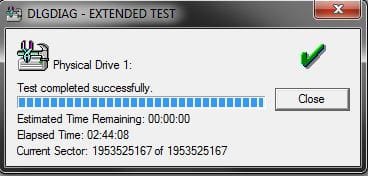
I have ran the western digital lifeguard and it passes that.

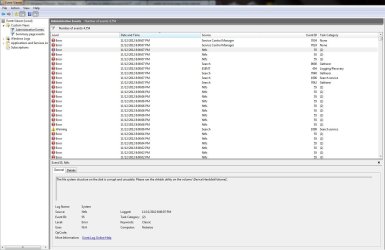
I have also looked at the event viewer and found multiple errors involved with the file system structure.

So far today the problem hasn't happened and my computer has been on for several hours. I have also found out that when I tried to play the game League of Legends I would receive an error message saying that some of the files are corrupt (also this seemed to be where the problem occurred the most). so I tried to uninstall the game but some files have remained and it does not allow me to delete them. but it says that the program is uninstalled. so it is possible that it was the game causing the restarts although it happened randomly throughout yesterday even when I wasn't on the game and the computer was idle. Steam had some start up issues as well which I reinstalled and that works fine now. I'm just hoping that I don't have to do a fresh install of windows because I don't have much room on my external hard drives for a full backup.

I have attached some print screens of the lifeguard results and the event viewer showing the main problem.
 

Attachments

  • Error.JPG
    Error.JPG
    126.1 KB · Views: 6
  • life guard.JPG
    life guard.JPG
    19.8 KB · Views: 1

My Computer

Computer Manufacturer/Model Number
PC Specialist
OS
Windows 7 Home Premium 64-Bit
CPU
Intel I5-3570k 3.4GHz
Motherboard
Asus P8Z77-V
Memory
8GB Kingston Hyperx Dual DDR3 1866MHz
Graphics Card(s)
AMD Radeon HD7770
Monitor(s) Displays
IIyama Prolite E2273HDS 22" LED
Hard Drives
Western digital 1TB Caviar black
PSU
650W corsair bronze
Case
CM Storm Trooper
Cooling
Tripple copper heatpipe cooler
Try running sfc /scannow and checkdisk. Let us know the results. Also, go to C:windows/minidump open the folder, if there are any files inside copy them and paste them to the desktop (you will have to provide admin permission all along the way) Right click the folder you just pasted, select send to and select compressed zip folder. Upload that folder with your next post.
 

My Computers

System One System Two

  • Computer type
    PC/Desktop
    Computer Manufacturer/Model Number
    ALWAYS UNDER CONSTRUCTION
    OS
    Windows 11 Pro
    CPU
    Ryzen 9 5900X
    Motherboard
    Asus X570 Crosshair Viii Hero
    Memory
    32GB G Skill DDR4-3600
    Graphics Card(s)
    EVGA RTX 3080 FTW 3 Ultra
    Sound Card
    On Board/Sennheiser PC37X Headset
    Monitor(s) Displays
    3 X Asus 27"
    Screen Resolution
    2560x1440
    Hard Drives
    2 X 1 TB NVME drives
    PSU
    EVGA 850
    Case
    Phanteks Eclipse P400A
    Cooling
    EVGA 280 AIO
    Keyboard
    Logitech G510s/ Logitech G13
    Mouse
    Logitech G502
    Internet Speed
    24/1
    Antivirus
    ESET/MBAM Pro/SAS Pro
    Browser
    Chrome/ Firefox/ Edge
  • Computer type
    Laptop
    System Manufacturer/Model Number
    Dell 16 Plus
    OS
    Windows 11 Pro
    CPU
    Intel Ultra 9 288V
    Memory
    32 GB LPDDR5X 8533
    Monitor(s) Displays
    16" Mini-LED HDR600 Touch 90 Hz
    Screen Resolution
    2560X1600
    Hard Drives
    1 TB NVME
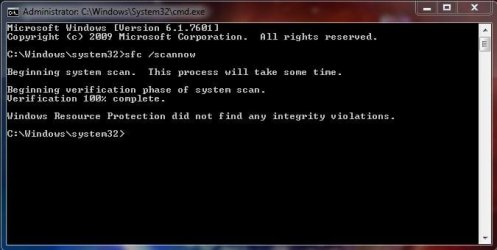
Ok, so I performed 2 checkdisk's and they have ran all the way through with no problems. I then ran the sfc scan and it found no problems. I have attached the minidump file and a screen print of the sfc results.

My computer hasn't had the problem of the resets yet today, however I did uninstall league of legends and there are some corrupt files which I think may have been the cause of the resets as the first time the problem occurred was when i was running the game. There are some files still in the directory of where the game was installed and it wouldn't let me delete them but after the check disk's it seemed to let me remove them. so maybe that was the problem.
 

Attachments

Last edited:

My Computer

Computer Manufacturer/Model Number
PC Specialist
OS
Windows 7 Home Premium 64-Bit
CPU
Intel I5-3570k 3.4GHz
Motherboard
Asus P8Z77-V
Memory
8GB Kingston Hyperx Dual DDR3 1866MHz
Graphics Card(s)
AMD Radeon HD7770
Monitor(s) Displays
IIyama Prolite E2273HDS 22" LED
Hard Drives
Western digital 1TB Caviar black
PSU
650W corsair bronze
Case
CM Storm Trooper
Cooling
Tripple copper heatpipe cooler
So when i tried to reinstall league of legends it just restarted my computer.

its the only thing that i can think off that could cause the problem
 

My Computer

Computer Manufacturer/Model Number
PC Specialist
OS
Windows 7 Home Premium 64-Bit
CPU
Intel I5-3570k 3.4GHz
Motherboard
Asus P8Z77-V
Memory
8GB Kingston Hyperx Dual DDR3 1866MHz
Graphics Card(s)
AMD Radeon HD7770
Monitor(s) Displays
IIyama Prolite E2273HDS 22" LED
Hard Drives
Western digital 1TB Caviar black
PSU
650W corsair bronze
Case
CM Storm Trooper
Cooling
Tripple copper heatpipe cooler
Well, may I suggest not installing it for a while. At least long enough for you to be sure that the game is the problem. And, I have asked someone to read your dump files. They will be here later. Reading dump files is way above my pay grade.
 

My Computers

System One System Two

  • Computer type
    PC/Desktop
    Computer Manufacturer/Model Number
    ALWAYS UNDER CONSTRUCTION
    OS
    Windows 11 Pro
    CPU
    Ryzen 9 5900X
    Motherboard
    Asus X570 Crosshair Viii Hero
    Memory
    32GB G Skill DDR4-3600
    Graphics Card(s)
    EVGA RTX 3080 FTW 3 Ultra
    Sound Card
    On Board/Sennheiser PC37X Headset
    Monitor(s) Displays
    3 X Asus 27"
    Screen Resolution
    2560x1440
    Hard Drives
    2 X 1 TB NVME drives
    PSU
    EVGA 850
    Case
    Phanteks Eclipse P400A
    Cooling
    EVGA 280 AIO
    Keyboard
    Logitech G510s/ Logitech G13
    Mouse
    Logitech G502
    Internet Speed
    24/1
    Antivirus
    ESET/MBAM Pro/SAS Pro
    Browser
    Chrome/ Firefox/ Edge
  • Computer type
    Laptop
    System Manufacturer/Model Number
    Dell 16 Plus
    OS
    Windows 11 Pro
    CPU
    Intel Ultra 9 288V
    Memory
    32 GB LPDDR5X 8533
    Monitor(s) Displays
    16" Mini-LED HDR600 Touch 90 Hz
    Screen Resolution
    2560X1600
    Hard Drives
    1 TB NVME
That dump is quite old. Are you experiencing blue screens?
Perform a clean install of "Realtek High Definition Audio Function Driver"

Click on the Start :orb: ► Control Panel ► Programs ► Uninstall a program ► Uninstall everything related to; Realtek High Definition Audio Function Driver. Restart the system. Delete remnants of its drivers/older drivers using Driver Fusion/Sweeper
Download link: Driver Reference Table
 

My Computer

Computer type
PC/Desktop
Computer Manufacturer/Model Number
Self assembled
OS
Windows 10 Home 64Bit
CPU
Intel Core i5 10400 @ 2.90GHz
Motherboard
Intel Corporation DG41WV (PROCESSOR)
Memory
8.00GB Single-Channel Unknown @ 1329MHz (16-20-20-38)
Sound Card
Realtek High Definition Audio
Monitor(s) Displays
DELL E170S
Screen Resolution
1280x1024 pixels
Hard Drives
931GB TOSHIBA DT01ACA100 (SATA)
238GB TEAM TM8PS7256G (SATA SSD)
Case
Nothing Fancy
Cooling
Fans
Keyboard
A4 Tech Co LTD
Mouse
A4 Tech Co Ltd/Logitech
Internet Speed
25 Mbps
Thanks for the help, Tweety, I mean koolkat. We can always count on you.
 

My Computers

System One System Two

  • Computer type
    PC/Desktop
    Computer Manufacturer/Model Number
    ALWAYS UNDER CONSTRUCTION
    OS
    Windows 11 Pro
    CPU
    Ryzen 9 5900X
    Motherboard
    Asus X570 Crosshair Viii Hero
    Memory
    32GB G Skill DDR4-3600
    Graphics Card(s)
    EVGA RTX 3080 FTW 3 Ultra
    Sound Card
    On Board/Sennheiser PC37X Headset
    Monitor(s) Displays
    3 X Asus 27"
    Screen Resolution
    2560x1440
    Hard Drives
    2 X 1 TB NVME drives
    PSU
    EVGA 850
    Case
    Phanteks Eclipse P400A
    Cooling
    EVGA 280 AIO
    Keyboard
    Logitech G510s/ Logitech G13
    Mouse
    Logitech G502
    Internet Speed
    24/1
    Antivirus
    ESET/MBAM Pro/SAS Pro
    Browser
    Chrome/ Firefox/ Edge
  • Computer type
    Laptop
    System Manufacturer/Model Number
    Dell 16 Plus
    OS
    Windows 11 Pro
    CPU
    Intel Ultra 9 288V
    Memory
    32 GB LPDDR5X 8533
    Monitor(s) Displays
    16" Mini-LED HDR600 Touch 90 Hz
    Screen Resolution
    2560X1600
    Hard Drives
    1 TB NVME

My Computer

Computer type
PC/Desktop
Computer Manufacturer/Model Number
Self assembled
OS
Windows 10 Home 64Bit
CPU
Intel Core i5 10400 @ 2.90GHz
Motherboard
Intel Corporation DG41WV (PROCESSOR)
Memory
8.00GB Single-Channel Unknown @ 1329MHz (16-20-20-38)
Sound Card
Realtek High Definition Audio
Monitor(s) Displays
DELL E170S
Screen Resolution
1280x1024 pixels
Hard Drives
931GB TOSHIBA DT01ACA100 (SATA)
238GB TEAM TM8PS7256G (SATA SSD)
Case
Nothing Fancy
Cooling
Fans
Keyboard
A4 Tech Co LTD
Mouse
A4 Tech Co Ltd/Logitech
Internet Speed
25 Mbps
Yes I previously had problems with blue screens and i got told to remove and reinstall my drivers a few months ago. would i still need to do that again?

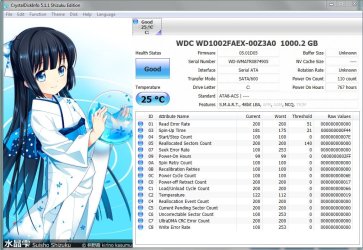
I have also attached a print screen of the Crystal disk check in use.
 

Attachments

  • CrystalDisk.JPG
    CrystalDisk.JPG
    137.6 KB · Views: 4

My Computer

Computer Manufacturer/Model Number
PC Specialist
OS
Windows 7 Home Premium 64-Bit
CPU
Intel I5-3570k 3.4GHz
Motherboard
Asus P8Z77-V
Memory
8GB Kingston Hyperx Dual DDR3 1866MHz
Graphics Card(s)
AMD Radeon HD7770
Monitor(s) Displays
IIyama Prolite E2273HDS 22" LED
Hard Drives
Western digital 1TB Caviar black
PSU
650W corsair bronze
Case
CM Storm Trooper
Cooling
Tripple copper heatpipe cooler
So you're not having blue screen issues now?
There were some dump files attached to this post so I checked them. Was there any purpose for attaching them?
 

My Computer

Computer type
PC/Desktop
Computer Manufacturer/Model Number
Self assembled
OS
Windows 10 Home 64Bit
CPU
Intel Core i5 10400 @ 2.90GHz
Motherboard
Intel Corporation DG41WV (PROCESSOR)
Memory
8.00GB Single-Channel Unknown @ 1329MHz (16-20-20-38)
Sound Card
Realtek High Definition Audio
Monitor(s) Displays
DELL E170S
Screen Resolution
1280x1024 pixels
Hard Drives
931GB TOSHIBA DT01ACA100 (SATA)
238GB TEAM TM8PS7256G (SATA SSD)
Case
Nothing Fancy
Cooling
Fans
Keyboard
A4 Tech Co LTD
Mouse
A4 Tech Co Ltd/Logitech
Internet Speed
25 Mbps
Well i was asked previously by another member of the forum to provide them.
 

My Computer

Computer Manufacturer/Model Number
PC Specialist
OS
Windows 7 Home Premium 64-Bit
CPU
Intel I5-3570k 3.4GHz
Motherboard
Asus P8Z77-V
Memory
8GB Kingston Hyperx Dual DDR3 1866MHz
Graphics Card(s)
AMD Radeon HD7770
Monitor(s) Displays
IIyama Prolite E2273HDS 22" LED
Hard Drives
Western digital 1TB Caviar black
PSU
650W corsair bronze
Case
CM Storm Trooper
Cooling
Tripple copper heatpipe cooler

My Computer

Computer type
PC/Desktop
Computer Manufacturer/Model Number
Self assembled
OS
Windows 10 Home 64Bit
CPU
Intel Core i5 10400 @ 2.90GHz
Motherboard
Intel Corporation DG41WV (PROCESSOR)
Memory
8.00GB Single-Channel Unknown @ 1329MHz (16-20-20-38)
Sound Card
Realtek High Definition Audio
Monitor(s) Displays
DELL E170S
Screen Resolution
1280x1024 pixels
Hard Drives
931GB TOSHIBA DT01ACA100 (SATA)
238GB TEAM TM8PS7256G (SATA SSD)
Case
Nothing Fancy
Cooling
Fans
Keyboard
A4 Tech Co LTD
Mouse
A4 Tech Co Ltd/Logitech
Internet Speed
25 Mbps
Yes i have previously used event viewer and i had a lot of ntfs errors which said:
"The file system structure on the disk is corrupt and unusable. Please run the chkdsk utility on the volume \Device\HarddiskVolume2."

So that last happened on the 11th and since i followed instructions from this forum it seems to have stopped.

My initial problem was that my computer would randomly shut down without any messages and then start back up after a few seconds.

since the 11th it hasn't happened often. maybe 2 to 3 times since.
 

My Computer

Computer Manufacturer/Model Number
PC Specialist
OS
Windows 7 Home Premium 64-Bit
CPU
Intel I5-3570k 3.4GHz
Motherboard
Asus P8Z77-V
Memory
8GB Kingston Hyperx Dual DDR3 1866MHz
Graphics Card(s)
AMD Radeon HD7770
Monitor(s) Displays
IIyama Prolite E2273HDS 22" LED
Hard Drives
Western digital 1TB Caviar black
PSU
650W corsair bronze
Case
CM Storm Trooper
Cooling
Tripple copper heatpipe cooler

My Computer

Computer type
PC/Desktop
Computer Manufacturer/Model Number
Self assembled
OS
Windows 10 Home 64Bit
CPU
Intel Core i5 10400 @ 2.90GHz
Motherboard
Intel Corporation DG41WV (PROCESSOR)
Memory
8.00GB Single-Channel Unknown @ 1329MHz (16-20-20-38)
Sound Card
Realtek High Definition Audio
Monitor(s) Displays
DELL E170S
Screen Resolution
1280x1024 pixels
Hard Drives
931GB TOSHIBA DT01ACA100 (SATA)
238GB TEAM TM8PS7256G (SATA SSD)
Case
Nothing Fancy
Cooling
Fans
Keyboard
A4 Tech Co LTD
Mouse
A4 Tech Co Ltd/Logitech
Internet Speed
25 Mbps
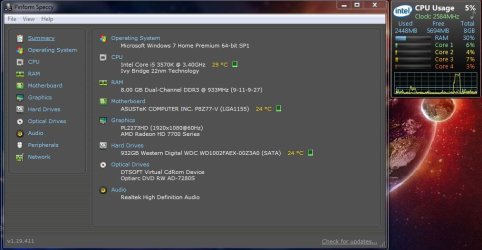
The temps seem fine, this is running a few programs in the background.
 

Attachments

  • Temp.JPG
    Temp.JPG
    70.4 KB · Views: 2

My Computer

Computer Manufacturer/Model Number
PC Specialist
OS
Windows 7 Home Premium 64-Bit
CPU
Intel I5-3570k 3.4GHz
Motherboard
Asus P8Z77-V
Memory
8GB Kingston Hyperx Dual DDR3 1866MHz
Graphics Card(s)
AMD Radeon HD7770
Monitor(s) Displays
IIyama Prolite E2273HDS 22" LED
Hard Drives
Western digital 1TB Caviar black
PSU
650W corsair bronze
Case
CM Storm Trooper
Cooling
Tripple copper heatpipe cooler
More than normal :) lol
Please upload your msinfo32.nfo file. To get this: Start Menu -> Type msinfo32 into the Search programs and files box -> When it opens, go to File, Save -> Save as msinfo32.nfo and save in a place you will remember -> Let it finish the process of gathering and saving the system info -> Right click the .nfo file, click send to compressed (zipped) folder -> Upload the .zip file here.

Please upload your msinfo32.txt file. To get this: Start Menu -> Type msinfo32 into the Search programs and files box -> When it opens, go to File, Export -> Save as msinfo32.txt and save in a place you will remember -> Let it finish the process of gathering and saving the system info -> Right click the .txt file, click send to compressed (zipped) folder -> Upload the .zip file here.
 

My Computer

Computer type
PC/Desktop
Computer Manufacturer/Model Number
Self assembled
OS
Windows 10 Home 64Bit
CPU
Intel Core i5 10400 @ 2.90GHz
Motherboard
Intel Corporation DG41WV (PROCESSOR)
Memory
8.00GB Single-Channel Unknown @ 1329MHz (16-20-20-38)
Sound Card
Realtek High Definition Audio
Monitor(s) Displays
DELL E170S
Screen Resolution
1280x1024 pixels
Hard Drives
931GB TOSHIBA DT01ACA100 (SATA)
238GB TEAM TM8PS7256G (SATA SSD)
Case
Nothing Fancy
Cooling
Fans
Keyboard
A4 Tech Co LTD
Mouse
A4 Tech Co Ltd/Logitech
Internet Speed
25 Mbps
here is the file that you wanted =]
 

Attachments

My Computer

Computer Manufacturer/Model Number
PC Specialist
OS
Windows 7 Home Premium 64-Bit
CPU
Intel I5-3570k 3.4GHz
Motherboard
Asus P8Z77-V
Memory
8GB Kingston Hyperx Dual DDR3 1866MHz
Graphics Card(s)
AMD Radeon HD7770
Monitor(s) Displays
IIyama Prolite E2273HDS 22" LED
Hard Drives
Western digital 1TB Caviar black
PSU
650W corsair bronze
Case
CM Storm Trooper
Cooling
Tripple copper heatpipe cooler
Back
Top