Solved Random system working set RAM overload

Diddy7Kong

New member
Member
Local time
8:48 AM
Messages
39
I'm not sure where this belongs, and I dont know what to call it, but I had a system process terminated blue screen error during boot, and after a second attempt, it booted fine, but when I render something in sony vegas, now I get all 8 gigs of my system RAM occupied from nothing and the render self-cancels, and I am stuck using ramMap purging system working set every 2 minutes
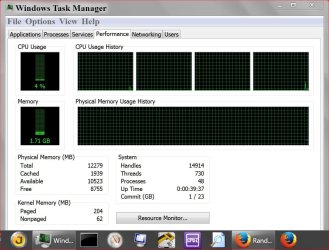
I'm not sure where to go from here, or if i should delete the whole system and reinstall it.. Here is a screenshow of the ram section of resource monitor:
 

Attachments

  • 6.PNG
    6.PNG
    23.2 KB · Views: 0

My Computer

Computer type
Laptop
Computer Manufacturer/Model Number
HP
OS
Windows 7 Professional 64 bit
CPU
AMD APU
Motherboard
unknown
Memory
8GB
Graphics Card(s)
ATI radeon chipset
Hard Drives
500GB internal
2,048 GB external
Browser
Google Chrome
Maybe I'm not understanding your question but looking at your picture it shows that you are using all the ram and about to run out of ram.
You either stop doing some things or install more ram.
 

My Computer

Computer type
PC/Desktop
Computer Manufacturer/Model Number
Home made Desktop
OS
Windows 10 Pro. 64/ version 1709 Windows 7 Pro/64
CPU
Intel i7-6800K @ 4.3
Motherboard
ASUS X-99 Deluxe II
Memory
Corsair Platinum 16 gig @2400
Graphics Card(s)
EVGA GTX 1070 OC
Monitor(s) Displays
Asus 27" LED LCD/VE278Q
Screen Resolution
1920-1080 or 1280-720 HDMI
Hard Drives
INTEL SSD 730-240 Gb Sata 3.0/
PSU
EVGA Platium 1200W
Case
Phanteks Luxe Tempered Glass 8 fans/ one radiator
Cooling
XSPC/ Water Cooled CPU
Keyboard
Das 4 Professional
Mouse
Logitech M705/MX Anywhere 2-S
Internet Speed
100 mbits
Antivirus
Microsoft Security Essentials/ Malwarebytes Premium 3.0/ SAS
Browser
I.E. 11 default/Firefox/ ISP Time Warner Cable/Spectrum
Other Info
LG BluRay Burner/
Sound system-KLipsch-THX/
Icy Dock ssd Hot Swap bays.
Maybe I'm not understanding your question but looking at your picture it shows that you are using all the ram and about to run out of ram.
You either stop doing some things or install more ram.

, it shows that im about to run out, but the thing is, that nothings using up to that amount in total, this only happens when i perform a video export from sony vegas and it starts rendering the video, the ram slowly climbs up to that, crashes the render, the RAM goes away sometimes, after closing sony vegas, otherwise, it stays like that and actually CLIMBS as i close other programs, using rammap, if i purge the system from RAM, it clears up all the suspicious ram ussage and the ussage goes back to "normal" under the conditions shown on that list in the image
 

My Computer

Computer type
Laptop
Computer Manufacturer/Model Number
HP
OS
Windows 7 Professional 64 bit
CPU
AMD APU
Motherboard
unknown
Memory
8GB
Graphics Card(s)
ATI radeon chipset
Hard Drives
500GB internal
2,048 GB external
Browser
Google Chrome
Post a screenshot of Task Manager - Performance tab. That is always the best place to start. There is information there that is not found anywhere else.

Edit: The memory usage in the process list will never add up to total usage. It was never intended that it would. There are major users of memory that are not processes.
 

My Computer

Computer type
PC/Desktop
Computer Manufacturer/Model Number
HP
OS
Windows 7 Pro 64 bit
CPU
Xeon W3520
Memory
8 GB
Graphics Card(s)
Nvidia Geforce 210
Post a screenshot of Task Manager - Performance tab. That is always the best place to start. There is information there that is not found anywhere else.

Edit: The memory usage in the process list will never add up to total usage. It was never intended that it would. There are major users of memory that are not processes.
Ok, then I don't know what it could be, my onyl guess is that the sytem itself is filling up empty bytes to the ram, because when I use rammap to empty "system working set", the phantomly filled ram goes away and starts crawling back

I provided the screenshot because I knew that I would be asked for it to check for applications that might be unexpectedly using it and ussage didnt add up

the ussage with the screenie above is supposed to be around the 3 gig mark and instead filled up to the 8 gig mario (which is how much ram is installed on my system)
 

My Computer

Computer type
Laptop
Computer Manufacturer/Model Number
HP
OS
Windows 7 Professional 64 bit
CPU
AMD APU
Motherboard
unknown
Memory
8GB
Graphics Card(s)
ATI radeon chipset
Hard Drives
500GB internal
2,048 GB external
Browser
Google Chrome
This is what LMiller requested.

Capture.JPG

I would suggest forget about Rammap and let Windows 7 manage all memory. Using such programs will have you chasing ram until cows can tap dance.

Check and see how many programs you have set to start at boot that will be running in the background even when not need.

Take a look at #8 in this tutorial by Brink.

http://www.sevenforums.com/tutorials/11728-optimize-windows-7-a.html

After optimize Windows 7 as per the tutorial and let Windows manage all ram you have two choices if you are using all your ram.
1. Stop doing so many things on your computer at one time.
2. Add more ram.

Rebooting your computer also helps.
 

My Computer

Computer type
PC/Desktop
Computer Manufacturer/Model Number
Home made Desktop
OS
Windows 10 Pro. 64/ version 1709 Windows 7 Pro/64
CPU
Intel i7-6800K @ 4.3
Motherboard
ASUS X-99 Deluxe II
Memory
Corsair Platinum 16 gig @2400
Graphics Card(s)
EVGA GTX 1070 OC
Monitor(s) Displays
Asus 27" LED LCD/VE278Q
Screen Resolution
1920-1080 or 1280-720 HDMI
Hard Drives
INTEL SSD 730-240 Gb Sata 3.0/
PSU
EVGA Platium 1200W
Case
Phanteks Luxe Tempered Glass 8 fans/ one radiator
Cooling
XSPC/ Water Cooled CPU
Keyboard
Das 4 Professional
Mouse
Logitech M705/MX Anywhere 2-S
Internet Speed
100 mbits
Antivirus
Microsoft Security Essentials/ Malwarebytes Premium 3.0/ SAS
Browser
I.E. 11 default/Firefox/ ISP Time Warner Cable/Spectrum
Other Info
LG BluRay Burner/
Sound system-KLipsch-THX/
Icy Dock ssd Hot Swap bays.
thanks for the help, I will try it after this skype call marathon I'm hosting is over
I get really paranoid about rebooting the system
 

My Computer

Computer type
Laptop
Computer Manufacturer/Model Number
HP
OS
Windows 7 Professional 64 bit
CPU
AMD APU
Motherboard
unknown
Memory
8GB
Graphics Card(s)
ATI radeon chipset
Hard Drives
500GB internal
2,048 GB external
Browser
Google Chrome
ok, I want to clearify on this issue in when and how it exactly happens:

1) when sony vegas is open with the screenshot supplied, ram ussage is around 3GB

2) when i click on render/export, and start rendering, it is at THIS point in time, that the ram ussage starts infinitely climbing mysteriously, and with ram Map, pointing the blame at "system working set" as task manager does NOT show the mysterious ram being used

3) system starts dumping RAM to the paging file and system becomes practicaly unresponsive except for movement of the mouse

4) sony vegas terminated render prematurely


5) reinstalling sony vegas did NOT fix the problem

6) a RAMDISK driver was installed, but later removed.


7)mysterious RAM spike in otherwise, does NOT occur

and it is this reason, I cannot compress my fraps AVI files (total: 150GB) so that I can upload them to youtube in a reasonable time
 

My Computer

Computer type
Laptop
Computer Manufacturer/Model Number
HP
OS
Windows 7 Professional 64 bit
CPU
AMD APU
Motherboard
unknown
Memory
8GB
Graphics Card(s)
ATI radeon chipset
Hard Drives
500GB internal
2,048 GB external
Browser
Google Chrome
To me it is not mysterious.
Your Vegas program and rendering is using the ram.
Then you through all the other things you are doing on your computer it makes sense to me.

Did you or did you not check the programs that start with Windows using msconfig/Startup.

Could you post a picture of all you start up programs in msconfig.

From your post #8

2) when i click on render/export, and start rendering, it is at THIS point in time, that the ram ussage starts infinitely climbing mysteriously, and with ram Map, pointing the blame at "system working set" as task manager does NOT show the mysterious ram being used
Forget about all that XP stuff about routing ram, ram drives ect.

You either stop do the things that is using the ram or you add more ram so you can do all those things.

What is the exact H.P. Laptop you are using?
 

My Computer

Computer type
PC/Desktop
Computer Manufacturer/Model Number
Home made Desktop
OS
Windows 10 Pro. 64/ version 1709 Windows 7 Pro/64
CPU
Intel i7-6800K @ 4.3
Motherboard
ASUS X-99 Deluxe II
Memory
Corsair Platinum 16 gig @2400
Graphics Card(s)
EVGA GTX 1070 OC
Monitor(s) Displays
Asus 27" LED LCD/VE278Q
Screen Resolution
1920-1080 or 1280-720 HDMI
Hard Drives
INTEL SSD 730-240 Gb Sata 3.0/
PSU
EVGA Platium 1200W
Case
Phanteks Luxe Tempered Glass 8 fans/ one radiator
Cooling
XSPC/ Water Cooled CPU
Keyboard
Das 4 Professional
Mouse
Logitech M705/MX Anywhere 2-S
Internet Speed
100 mbits
Antivirus
Microsoft Security Essentials/ Malwarebytes Premium 3.0/ SAS
Browser
I.E. 11 default/Firefox/ ISP Time Warner Cable/Spectrum
Other Info
LG BluRay Burner/
Sound system-KLipsch-THX/
Icy Dock ssd Hot Swap bays.
When dealing with memory issues I find it best to start with a screenshot of Task Manager - Performance tab. There is information there not found anywhere else.
 

My Computer

Computer type
PC/Desktop
Computer Manufacturer/Model Number
HP
OS
Windows 7 Pro 64 bit
CPU
Xeon W3520
Memory
8 GB
Graphics Card(s)
Nvidia Geforce 210
When dealing with memory issues I find it best to start with a screenshot of Task Manager - Performance tab. There is information there not found anywhere else.

ok, so next time it does that, I will take a screenshot (though im probably going to be asked tyo have it show "working memory" coulums) so I will include that
 

My Computer

Computer type
Laptop
Computer Manufacturer/Model Number
HP
OS
Windows 7 Professional 64 bit
CPU
AMD APU
Motherboard
unknown
Memory
8GB
Graphics Card(s)
ATI radeon chipset
Hard Drives
500GB internal
2,048 GB external
Browser
Google Chrome
The Performance tab is of greatest importance. A process listing is of only minor interest.
 

My Computer

Computer type
PC/Desktop
Computer Manufacturer/Model Number
HP
OS
Windows 7 Pro 64 bit
CPU
Xeon W3520
Memory
8 GB
Graphics Card(s)
Nvidia Geforce 210
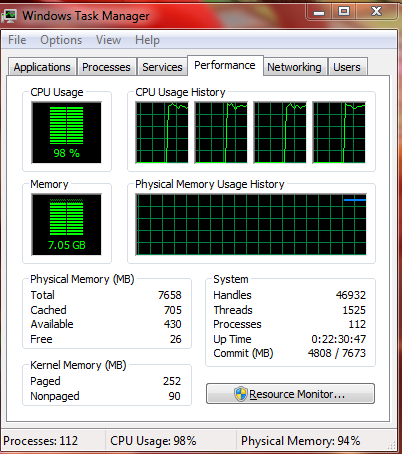
ok I finally finished my next project to render, and this is what happened in task manager

had to "empty system working sets" with rammap again toclear 4 GB of phantom RAM (in use)

below is a screenshot of the requested task manager tab when the phantom ussage happened

9BJGrLj.png
 

My Computer

Computer type
Laptop
Computer Manufacturer/Model Number
HP
OS
Windows 7 Professional 64 bit
CPU
AMD APU
Motherboard
unknown
Memory
8GB
Graphics Card(s)
ATI radeon chipset
Hard Drives
500GB internal
2,048 GB external
Browser
Google Chrome
I see that the commit limit is 7673 MB with 7658 MB RAM. The commit limit is RAM size plus pagefile size minus a small overhead. This tells me that the pagefile is very small, too small to be of any real benefit. This will impair the system in making optimum use of your RAM.

I would suggest setting the pagefile to system managed.

Edit: In a 64 bit OS the file cache can be a major contributor to memory usage. I suspect that is the case here. Nothing in Task Manager or Resource Monitor will tell you about this. This memory is not included in what is labeled "Cached".
 

My Computer

Computer type
PC/Desktop
Computer Manufacturer/Model Number
HP
OS
Windows 7 Pro 64 bit
CPU
Xeon W3520
Memory
8 GB
Graphics Card(s)
Nvidia Geforce 210
I see that the commit limit is 7673 MB with 7658 MB RAM. The commit limit is RAM size plus pagefile size minus a small overhead. This tells me that the pagefile is very small, too small to be of any real benefit. This will impair the system in making optimum use of your RAM.

I would suggest setting the pagefile to system managed.

Edit: In a 64 bit OS the file cache can be a major contributor to memory usage. I suspect that is the case here. Nothing in Task Manager or Resource Monitor will tell you about this. This memory is not included in what is labeled "Cached".

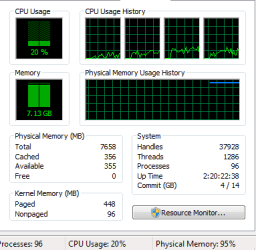
yes my OS is 64 bit, I set the pagefile to system managed...

it still happened, now specifically when dealing with sony vegas AND AMD RAMDisk

I attached a screenshot of task manager again

out of frustration with this, I'm considering setting the page file to 200GB
 

Attachments

  • Capture.PNG
    Capture.PNG
    7 KB · Views: 19

My Computer

Computer type
Laptop
Computer Manufacturer/Model Number
HP
OS
Windows 7 Professional 64 bit
CPU
AMD APU
Motherboard
unknown
Memory
8GB
Graphics Card(s)
ATI radeon chipset
Hard Drives
500GB internal
2,048 GB external
Browser
Google Chrome
You are using a RamDisk?
How large is it?
 

My Computer

Computer type
PC/Desktop
Computer Manufacturer/Model Number
HP
OS
Windows 7 Pro 64 bit
CPU
Xeon W3520
Memory
8 GB
Graphics Card(s)
Nvidia Geforce 210
You are using a RamDisk?
How large is it?
I rarely use it, unless I am doing small, high speed captures. when I have it open, which is never used in conjunction with sony vegas open, it is 512MB, if set it to 1.4 gigs or higher, the system proceeds to consume 8 GB of RAM.

though my main issue is being unable to export video edits due to system working set eating up all the ram and crashing sony vegas when the ram gets full

I should add that this ram issue also happens in safe mode under the same condition (rendering a video in sony vegas)

EDIT: I am really confused now it isnt flooding RAM now, it was also alternating between flooding ram and not a few weeks ago back in early july, it would flood ram, then late july through early august, it would behave, then recently it flooded ram again and even in safe mode, now its not. rebooting also doesn't fix the flooding

EDIT2: and its doing it again =(


EDIT 3:

OK I believe i traced the problem to something unsolvable,

I have observed that the system working set on behalf of sony vegas during random project renders (on a project to project basis (carries over veg saved projects)) steadily climbs in usage at a consistent rate until the ram fills up and crashes the computer

additionally, the faster the render is able to go, the faster this RAM consumption climb spikes

example: if I use CPU rendering, the rate the frames process is about 5FPS and the RAM reaches 100% in about 10 minutes, vegas crashes (with its own crash screen) or system blue screens

if i use GPU rendering on the same project, it processes at a rate at which the frame renders process is 40 FPS, and the ram reaches 100% in under a minute, vegas crashes (with its own crash screen) or system blue screens

If I render at 480p when the source clips are MPEG4, the ram spike happens too slowly to crash the render or computer (or isnt happening at all) i don't notice here

source files in the render it's happening with is AVI which fraps created during a PC game capture source AND output render is 720p using AVC MP4 4MBPS

the issue with RAMDisk is when the "disk size" for the ramdisk is set above 1GB, shuting down the ramdisk drive (ejecting it in the process) does NOT lower ram usage and a reboot is required to purge it in this case


isn't this a memory leak? and how do I fix this?

that's about all the info about the abnormal ram usage issues I can dig up from my system

 
Last edited:

My Computer

Computer type
Laptop
Computer Manufacturer/Model Number
HP
OS
Windows 7 Professional 64 bit
CPU
AMD APU
Motherboard
unknown
Memory
8GB
Graphics Card(s)
ATI radeon chipset
Hard Drives
500GB internal
2,048 GB external
Browser
Google Chrome
ok so thanks guys for helpign me with tips, I managed to figure out exactly how the ram issue is happening when i tried to mass convert and combine the source clips into one MP4 and the fraps codec threw a memory map attempt failure error claiming insufficient memory, so I converted everything one by one into MP4s and vegas didn't leak memory.


issue was encoder using fraps decoder demanded more than 32GB of memory, not releasing memory or reusing memory when parts were no longer needed


ROOT: AVI files compressed with fraps video codec
 

My Computer

Computer type
Laptop
Computer Manufacturer/Model Number
HP
OS
Windows 7 Professional 64 bit
CPU
AMD APU
Motherboard
unknown
Memory
8GB
Graphics Card(s)
ATI radeon chipset
Hard Drives
500GB internal
2,048 GB external
Browser
Google Chrome
Back
Top