Random Wake-Up

pafao

New member
Local time
8:29 PM
Messages
9
I've recently bought a Toshiba Satellite A500 with Windows 7 on it, and I'm having some issues with it waking up randomly. I will usually shut my computer down before I go to bed, but by the time I get up in the morning it has turned itself on and put itself into sleep mode.
Often times when I turn it on after this, the batter will have lost 10-20%, and today I just left it when I left my house this morning and when I got home it was completely dead.
So it seems that I have no way of keeping the battery charged for more than a day.
I have no idea what is causing this, and I have found a couple of other cases online where people were having this problem.
Thanks
 

My Computer

Computer Manufacturer/Model Number
Toshiba
OS
Windows 7
CPU
intel i5
Memory
4GB
Graphics Card(s)
nvidia GT 330M
By any chance is it waking up at 8:20am?

Are you 100% positive the machine is completely shutting down and not suspending or hibernating? I know it's a stupid question but the simplest stuff is overlooked the most.

If you are 100% sure, restart your machine and enter the BIOS [F2, I believe]

Find the entry for USB SLEEP AND CHARGE and disable it.

That should fix it.

If it doesn't, check the Toshiba Web site for your specific A500 model and get the latest BIOS update [the latest should be 1.50]

If that STILL doesn't work, reset your BIOS to default settings and restart.

[reference: http://forums.computers.toshiba-europe.com/forums/thread.jspa?threadID=51374&start=30&tstart=0]

Still stuck? let me know.
 

My Computer

OS
Windows 7 Ultimate 64-bit
CPU
AMD Phenom II X6 1090T 3.2GHZ
Motherboard
MSI 890FXA-GD70
Memory
G.SKILL RipJaw 3x2GB DDR3-1066
Graphics Card(s)
2x HIS Radeon HD 6850 1 GB
Sound Card
VIA 8-channel
Monitor(s) Displays
2x 20 inch Acer LCDs, 1x 32" Sony LCD TV
Screen Resolution
4480x900
Hard Drives
1x Crucial 64GB SSD
3x 1TB HDDs (WD, Seagate, Hitatchi)
1x 500GB Seagate External
PSU
Kingwin 1000W Modular
Case
Coolermaster HAF 932
Cooling
1x 120mm, 3x 200mm, CoolerMaster Hyper 212+
Keyboard
Microsoft Wireless Keyboard 1000
Mouse
Microsoft Wiresless Mouse 5000
Internet Speed
20mbps
Other Info
Samsung BD-ROM/DVD-RW
I've recently bought a Toshiba Satellite A500 with Windows 7 on it, and I'm having some issues with it waking up randomly. I will usually shut my computer down before I go to bed, but by the time I get up in the morning it has turned itself on and put itself into sleep mode.
Often times when I turn it on after this, the batter will have lost 10-20%, and today I just left it when I left my house this morning and when I got home it was completely dead.
So it seems that I have no way of keeping the battery charged for more than a day.
I have no idea what is causing this, and I have found a couple of other cases online where people were having this problem.
Thanks

I was and still am having this issue. There is another thread on the forum that we talked about this. I will see if I can quickly find it.

Edit: Here it is: http://www.sevenforums.com/network-sharing/76878-networking-question.html
 

My Computer

Computer type
PC/Desktop
Computer Manufacturer/Model Number
Dell OP7010
OS
Windows 7 Enterprise (x64); Windows Server 2008 R2 (x64)
Memory
16GB
Monitor(s) Displays
4 Dell 24" LCD
Screen Resolution
1280x1024
Keyboard
Dell
Mouse
Dell Optical
Internet Speed
40meg
I've recently bought a Toshiba Satellite A500 with Windows 7 on it, and I'm having some issues with it waking up randomly. I will usually shut my computer down before I go to bed, but by the time I get up in the morning it has turned itself on and put itself into sleep mode.
Often times when I turn it on after this, the batter will have lost 10-20%, and today I just left it when I left my house this morning and when I got home it was completely dead.
So it seems that I have no way of keeping the battery charged for more than a day.
I have no idea what is causing this, and I have found a couple of other cases online where people were having this problem.
Thanks

I was and still am having this issue. There is another thread on the forum that we talked about this. I will see if I can quickly find it.

Take a look at what I posted above.
 

My Computer

OS
Windows 7 Ultimate 64-bit
CPU
AMD Phenom II X6 1090T 3.2GHZ
Motherboard
MSI 890FXA-GD70
Memory
G.SKILL RipJaw 3x2GB DDR3-1066
Graphics Card(s)
2x HIS Radeon HD 6850 1 GB
Sound Card
VIA 8-channel
Monitor(s) Displays
2x 20 inch Acer LCDs, 1x 32" Sony LCD TV
Screen Resolution
4480x900
Hard Drives
1x Crucial 64GB SSD
3x 1TB HDDs (WD, Seagate, Hitatchi)
1x 500GB Seagate External
PSU
Kingwin 1000W Modular
Case
Coolermaster HAF 932
Cooling
1x 120mm, 3x 200mm, CoolerMaster Hyper 212+
Keyboard
Microsoft Wireless Keyboard 1000
Mouse
Microsoft Wiresless Mouse 5000
Internet Speed
20mbps
Other Info
Samsung BD-ROM/DVD-RW
I've recently bought a Toshiba Satellite A500 with Windows 7 on it, and I'm having some issues with it waking up randomly. I will usually shut my computer down before I go to bed, but by the time I get up in the morning it has turned itself on and put itself into sleep mode.
Often times when I turn it on after this, the batter will have lost 10-20%, and today I just left it when I left my house this morning and when I got home it was completely dead.
So it seems that I have no way of keeping the battery charged for more than a day.
I have no idea what is causing this, and I have found a couple of other cases online where people were having this problem.
Thanks

I was and still am having this issue. There is another thread on the forum that we talked about this. I will see if I can quickly find it.

Take a look at what I posted above.

Not the problem I am having....Thanks

Take a look at this: http://www.sevenforums.com/network-sharing/76878-networking-question.html
 

My Computer

Computer type
PC/Desktop
Computer Manufacturer/Model Number
Dell OP7010
OS
Windows 7 Enterprise (x64); Windows Server 2008 R2 (x64)
Memory
16GB
Monitor(s) Displays
4 Dell 24" LCD
Screen Resolution
1280x1024
Keyboard
Dell
Mouse
Dell Optical
Internet Speed
40meg
I was and still am having this issue. There is another thread on the forum that we talked about this. I will see if I can quickly find it.

Take a look at what I posted above.

Not the problem I am having....Thanks

Take a look at this: http://www.sevenforums.com/network-sharing/76878-networking-question.html

WindowsStar, it appears that you're having a different problem than mine. Your forum talks about waking up because of accessing folders on the LAN, mine just turns itself on from being powered off and then goes into sleep mode. Different issue entirely.

Jelyman, I am not 100% sure that I've been turning it completely off, but I am pretty sure. I set all of my different power settings to "shut down" when I pressed the power button, and have been shutting it down from the start menu's "shut down" button.
Now I tried your advice on the USB sleep and charge, and it seemed to work so far, it was still off this morning! Although when I shut down last night, I powered up again to go to the bios, then made the switch, but then I didn't boot into windows again, so that maaay have something to do with it, I'll keep you updated though. Thanks for your help!
 

My Computer

Computer Manufacturer/Model Number
Toshiba
OS
Windows 7
CPU
intel i5
Memory
4GB
Graphics Card(s)
nvidia GT 330M
What happens here are my Windows 7 machines turn ON randomly for no reason at all. They do it at night or in the middle of the day. Even when people are not using any computers at all, so I assume this is not an accessing shared folders issue. One time (1:00am while everyone was asleep) I saw computer turn on and I watched it completely boot up, I powered it off waited 15 minutes and it powered back on all by itself. It did this 5 times and then stopped. At any point the only shared folders we have are on the server that are shared with all computers. The server is on 24/7 and the workstations are turned on and off as needed. I never had this issue with Windows XP it only started when I converted the Windows XP machines to Windows 7. Clean loads with brand new hard drives. I Hope this helps in figuring this all out.
 

My Computer

Computer type
PC/Desktop
Computer Manufacturer/Model Number
Dell OP7010
OS
Windows 7 Enterprise (x64); Windows Server 2008 R2 (x64)
Memory
16GB
Monitor(s) Displays
4 Dell 24" LCD
Screen Resolution
1280x1024
Keyboard
Dell
Mouse
Dell Optical
Internet Speed
40meg
What happens here are my Windows 7 machines turn ON randomly for no reason at all. They do it at night or in the middle of the day. Even when people are not using any computers at all, so I assume this is not an accessing shared folders issue. One time (1:00am while everyone was asleep) I saw computer turn on and I watched it completely boot up, I powered it off waited 15 minutes and it powered back on all by itself. It did this 5 times and then stopped. At any point the only shared folders we have are on the server that are shared with all computers. The server is on 24/7 and the workstations are turned on and off as needed. I never had this issue with Windows XP it only started when I converted the Windows XP machines to Windows 7. Clean loads with brand new hard drives. I Hope this helps in figuring this all out.

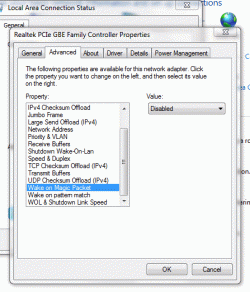
I really can't help but think you have a wake-on-lan setting mis-flipped. I would try going one night with ALL the devices off on your network including the server if you can and see if that make a difference.

pafao said:
Jelyman, I am not 100% sure that I've been turning it completely off, but I am pretty sure. I set all of my different power settings to "shut down" when I pressed the power button, and have been shutting it down from the start menu's "shut down" button.
Now I tried your advice on the USB sleep and charge, and it seemed to work so far, it was still off this morning! Although when I shut down last night, I powered up again to go to the bios, then made the switch, but then I didn't boot into windows again, so that maaay have something to do with it, I'll keep you updated though. Thanks for your help!

Let me know how it works out for you!
 

My Computer

OS
Windows 7 Ultimate 64-bit
CPU
AMD Phenom II X6 1090T 3.2GHZ
Motherboard
MSI 890FXA-GD70
Memory
G.SKILL RipJaw 3x2GB DDR3-1066
Graphics Card(s)
2x HIS Radeon HD 6850 1 GB
Sound Card
VIA 8-channel
Monitor(s) Displays
2x 20 inch Acer LCDs, 1x 32" Sony LCD TV
Screen Resolution
4480x900
Hard Drives
1x Crucial 64GB SSD
3x 1TB HDDs (WD, Seagate, Hitatchi)
1x 500GB Seagate External
PSU
Kingwin 1000W Modular
Case
Coolermaster HAF 932
Cooling
1x 120mm, 3x 200mm, CoolerMaster Hyper 212+
Keyboard
Microsoft Wireless Keyboard 1000
Mouse
Microsoft Wiresless Mouse 5000
Internet Speed
20mbps
Other Info
Samsung BD-ROM/DVD-RW
123
 

Attachments

  • Win 7 RTM112.gif
    Win 7 RTM112.gif
    34.7 KB · Views: 30

My Computer

Computer Manufacturer/Model Number
ME!
OS
Windows 7 SP1 Ultimate 64bit
CPU
AMD Phenom II X4 940
Motherboard
ASUS M4A79 Deluxe (BIOS 3603)
Memory
OCZ PC8500 Platinum 4GB
Graphics Card(s)
Sapphire HD4870 1GB 256-bit GDDR5
Sound Card
HT Omega Claro
Monitor(s) Displays
ViewSonic G220fb still rocks
Screen Resolution
1600x1200@85hz
Hard Drives
160GB Seagate 7200.10 Sata
150GB WD Raptor 10,000rpm Sata
PSU
Corsair TX950W
Cooling
Zalman 9700NT
Keyboard
Logitech Standard
Mouse
Microsoft SideWinder
Internet Speed
5.26MB down 0.86MB up
Other Info
APC BackUps 900VA
I really can't help but think you have a wake-on-lan setting mis-flipped. I would try going one night with ALL the devices off on your network including the server if you can and see if that make a difference.

I have tried that, still no go, no magic packets on the network. I even had Dell replace motherboards and power supplies thinking that had something do to with it. Replaced UPS’s, power cords, patch cables from CAT5e to CAT6, I have changed the switch from 5 year old Cisco to 2 year old Dell then back to New Cisco still nothing. I borrowed a power monitor meter from the power company and had it run for 4 weeks collecting data. Cool piece of equipment about $20,000USD to buy (ouch). The tech and I retrieved the data and reviewed it together, this area has some of the cleanest power around very few spikes, over voltage, brown out, etc. I have changed firewalls older 5 year old Sonicwall to brand new Sonicwall only 2 months old. I have even tried having the firewall turned off, no joy. Still a huge mystery here. :(
 

My Computer

Computer type
PC/Desktop
Computer Manufacturer/Model Number
Dell OP7010
OS
Windows 7 Enterprise (x64); Windows Server 2008 R2 (x64)
Memory
16GB
Monitor(s) Displays
4 Dell 24" LCD
Screen Resolution
1280x1024
Keyboard
Dell
Mouse
Dell Optical
Internet Speed
40meg
Are you using Windows Media Center and have the option to perform optimizations enabled?

I put my pc to sleep at night and some nights it will have awaken by itself. When I log on, I usually find that Media Center is active and performing its optimizations. Most of the time, my pc will enter back into sleep mode by itself. But other times, I have to get up, log on, and manually put it back into sleep.
 

My Computer

Computer Manufacturer/Model Number
Rig 1
OS
Windows 7 Ultimate x64
CPU
AMD Phenom II X4 940 Black Edition @ 3.4GHz (AM2+)
Motherboard
Gigabyte GA-MA790X-UD4P (AM2+)
Memory
Corsair CM2X4096-8500C5 (4 X 2GB)
Graphics Card(s)
XFX Radeon HD 5770 / Diamond Radeon HD 5770 CrossFireX
Sound Card
Asus Xonar DS (PCI)
Monitor(s) Displays
Samsung SyncMaster 932bw+ (3)
Screen Resolution
4320x900
Hard Drives
OCZ Vertex 2 80 GB - Windows 7 System --
WD Caviar Black 1TB - Music, Movies, Vids, Pics --
WD Caviar Black 640GB - User Profiles & Games --
WD My Book 320GB external
PSU
Corsair CMPSU-750TX
Case
Cooler Master HAF 932
Cooling
Corsair Hydro Series H50
Keyboard
Logitech Desktop Wave
Mouse
Logitech LX8 Laser
Internet Speed
20 down / 2 up
Other Info
LG GGC-H20L Blu-Ray / HDDVD combo --
Hauppauge HVR-1250 --
Silverstone MFP-51 --
Logitech Webcam C600

My Computer

Computer type
PC/Desktop
Computer Manufacturer/Model Number
Dell OP7010
OS
Windows 7 Enterprise (x64); Windows Server 2008 R2 (x64)
Memory
16GB
Monitor(s) Displays
4 Dell 24" LCD
Screen Resolution
1280x1024
Keyboard
Dell
Mouse
Dell Optical
Internet Speed
40meg
I really can't help but think you have a wake-on-lan setting mis-flipped. I would try going one night with ALL the devices off on your network including the server if you can and see if that make a difference.

I have tried that, still no go, no magic packets on the network.

have you checked your BIOS as well? a lot of machines have wake-on-lan options in their BIOS for non-windows situations.
 

My Computer

OS
Windows 7 Ultimate 64-bit
CPU
AMD Phenom II X6 1090T 3.2GHZ
Motherboard
MSI 890FXA-GD70
Memory
G.SKILL RipJaw 3x2GB DDR3-1066
Graphics Card(s)
2x HIS Radeon HD 6850 1 GB
Sound Card
VIA 8-channel
Monitor(s) Displays
2x 20 inch Acer LCDs, 1x 32" Sony LCD TV
Screen Resolution
4480x900
Hard Drives
1x Crucial 64GB SSD
3x 1TB HDDs (WD, Seagate, Hitatchi)
1x 500GB Seagate External
PSU
Kingwin 1000W Modular
Case
Coolermaster HAF 932
Cooling
1x 120mm, 3x 200mm, CoolerMaster Hyper 212+
Keyboard
Microsoft Wireless Keyboard 1000
Mouse
Microsoft Wiresless Mouse 5000
Internet Speed
20mbps
Other Info
Samsung BD-ROM/DVD-RW
Have you checked your BIOS as well? a lot of machines have wake-on-lan options in their BIOS for non-windows situations.

Yep, 3 of the machines do not have BIOS options to wake up, the others do but are completely turned off.
 

My Computer

Computer type
PC/Desktop
Computer Manufacturer/Model Number
Dell OP7010
OS
Windows 7 Enterprise (x64); Windows Server 2008 R2 (x64)
Memory
16GB
Monitor(s) Displays
4 Dell 24" LCD
Screen Resolution
1280x1024
Keyboard
Dell
Mouse
Dell Optical
Internet Speed
40meg

My Computer

Computer Manufacturer/Model Number
Rig 1
OS
Windows 7 Ultimate x64
CPU
AMD Phenom II X4 940 Black Edition @ 3.4GHz (AM2+)
Motherboard
Gigabyte GA-MA790X-UD4P (AM2+)
Memory
Corsair CM2X4096-8500C5 (4 X 2GB)
Graphics Card(s)
XFX Radeon HD 5770 / Diamond Radeon HD 5770 CrossFireX
Sound Card
Asus Xonar DS (PCI)
Monitor(s) Displays
Samsung SyncMaster 932bw+ (3)
Screen Resolution
4320x900
Hard Drives
OCZ Vertex 2 80 GB - Windows 7 System --
WD Caviar Black 1TB - Music, Movies, Vids, Pics --
WD Caviar Black 640GB - User Profiles & Games --
WD My Book 320GB external
PSU
Corsair CMPSU-750TX
Case
Cooler Master HAF 932
Cooling
Corsair Hydro Series H50
Keyboard
Logitech Desktop Wave
Mouse
Logitech LX8 Laser
Internet Speed
20 down / 2 up
Other Info
LG GGC-H20L Blu-Ray / HDDVD combo --
Hauppauge HVR-1250 --
Silverstone MFP-51 --
Logitech Webcam C600
Are you using Windows Media Center and have the option to perform optimizations enabled?

Nope, not here. I don't use WMC.

I'm sorry, I should have been more specific :o
My question was directed to the OP.

All good, just wanted to answer the question if it was for me. Like to solve this one. My kiddo said her machine turned on again last night. She turned it off at 2am when she noticed it; while on her way going to the bathroom. UGH!
 

My Computer

Computer type
PC/Desktop
Computer Manufacturer/Model Number
Dell OP7010
OS
Windows 7 Enterprise (x64); Windows Server 2008 R2 (x64)
Memory
16GB
Monitor(s) Displays
4 Dell 24" LCD
Screen Resolution
1280x1024
Keyboard
Dell
Mouse
Dell Optical
Internet Speed
40meg
WindowStar, I can't remember if you answered this question or not because my head is pounding like none other, but what make/model is the computer in question?
 

My Computer

OS
Windows 7 Ultimate 64-bit
CPU
AMD Phenom II X6 1090T 3.2GHZ
Motherboard
MSI 890FXA-GD70
Memory
G.SKILL RipJaw 3x2GB DDR3-1066
Graphics Card(s)
2x HIS Radeon HD 6850 1 GB
Sound Card
VIA 8-channel
Monitor(s) Displays
2x 20 inch Acer LCDs, 1x 32" Sony LCD TV
Screen Resolution
4480x900
Hard Drives
1x Crucial 64GB SSD
3x 1TB HDDs (WD, Seagate, Hitatchi)
1x 500GB Seagate External
PSU
Kingwin 1000W Modular
Case
Coolermaster HAF 932
Cooling
1x 120mm, 3x 200mm, CoolerMaster Hyper 212+
Keyboard
Microsoft Wireless Keyboard 1000
Mouse
Microsoft Wiresless Mouse 5000
Internet Speed
20mbps
Other Info
Samsung BD-ROM/DVD-RW
WindowStar, I can't remember if you answered this question or not because my head is pounding like none other, but what make/model is the computer in question?

Dell 755, Dell 745, Dell GX620, Gateway 4500. All are doing the same thing.
 

My Computer

Computer type
PC/Desktop
Computer Manufacturer/Model Number
Dell OP7010
OS
Windows 7 Enterprise (x64); Windows Server 2008 R2 (x64)
Memory
16GB
Monitor(s) Displays
4 Dell 24" LCD
Screen Resolution
1280x1024
Keyboard
Dell
Mouse
Dell Optical
Internet Speed
40meg
Are you using Windows Media Center and have the option to perform optimizations enabled?

I put my pc to sleep at night and some nights it will have awaken by itself. When I log on, I usually find that Media Center is active and performing its optimizations. Most of the time, my pc will enter back into sleep mode by itself. But other times, I have to get up, log on, and manually put it back into sleep.

Yep, I am using WMC, but I don't have optimizations enabled, as well, I think that that is the issue because I have never opened it up to find WMC open.

pafao said:
Jelyman, I am not 100% sure that I've been turning it completely off, but I am pretty sure. I set all of my different power settings to "shut down" when I pressed the power button, and have been shutting it down from the start menu's "shut down" button.
Now I tried your advice on the USB sleep and charge, and it seemed to work so far, it was still off this morning! Although when I shut down last night, I powered up again to go to the bios, then made the switch, but then I didn't boot into windows again, so that maaay have something to do with it, I'll keep you updated though. Thanks for your help!

Let me know how it works out for you!

Alright so far so good! I did a normal shut down last night straight from windows and it didn't wake up yet!
Now I've got a question though, why would USB sleep and charge be causing my computer to turn itself on? Is there anyway to keep it (I do use it occasionally) but set it so that it won't turn on the computer?
 

My Computer

Computer Manufacturer/Model Number
Toshiba
OS
Windows 7
CPU
intel i5
Memory
4GB
Graphics Card(s)
nvidia GT 330M
Are you using Windows Media Center and have the option to perform optimizations enabled?

I put my pc to sleep at night and some nights it will have awaken by itself. When I log on, I usually find that Media Center is active and performing its optimizations. Most of the time, my pc will enter back into sleep mode by itself. But other times, I have to get up, log on, and manually put it back into sleep.

Yep, I am using WMC, but I don't have optimizations enabled, as well, I think that that is the issue because I have never opened it up to find WMC open.

pafao said:
Jelyman, I am not 100% sure that I've been turning it completely off, but I am pretty sure. I set all of my different power settings to "shut down" when I pressed the power button, and have been shutting it down from the start menu's "shut down" button.
Now I tried your advice on the USB sleep and charge, and it seemed to work so far, it was still off this morning! Although when I shut down last night, I powered up again to go to the bios, then made the switch, but then I didn't boot into windows again, so that maaay have something to do with it, I'll keep you updated though. Thanks for your help!

Let me know how it works out for you!

Alright so far so good! I did a normal shut down last night straight from windows and it didn't wake up yet!
Now I've got a question though, why would USB sleep and charge be causing my computer to turn itself on? Is there anyway to keep it (I do use it occasionally) but set it so that it won't turn on the computer?

Honestly, hellifiknow. I've read a few threads on various toshiba website forums that is what Toshiba support told them to do but they never shared with the community why. My guess is there's bad code somewhere in regards to nothing charging on the ports and after X amount of time the system wakes up for whatever reason. Windows won't have a record of it because sleep-and-charge is hardware-controlled.

It's an unsolved mystery but it looks like it's solved your problem!
 

My Computer

OS
Windows 7 Ultimate 64-bit
CPU
AMD Phenom II X6 1090T 3.2GHZ
Motherboard
MSI 890FXA-GD70
Memory
G.SKILL RipJaw 3x2GB DDR3-1066
Graphics Card(s)
2x HIS Radeon HD 6850 1 GB
Sound Card
VIA 8-channel
Monitor(s) Displays
2x 20 inch Acer LCDs, 1x 32" Sony LCD TV
Screen Resolution
4480x900
Hard Drives
1x Crucial 64GB SSD
3x 1TB HDDs (WD, Seagate, Hitatchi)
1x 500GB Seagate External
PSU
Kingwin 1000W Modular
Case
Coolermaster HAF 932
Cooling
1x 120mm, 3x 200mm, CoolerMaster Hyper 212+
Keyboard
Microsoft Wireless Keyboard 1000
Mouse
Microsoft Wiresless Mouse 5000
Internet Speed
20mbps
Other Info
Samsung BD-ROM/DVD-RW
Back
Top