Randomly BSOD while using or idle, 0x0a,0x50,0x3b,0xd1

pongtana

New member
Local time
3:52 PM
Messages
6
My NB is HP G32-304TX
CPU: Intel Core i5-480M
Chipset: Mobile Intel® HM55 Express

Graphic Card: ATI Mobility Radeon HD 5470 (1GB DDR3 VRAM)
RAM: 4GB (2GB Samsung,2G Kingston)


It's randomly to get BSOD while playing game , use Word, watch youtube or idle.
i can't figure what is error or broken in my NB.
i try test my RAM with memtest and all RAM is passed.
Sorry for my bad english :cry:
 

My Computer My Computer

At a glance

Windows 7 Ultimate x64
OS
Windows 7 Ultimate x64
Welcome aboard.

I am assuming that there is some virus. First make it sure that the system is free from viruses. Scan the system for possible virus infection.

Let us know the results.

EDIT : Uninstall McAfee Using McAfee Removal Tool. It cannot give you the protection that you need, and it is a very well known BSOD causer.
Use Microsoft Security Essentials as your antivirus with windows inbuilt firewall, and free MBAM as the on demand scanner.

Download and install those, and then run full system scans with both of them, one by one.
 

My Computer My Computer

At a glance

Microsoft Windows 10 Pro Insider Preview 64-bitIntel(R) Core(TM) i3-4130 CPU @ 3.40GHzCorsair Vengence 4GB x2 (8.00GB Dual-Channel ...2047MB GeForce GTS 450 (ZOTAC International)
Computer type
PC/Desktop
Computer Manufacturer/Model Number
Self Assembled
OS
Microsoft Windows 10 Pro Insider Preview 64-bit
CPU
Intel(R) Core(TM) i3-4130 CPU @ 3.40GHz
Motherboard
Gigabyte Technology Co., Ltd. B85M-D3H
Memory
Corsair Vengence 4GB x2 (8.00GB Dual-Channel DDR3 @ 798MHz)
Graphics Card(s)
2047MB GeForce GTS 450 (ZOTAC International)
Sound Card
Onboard (Realtek High Definition Audio)
Monitor(s) Displays
LG Flatron E2040T
Screen Resolution
1600x900
Hard Drives
Western Digital 1 TB
Seagate 500 GB
PSU
Corsair VS550
Case
Cooler Master K380
Cooling
Cooler Master Seidon 120V Plus
Keyboard
Logitech MK260r
Mouse
Logitech MK260r
Internet Speed
PMPL Broadband
Antivirus
Windows Defender + MBAM
Browser
Firefox
Other Info
Dell Studio 15" Laptop
I scan with TDSSKiller & Windows Defender Offline & MBAM and it say my NB is free from viruses and malware :)
 

My Computer My Computer

At a glance

Windows 7 Ultimate x64
OS
Windows 7 Ultimate x64
Next step, do some disc checks.

  1. Update your SSD's Firmware (Skip it, if it is not a SSD)
  2. Re-seat the sata and power.
  3. Run chkdsk /f/r, following the option two of the tutorial Disk Check
  4. Seatool for dos: SeaTools | Seagate download
    Burn it in a blank cd. boot from the CD, click on "Accept", wait for it to finish detecting the drives, then in the upper left corner select "Basic Tests", then select "Long Test" and let it run.
 

My Computer My Computer

At a glance

Microsoft Windows 10 Pro Insider Preview 64-bitIntel(R) Core(TM) i3-4130 CPU @ 3.40GHzCorsair Vengence 4GB x2 (8.00GB Dual-Channel ...2047MB GeForce GTS 450 (ZOTAC International)
Computer type
PC/Desktop
Computer Manufacturer/Model Number
Self Assembled
OS
Microsoft Windows 10 Pro Insider Preview 64-bit
CPU
Intel(R) Core(TM) i3-4130 CPU @ 3.40GHz
Motherboard
Gigabyte Technology Co., Ltd. B85M-D3H
Memory
Corsair Vengence 4GB x2 (8.00GB Dual-Channel DDR3 @ 798MHz)
Graphics Card(s)
2047MB GeForce GTS 450 (ZOTAC International)
Sound Card
Onboard (Realtek High Definition Audio)
Monitor(s) Displays
LG Flatron E2040T
Screen Resolution
1600x900
Hard Drives
Western Digital 1 TB
Seagate 500 GB
PSU
Corsair VS550
Case
Cooler Master K380
Cooling
Cooler Master Seidon 120V Plus
Keyboard
Logitech MK260r
Mouse
Logitech MK260r
Internet Speed
PMPL Broadband
Antivirus
Windows Defender + MBAM
Browser
Firefox
Other Info
Dell Studio 15" Laptop
In Disk Check it not have any bad sector or error.
But I got freeze when run "Long Tests" with Seatools in +-50% when i have click on the screen. ( In "Short Tests" it passed)
It show a very small and green color of some information on the top of screen but i can't read it.
 

My Computer My Computer

At a glance

Windows 7 Ultimate x64
OS
Windows 7 Ultimate x64

My Computer My Computer

At a glance

Microsoft Windows 10 Pro Insider Preview 64-bitIntel(R) Core(TM) i3-4130 CPU @ 3.40GHzCorsair Vengence 4GB x2 (8.00GB Dual-Channel ...2047MB GeForce GTS 450 (ZOTAC International)
Computer type
PC/Desktop
Computer Manufacturer/Model Number
Self Assembled
OS
Microsoft Windows 10 Pro Insider Preview 64-bit
CPU
Intel(R) Core(TM) i3-4130 CPU @ 3.40GHz
Motherboard
Gigabyte Technology Co., Ltd. B85M-D3H
Memory
Corsair Vengence 4GB x2 (8.00GB Dual-Channel DDR3 @ 798MHz)
Graphics Card(s)
2047MB GeForce GTS 450 (ZOTAC International)
Sound Card
Onboard (Realtek High Definition Audio)
Monitor(s) Displays
LG Flatron E2040T
Screen Resolution
1600x900
Hard Drives
Western Digital 1 TB
Seagate 500 GB
PSU
Corsair VS550
Case
Cooler Master K380
Cooling
Cooler Master Seidon 120V Plus
Keyboard
Logitech MK260r
Mouse
Logitech MK260r
Internet Speed
PMPL Broadband
Antivirus
Windows Defender + MBAM
Browser
Firefox
Other Info
Dell Studio 15" Laptop
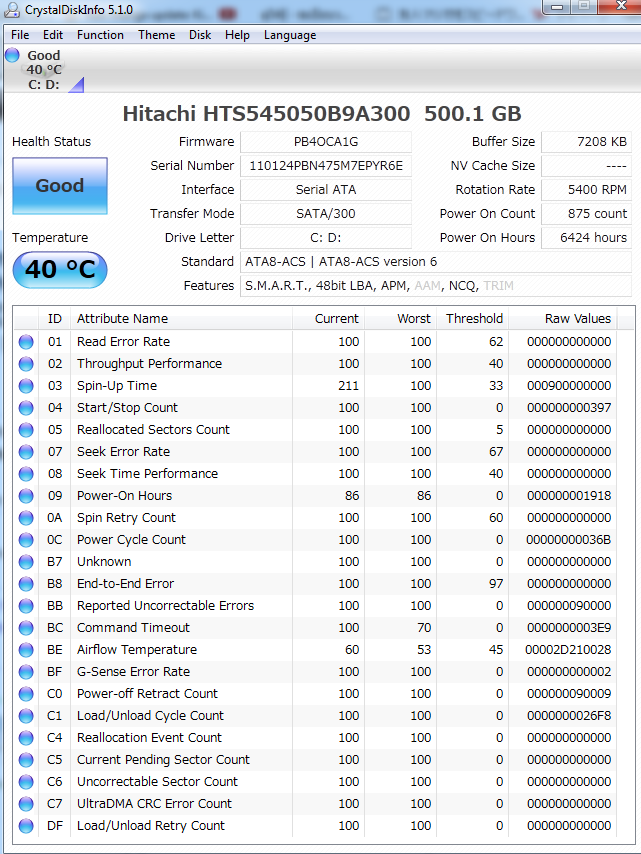
OQdjf.png


and i get new BSOD code is c4 :cry:
 

My Computer My Computer

At a glance

Windows 7 Ultimate x64
OS
Windows 7 Ultimate x64
Apparently the HDD is in a good condition. It looks OK, other than the sign up time.

In the last incidence, there are two failures I am finding. The first thing is the display driver.
Code:
fffff880`09624f78  fffff880`0487238eUnable to load image atikmdag.sys, Win32 error 0n2
[COLOR=Red]*** WARNING: Unable to verify timestamp for atikmdag.sys
*** ERROR: Module load completed but symbols could not be loaded for atikmdag.sys
 atikmdag+0x5538e[/COLOR]
And again ...
Code:
fffff880`09624f08  fffff880`04004a35Unable to load image atikmpag.sys, Win32 error 0n2
[COLOR=Red]*** WARNING: Unable to verify timestamp for atikmpag.sys
*** ERROR: Module load completed but symbols could not be loaded for atikmpag.sys
 atikmpag+0x4a35[/COLOR]
Coz the display driver is very old.
Code:
lmvm atikmpag
start             end                 module name
fffff880`04000000 fffff880`0404a000   atikmpag T (no symbols)           
    Loaded symbol image file: atikmpag.sys
    Image path: atikmpag.sys
 [COLOR=Red]   Image name: atikmpag.sys
    Timestamp:        Thu Jan 27 10:07:03 2011 [/COLOR](4D40F66F)
    CheckSum:         0004BBA7
    ImageSize:        0004A000
    Translations:     0000.04b0 0000.04e4 0409.04b0 0409.04e4
Update it, from http://www.sevenforums.com/graphic-...alyst-video-driver-windows-7-a.html#post17671

The other thing is network related, though not very specific.
Code:
*******************************************************************************
*                                                                             *
*                        Bugcheck Analysis                                    *
*                                                                             *
*******************************************************************************

Use !analyze -v to get detailed debugging information.

[COLOR=Red]BugCheck C4[/COLOR], {91, 2, fffffa8004ed5060, 0}

[COLOR=Red]Probably caused by : NETIO.SYS [/COLOR]( NETIO!NetioAllocateAndReferenceNetBufferListNetBufferMdlAndData+21 )

Followup: MachineOwner
---------
And it is also very old.
Code:
lmvm bcmwl664
start             end                 module name
fffff880`05089000 fffff880`05379000   bcmwl664   (deferred)             
    Image path: bcmwl664.sys
   [COLOR=Red] Image name: bcmwl664.sys
    Timestamp:        Thu Sep 02 05:44:13 2010 [/COLOR](4C7EEC55)
    CheckSum:         002FA15E
    ImageSize:        002F0000
    Translations:     0000.04b0 0000.04e4 0409.04b0 0409.04e4
update the network driver.
First, download the network card driver from manufactuer's website. Downloads | Broadcom
Then reinstall the driver:

  1. Click the Start Button, type "devmgmt.msc" (without quotation marks) in the Start Menu Search box and press Enter.
  2. Double click to expand "Network adaptors".
  3. Right click your network card and click Uninstall.
  4. Check "Delete driver software for this device" check box, click OK.
  5. Restart the computer
  6. If windows does not auto configure the appropriate drivers at startup, install the downloaded one manually.
Let us know the results.
 

My Computer My Computer

At a glance

Microsoft Windows 10 Pro Insider Preview 64-bitIntel(R) Core(TM) i3-4130 CPU @ 3.40GHzCorsair Vengence 4GB x2 (8.00GB Dual-Channel ...2047MB GeForce GTS 450 (ZOTAC International)
Computer type
PC/Desktop
Computer Manufacturer/Model Number
Self Assembled
OS
Microsoft Windows 10 Pro Insider Preview 64-bit
CPU
Intel(R) Core(TM) i3-4130 CPU @ 3.40GHz
Motherboard
Gigabyte Technology Co., Ltd. B85M-D3H
Memory
Corsair Vengence 4GB x2 (8.00GB Dual-Channel DDR3 @ 798MHz)
Graphics Card(s)
2047MB GeForce GTS 450 (ZOTAC International)
Sound Card
Onboard (Realtek High Definition Audio)
Monitor(s) Displays
LG Flatron E2040T
Screen Resolution
1600x900
Hard Drives
Western Digital 1 TB
Seagate 500 GB
PSU
Corsair VS550
Case
Cooler Master K380
Cooling
Cooler Master Seidon 120V Plus
Keyboard
Logitech MK260r
Mouse
Logitech MK260r
Internet Speed
PMPL Broadband
Antivirus
Windows Defender + MBAM
Browser
Firefox
Other Info
Dell Studio 15" Laptop
I test run my NB with new a new display and Broadcom4313 driver all night but not get any BSOD.
But I will test run for 3-4 days if it not get any BSOD i think my nb is in stable state.

Thank you for your advice :)
 

My Computer My Computer

At a glance

Windows 7 Ultimate x64
OS
Windows 7 Ultimate x64
Out of curiosity, are you overclocking somehow in the BIOS or by using any kind of software in the OS?
 

My Computer My Computer

At a glance

Windows 7 Home Premium x64Intel 2500k @4.5ghz 66deg max P95/IBT8 Gigs Patriot Viper 2 Extreme @1600EVGA GTX 580 3 GIG 35degrees idle
Computer Manufacturer/Model Number
Home Made
OS
Windows 7 Home Premium x64
CPU
Intel 2500k @4.5ghz 66deg max P95/IBT
Motherboard
Gigabyte Z68A-D3-B3
Memory
8 Gigs Patriot Viper 2 Extreme @1600
Graphics Card(s)
EVGA GTX 580 3 GIG 35degrees idle
Sound Card
Nvidia HD audio via HDMI to 7.1 Receiver
Monitor(s) Displays
32" Olevia hdtv
Screen Resolution
1080p
Hard Drives
64gig SSD(OS/Apps)
250gig (Files and Dox)
1tb (imaging and backup)
PSU
Corsair vx550w
Case
Thermaltake V3 black
Cooling
CM 212+(push n pull) 4 case fans
Keyboard
Logitech wireless Combo, G13
Mouse
G300
Internet Speed
40mps
Other Info
Two others up and running; C2D E5200/MSI G41M-P26/Corsair XMS3 8gb/GTS 250 1gb and C2D E8200/xFx 750sli/8gb Corsair Dominator/2x EVGA 550ti
Working on; i2600 Build...
HP DV6
@Work I use a Lenovo 5536B8U + Lenovo U300s
Hi James, apparently the CPU is not overclocked.
Code:
 kd> !sysinfo cpuspeed
CPUID:        "Intel(R) Core(TM) i5 CPU       M 480  @ 2.67GHz"
MaxSpeed:     2670
CurrentSpeed: 2666
 

My Computer My Computer

At a glance

Microsoft Windows 10 Pro Insider Preview 64-bitIntel(R) Core(TM) i3-4130 CPU @ 3.40GHzCorsair Vengence 4GB x2 (8.00GB Dual-Channel ...2047MB GeForce GTS 450 (ZOTAC International)
Computer type
PC/Desktop
Computer Manufacturer/Model Number
Self Assembled
OS
Microsoft Windows 10 Pro Insider Preview 64-bit
CPU
Intel(R) Core(TM) i3-4130 CPU @ 3.40GHz
Motherboard
Gigabyte Technology Co., Ltd. B85M-D3H
Memory
Corsair Vengence 4GB x2 (8.00GB Dual-Channel DDR3 @ 798MHz)
Graphics Card(s)
2047MB GeForce GTS 450 (ZOTAC International)
Sound Card
Onboard (Realtek High Definition Audio)
Monitor(s) Displays
LG Flatron E2040T
Screen Resolution
1600x900
Hard Drives
Western Digital 1 TB
Seagate 500 GB
PSU
Corsair VS550
Case
Cooler Master K380
Cooling
Cooler Master Seidon 120V Plus
Keyboard
Logitech MK260r
Mouse
Logitech MK260r
Internet Speed
PMPL Broadband
Antivirus
Windows Defender + MBAM
Browser
Firefox
Other Info
Dell Studio 15" Laptop
I test run 3 days 5 nights with idle, office and game. And i not get any BSOD again !
I think my problem is ATI or Broadcom driver is too old or is not fit with my NB.

Thanks Arc for every advice for me to fix my buddy :)
 

My Computer My Computer

At a glance

Windows 7 Ultimate x64
OS
Windows 7 Ultimate x64
Really good news. :)
 

My Computer My Computer

At a glance

Microsoft Windows 10 Pro Insider Preview 64-bitIntel(R) Core(TM) i3-4130 CPU @ 3.40GHzCorsair Vengence 4GB x2 (8.00GB Dual-Channel ...2047MB GeForce GTS 450 (ZOTAC International)
Computer type
PC/Desktop
Computer Manufacturer/Model Number
Self Assembled
OS
Microsoft Windows 10 Pro Insider Preview 64-bit
CPU
Intel(R) Core(TM) i3-4130 CPU @ 3.40GHz
Motherboard
Gigabyte Technology Co., Ltd. B85M-D3H
Memory
Corsair Vengence 4GB x2 (8.00GB Dual-Channel DDR3 @ 798MHz)
Graphics Card(s)
2047MB GeForce GTS 450 (ZOTAC International)
Sound Card
Onboard (Realtek High Definition Audio)
Monitor(s) Displays
LG Flatron E2040T
Screen Resolution
1600x900
Hard Drives
Western Digital 1 TB
Seagate 500 GB
PSU
Corsair VS550
Case
Cooler Master K380
Cooling
Cooler Master Seidon 120V Plus
Keyboard
Logitech MK260r
Mouse
Logitech MK260r
Internet Speed
PMPL Broadband
Antivirus
Windows Defender + MBAM
Browser
Firefox
Other Info
Dell Studio 15" Laptop
Back
Top