
Randomly drops network connection

Sibuy

New member
Local time
7:29 PM
Messages
22
I hope somebody can shed some light on this matter as looking around the internet, there does not appear to be any confirmed answer to this problem.

A bit of background:-
I have a client who is has 30 machines that have been ok for the last 3 months.
That is, all except 1. This 1 particular machine would lose connection to the network randomly and sometimes running the Windows fix would fix the issue, other times, it did not. Even upon reboot it would not work sometimes.

This was then returned to myself for repair as we thought there maybe an issue with the motherboard NIC. So, the Motherboard was replaced but the problem still persisted.
Windows 7 Pro was reloaded a fresh and only the motherboard NIC drivers (latest available as of 5th June 2012) were installed. It was left to do Windows updates which completed ok. After a period of time, the yellow triangle appeared over the network icon identfying an issue. Again, running the windows fix on this seemed to fix it, but only temporarily as it seemed to come back after several reboots.
So rather than reboot, we left the machine on and it still came up with the same issue.
It seems to happen randomly not matter if the system is sitting there doing nothing or is being used to surf the internet.

After replacing all hardware and reinstalling Windows 7 on no less than 5 occasions, as well as running fixes recommended by Microsoft and various forums, the problem still pesists.

I have tried it on both our network and direct into the router, with the same problems occuring.

I would like to think it is an drivere issue, but that would not explain why the other 29 identical machines are not experiencing this issue.
If anybody has any recommendations, it would be greatly appreciated, as we are now tearing our hair out trying to fix this, but are getting nowhere.

Cheers,
Si

Additional: PC Spec might assist:-
Gigabyte GA-H61M-D2H-USB3, Intel H61, S 1155, DDR3, SATA II
Intel Core i3 2100, S1155, Sdy Bridge, 3.GHz, 5GT/s, HD2000
4GB kit (2GBx2) Corsair DDR3 PC3-10600 (1333MHz)
500GB Seagate ST3500413AS Barracuda 7200.12, SATA 6Gb/s, 720
Powercool PC750 PSU

Usual displayed windows error for network:-
"local Area Connection" does not have a valid IP Configuration.

This system is set to DHCP and addresses are being supplied without issue to other systems.
 
Last edited:

My Computer

Computer type
PC/Desktop
Computer Manufacturer/Model Number
D.V.S
OS
Windows 7 Pro 64BIT
CPU
Intel Core i3 2120, S1155, Sdy Bridge, 3.3GHz
Motherboard
Asus P8H67-M LE Rev3.0 Motherboard
Memory
Corsair DDR3 PC3-10600 (1333MHz) 4GB kit (2GBx2)
Graphics Card(s)
1GB Gainward G 210 Video Card
Sound Card
On board
Monitor(s) Displays
Various
Screen Resolution
Various
Hard Drives
500GB Seagate ST3500413AS Barracuda 7200
I have experiendced this also in the past. I dont know if this is suitable for your situation but have you tried setting the problem PC to have a static IP. In the past I have had similar problems and the only thing I could put it down to is that the router was assigning an address then the PC was losing connection. When the Pc requested a new IP address the router still registered it as having one so did not give it a new one. Setting a static IP address has always resolved this for me but as I said it may not suit your situation.
 

My Computer

OS
Windows 7 Profesional 64 bit
Thanks for the suggestion. Yes, I have tried various static addresses but to no avail. So damn frustrating this issue. So many people seem to have a similar issue, but it's usually a hardware fault that is the issue. Sadly, I dont feel that is the case in this situation.
 

My Computer

Computer type
PC/Desktop
Computer Manufacturer/Model Number
D.V.S
OS
Windows 7 Pro 64BIT
CPU
Intel Core i3 2120, S1155, Sdy Bridge, 3.3GHz
Motherboard
Asus P8H67-M LE Rev3.0 Motherboard
Memory
Corsair DDR3 PC3-10600 (1333MHz) 4GB kit (2GBx2)
Graphics Card(s)
1GB Gainward G 210 Video Card
Sound Card
On board
Monitor(s) Displays
Various
Screen Resolution
Various
Hard Drives
500GB Seagate ST3500413AS Barracuda 7200
Thanks for the suggestion. Yes, I have tried various static addresses but to no avail. So damn frustrating this issue. So many people seem to have a similar issue, but it's usually a hardware fault that is the issue. Sadly, I dont feel that is the case in this situation.

If you can post the ipconfig/all from the problem machine it may help me to diagnose the problem. :)
 

My Computer

Computer type
PC/Desktop
Computer Manufacturer/Model Number
Home built
OS
Windows 7 Ult, Windows 8.1 Pro,
CPU
Q9650-4.275GHz, E8600 4.5GHz, E6750-3.8GHz
Motherboard
Evga 780i FTW
Memory
G.Skill PC2 9600 1200Mhz 5 5 5 15 2T
Graphics Card(s)
GTX480
Sound Card
Asus Xonar D2
Monitor(s) Displays
HannsG
Screen Resolution
1680X1050
Hard Drives
GSkill Phoenix Pro 120GB SSD
PSU
ThermalTake Toughpower 1000Watt modular
Case
ThermalTake XaserV
Cooling
Xigmatek S1283
Keyboard
Logitech G15
Mouse
Logitech G9
Internet Speed
T1
I will get that posted as soon as it's finished reloading.....again ;)
 

My Computer

Computer type
PC/Desktop
Computer Manufacturer/Model Number
D.V.S
OS
Windows 7 Pro 64BIT
CPU
Intel Core i3 2120, S1155, Sdy Bridge, 3.3GHz
Motherboard
Asus P8H67-M LE Rev3.0 Motherboard
Memory
Corsair DDR3 PC3-10600 (1333MHz) 4GB kit (2GBx2)
Graphics Card(s)
1GB Gainward G 210 Video Card
Sound Card
On board
Monitor(s) Displays
Various
Screen Resolution
Various
Hard Drives
500GB Seagate ST3500413AS Barracuda 7200
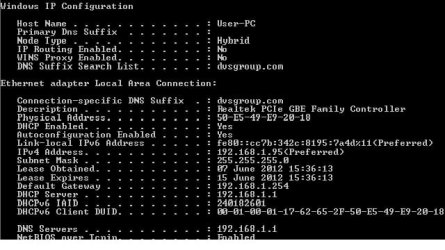
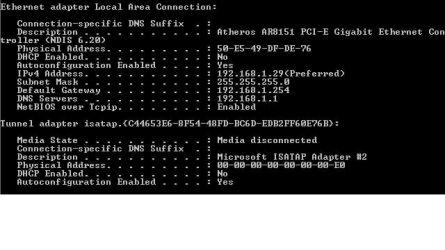
Here are the 2 images attached that show one system, that was built today and is currently set to DHCP and is downloading Windows Updates.
The 2nd shows the problem machine that is currently set to a static IP.
 

Attachments

  • Working System - DHCP.jpg
    Working System - DHCP.jpg
    37.3 KB · Views: 52
  • Problem System-StaticIPConfig.jpg
    Problem System-StaticIPConfig.jpg
    29.1 KB · Views: 39

My Computer

Computer type
PC/Desktop
Computer Manufacturer/Model Number
D.V.S
OS
Windows 7 Pro 64BIT
CPU
Intel Core i3 2120, S1155, Sdy Bridge, 3.3GHz
Motherboard
Asus P8H67-M LE Rev3.0 Motherboard
Memory
Corsair DDR3 PC3-10600 (1333MHz) 4GB kit (2GBx2)
Graphics Card(s)
1GB Gainward G 210 Video Card
Sound Card
On board
Monitor(s) Displays
Various
Screen Resolution
Various
Hard Drives
500GB Seagate ST3500413AS Barracuda 7200
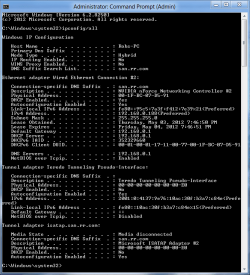
The long form ipconfig would be more helpful, where I can see all the other adaptors involved.

Should look like the picture below.
 

Attachments

  • My ipconfig.PNG
    My ipconfig.PNG
    21 KB · Views: 31

My Computer

Computer type
PC/Desktop
Computer Manufacturer/Model Number
Home built
OS
Windows 7 Ult, Windows 8.1 Pro,
CPU
Q9650-4.275GHz, E8600 4.5GHz, E6750-3.8GHz
Motherboard
Evga 780i FTW
Memory
G.Skill PC2 9600 1200Mhz 5 5 5 15 2T
Graphics Card(s)
GTX480
Sound Card
Asus Xonar D2
Monitor(s) Displays
HannsG
Screen Resolution
1680X1050
Hard Drives
GSkill Phoenix Pro 120GB SSD
PSU
ThermalTake Toughpower 1000Watt modular
Case
ThermalTake XaserV
Cooling
Xigmatek S1283
Keyboard
Logitech G15
Mouse
Logitech G9
Internet Speed
T1
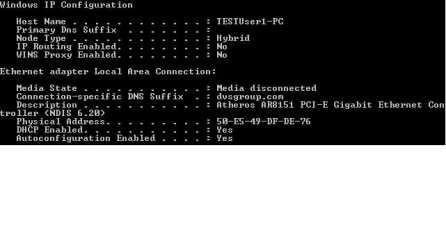
Additional Image. This is the problem machine, but set as DHCP. As I type this, it is currently working, but this WILL fail. It's 100% guaranteed.
 

Attachments

  • ProblemSystem - DHCP.jpg
    ProblemSystem - DHCP.jpg
    20.5 KB · Views: 27

My Computer

Computer type
PC/Desktop
Computer Manufacturer/Model Number
D.V.S
OS
Windows 7 Pro 64BIT
CPU
Intel Core i3 2120, S1155, Sdy Bridge, 3.3GHz
Motherboard
Asus P8H67-M LE Rev3.0 Motherboard
Memory
Corsair DDR3 PC3-10600 (1333MHz) 4GB kit (2GBx2)
Graphics Card(s)
1GB Gainward G 210 Video Card
Sound Card
On board
Monitor(s) Displays
Various
Screen Resolution
Various
Hard Drives
500GB Seagate ST3500413AS Barracuda 7200
Here is the long form.
 

Attachments

  • Problem System_IPConfig - DHCP.jpg
    Problem System_IPConfig - DHCP.jpg
    63.9 KB · Views: 33

My Computer

Computer type
PC/Desktop
Computer Manufacturer/Model Number
D.V.S
OS
Windows 7 Pro 64BIT
CPU
Intel Core i3 2120, S1155, Sdy Bridge, 3.3GHz
Motherboard
Asus P8H67-M LE Rev3.0 Motherboard
Memory
Corsair DDR3 PC3-10600 (1333MHz) 4GB kit (2GBx2)
Graphics Card(s)
1GB Gainward G 210 Video Card
Sound Card
On board
Monitor(s) Displays
Various
Screen Resolution
Various
Hard Drives
500GB Seagate ST3500413AS Barracuda 7200
My Computer

Computer type
PC/Desktop
Computer Manufacturer/Model Number
Home built
OS
Windows 7 Ult, Windows 8.1 Pro,
CPU
Q9650-4.275GHz, E8600 4.5GHz, E6750-3.8GHz
Motherboard
Evga 780i FTW
Memory
G.Skill PC2 9600 1200Mhz 5 5 5 15 2T
Graphics Card(s)
GTX480
Sound Card
Asus Xonar D2
Monitor(s) Displays
HannsG
Screen Resolution
1680X1050
Hard Drives
GSkill Phoenix Pro 120GB SSD
PSU
ThermalTake Toughpower 1000Watt modular
Case
ThermalTake XaserV
Cooling
Xigmatek S1283
Keyboard
Logitech G15
Mouse
Logitech G9
Internet Speed
T1
Yep, sadly there was an issue months ago and we lost IPV6 of the server.
working with legacy stuff, but got a complete rebuild due shortly of the entire server & network.

Certainly has not caused any issues with other systems, just this little trouble maker ;)
 

My Computer

Computer type
PC/Desktop
Computer Manufacturer/Model Number
D.V.S
OS
Windows 7 Pro 64BIT
CPU
Intel Core i3 2120, S1155, Sdy Bridge, 3.3GHz
Motherboard
Asus P8H67-M LE Rev3.0 Motherboard
Memory
Corsair DDR3 PC3-10600 (1333MHz) 4GB kit (2GBx2)
Graphics Card(s)
1GB Gainward G 210 Video Card
Sound Card
On board
Monitor(s) Displays
Various
Screen Resolution
Various
Hard Drives
500GB Seagate ST3500413AS Barracuda 7200
I'm not sure where you downloaded the driver from but reinstalling a different driver from another site would be worth trying.

Nothing very obvious is showing up on the ipconfig, rebuilding the server and network might even make a difference.

It might help if I could see an ipconfig from this machine when the connection drops out.
 

My Computer

Computer type
PC/Desktop
Computer Manufacturer/Model Number
Home built
OS
Windows 7 Ult, Windows 8.1 Pro,
CPU
Q9650-4.275GHz, E8600 4.5GHz, E6750-3.8GHz
Motherboard
Evga 780i FTW
Memory
G.Skill PC2 9600 1200Mhz 5 5 5 15 2T
Graphics Card(s)
GTX480
Sound Card
Asus Xonar D2
Monitor(s) Displays
HannsG
Screen Resolution
1680X1050
Hard Drives
GSkill Phoenix Pro 120GB SSD
PSU
ThermalTake Toughpower 1000Watt modular
Case
ThermalTake XaserV
Cooling
Xigmatek S1283
Keyboard
Logitech G15
Mouse
Logitech G9
Internet Speed
T1
I agree completely. Installed the new driver from the link you priovided.
This was all OK for about an hour this morning. It has then failed with the usual 'Yellow Triangle'. Attached should be the ipconfig/all from this current state.
 

Attachments

  • ProblemSystem - DHCP - Failed.jpg
    ProblemSystem - DHCP - Failed.jpg
    62.3 KB · Views: 17

My Computer

Computer type
PC/Desktop
Computer Manufacturer/Model Number
D.V.S
OS
Windows 7 Pro 64BIT
CPU
Intel Core i3 2120, S1155, Sdy Bridge, 3.3GHz
Motherboard
Asus P8H67-M LE Rev3.0 Motherboard
Memory
Corsair DDR3 PC3-10600 (1333MHz) 4GB kit (2GBx2)
Graphics Card(s)
1GB Gainward G 210 Video Card
Sound Card
On board
Monitor(s) Displays
Various
Screen Resolution
Various
Hard Drives
500GB Seagate ST3500413AS Barracuda 7200
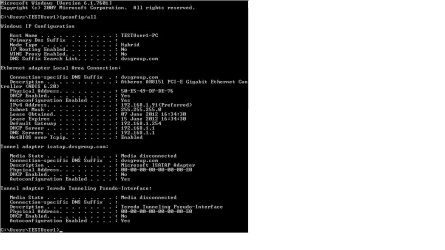
According to this one the connection from the router was lost completely. Assuming that your router is still working.... We can try flushing the DNS and resetting the IP stack. To do that, save the file below, unzip and click on the file, let it run until your machine reboots. See if it stays online any longer this time.
 

Attachments

My Computer

Computer type
PC/Desktop
Computer Manufacturer/Model Number
Home built
OS
Windows 7 Ult, Windows 8.1 Pro,
CPU
Q9650-4.275GHz, E8600 4.5GHz, E6750-3.8GHz
Motherboard
Evga 780i FTW
Memory
G.Skill PC2 9600 1200Mhz 5 5 5 15 2T
Graphics Card(s)
GTX480
Sound Card
Asus Xonar D2
Monitor(s) Displays
HannsG
Screen Resolution
1680X1050
Hard Drives
GSkill Phoenix Pro 120GB SSD
PSU
ThermalTake Toughpower 1000Watt modular
Case
ThermalTake XaserV
Cooling
Xigmatek S1283
Keyboard
Logitech G15
Mouse
Logitech G9
Internet Speed
T1
According to this one the connection from the router was lost completely. Assuming that your router is still working.... We can try flushing the DNS and resetting the IP stack. To do that, save the file below, unzip and click on the file, let it run until your machine reboots. See if it stays online any longer this time.

I have run this on the system this morning. I will keep you informed of how things progress.
 
Last edited:

My Computer

Computer type
PC/Desktop
Computer Manufacturer/Model Number
D.V.S
OS
Windows 7 Pro 64BIT
CPU
Intel Core i3 2120, S1155, Sdy Bridge, 3.3GHz
Motherboard
Asus P8H67-M LE Rev3.0 Motherboard
Memory
Corsair DDR3 PC3-10600 (1333MHz) 4GB kit (2GBx2)
Graphics Card(s)
1GB Gainward G 210 Video Card
Sound Card
On board
Monitor(s) Displays
Various
Screen Resolution
Various
Hard Drives
500GB Seagate ST3500413AS Barracuda 7200
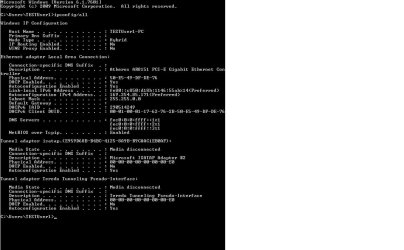
After a period of 30 minutes and 5 reboots, the same problem has come back again. Image is below of IPCONFIG/ALL after failure.

A subsequent reboot has cured the fault and it is back on the network. But there is still the problem there. Several reboots and it will lose the network again.
 

Attachments

  • Failure after IPResetALL.jpg
    Failure after IPResetALL.jpg
    67.1 KB · Views: 14
Last edited:

My Computer

Computer type
PC/Desktop
Computer Manufacturer/Model Number
D.V.S
OS
Windows 7 Pro 64BIT
CPU
Intel Core i3 2120, S1155, Sdy Bridge, 3.3GHz
Motherboard
Asus P8H67-M LE Rev3.0 Motherboard
Memory
Corsair DDR3 PC3-10600 (1333MHz) 4GB kit (2GBx2)
Graphics Card(s)
1GB Gainward G 210 Video Card
Sound Card
On board
Monitor(s) Displays
Various
Screen Resolution
Various
Hard Drives
500GB Seagate ST3500413AS Barracuda 7200
I am going to leave the system on overnight to see if the connection is still established in the morning.
It could very well be the reboots that are causing the loss of network.
 

My Computer

Computer type
PC/Desktop
Computer Manufacturer/Model Number
D.V.S
OS
Windows 7 Pro 64BIT
CPU
Intel Core i3 2120, S1155, Sdy Bridge, 3.3GHz
Motherboard
Asus P8H67-M LE Rev3.0 Motherboard
Memory
Corsair DDR3 PC3-10600 (1333MHz) 4GB kit (2GBx2)
Graphics Card(s)
1GB Gainward G 210 Video Card
Sound Card
On board
Monitor(s) Displays
Various
Screen Resolution
Various
Hard Drives
500GB Seagate ST3500413AS Barracuda 7200
You might want to check your start up programs and running processes in task manager. Something seems to be causing the connection to drop but nothing is showing up in the ipconfig.
 

My Computer

Computer type
PC/Desktop
Computer Manufacturer/Model Number
Home built
OS
Windows 7 Ult, Windows 8.1 Pro,
CPU
Q9650-4.275GHz, E8600 4.5GHz, E6750-3.8GHz
Motherboard
Evga 780i FTW
Memory
G.Skill PC2 9600 1200Mhz 5 5 5 15 2T
Graphics Card(s)
GTX480
Sound Card
Asus Xonar D2
Monitor(s) Displays
HannsG
Screen Resolution
1680X1050
Hard Drives
GSkill Phoenix Pro 120GB SSD
PSU
ThermalTake Toughpower 1000Watt modular
Case
ThermalTake XaserV
Cooling
Xigmatek S1283
Keyboard
Logitech G15
Mouse
Logitech G9
Internet Speed
T1
You might want to check your start up programs and running processes in task manager. Something seems to be causing the connection to drop but nothing is showing up in the ipconfig.

Thanks for the advice chev. Any recommendations what to disable?
Basically, this is fresh Windows 7 installation, so other than Windows componants, nothing else should be running. All updates are switched off and the only additional piece of software was the NIC driver which I downloaded from the link you provided previous.

Which of course leads to "If it's Windows, why do other people not get this all the time?", "Why does it not happen with other machines I have built at my office?", "Why does it happen at the school where they are being used, but only on this machine, as the other 29 identical machines are fine?"

You can see the frustration with the questions above. I keep going over various things as to what could be causing it, but there does not seem to be any logic to it.
 

My Computer

Computer type
PC/Desktop
Computer Manufacturer/Model Number
D.V.S
OS
Windows 7 Pro 64BIT
CPU
Intel Core i3 2120, S1155, Sdy Bridge, 3.3GHz
Motherboard
Asus P8H67-M LE Rev3.0 Motherboard
Memory
Corsair DDR3 PC3-10600 (1333MHz) 4GB kit (2GBx2)
Graphics Card(s)
1GB Gainward G 210 Video Card
Sound Card
On board
Monitor(s) Displays
Various
Screen Resolution
Various
Hard Drives
500GB Seagate ST3500413AS Barracuda 7200
It could just be a problem with the network adaptor or the motherboard on this particular machine.

Intermittent connection problems aren't easy to diagnose. I'm also not so sure that the server isn't part of the problem with IPv6 missing and all. Something seems to be disconnecting this machine from the DHCP server from what I can see here.
 

My Computer

Computer type
PC/Desktop
Computer Manufacturer/Model Number
Home built
OS
Windows 7 Ult, Windows 8.1 Pro,
CPU
Q9650-4.275GHz, E8600 4.5GHz, E6750-3.8GHz
Motherboard
Evga 780i FTW
Memory
G.Skill PC2 9600 1200Mhz 5 5 5 15 2T
Graphics Card(s)
GTX480
Sound Card
Asus Xonar D2
Monitor(s) Displays
HannsG
Screen Resolution
1680X1050
Hard Drives
GSkill Phoenix Pro 120GB SSD
PSU
ThermalTake Toughpower 1000Watt modular
Case
ThermalTake XaserV
Cooling
Xigmatek S1283
Keyboard
Logitech G15
Mouse
Logitech G9
Internet Speed
T1
Back
Top