ransommalware

dumper100

New member
Local time
2:42 PM
Messages
1
hi have got this thing demanding money or police action I know its ascam but my computer is locked with this so called official message. I cannot get into safemode by the f8 key any ideas .

thanks . Dumper:mad:
 

My Computer

Computer type
PC/Desktop
Computer Manufacturer/Model Number
custombuild
OS
windows7 32bit
CPU
?
Motherboard
?
Memory
?
Graphics Card(s)
?
Antivirus
avg
Is it the moneypak/FBI scam virus? Do you have a recovery image you can use? If not, you'll need a virus removal guide or someone who knows how to remove it.
 

My Computer

Computer type
PC/Desktop
OS
Windows 7 UnProfessional x64

My Computer

Computer type
PC/Desktop
Computer Manufacturer/Model Number
Golden Mk. I.4
OS
Windows 10 Pro x64 ; Xubuntu x64
CPU
Intel i7 860 @ 2.80 GHz O/C'ed to 4.0GHz
Motherboard
Gigabyte P55A-UD3R Rev.1. Award BIOS F13
Memory
16GB Corsair Vengance DDR3 @ 661 MHz Dual Channel (9-9-9-24)
Graphics Card(s)
EVGA NVidia GTX 560 1024MB
Sound Card
Realtek Integrated
Monitor(s) Displays
Dual Samsung SyncMaster 2494HS
Screen Resolution
1920*1080 and 1920*1080
Hard Drives
1*Samsung 840 EVO 120GB SSD;
1*OCZ Vertex 2 60GB SSD;
2*Samsung F3 SpinPoint 1TB in RAID0;
1*Samsung F1 SpinPoint 1TB;
2*Western Digital 1TB External USB 3.0
1*Western Digital 500GB External USB 3.0
1*Seagate 500GB External USB 2.0
PSU
Thermaltake ToughPower QFan 750W
Case
Thermaltake Element S VK60001W2Z
Cooling
Corsair H60 Water Cooling, 2*230mm and 2*80mm case fans
Keyboard
Logitech G110
Mouse
Logitech MX518
After you get through reading through the links Golden provided,
See if this startup process gets you to a Free scanner utility site so you can download it,
Safe mode with networking,
Shut down your machine, Unplug-Hold the power button down for 30/45 seconds (Power Drain)
Leave the machine Unpluged from the power source for longer the better.
Power up and Tap the F8 key continuously until you see a black page with white text,
Use the down arrow key to toggle to safe mode with networking/ hit the enter key.
Login as usual
Other advanced methods,
http://www.sevenforums.com/tutorials/69585-safe-mode.html

Oops,
Forgot the scanners,
Review Jacee’s instructions to run Adwcleaner here,
Ignore the title of the thread,
http://www.sevenforums.com/system-security/309998-how-can-i-kill-avg-search.html


You can use these free tools to see if they find anything,
Manually Update them before running full scans,
Try not to use your computer while the scans are running, (one at a time of course).
Uncheck the box to Activate the Free trial from the final install options,
http://www.malwarebytes.org/products/malwarebytes_free
http://www.superantispyware.com/?tag=SUPERANTISPYWARE
 

My Computer

Computer type
PC/Desktop
Computer Manufacturer/Model Number
Custom assembled by me :}
OS
Win-7-Pro64bit 7-H-Prem-64bit
CPU
i7-5930K 2nd i9-9940x both water blocked VRM's too
Motherboard
ASUS SABERTOOTH X99 2nd ASUS x299 Apex
Memory
Trident-z 3200C14 2nd Trident-z 3600C16
Graphics Card(s)
EVGA 1080ti ftw3 2nd Titan Xp both water blocked
Sound Card
Built-in Realtek
Monitor(s) Displays
1-AOC G2460PG 24"G-Sync 144Hz/ 2nd 1-ASUS VG248QE 24" 144Hz
Screen Resolution
1920 x 1080 144Hz
Hard Drives
2-Samsung M.2 Evo & Evo Plus
2-Samsung 850 EVO 500GB SSD's/ 3-2.5 W.D. Black 1tb-&3-1tb/3-3.5 WD Black 1tb hdd's
PSU
EVGA SuperNOVA 1000-P2 2nd 1200-P2
Case
2-Corsair Obsidian Series 450D Black ATX Mid Tower
Cooling
Custom water loops
Keyboard
Logitech G710+/ 2nd Logitech G910
Mouse
2-RedDragon M901 Perdition 16400 dpi Gaming mouse = wired
Internet Speed
Comcast Ping 19ms 89.31mbps download speed 6.12mbps upload
Antivirus
Malwarebytes Pro/ Superantispyware Pro
Browser
FireFox & Pale moon
Other Info
2nd ASUS X299 Apex/Intel i9-9940x with Custom water loop/7H-Prem-x64/Corsair 450D case/Ram Trident-z 3600C16 4x8gb / Samsung970Evo plus 500gb SSD/Dual ssd EZ swap evo/PSU EVGA SuperNova 1200w-P2 80+Platinum/GPU Titan Xp /8-ML-140 on push-pull on 2-280GTX rads
dumper100,

Bonjour!

If you wish, follow these instructions. I've provided them to Users who ran them successfully, several times...


Let's use HitmanPro.Kickstart to access your computer, scan it for malware, and remove this infection. The program targets this ransomware.


Also, you may want to print these instructions, so they are available to follow.


Now, load a USB flash drive with HitmanPro.Kickstart as follows...
Note: the contents of the USB flash drive are erased during this process!


Use a clean (non-infected) computer, and download:
HitmanPro.Kickstart - Anti ransomware, politievirus, bundestrojaner, Reveton, BKA, GVU - SurfRight


Under Download (on the right) select the program applicable to the system: 32-bit


When HitmanPro opens, click the KickStart icon at the bottom of the screen.


>>Plug in the USB flash drive.


When the USB flash drive is detected, a selection screen is presented.
Select the USB flash drive from the choices, and press: Install Kickstart
A warning that all contents of the selected flash drive will erase is presented.
Press: Yes


As the HitmanPro.Kickstart files are loaded, a progress indicator is shown on the screen.
Once the process is completed a screen is presented with the contents of HitmanPro.Kickstart

Remove the USB flash drive from the clean computer and press: Close


Now, with the ransomed computer shut down, plug the USB flash drive into a USB port, and turn on the power.


When the computer starts, press the key that brings up the Boot Menu. (On some machines its F12, F10, or F2)

From there, select to boot from the USB drive. (It may say 'Removable Drive' in the options.)
Info: How to Remove Ransomware - Select Real Security


Once you select the USB flash drive to boot from, press: Enter


A Kickstart prompt with USB boot options appears.
Select: 1 (Bypass the Master Boot Record (Default))


The system continues to boot from the hard drive and starts Windows.

If you get a message stating that Windows failed to start, etc., just select: Start Windows Normally

When Windows boots, you either get a logon screen, or the Desktop is started.
If you see a logon screen with your User name, logon with it.


In the next prompt that appears, to start the program without installing to the local hard disk, select the option to do a: One-time scan to check the computer.

To start scanning for malware press: Next


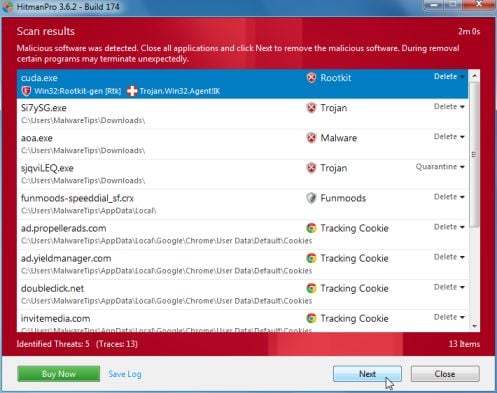
If malware is detected, the program shows what malware is present on the system using a red framed screen as shown below:
hitmanpro-scan-results.jpg

Select Next to quarantine the malware into a secure storage where it can no longer start.


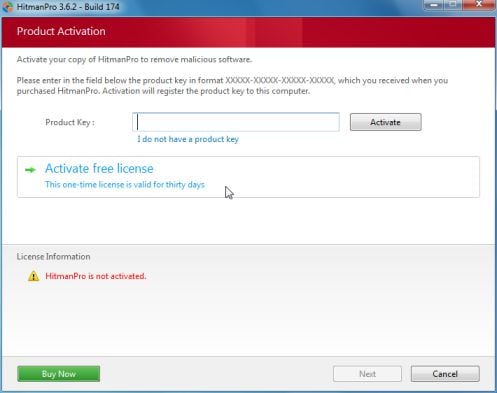
At the next screen, activate the 30-day free license:
hitmanpro-activation.jpg

After successful activation (30 days), press: Next


A screen indicating that the malware was successfully disabled or removed is presented.
Press: Next


To obtain a report of the scan results, press: Save log
>>Save the Notepad log to the Desktop<<
It has a name such as: HitmanPro_xxxxxxxx_xxxx


Remove the USB drive, and press: Reboot
If no malware is found, press: Close


After HitmanPro.Kickstart is done, you should be back into normal Windows.


Please post the HitmanPro log in your reply. <<Important!

 
Last edited:

My Computer

Computer type
PC/Desktop
Computer Manufacturer/Model Number
An ol' eMachines
OS
Windows 7 Home Premium
Internet Speed
Fine for me...I'm retired!
dumper100,

There has also been some success in removing the FBI ransomware with Windows Defender Offline.

A tutorial prepared by Brink is found here:
http://www.sevenforums.com/tutorials/166445-windows-defender-offline.html

However, I recommend you use WDO on a bootable USB pen/flash drive, since the virus definitions for it can be updated.


If you decide to do so, the following are instructions for only using the USB option:

:info: Download: What is Windows Defender Offline?
Press the download that applies to your system: 32-bit

Save the exe file to the Desktop of a computer that is not infected, since the ransomware can interfere with the USB media creation!

Double-click the downloaded mssstool32.exe file.

At the initial WDO welcome window, you are also made aware that an Internet connection is needed.
Click on: Next

At the next window with License Terms, click on: I accept

Next, you are asked which type of media you are installing Windows Defender on.
At this point select: On a USB flash drive that is not password protected
Click: Next

Connect the USB flach drive to the clean computer.
A warning appears about reformatting and its consequences.
Backup anything that you do not want to lose to another location!!

If you have more than one USB drive connected, select the one to use, and click on: Next
After clicking Next, you see another Window which initiates the copying and downloading of all the needed files to create the offline bootable version of Windows Defender.

The Window will also show a progress bar so you can see the overall progress of the process.
When the Installation Complete window appears, you can click: Finish

Remove the USB flash drive from the clean computer using the Safely Remove... icon on the lower right of the Taskbar.


:info: Now, connect the USB flash drive to the infected computer.

Restart the infected computer from the USB flash drive.

After WDO starts (automatically), under Scan Options, click: Full
Next, click: Scan Now

WDO performs the scan, and displays steps to follow based on its scan results...

When done, close Windows Defender Offline and restart the computer.

Back in Windows, the log of quarantined or detected items should be available in: C:\Windows\Windows Defender Offline\Support

It is stored in an MPLog-MM/DD/YYYY-HH/MM/SS.txt file

:ar: Please provide the MPLog in your reply.
 
Last edited:

My Computer

Computer type
PC/Desktop
Computer Manufacturer/Model Number
An ol' eMachines
OS
Windows 7 Home Premium
Internet Speed
Fine for me...I'm retired!
Post #3 has it covered Cottonball
 

My Computer

Computer type
PC/Desktop
Computer Manufacturer/Model Number
Golden Mk. I.4
OS
Windows 10 Pro x64 ; Xubuntu x64
CPU
Intel i7 860 @ 2.80 GHz O/C'ed to 4.0GHz
Motherboard
Gigabyte P55A-UD3R Rev.1. Award BIOS F13
Memory
16GB Corsair Vengance DDR3 @ 661 MHz Dual Channel (9-9-9-24)
Graphics Card(s)
EVGA NVidia GTX 560 1024MB
Sound Card
Realtek Integrated
Monitor(s) Displays
Dual Samsung SyncMaster 2494HS
Screen Resolution
1920*1080 and 1920*1080
Hard Drives
1*Samsung 840 EVO 120GB SSD;
1*OCZ Vertex 2 60GB SSD;
2*Samsung F3 SpinPoint 1TB in RAID0;
1*Samsung F1 SpinPoint 1TB;
2*Western Digital 1TB External USB 3.0
1*Western Digital 500GB External USB 3.0
1*Seagate 500GB External USB 2.0
PSU
Thermaltake ToughPower QFan 750W
Case
Thermaltake Element S VK60001W2Z
Cooling
Corsair H60 Water Cooling, 2*230mm and 2*80mm case fans
Keyboard
Logitech G110
Mouse
Logitech MX518
Thanks, Golden.

Just added some miscellaneous trivia, and placed it all in one sequence so the OP does not have to refer to more than one section.

No biggie...
 

My Computer

Computer type
PC/Desktop
Computer Manufacturer/Model Number
An ol' eMachines
OS
Windows 7 Home Premium
Internet Speed
Fine for me...I'm retired!
Back
Top