Solved Ransomware?

Frogpond51

New member
Local time
1:35 PM
Messages
86
Location
In the pond -of course!
Hi All,
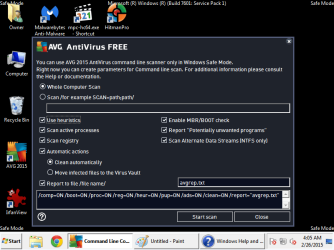
A friend of mine recently had an online experience where he was browsing and a screen popped-up telling him he had been downloading blahblahblah, demanding $300 , locking his computer, he thinks. He is a bit of a novice on-line and I first thought he had some ransom malware or virus. He said that it locked his browser and couldn't shut down his computer. When he brought it over, I turned it on and was expecting to see a blocked computer screen but it booted normally into Windows. He is using Windows Firewall, AVG Free and Malwarebytes Free for security and Windows Updates are current. I ran AVG scan and it showed no infections, ran MBAM and all it showed was the Ask Bar, which I allowed it to remove. Then ran AVG and MBAM in Safe Mode. AVG scan in safe mode showed 92 infections? and MBAM showed nothing. I then ran TDSS Killer, Hitman Pro and Kaspersky Rescue Disk 10 and AVG and MBAM several times in normal and safe mode. Nothing seems to show up except when I run AVG in safe mode, or maybe I don't understand the report (please see attached).
Sorry for the lengthy post, but any help to make sure his machine is clean would be greatly appreciated.
 

Attachments

My Computer

Computer type
PC/Desktop
Computer Manufacturer/Model Number
custom build
OS
Windows 7 Ultimate 64bit & Windows XP Pro (Dual Boot)
CPU
AMD Phenom II x4 965 3.40GHz
Motherboard
ECS A885GM-A2
Memory
8.00 GB
Graphics Card(s)
AMD Radeon HD 6670
Monitor(s) Displays
HP L2445w
Screen Resolution
1920 x 1200
Hard Drives
Samsung SSD 840 series SATA 120GB-Win 7 &
WD 1Tb Caviar Black 7200 rpm-XP Pro
PSU
Cooler Master Elite Power 460 Watt ATX Power Supply
Case
Thermaltake V3 Black Edition ATX Mid Tower
Cooling
Cooler Master Hyper 212 EVO Universal CPU Cooler
Keyboard
Logitech
Internet Speed
30 Mg download-10 Mg upload
Antivirus
Bitdefender & Malwarebytes Pro
Browser
IE 11-because I like a SLOW browser!
Sounds like in addition to having some infections found by avg; I would also download, install, and run superantispyware from the following link and let it scan for spyware:

SUPERAntiSpyware - Downloading File
 

My Computer

Computer type
PC/Desktop
Computer Manufacturer/Model Number
custom built
OS
Windows 7 ultimate 64-bit
CPU
Intel I7 2600K 3.4ghz
Motherboard
Asus Evo P8P67
Memory
Corsair 16gb ddr3 1600mhz
Graphics Card(s)
Nvidia Geforce gt 430
Sound Card
Sound Blaster Titanium x-fi pci express
Monitor(s) Displays
Dell E198WFP
Hard Drives
1 western digital 2TB drive.
PSU
Antec 1200 watt
Case
Inwin Dragon Rider
Cooling
6 case supplied cooling fans
Keyboard
logitech mk700
Mouse
logitech m705
Internet Speed
25-50mbps download; 10mbps upload(i think)
Antivirus
avg free 2014
Browser
mozilla firefox
Other Info
Also have a pretty bad speaker setup which is a klipsch promedia 5.1 surround speaker setup with huge subwoofer and lg blu ray player/writer. Also a hp officejet pro 8600 plus wireless all in one and a logitech s7500 webcam.
Frogpond51,

Can't claim to be a fan of AVG, but, did you request an additional scan to report locked files?
If this option got inadvertently set, see if you can uncheck it.

It is my understanding these files cannot be infected by usual viruses because they are locked and cannot be modified by other processes.

If there is a pressing need to scan these files, and I do not see any, consider using a program where the operating system will not be running, and files will not be locked.
 

My Computer

Computer type
PC/Desktop
Computer Manufacturer/Model Number
An ol' eMachines
OS
Windows 7 Home Premium
Internet Speed
Fine for me...I'm retired!
Hi All,
A friend of mine recently had an online experience where he was browsing and a screen popped-up telling him he had been downloading blahblahblah, demanding $300 , locking his computer, he thinks. He is a bit of a novice on-line and I first thought he had some ransom malware or virus. He said that it locked his browser and couldn't shut down his computer. When he brought it over, I turned it on and was expecting to see a blocked computer screen but it booted normally into Windows. He is using Windows Firewall, AVG Free and Malwarebytes Free for security and Windows Updates are current. I ran AVG scan and it showed no infections, ran MBAM and all it showed was the Ask Bar, which I allowed it to remove. Then ran AVG and MBAM in Safe Mode. AVG scan in safe mode showed 92 infections? and MBAM showed nothing. I then ran TDSS Killer, Hitman Pro and Kaspersky Rescue Disk 10 and AVG and MBAM several times in normal and safe mode. Nothing seems to show up except when I run AVG in safe mode, or maybe I don't understand the report (please see attached).
Sorry for the lengthy post, but any help to make sure his machine is clean would be greatly appreciated.

If you see any of these pages that say "FBI warning" or the like, just open task manager and click stop process.
 

My Computer

Computer type
PC/Desktop
Computer Manufacturer/Model Number
Self-Built
OS
Windows 7 Professional X64
CPU
Core i7 (2nd gen) i7-2600K / 3.40GHz
Motherboard
ASUS P8Z77-V Intel 7 Series Motherboard
Memory
DDR3 2400MHz (OC) 16gb
Graphics Card(s)
Intel(R) HD Graphics 3000, -1988 Mb
Sound Card
8 ChannelsAudio Chipset Realtek ALC892
Monitor(s) Displays
LG 29UM65 Black 29"
Screen Resolution
2560 x 1080
Hard Drives
840 EVO 250 GB SSD ;2tb (2);Seagate;1tb Seagate; 750 gb Seagate; wd ext (2) 750 gb,WD 2tb X 2;WD 3TB Black
PSU
750 watt
Case
Thermaltake RX -1
Cooling
2120mm Fans Included 1Other Fan Ports 5x 200mm Fan Ports
Keyboard
Microsoft Digital Media Pro
Mouse
Microsoft Wireless 6000
Internet Speed
U-verse 18 mbps
Antivirus
MSE
Browser
Firefox, Chrome and my favorite: Pale Moon
Other Info
HdHomerun Dual Tuner.
SRS Audio Lab,
Pioneer BDR 208-DBK
PS3-What a difference in my Surround Sound Receiver!
HP 4540s - My new Toy.
Epson R280 Printer- To personalize my Dvds.
Canon MP 560 - For scanning.
Hi,

Thank you matts6887, cottonball, and PSCO2007 for responding to my post!

To: matts6887 about the (infections) AVG is reporting, I guess I'm not certain, considering the "wonky" way AVG reports this with the command line scanner in safe mode, as cottonball is pointing out that they may be "locked files" in the operating system. I will definitely look into the SuperAntiSpyware prog you recommended. Thanks! :D

To: cottonball thank you for pointing out those "reported" infections being locked system files. GeezLouise! can't they be a little more clear in the report, instead of marking all the locked files as "infections"? I'm inserting a screenshot of the AVG command line safe mode scanner settings. Maybe you can see something I did wrong.
I also unchecked 'Scan Alternate Data Streams (NTSF only)' and 'Scan active processes' in seperate scans and got similar results with all the locked files stuff.

To: PSCO2007 thanks for your response, ya, that was the first place I looked after running AVG and MBAM when I first fired up the machine. It didn't show anything other than the normal processes when Windows is running. hmmmm. Makes me wonder, does this machine have a problem or not? Also checked his browsers for toolbars running all the above and didn't find anything.

I guess I would like to make sure his machine is "Really" clean before I upgrade MBAM to the premium edition for some real time online protection and make a backup image for him.

Thanks to all who responded, all suggestions and input is greatly appreciated. :D
 

Attachments

  • avg-safemode.png
    avg-safemode.png
    28.6 KB · Views: 1

My Computer

Computer type
PC/Desktop
Computer Manufacturer/Model Number
custom build
OS
Windows 7 Ultimate 64bit & Windows XP Pro (Dual Boot)
CPU
AMD Phenom II x4 965 3.40GHz
Motherboard
ECS A885GM-A2
Memory
8.00 GB
Graphics Card(s)
AMD Radeon HD 6670
Monitor(s) Displays
HP L2445w
Screen Resolution
1920 x 1200
Hard Drives
Samsung SSD 840 series SATA 120GB-Win 7 &
WD 1Tb Caviar Black 7200 rpm-XP Pro
PSU
Cooler Master Elite Power 460 Watt ATX Power Supply
Case
Thermaltake V3 Black Edition ATX Mid Tower
Cooling
Cooler Master Hyper 212 EVO Universal CPU Cooler
Keyboard
Logitech
Internet Speed
30 Mg download-10 Mg upload
Antivirus
Bitdefender & Malwarebytes Pro
Browser
IE 11-because I like a SLOW browser!
Hi,

Thank you matts6887, cottonball, and PSCO2007 for responding to my post!

To: matts6887 about the (infections) AVG is reporting, I guess I'm not certain, considering the "wonky" way AVG reports this with the command line scanner in safe mode, as cottonball is pointing out that they may be "locked files" in the operating system. I will definitely look into the SuperAntiSpyware prog you recommended. Thanks! :D

To: cottonball thank you for pointing out those "reported" infections being locked system files. GeezLouise! can't they be a little more clear in the report, instead of marking all the locked files as "infections"? I'm inserting a screenshot of the AVG command line safe mode scanner settings. Maybe you can see something I did wrong.
I also unchecked 'Scan Alternate Data Streams (NTSF only)' and 'Scan active processes' in seperate scans and got similar results with all the locked files stuff.

To: PSCO2007 thanks for your response, ya, that was the first place I looked after running AVG and MBAM when I first fired up the machine. It didn't show anything other than the normal processes when Windows is running. hmmmm. Makes me wonder, does this machine have a problem or not? Also checked his browsers for toolbars running all the above and didn't find anything.

I guess I would like to make sure his machine is "Really" clean before I upgrade MBAM to the premium edition for some real time online protection and make a backup image for him.

Thanks to all who responded, all suggestions and input is greatly appreciated. :D
To: PSCO2007 thanks for your response, ya, that was the first place I looked
Whenever I get those messages, I open Task Mgr and Applications - that's where you will see it (F.B.I. warning or similar)

Stop the process and run your usual scans.
 

My Computer

Computer type
PC/Desktop
Computer Manufacturer/Model Number
Self-Built
OS
Windows 7 Professional X64
CPU
Core i7 (2nd gen) i7-2600K / 3.40GHz
Motherboard
ASUS P8Z77-V Intel 7 Series Motherboard
Memory
DDR3 2400MHz (OC) 16gb
Graphics Card(s)
Intel(R) HD Graphics 3000, -1988 Mb
Sound Card
8 ChannelsAudio Chipset Realtek ALC892
Monitor(s) Displays
LG 29UM65 Black 29"
Screen Resolution
2560 x 1080
Hard Drives
840 EVO 250 GB SSD ;2tb (2);Seagate;1tb Seagate; 750 gb Seagate; wd ext (2) 750 gb,WD 2tb X 2;WD 3TB Black
PSU
750 watt
Case
Thermaltake RX -1
Cooling
2120mm Fans Included 1Other Fan Ports 5x 200mm Fan Ports
Keyboard
Microsoft Digital Media Pro
Mouse
Microsoft Wireless 6000
Internet Speed
U-verse 18 mbps
Antivirus
MSE
Browser
Firefox, Chrome and my favorite: Pale Moon
Other Info
HdHomerun Dual Tuner.
SRS Audio Lab,
Pioneer BDR 208-DBK
PS3-What a difference in my Surround Sound Receiver!
HP 4540s - My new Toy.
Epson R280 Printer- To personalize my Dvds.
Canon MP 560 - For scanning.
I like this option from PSCO2007 post #6

Whenever I get those messages, I open Task Mgr and Applications - that's where you will see it (F.B.I. warning or similar)

Stop the process and run your usual scans.
Ticking on the ransomware any place including the (X) in the upper right corner could download and install the ransomware.

The bad guys can program that (X) to do anything.

You can also shut down the computer with the power button and hope the ramsomware didn't have time to download. Remember the crooks are smart crooks.

Then start your computer again and run your several scans.

Hopefully you caught it in time.
 

My Computer

Computer type
PC/Desktop
Computer Manufacturer/Model Number
Home made Desktop
OS
Windows 10 Pro. 64/ version 1709 Windows 7 Pro/64
CPU
Intel i7-6800K @ 4.3
Motherboard
ASUS X-99 Deluxe II
Memory
Corsair Platinum 16 gig @2400
Graphics Card(s)
EVGA GTX 1070 OC
Monitor(s) Displays
Asus 27" LED LCD/VE278Q
Screen Resolution
1920-1080 or 1280-720 HDMI
Hard Drives
INTEL SSD 730-240 Gb Sata 3.0/
PSU
EVGA Platium 1200W
Case
Phanteks Luxe Tempered Glass 8 fans/ one radiator
Cooling
XSPC/ Water Cooled CPU
Keyboard
Das 4 Professional
Mouse
Logitech M705/MX Anywhere 2-S
Internet Speed
100 mbits
Antivirus
Microsoft Security Essentials/ Malwarebytes Premium 3.0/ SAS
Browser
I.E. 11 default/Firefox/ ISP Time Warner Cable/Spectrum
Other Info
LG BluRay Burner/
Sound system-KLipsch-THX/
Icy Dock ssd Hot Swap bays.
Back
Top