A belated welcome to the Seven Forums.
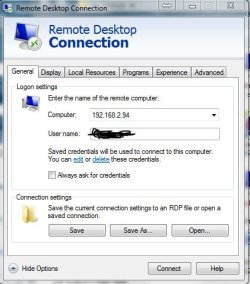
This is the version of RDC that I have to work with.
I've not installed the latest version from W8.
http://blogs.msdn.com/b/rds/archive...update-for-windows-7-sp1-released-to-web.aspx

An RDC shortcut (profile?) is just a text file. Drag/drop it into notepad and see if the stuff that you thought should change - did change. Or change it via notepad. The password is kept in the Windows credential manager... so obviously, it won't be in the text file

Starting with a connection that has been made once (where the username and password was saved), you should see something like this:
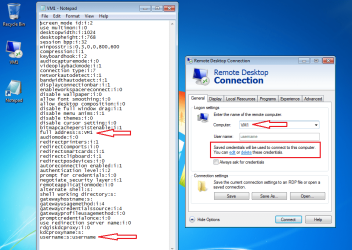
As soon as you change the computer name, the info under the username changes:
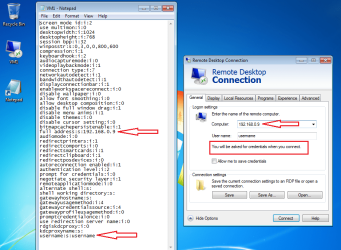
But you can save everything except the password to the text file (shortcut/profile) without connecting.
For computers that you have connected to in the past, you can edit the password and it should save WITHOUT having to connect to the computer. I have so many of these RDC shortcuts that I have a script to change all of the passwords. I might not even connect to one of the computers before I have to change the password again... but they are all ready for me to use via a double click without having to dig up the password.
Let us know if your computer does not act as I have described.
Here is some info if you want to post screenshots:
http://www.sevenforums.com/tutorials/9733-screenshots-files-upload-post-seven-forums.html