
Useless User
New member
- Local time
- 1:19 AM
- Messages
- 147
Dear forum,
I have a laptop and several PCs (running simulations). They are connected with a TP-LINK desktop switch. From the laptop, I can RDP into the PCs, but I cannot open their folders from Explorer or write to them from software running on the laptop, see below:
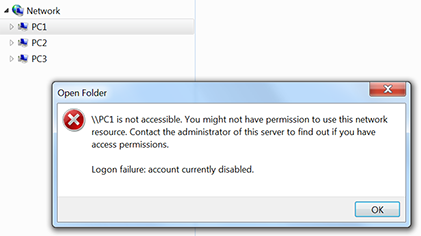
All machines are WORKGROUP and the network is LAN ("Unidentified network" Work network).
What must I change? Thanks a lot in advance!
pc 3 (a laptop)
pc2 (a desktop PC)
pc1 (a desktop PC)
I have a laptop and several PCs (running simulations). They are connected with a TP-LINK desktop switch. From the laptop, I can RDP into the PCs, but I cannot open their folders from Explorer or write to them from software running on the laptop, see below:
All machines are WORKGROUP and the network is LAN ("Unidentified network" Work network).
What must I change? Thanks a lot in advance!
pc 3 (a laptop)
Code:
Windows IP Configuration
   Host Name . . . . . . . . . . . . : PC3
   Primary Dns Suffix  . . . . . . . :
   Node Type . . . . . . . . . . . . : Mixed
   IP Routing Enabled. . . . . . . . : No
   WINS Proxy Enabled. . . . . . . . : No
Ethernet adapter LAN:
   Connection-specific DNS Suffix  . :
   Description . . . . . . . . . . . : Broadcom NetXtreme Gigabit Ethernet
   Physical Address. . . . . . . . . : A8-20-66-1F-1B-26
   DHCP Enabled. . . . . . . . . . . : No
   Autoconfiguration Enabled . . . . : Yes
   Link-local IPv6 Address . . . . . : fe80::91dd:c203:df5b:3448%19(Preferred)
   IPv4 Address. . . . . . . . . . . : 192.168.2.4(Preferred)
   Subnet Mask . . . . . . . . . . . : 255.255.255.0
   Default Gateway . . . . . . . . . : 192.168.2.1
   DHCPv6 IAID . . . . . . . . . . . : 430448742
   DHCPv6 Client DUID. . . . . . . . : 00-01-00-01-18-5E-58-55-14-10-9F-DA-3E-2D
   DNS Servers . . . . . . . . . . . : 192.168.2.1
   NetBIOS over Tcpip. . . . . . . . : Enabled
Tunnel adapter Local Area Connection* 13:
   Media State . . . . . . . . . . . : Media disconnected
   Connection-specific DNS Suffix  . :
   Description . . . . . . . . . . . : Teredo Tunneling Pseudo-Interface
   Physical Address. . . . . . . . . : 00-00-00-00-00-00-00-E0
   DHCP Enabled. . . . . . . . . . . : No
   Autoconfiguration Enabled . . . . : Yes
pc2 (a desktop PC)
Code:
Windows-IP-Konfiguration
Hostname . . . . . . . . . . . . : PC2
Prim„res DNS-Suffix . . . . . . . :
Knotentyp . . . . . . . . . . . . : Hybrid
IP-Routing aktiviert . . . . . . : Nein
WINS-Proxy aktiviert . . . . . . : Nein
Ethernet-Adapter LAN-Verbindung:
Verbindungsspezifisches DNS-Suffix:
Beschreibung. . . . . . . . . . . : Intel(R) 82579V Gigabit Network Connection
Physikalische Adresse . . . . . . : 54-04-A6-49-7B-C3
DHCP aktiviert. . . . . . . . . . : Nein
Autokonfiguration aktiviert . . . : Ja
Verbindungslokale IPv6-Adresse . : fe80::34a0:5c8c:e400:1983%12(Bevorzugt)
IPv4-Adresse . . . . . . . . . . : 192.168.2.3(Bevorzugt)
Subnetzmaske . . . . . . . . . . : 255.255.255.0
Standardgateway . . . . . . . . . : 192.168.2.1
DHCPv6-IAID . . . . . . . . . . . : 357827750
DHCPv6-Client-DUID. . . . . . . . : 00-01-00-01-16-97-FD-A0-B0-48-7A-C3-A9-6B
DNS-Server . . . . . . . . . . . : 192.168.2.1
NetBIOS ber TCP/IP . . . . . . . : Aktiviert
Tunneladapter Reusable ISATAP Interface {4E919AF4-7C43-49F1-BE1C-C87C84C41845}:
Medienstatus. . . . . . . . . . . : Medium getrennt
Verbindungsspezifisches DNS-Suffix:
Beschreibung. . . . . . . . . . . : Microsoft-ISATAP-Adapter
Physikalische Adresse . . . . . . : 00-00-00-00-00-00-00-E0
DHCP aktiviert. . . . . . . . . . : Nein
Autokonfiguration aktiviert . . . : Japc1 (a desktop PC)
Code:
Windows-IP-Konfiguration
Hostname . . . . . . . . . . . . : PC1
Prim„res DNS-Suffix . . . . . . . :
Knotentyp . . . . . . . . . . . . : Hybrid
IP-Routing aktiviert . . . . . . : Nein
WINS-Proxy aktiviert . . . . . . : Nein
Ethernet-Adapter LAN-Verbindung:
Verbindungsspezifisches DNS-Suffix:
Beschreibung. . . . . . . . . . . : Intel(R) 82579V Gigabit Network Connection
Physikalische Adresse . . . . . . : 40-16-7E-AF-04-44
DHCP aktiviert. . . . . . . . . . : Nein
Autokonfiguration aktiviert . . . : Ja
Verbindungslokale IPv6-Adresse . : fe80::c1b2:205c:40c6:2232%13(Bevorzugt)
IPv4-Adresse . . . . . . . . . . : 192.168.2.2(Bevorzugt)
Subnetzmaske . . . . . . . . . . : 255.255.255.0
Standardgateway . . . . . . . . . : 192.168.2.1
DHCPv6-IAID . . . . . . . . . . . : 356521598
DHCPv6-Client-DUID. . . . . . . . : 00-01-00-01-1C-14-A5-73-F8-D1-11-61-4F-10
DNS-Server . . . . . . . . . . . : 192.168.2.1
NetBIOS ber TCP/IP . . . . . . . : Aktiviert
Tunneladapter isatap.{69852BF8-8299-4568-A431-D4539206496C}:
Medienstatus. . . . . . . . . . . : Medium getrennt
Verbindungsspezifisches DNS-Suffix:
Beschreibung. . . . . . . . . . . : Microsoft-ISATAP-Adapter
Physikalische Adresse . . . . . . : 00-00-00-00-00-00-00-E0
DHCP aktiviert. . . . . . . . . . : Nein
Autokonfiguration aktiviert . . . : JaMy Computer
At a glance
Microsoft Windows 7 Professional 64-Bit 7601 ...Intel(R) Core(TM) i7-3930K CPU @ 3.20 Steppin...Kingston KHX1600C9D3K4/16GX 16 GB DDR3 9-9-9-27AMD FirePro V4900 (FireGL V)
- Computer type
- PC/Desktop
- Computer Manufacturer/Model Number
- Custom build 01/06/2012, rebuilt 10/24/2014
- OS
- Microsoft Windows 7 Professional 64-Bit 7601 Multiprocessor Free Service Pack 1
- CPU
- Intel(R) Core(TM) i7-3930K CPU @ 3.20 Stepping 6 Revision C1
- Motherboard
- ASUSTeK COMPUTER INC. P9X79 BIOS 4608
- Memory
- Kingston KHX1600C9D3K4/16GX 16 GB DDR3 9-9-9-27
- Graphics Card(s)
- AMD FirePro V4900 (FireGL V)
- Sound Card
- (1) AMD High Definition Audio Device (2) Realtek High Defini
- Monitor(s) Displays
- HP LP2475w
- Screen Resolution
- 1920 x 1200
- Hard Drives
- (1) ATA SAMSUNG HD204UI SCSI Disk Device
(2) ATA SAMSUNG SSD 830 SCSI Disk Device
- PSU
- CORSAIR HX650W
- Case
- fractal design DEFINE R4
- Cooling
- Noctua NH-D14 SE2011 and 2 x NF-A14 PWM
- Keyboard
- FILCO Majestouch 2 Ninja
- Antivirus
- Microsoft Security Essentials
- Browser
- IE11
- Other Info
- TP-LINK 150Mbps-Wireless-N-PCI-Adapter TL-WN751ND


