
Until recently I had my hard drive setup in a Dual Boot arrangement which contained XP Pro and WIN 7. This was a temporary arrangement until such time as I became familiar with WIN 7 when I intended to remove the XP installation.
Under this setup, whenever I booted into WIN 7 this appeared as Partition C: of 20 Gbts and with XP hidden in a Partition E of 15 Gbts which showed up in Disk Management as Unspecified Space of some sort ? ( I forget now the exact description )
If I booted into XP , this appeared as Partition C but now of 15 Gbts with the partiton containing WIN 7 showing as Partition E of 20 Gbts this being similarly described in Disk Management.
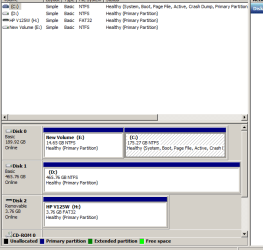
I have now removed XP from this setup by deleting its partiton when I was booted into WIN 7 re-formatting it in NTFS thus ending up with a hard drive containing only Partitions C: of 175.27 Gbts which is where WIN 7 is installed and a "New Volume E" of 14.65 Gbts this latter being the former "home" of XP .
This result is shown in the Attachment to this post.
As you will note , New Volume E , appears before the C: Partition on HD0.
Now that I have finally arrived at a single OS (WIN 7) setup I would like to re-arrange HD0 to have Partition C appear first then extend this to include New Volume E so that HD0 wil be just a single unpartitioned drive .
Is this possible and , if so , how do I go about it ?
Under this setup, whenever I booted into WIN 7 this appeared as Partition C: of 20 Gbts and with XP hidden in a Partition E of 15 Gbts which showed up in Disk Management as Unspecified Space of some sort ? ( I forget now the exact description )
If I booted into XP , this appeared as Partition C but now of 15 Gbts with the partiton containing WIN 7 showing as Partition E of 20 Gbts this being similarly described in Disk Management.
I have now removed XP from this setup by deleting its partiton when I was booted into WIN 7 re-formatting it in NTFS thus ending up with a hard drive containing only Partitions C: of 175.27 Gbts which is where WIN 7 is installed and a "New Volume E" of 14.65 Gbts this latter being the former "home" of XP .
This result is shown in the Attachment to this post.
As you will note , New Volume E , appears before the C: Partition on HD0.
Now that I have finally arrived at a single OS (WIN 7) setup I would like to re-arrange HD0 to have Partition C appear first then extend this to include New Volume E so that HD0 wil be just a single unpartitioned drive .
Is this possible and , if so , how do I go about it ?
Attachments
My Computer
At a glance
Windows 7 Home Premium x64AMD 3000+ 2.00gHZ2048 MbsRAEDON 9800 PRO
- Computer Manufacturer/Model Number
- Home Built
- OS
- Windows 7 Home Premium x64
- CPU
- AMD 3000+ 2.00gHZ
- Motherboard
- ASUSTeK k8vsedx
- Memory
- 2048 Mbs
- Graphics Card(s)
- RAEDON 9800 PRO
- Monitor(s) Displays
- Sony SDM-HS95P 19.1"vis
- Hard Drives
- 2x500 Gbts
