Re-Format Hard Drive.

ihaveissues

New member
Local time
2:53 AM
Messages
4
Hi Guys.
Briefly. I tried to reformat my dads hard drive to reinstall windows 7. It was in 2 partitions, so i ran the windows 7 disc and it ran through the motions, i formatted the c to re-install windows and it wouldn't let me. I went into dos under diskpart to try and format it that way, still no luck. I connected it to my computer then under disk managment deleted the 2 partitions so there was only 1 now which had the size i.e, 600GB Unallocated. I connected it back into my dads computer and ran the set-up again. Now the computer wont even detect the drive. I need to re-format the drive to like factory default, is this possible, also do i have to do it in dos, I really hope you tech wizards ca help me.
Thanks for your time.
Kevin.
 

My Computer

Computer Manufacturer/Model Number
Packard Bell
OS
Windows 7 64bit.
CPU
Intel Core2 Quad Q8300
Motherboard
Packard Bell MCP73PVT-PM
Memory
3.75 GB 800 MHz FSB 333 MHz
Graphics Card(s)
Nvidea Gforce 7100
Sound Card
NVIDEA
Monitor(s) Displays
Samsung
Hard Drives
WDC W064 00AAKS-22A7B internal hard drive.
You could just plug it back into your machine and format it under disk management.
 

My Computer

OS
7 Ultimate x64
CPU
i5-2500k
Motherboard
Asus P8P67 Pro
Memory
8GB G.Skill Ripjaws X F3-12800CL7D-8GBXH 1866MHz 8-9-8-24
Graphics Card(s)
EVGA GTX 570 SC
Sound Card
X-Fi Titanium Fatality
Monitor(s) Displays
Samsung S27A550H 27" LED
Screen Resolution
1920x1080
Hard Drives
OCZ Vertex 3 120GB.
1TB Samsung F3.
2TB Samsung F4.
PSU
PC Power & Cooling Silencer 760
Case
Lian Li Lancool K62
Cooling
Thermalright Venomous X Black/Scythe S-Flex/Shin-Etsu X23
Keyboard
MS Natural Elite 4000 Ergonomic
Mouse
Logitech G500
Internet Speed
6MB/768
Other Info
Logitech Z-5500 505 watts.
D-Link DGL-4500.
Tripp-Lite Smart Pro 1500.
"Unallocated" means there is no partition, just blank disk space.
You need to create a partition, format it, make it active and then you can install Win 7.

Jim :geek:
 

My Computer

Computer type
PC/Desktop
Computer Manufacturer/Model Number
Home Built
OS
Windows 8.1 Pro w/Media Center 64bit, Windows 7 HP 64bit
CPU
Phenom II X6 1100T
Motherboard
ASUS M5A99X EVO
Memory
Crucial Balistic 8gb DDR3-1866 CL9
Graphics Card(s)
MSI R6850 Cyclone IGD5 PE
Sound Card
On Board
Monitor(s) Displays
ASUS VE258Q 25" LED with DVI-HDMI-DisplayPort
Screen Resolution
1920 x 1080
Hard Drives
Two WD Cavier Black 2TB Sata III, WD My Book Essential 2TB USB 3.0
PSU
Seasonic X650 80 Plus GOLD Modular
Case
Corsair 400R
Cooling
Antec Kuhler H2O 620, Two 120mm and four 140mm
Keyboard
Logitech K120
Mouse
Logitech Marble Mouse USB, Logitech Precision Game Pad
Internet Speed
15MB
Antivirus
Norton IS 2013, Malwarebytes Pro Beta 2
Browser
IE-11, FF-27
Other Info
APC UPS ES 750, Netgear WNR3500L Gigabit & Wireless N Router with SamKnows Test Program, Motorola SB6120 Gigabit Cable Modem. Brother HL-2170W Laser Printer, Epson V300 Scanner
Try a full clean & full format.
http://www.sevenforums.com/tutorials/52129-disk-clean-clean-all-diskpart-command.html
http://www.sevenforums.com/tutorials/2668-partition-volume-delete.html?ltr=P
http://www.sevenforums.com/tutorials/2674-partition-volume-create-new.html?ltr=P
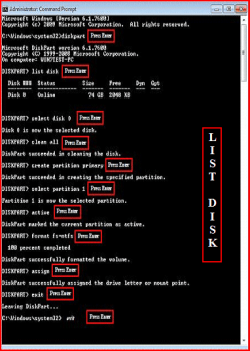
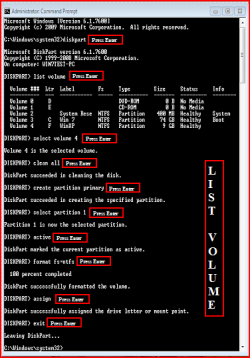
1) Boot DVD.
2) Press Shift+F10 (for command prompt)

Type in command line
DISKPART
LIST DISK OR List Volume (If you have partitions)
SELECT DISK # (win HD)
CLEAN ALL
CREATE PARTITION PRIMARY
SELECT PARTITION 1
ACTIVE
FORMAT=NTFS
ASSIGN
EXIT
EXIT
List Disk.PNG
List Volume.PNG
 

My Computer

OS
ME/XP/Vista/Win7
Try a full clean & full format.
http://www.sevenforums.com/tutorials/52129-disk-clean-clean-all-diskpart-command.html
http://www.sevenforums.com/tutorials/2668-partition-volume-delete.html?ltr=P
http://www.sevenforums.com/tutorials/2674-partition-volume-create-new.html?ltr=P
1) Boot DVD.
2) Press Shift+F10 (for command prompt)

Type in command line
DISKPART
LIST DISK OR List Volume (If you have partitions)
SELECT DISK # (win HD)
CLEAN ALL
CREATE PARTITION PRIMARY
SELECT PARTITION 1
ACTIVE
FORMAT=NTFS
ASSIGN
EXIT
EXIT
View attachment 78050
View attachment 78051

I also wanted a way to format my hard drives back to factory specs. I had them loaded up with all kinds of info and they started making a vibration so I decided to RMA them. Just wanted to thank you for giving a complete and easy to understand way of doing this. It worked perfectly. One thing, you need to type "FORMAT FC=NTFS" Thank you again!
 

My Computer

Computer type
PC/Desktop
Computer Manufacturer/Model Number
Custom built
OS
windows 7 x64
CPU
i7-4930K
Motherboard
Asus X79 Deluxe
Memory
GSkill Ripjaws, 1866mhz, 16GB
Graphics Card(s)
EVGA GTX 980 ti SC ACX 2.0
Sound Card
on board
Monitor(s) Displays
Asus PB278Q
Screen Resolution
2560 x 1440
Hard Drives
(1) OCZ Vertex 4 128GB (OS)
(2) WD RE4 500GB RAID0 (Data)
(1) WD Caviar Black 2TB (Backup)
PSU
Corsair 1000watt
Case
Coolermaster HAF932 Blue
Cooling
CoolerMaster TPC812
Keyboard
Logitech G19
Mouse
Logitech G5
Antivirus
Norton
Try a full clean & full format.
http://www.sevenforums.com/tutorials/52129-disk-clean-clean-all-diskpart-command.html
http://www.sevenforums.com/tutorials/2668-partition-volume-delete.html?ltr=P
http://www.sevenforums.com/tutorials/2674-partition-volume-create-new.html?ltr=P
1) Boot DVD.
2) Press Shift+F10 (for command prompt)

Type in command line
DISKPART
LIST DISK OR List Volume (If you have partitions)
SELECT DISK # (win HD)
CLEAN ALL
CREATE PARTITION PRIMARY
SELECT PARTITION 1
ACTIVE
FORMAT=NTFS
ASSIGN
EXIT
EXIT
View attachment 78050
View attachment 78051

I also wanted a way to format my hard drives back to factory specs. I had them loaded up with all kinds of info and they started making a vibration so I decided to RMA them. Just wanted to thank you for giving a complete and easy to understand way of doing this. It worked perfectly. One thing, you need to type "FORMAT FC=NTFS" Thank you again!

You are welcome.

PS.
FORMAT FS=NTFS
 

My Computer

OS
ME/XP/Vista/Win7
Back
Top