Solved Re-install now cannot access other machine?

markg2

New member
Member
VIP
Local time
2:53 PM
Messages
477
Prior to upgdrading from 32 to 64 bit Win7 I had no difficulty moving files between my Win7 computer and my wife's XP.

After doing so, there must be a security setting that requires attention.

I have right clicked my wife's computer explorer, selected Administrator (that's her), My documents and My pictures and checked off both instances of share this on the network.

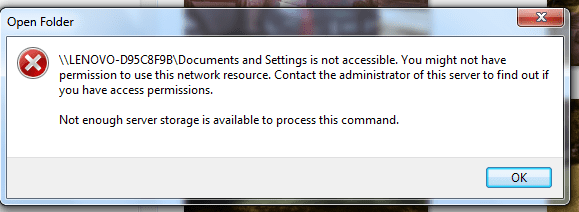
However, I'm still getting the attached error on my screen when attempting to open one of those directories?

Mark
 

Attachments
  • NetworkShareError.PNG
    NetworkShareError.PNG
    14.4 KB · Views: 11

My Computer

Computer type
PC/Desktop
OS
Windows 7 & Windows 10
Try and create a new share with the proper credentials and delete the old and try it again.
 

My Computer

Computer Manufacturer/Model Number
Alienware
OS
Windows 7 Ultimate x64
CPU
I7
Motherboard
GA-X58-USB3
Memory
6 x 1.5V DDR3 DIMM sockets supporting up to 24 GB of system
Graphics Card(s)
GeForce GTX 580
Sound Card
Realtek ALC892 codec 2/4/5.1/7.1-channel
Monitor(s) Displays
NEC Display Solutions E321 Black 32"
Screen Resolution
1366 x 768
Hard Drives
OCZ Colossus LT Series OCZSSD2-1CLSLT1T 3.5" 1TB SATA II MLC Internal Solid State Drive
PSU
XFX Black Edition XPS-850W-BES 850W ATX12V
Case
Antec
Cooling
Zalman
Keyboard
Microsoft
Mouse
Microsoft
I don't get the delete existing share and create a new one.

The Share box on the XP has 2 check off boxes with a share name in the middle of the two. If I unclick the boxes the share grays out. If I check the box and the share name appears I cannot delete the name and give it a new name.

I guess I'm missing something here (assuming this is the problem). I had no sharing problems with my wife's XP prior to my changing my Win7 to 64 bit--if that info helps.

Mark
 

My Computer

Computer type
PC/Desktop
OS
Windows 7 & Windows 10

My Computer

Computer Manufacturer/Model Number
HP Pavilion Elite 495UK
OS
Windows 7 Ultimate SP1 64-Bit
CPU
Intel Core i7 870 @ 2.93GHz
Motherboard
MSI 2A9C (CPU1)
Memory
8Gb Dual-Channel DDR3 @ 664MHz
Graphics Card(s)
nVidia GeForce GTX 460 1024MB dedicated RAM
Sound Card
Realtek HD Audio
Monitor(s) Displays
HP2310i
Screen Resolution
1920 x 1080
Hard Drives
1x1954GB Hitachi HDS22020ALA 330 (RAID), 1x1954GB Hitachi External for backup and storage
PSU
460W
Case
HP Elite
Cooling
Air cooled
Keyboard
Logitech K750 solar-powered keyboard
Mouse
Logitech Wireless M180 mouse
Internet Speed
2Mb
Other Info
Pure Avanti Flow Internet Radio with iPod Dock, 64Gb iPod, HP USB Speakers, Sony MDR-V500 Headphones, Sony Vaio F-Series Laptop
I have a lot of trouble believing this problem is due to sharing. I've shared my computer with my wife's XP for the past 3 years with this particular computer--first (as shipped) with Vista, then Win7 32 bit and now (it seems problematically) with 64 bit--the only changed variable over time.

From what I've just read, this error is most likely a sharing problem OR something associated with 'Modifying the MaxUserPort Registry Entry.'

?
 

My Computer

Computer type
PC/Desktop
OS
Windows 7 & Windows 10
I had this same problem after my mom had to download some Oracle software to access her work's remote servers from home last December... it blew up my network (XP and Vista and 7 systems), and after that my XP desktop and the 7 Notebook REFUSED to see or communicate or do anything at all with each other, giving me the same exact error as it is giving you right now whenever I tried. However, come to find out just tonight, it all of a sudden has rediscovered the network and everything is fine again.

I don't know what happened or how it can be fixed, I didn't do anything at all... you might wind up having to wait it out like I did. It's probably a bug? Regardless, I hope it sorts itself out for you quicker than it did for me... it was a real pain to have to shuttle an external HDD/flash drive back and forth between them.
 

My Computer

Computer Manufacturer/Model Number
Acer Aspire 5738PG-6306
OS
7 Ultimate x64 SP1
CPU
Core 2 Duo T6600 @ 2.20GHz
Motherboard
Acer JV50 | Intel PM45 Chipset | BIOS Phoenix v1.21
Memory
4GB SDRAM DDR2 667
Graphics Card(s)
ATI Mobility Radeon 4570HD 512MB VDDR3 (2.25GB HyperMemory)
Sound Card
Integrated Dolby Home Theater HD Audio Support
Monitor(s) Displays
15.6" LED backlight HD/WS CineCrystal w/ Multi-Touch
Screen Resolution
Notebook: 1366x768 | Syncmaster P2370HD: 1920x1080
Hard Drives
Primary internal: 320GB WD3200BEVT-22ZCT0 @ 5400 RPM | Secondary external 1: 2TB Cavalry CAXB3702T0 @7200 RPM (USB 2.0) | Secondary external 2: 500GB Calvary CAUM @7200 RPM (USB 2.0).
PSU
AC Adapter
Case
Blue Clam shell
Cooling
OEM Bult-in.
Keyboard
Microsoft Wireless 3000 (USB)
Mouse
Logitech V220 (USB)
Internet Speed
31Mbps DL/25Mbps UL - Verizon fiOs/Netgear WNDR37AV
Other Info
EXTERNAL DISPLAY: 23" Samsung Syncmaster P2370HD | EXTERNAL SOUND: 300 Watt MX-KB30 JVC Stereo (AUX) | ROUTER: Netgear WNDR37AV 802.11a/b/g/n Dual-Band Gigabit | Satechi 12-Port USB 2.0 Hub | GAME PAD: SteelSeries 3GC USB 2.0 (JoyToKey Mapping) | DETAILED SYSTEM SPECIFICATIONS: http://www.tigerdirect.com/applications/SearchTools/item-details.asp?EdpNo=5265887&CatId=4938
Well, I'm sending my Thinkpad in for a fan replacement (Lenovo said that due to the way the thing is buried they don't want rookies doing home surgery) today or tomorrow so that should teach this thing a lesson about mis-behaving! Maybe it'll come back duly chastised and self-corrected. I'll let you guys know one way or another later.

Btw, after tomorrow I'll be offline for ~a week while the machine is in the hospital.
 

My Computer

Computer type
PC/Desktop
OS
Windows 7 & Windows 10
Think I found the problem--but?

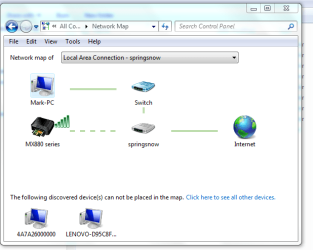
I checked the network connections from my Win7 machine and see that I do not appear connected to the XP machine.

I think I know what caused this problem but have no idea how to resolve it absent undoing the cause which would undo added function.

I added a Canon MX882 multi to the XP as a directly connected device. If I shared her printer as I had done with the previous printer through the network, I could not directly use the Canon's scan function on my computer. Canon said that I needed to activate the printer's wireless which I did. According to Canon, my computer would still connect to the router by Ethernet and the router would then connect to the printer by wireless. Sounded fine by me. I know that I'm not connected by wireless directly to anything since the Thinkpad requires a switch to be thrown to activate the radios--the switch is off.

Look at the attached screen shot and you'll see at the bottom of the page the XP computer and what appears to be Canon memory as not connected. [But that doesn't make sense since I can 'see' the XP machine from the Win7 machine]?

So, how do I 'add' back my wired connection through the router (springsnow) to my wife's XP and still maintain the router's current wireless connection to the printer?
 

Attachments

  • NetworkProblem.PNG
    NetworkProblem.PNG
    26.5 KB · Views: 4
Last edited:

My Computer

Computer type
PC/Desktop
OS
Windows 7 & Windows 10
The Win7 machine is back from repair so I'd like to try and wrap up a solution to the communication problem.

To recap:

1. Although my Win7 and my wife's XP had been connected and transferring files just fine for years vis a vie a workgroup, it appears the addition of the Canon multi (not the change from 32 bit to 64 bit Win7) connected by ethernet to the XP and wireless to the router (enabling my Win7 connected by ethernet to the router to scan directly to the Canon vis a vie Canon's install CD) served to break the pre-existing, working network.

Although I presume I could undo the Canon/wireless install on my computer, and go back to the beginning and simply share her directly connected Canon, I would no longer have the ability to directly scan.

As you can see from my prior post the Win7 now belongs to a Local Area Connection called springsnow (which is the name of the router). The XP is not connected to same. Previously we were connected by a share/workgroup

The XP has to be 'sort of connected' since my explorer does see her computer but cannot access it (first post). Also, on an earlier screen shot you'll see her computer at the bottom left

I ran the network wizard from the XP and it naturally wants to create a workgroup and doesn't see my computer. While my Win7 wants a Homegroup which isn't seeing the XP.

Again, as opposed to dumping the current configuration and starting over uninstalling the wireless Canon setup on my computer, is there not a way to force these computers to see each other in a way consistent with total access and file sharing as existed previously?

Mark
 

My Computer

Computer type
PC/Desktop
OS
Windows 7 & Windows 10
Mark are you just using windows firewall or do you have a third party firewall on your computers?
 

My Computer

Computer Manufacturer/Model Number
Alienware
OS
Windows 7 Ultimate x64
CPU
I7
Motherboard
GA-X58-USB3
Memory
6 x 1.5V DDR3 DIMM sockets supporting up to 24 GB of system
Graphics Card(s)
GeForce GTX 580
Sound Card
Realtek ALC892 codec 2/4/5.1/7.1-channel
Monitor(s) Displays
NEC Display Solutions E321 Black 32"
Screen Resolution
1366 x 768
Hard Drives
OCZ Colossus LT Series OCZSSD2-1CLSLT1T 3.5" 1TB SATA II MLC Internal Solid State Drive
PSU
XFX Black Edition XPS-850W-BES 850W ATX12V
Case
Antec
Cooling
Zalman
Keyboard
Microsoft
Mouse
Microsoft
Both computer have always run just the Norton 360 firewall and not Windows.

Btw, I just confirmed a curious addition. Before I shipped the computer off to Lenovo for repair, I was successfully running my scheduled Acronis image which placed the image 'successfully' on my wife's XP.

OTOH, the SecondCopy scheduled backups that involve backing up within her computer's drives as directed from mine or from me to her or her to me are throwing the same error that I receive when I try to open a folder on her computer from mine as displayed on my first post 'Not enough server storage is available to process this command'.

Mark
 

My Computer

Computer type
PC/Desktop
OS
Windows 7 & Windows 10
Tomorrow morning I will:
1. Uninstall the Canon drivers from both computers
2. Remove the printer's wireless connection
3. Re-establish the workgroup between both computers
4. Turn on the printer's wireless (confirm status of workgroup)
5. Install the wireless connection from the XP to the printer instead of the USB as done previously (confirm status of workgroup)
6. Install the Canon wireless drivers on my computer (confirm status of workgroup)

Hopefully this will resolve, one way or another, the current problem.
 

My Computer

Computer type
PC/Desktop
OS
Windows 7 & Windows 10
Annoyed, Aggravated and.....

Removing the Canon drivers and wireless made no difference.

I went back to seavixen32 post and read both articles. The workgroup name for the XP and Win7 machines was different. I resolved that problem to no avail.

I could not confirm that the XP machine's settings were for 'everyone' since that's not an option anywhere.

I have trouble resolving the compatibility of this being a rights or sharing problem when on the Network and Sharing Center I click on Show Full Map and my computer is shown at the top connected to the router to the internet whereas the XP computer is now at the bottom 'the following computer is discovered but cannot be shown on the map.' When I click on the 'click to show other devices' explorer opens and shows the various folders listed for the XP machine and clicking on any results in the same error as I initially posted.

Any more ideas?

Mark
 

My Computer

Computer type
PC/Desktop
OS
Windows 7 & Windows 10
Hot lead!

I ran the XP machine in Safe mode with networking and was able to click open the various directories absent the aforementioned error.

Since XP uninstall does not have the same 'last installed' sort feature as does Win7, any suggestions on limiting the search field for the problematic third party software (assuming that is the culprit)?

Mark
 

My Computer

Computer type
PC/Desktop
OS
Windows 7 & Windows 10

My Computer

Computer type
PC/Desktop
OS
Windows 7 & Windows 10
That's great news Mark.

Pleased to hear your problem is resolved and thanks for posting back as the solution may well help others.
 

My Computer

Computer Manufacturer/Model Number
HP Pavilion Elite 495UK
OS
Windows 7 Ultimate SP1 64-Bit
CPU
Intel Core i7 870 @ 2.93GHz
Motherboard
MSI 2A9C (CPU1)
Memory
8Gb Dual-Channel DDR3 @ 664MHz
Graphics Card(s)
nVidia GeForce GTX 460 1024MB dedicated RAM
Sound Card
Realtek HD Audio
Monitor(s) Displays
HP2310i
Screen Resolution
1920 x 1080
Hard Drives
1x1954GB Hitachi HDS22020ALA 330 (RAID), 1x1954GB Hitachi External for backup and storage
PSU
460W
Case
HP Elite
Cooling
Air cooled
Keyboard
Logitech K750 solar-powered keyboard
Mouse
Logitech Wireless M180 mouse
Internet Speed
2Mb
Other Info
Pure Avanti Flow Internet Radio with iPod Dock, 64Gb iPod, HP USB Speakers, Sony MDR-V500 Headphones, Sony Vaio F-Series Laptop
I think it's worth emphasizing that simply disabling Norton's antivirus (as I had done) is not sufficient. The problem was invoked by a recent Norton update and has to be resolved by following the MS XP registry alteration.

Mark
 

My Computer

Computer type
PC/Desktop
OS
Windows 7 & Windows 10
Just a thought, MSE.
 

My Computer

Computer type
PC/Desktop
Computer Manufacturer/Model Number
Home made Desktop
OS
Windows 10 Pro. 64/ version 1709 Windows 7 Pro/64
CPU
Intel i7-6800K @ 4.3
Motherboard
ASUS X-99 Deluxe II
Memory
Corsair Platinum 16 gig @2400
Graphics Card(s)
EVGA GTX 1070 OC
Monitor(s) Displays
Asus 27" LED LCD/VE278Q
Screen Resolution
1920-1080 or 1280-720 HDMI
Hard Drives
INTEL SSD 730-240 Gb Sata 3.0/
PSU
EVGA Platium 1200W
Case
Phanteks Luxe Tempered Glass 8 fans/ one radiator
Cooling
XSPC/ Water Cooled CPU
Keyboard
Das 4 Professional
Mouse
Logitech M705/MX Anywhere 2-S
Internet Speed
100 mbits
Antivirus
Microsoft Security Essentials/ Malwarebytes Premium 3.0/ SAS
Browser
I.E. 11 default/Firefox/ ISP Time Warner Cable/Spectrum
Other Info
LG BluRay Burner/
Sound system-KLipsch-THX/
Icy Dock ssd Hot Swap bays.
Back
Top