
First post here, hi everyone!
So here's my problem.
Long story short: I had 1 installation of windows 7 on my hard drive, I shrank that partition with the disk partitioner in windows 7, and installed another windows 7 installation on the other partition (I wanted to make sure the new one was working correctly before removing my old one) Both of them work working and booting up, and I installed all my drivers and copied all my files over and everything, then deleted the first partition, and apparently the boot loader was on that one, so now I can't boot into the second one. When I turn on my computer it goes the the screen like I don't have a hard drive in or a blank hard drive.
I tried using the startup repair on the installation disk, and it didn't do anything.
I can access the drive from my ubuntu live cd if neccessary.
So here's my problem.
Long story short: I had 1 installation of windows 7 on my hard drive, I shrank that partition with the disk partitioner in windows 7, and installed another windows 7 installation on the other partition (I wanted to make sure the new one was working correctly before removing my old one) Both of them work working and booting up, and I installed all my drivers and copied all my files over and everything, then deleted the first partition, and apparently the boot loader was on that one, so now I can't boot into the second one. When I turn on my computer it goes the the screen like I don't have a hard drive in or a blank hard drive.
I tried using the startup repair on the installation disk, and it didn't do anything.
I can access the drive from my ubuntu live cd if neccessary.
My Computer
- OS
- Windows 7+Ubuntu
- CPU
- Phenom II x4 840 @3.5Ghz
- Motherboard
- ECS GeForce 8200a AM2+
- Memory
- OCZ DDR2 2x2GB
- Graphics Card(s)
- ASUS DCU GTX 460 768mb
- Screen Resolution
- 1280x1024
- Hard Drives
- 64GB Kingston SSDNow V100
1TB WD Caviar Green
- PSU
- hec Orion XPower 585 Watt
- Cooling
- Hyper 212+
- Keyboard
- M$ comfort Curve 2000
- Mouse
- Cheap logitech


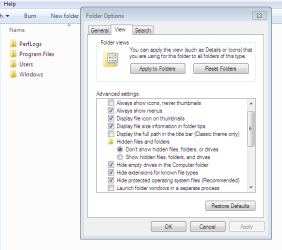
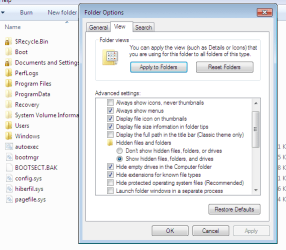
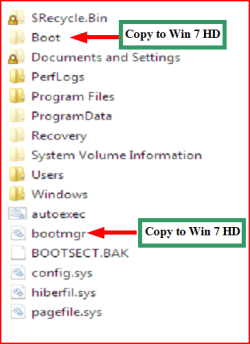

 )
)