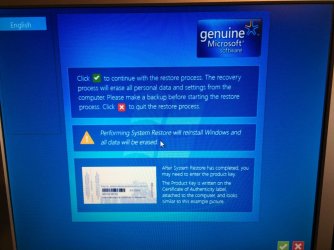
Re-installed Win7 (OS is Pre-Installed) but no way to DL the ISO File.

Nosoupforyou

New member
Local time
4:21 AM
Messages
3
Dell Optiplex 780 Desktop has Win 7 already pre-installed. I did a clean fresh install but now it states: "1. Insert your Windows installation disc (not available) and restart your computer." I have the product key but the Optiplex no longer will access the internet. I downloaded the Windows 7 USB/DVD Download Tool onto my other computer but how do I DL the ISO Win7 file from Microsoft since my original computer (with the pre-installed OS) no longer has internet access. Microsoft site asks for Product Key but if I try to download the file from my Vista computer it states "Error. The product key you entered appears to be for software pre-installed by the device manufacturer. Please contact the device manufacturer for software recovery options." Confused.
 

My Computer My Computer

At a glance

Windows 7 Pro 32 bit
Computer type
PC/Desktop
Computer Manufacturer/Model Number
Dell
OS
Windows 7 Pro 32 bit
Hi Nosoupforyou,

Welcome to SevenForums!

Dell Optiplex 780 Desktop has Win 7 already pre-installed. I did a clean fresh install but now it states: "1. Insert your Windows installation disc (not available) and restart your computer." I have the product key but the Optiplex no longer will access the internet. I downloaded the Windows 7 USB/DVD Download Tool onto my other computer but how do I DL the ISO Win7 file from Microsoft since my original computer (with the pre-installed OS) no longer has internet access. Microsoft site asks for Product Key but if I try to download the file from my Vista computer it states "Error. The product key you entered appears to be for software pre-installed by the device manufacturer. Please contact the device manufacturer for software recovery options." Confused.

Have you got a recovery partition [reset to factory]?
Did you disconnect all other drives when you did the clean install?
 

My Computer My Computer

At a glance

Win 7 HP SP1 64-bit Vista HB SP2 32-bit Linux...Intel(R) Pentium(R) CPU P6200 @ 2.13GHz4.00 GBIntel(R) Graphics Media Accelerator HD
Computer type
Laptop
Computer Manufacturer/Model Number
Fujitsu LIFEBOOK
OS
Win 7 HP SP1 64-bit Vista HB SP2 32-bit Linux Mint 18.3
CPU
Intel(R) Pentium(R) CPU P6200 @ 2.13GHz
Motherboard
FUJITSU FJNBB06
Memory
4.00 GB
Graphics Card(s)
Intel(R) Graphics Media Accelerator HD
Sound Card
[1] Realtek High Definition Audio [2] Intel(R) Display Audio
Screen Resolution
1366 x 768 x 32 bits (4294967296 colors) @ 59 Hz
Hard Drives
TOSHIBA MK5076GSX
Antivirus
AVG FREE

Attachments

  • 1.jpg
    1.jpg
    156.1 KB · Views: 3
  • 2.jpg
    2.jpg
    97.7 KB · Views: 4

My Computer My Computer

At a glance

Windows 7 Pro 32 bit
Computer type
PC/Desktop
Computer Manufacturer/Model Number
Dell
OS
Windows 7 Pro 32 bit
Hi

follow this
Dell Windows 7 Reinstallation .iso - Windows ISO Downloader - WinCert.net Forums,
read the artical as well.

notes
as you alleady have the downloader on YOUR desktop place this there as well
open the downloader >> import the Iso into it.

On your Optiplex CHANGE the BOOT ORDER in your BIOS, to CD/USB
REBOOT - INSERT CD/USB - REBOOT
(DONT forget to change it back later)

AS this is OFFICIAL DELL Recovery software, you will unlikely be required to enter your product key,
SKIP it on the install, if required do it later

Clean Install Windows 7

Roy
 

My Computer My Computer

At a glance

W7 home premium 32bit/W7HP 64bit/w10 tp insid...E5300 dual core3gbNvidia Geforce 7100 Nforce 630i
Computer type
PC/Desktop
Computer Manufacturer/Model Number
medionl/Aspire 6930G/acer x55a
OS
W7 home premium 32bit/W7HP 64bit/w10 tp insider ring
CPU
E5300 dual core
Motherboard
medion MS7366
Memory
3gb
Graphics Card(s)
Nvidia Geforce 7100 Nforce 630i
Monitor(s) Displays
avixc
Internet Speed
n (isp resticted to 72)
Antivirus
mse/pands
Browser
palemoon
Other Info
Belkin Fd7050 n USB using Railink RT2870 drivers, more upto date
Roy, thank you for the solution. However, now I find that my other computer is running Vista and Dell can only DL the recovery program to comps running Win 7 or 8. I'll get ahold of my kid's laptop and will try again. Thanks again (unless you can figure out another way using my beastly Vista machine). Maybe it's time to simply upgrade but I like challenges, not to mention the principle of the thing!:confused:
 

My Computer My Computer

At a glance

Windows 7 Pro 32 bit
Computer type
PC/Desktop
Computer Manufacturer/Model Number
Dell
OS
Windows 7 Pro 32 bit
roy,

I have made something to update win7 installation media.

Drivers:
You can place any drivers in the associated folders, and they will be integrated.

Updates:
It offers to use Simplix to integrate the updates - you can skip that if you wish to use dism++, or similar instead.
It will also integrate the nvme updates correctly - if you put them in the associated folders.

It can update any indvidual image, or all images.


Advanced:
For advanced users:
There is also folder called Import - put anything in there you want included, for example if you want to include a portable program e.g. bootice.exe , just put it in Import\Program Files. If you want to include a setupcomplete.cmd - put it in Import\windows\setup\scripts, and so on.


update-your-win-7-installation-media


Hi

follow this
Dell Windows 7 Reinstallation .iso - Windows ISO Downloader - WinCert.net Forums,
read the artical as well.

notes
as you alleady have the downloader on YOUR desktop place this there as well
open the downloader >> import the Iso into it.

On your Optiplex CHANGE the BOOT ORDER in your BIOS, to CD/USB
REBOOT - INSERT CD/USB - REBOOT
(DONT forget to change it back later)

AS this is OFFICIAL DELL Recovery software, you will unlikely be required to enter your product key,
SKIP it on the install, if required do it later

Clean Install Windows 7

Roy
 

My Computers My Computers

  • At a glance

    7 X64i5 84002x8gb 3200mhz
    Computer type
    PC/Desktop
    OS
    7 X64
    CPU
    i5 8400
    Motherboard
    gigabyte b365m ds3h
    Memory
    2x8gb 3200mhz
    Hard Drives
    various
    PSU
    pure power 11 400w cm
    Case
    Coolermaster
    Cooling
    cryorig m9i
  • At a glance

    7x64g54008gb ddr4 2400
    Computer type
    PC/Desktop
    OS
    7x64
    CPU
    g5400
    Motherboard
    ga b365m ds3h
    Memory
    8gb ddr4 2400
    PSU
    xfx pro 450w
Dell Optiplex 780 Desktop has Win 7 already pre-installed. I did a clean fresh install but [...] the Optiplex no longer will access the internet.
In addition to the other advice you're getting, note that after a clean install you have to install the Dell drivers before your network adapter will work. You can download them on another computer and transfer them to a usb flash drive to install on the Optiplex.

Note there's a lot of superfluous stuff on Dell's page that you do not need, but you'll at least need the chipset, audio, video, and network drivers.
 

My Computer My Computer

At a glance

Windows 7/8.1/10 multibootIntel Core i7-770048GB (2x16GB Crucial DDR4-3200 + 2x8GB Hynix ...Intel HD630 + AMD Radeon R7 450 PCIe
Computer type
PC/Desktop
Computer Manufacturer/Model Number
Dell Optiplex 7050
OS
Windows 7/8.1/10 multiboot
CPU
Intel Core i7-7700
Motherboard
Dell, Intel Q270 chipset
Memory
48GB (2x16GB Crucial DDR4-3200 + 2x8GB Hynix DDR4-2400)
Graphics Card(s)
Intel HD630 + AMD Radeon R7 450 PCIe
Monitor(s) Displays
Asus VC279 (27")
Screen Resolution
1920x1080
Hard Drives
Toshiba M.2 NVMe (256GB),
Samsung 960 Evo (500GB),
WD Red Plus 80EFBX (8TB)
Hi @SIW2 @dg1261

referenced that link as
1) genuine Dell so no activation call would be needed
2) its a FAR more updated version, includes IE11/USB3 and Sata drivers
3) if you follow the post down you will see it has been advanced even further, Via Heidoc, COMPUTER MODEL specific, so the wireless drivers will be included.

Roy
 

My Computer My Computer

At a glance

W7 home premium 32bit/W7HP 64bit/w10 tp insid...E5300 dual core3gbNvidia Geforce 7100 Nforce 630i
Computer type
PC/Desktop
Computer Manufacturer/Model Number
medionl/Aspire 6930G/acer x55a
OS
W7 home premium 32bit/W7HP 64bit/w10 tp insider ring
CPU
E5300 dual core
Motherboard
medion MS7366
Memory
3gb
Graphics Card(s)
Nvidia Geforce 7100 Nforce 630i
Monitor(s) Displays
avixc
Internet Speed
n (isp resticted to 72)
Antivirus
mse/pands
Browser
palemoon
Other Info
Belkin Fd7050 n USB using Railink RT2870 drivers, more upto date
Yes, I know what they are, and what is in them. :-)
 

My Computers My Computers

  • At a glance

    7 X64i5 84002x8gb 3200mhz
    Computer type
    PC/Desktop
    OS
    7 X64
    CPU
    i5 8400
    Motherboard
    gigabyte b365m ds3h
    Memory
    2x8gb 3200mhz
    Hard Drives
    various
    PSU
    pure power 11 400w cm
    Case
    Coolermaster
    Cooling
    cryorig m9i
  • At a glance

    7x64g54008gb ddr4 2400
    Computer type
    PC/Desktop
    OS
    7x64
    CPU
    g5400
    Motherboard
    ga b365m ds3h
    Memory
    8gb ddr4 2400
    PSU
    xfx pro 450w
Dell Optiplex 780 Desktop has Win 7 already pre-installed. I did a clean fresh install
Please elaborate Exactly how you Reinstalled? From within Windows, using the Dell Recovery tool? From a Disk or USB, From a Function key like F11 If you Restored from the Recovery Partition you would not have issues with drivers as they would all be contained in the Recovery Partition.

Was this W7 Pro? Does it say Windows 7 Pro on the Product key?

It may be that someone installed the wrong OS on there. Most of these I think did not have a Recovery Partition, so if it has one that may be a tip that it is not the original OS, and that is why there are no drivers for Networking, though you are saying that the OS won't boot either...hmm?

Microsoft site asks for Product Key but if I try to download the file from my Vista computer it states "Error. The product key you entered appears to be for software pre-installed by the device manufacturer. Please contact the device manufacturer for software recovery options." Confused.

This is simply because you cannot download a Retail Version of Windows 7 without a Retail License.

I think the best thing to do is find yourself a download of whatever is on your Product Key, but that is an issue because they are not officially available anymore, but someone here may allow you to download theirs. These are called Retail Versions. You will need to get the Home Premium, Pro, or whatever else is on there.

Please post the Service Tag so we will know what the pc came with. I think that is allowed here. Is it the SFF, MiniTower etc?
 

My Computer My Computer

At a glance

Windows 7 Home Premium 64bitAMD A8-3520M6.00GB DDR3 @ 674MHz (9-9-9-24)512MB ATI AMD Radeon HD 6620G
Computer type
Laptop
Computer Manufacturer/Model Number
HP Pavilion dv7-6c23cl
OS
Windows 7 Home Premium 64bit
CPU
AMD A8-3520M
Motherboard
Hewlett-Packard 180B (Socket FS1)
Memory
6.00GB DDR3 @ 674MHz (9-9-9-24)
Graphics Card(s)
512MB ATI AMD Radeon HD 6620G
Sound Card
IDT High Definition Audio CODEC
Monitor(s) Displays
Generic PnP Monitor
Screen Resolution
(1600x900@60Hz)
Hard Drives
Samsung 850 EVO 250GB SSD
Mouse
Logitec M525
Internet Speed
30-75Mbps
Antivirus
Avast Free, Unfortunately
Browser
Google Chrome, Firefox, IE
Also, you may as well run the System Diagnostics if possible. This way you won't waste time installing to a bad Hard Drive.

1. Turn on (or restart) your computer.

2. When the DELL logo appears, press <F12> immediately.
NOTE: If you see a message stating that no diagnostics utility partition has been found, run the Dell Diagnostics from
your Drivers and Utilities media.
If you wait too long and the operating system logo appears, continue to wait until you see the Microsoft®
Windows® desktop. Then shut down your computer and try again.

3. When the boot device list appears, highlight Boot to Utility Partition and press <Enter>.

4. When the Dell Diagnostics Main Menu appears, select the test that you want to run.

https://downloads.dell.com/manuals/...desktop/optiplex-780_service manual_en-us.pdf
 

My Computer My Computer

At a glance

Windows 7 Home Premium 64bitAMD A8-3520M6.00GB DDR3 @ 674MHz (9-9-9-24)512MB ATI AMD Radeon HD 6620G
Computer type
Laptop
Computer Manufacturer/Model Number
HP Pavilion dv7-6c23cl
OS
Windows 7 Home Premium 64bit
CPU
AMD A8-3520M
Motherboard
Hewlett-Packard 180B (Socket FS1)
Memory
6.00GB DDR3 @ 674MHz (9-9-9-24)
Graphics Card(s)
512MB ATI AMD Radeon HD 6620G
Sound Card
IDT High Definition Audio CODEC
Monitor(s) Displays
Generic PnP Monitor
Screen Resolution
(1600x900@60Hz)
Hard Drives
Samsung 850 EVO 250GB SSD
Mouse
Logitec M525
Internet Speed
30-75Mbps
Antivirus
Avast Free, Unfortunately
Browser
Google Chrome, Firefox, IE
Back
Top